Connection hickups.

Steez

New member
Member
Local time
4:14 AM
Messages
28
Hi there networking forum. I'm experiencing a networking problem that effects all desktops (2 P.c's), laptops (2) and smartphones (3) in my house. From time to time, while opening a page on the web, the browser will display server not found, and in some cases the interent connection on the computer will drop out then reconnect.
I suspected there might be too many wireless connections stressing the router ( I believe there are at least 5 running at any given time.) But upon reading about it new routers are able to handle more than 5 easily.
For informations sake the model of my router is TD-w8960n, its a modem router. There are splitters on every phone line in the house, however there is a wireless phone sitting an arms length away from the router, so possibly this is causing some issues with the wireless broadcast?
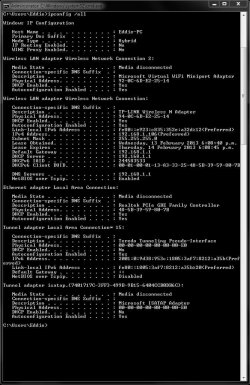
I've attached an ipconig/all command as suggested.
Thanks for your time,
Steez
 

Attachments
  • ipconfig-all.JPG
    ipconfig-all.JPG
    148.6 KB · Views: 27

My Computer

Computer Manufacturer/Model Number
Home made
OS
Windows 7 Home Premium 64 (6.1, Build 7601)
CPU
Intel(R) Core(TM) i5 CPU 750 @ 2.67GHz
Motherboard
Asus P7P55D-E PRO
Memory
2x 2gb Corsair DDR3 1333mhz (VS2GB1333D3)
Graphics Card(s)
MSi GTX 460 1gb
Sound Card
onboard
Monitor(s) Displays
Samsung SyncMaster 2494HS
Hard Drives
500gb Seagate sata 3gb's (st3500418as)
PSU
Antec 650w 'Truepower'
Case
Cooler Master Elite 333
Cooling
Stock Intel.
Keyboard
Logitech cordless
Mouse
Logitech cordless
Oh and I forgot to mention, the firmware for the router is up to date, I believe all usb network adaptors for the computers are up to date as well.
 

My Computer

Computer Manufacturer/Model Number
Home made
OS
Windows 7 Home Premium 64 (6.1, Build 7601)
CPU
Intel(R) Core(TM) i5 CPU 750 @ 2.67GHz
Motherboard
Asus P7P55D-E PRO
Memory
2x 2gb Corsair DDR3 1333mhz (VS2GB1333D3)
Graphics Card(s)
MSi GTX 460 1gb
Sound Card
onboard
Monitor(s) Displays
Samsung SyncMaster 2494HS
Hard Drives
500gb Seagate sata 3gb's (st3500418as)
PSU
Antec 650w 'Truepower'
Case
Cooler Master Elite 333
Cooling
Stock Intel.
Keyboard
Logitech cordless
Mouse
Logitech cordless
No problems with the ipconfig/all, looks good.

You should probably move the phone away from the router or visa versa, most likely they are on the same frequency 2.4Ghz.

Changing the wireless channel on your router can also help. You can use Xirrus Wifi inspector to determine which channel to use. :)

http://www.xirrus.com/Products/Wi-Fi-Inspector
 

My Computer

Computer type
PC/Desktop
Computer Manufacturer/Model Number
Home built
OS
Windows 7 Ult, Windows 8.1 Pro,
CPU
Q9650-4.275GHz, E8600 4.5GHz, E6750-3.8GHz
Motherboard
Evga 780i FTW
Memory
G.Skill PC2 9600 1200Mhz 5 5 5 15 2T
Graphics Card(s)
GTX480
Sound Card
Asus Xonar D2
Monitor(s) Displays
HannsG
Screen Resolution
1680X1050
Hard Drives
GSkill Phoenix Pro 120GB SSD
PSU
ThermalTake Toughpower 1000Watt modular
Case
ThermalTake XaserV
Cooling
Xigmatek S1283
Keyboard
Logitech G15
Mouse
Logitech G9
Internet Speed
T1
Thanks, I'll give it ago, and post results in a day or so. Not sure what channel the wireless phone broadcasts on and it doesnt seem to be documented in the manual, other wise I would change the router (which is one channel 1) to make sure they werent on the sam channel.
Cheers!
 

My Computer

Computer Manufacturer/Model Number
Home made
OS
Windows 7 Home Premium 64 (6.1, Build 7601)
CPU
Intel(R) Core(TM) i5 CPU 750 @ 2.67GHz
Motherboard
Asus P7P55D-E PRO
Memory
2x 2gb Corsair DDR3 1333mhz (VS2GB1333D3)
Graphics Card(s)
MSi GTX 460 1gb
Sound Card
onboard
Monitor(s) Displays
Samsung SyncMaster 2494HS
Hard Drives
500gb Seagate sata 3gb's (st3500418as)
PSU
Antec 650w 'Truepower'
Case
Cooler Master Elite 333
Cooling
Stock Intel.
Keyboard
Logitech cordless
Mouse
Logitech cordless
Moving the wireless phone to another room doesn't seemed to have solved the issue, still getting a patchy connection.
 

My Computer

Computer Manufacturer/Model Number
Home made
OS
Windows 7 Home Premium 64 (6.1, Build 7601)
CPU
Intel(R) Core(TM) i5 CPU 750 @ 2.67GHz
Motherboard
Asus P7P55D-E PRO
Memory
2x 2gb Corsair DDR3 1333mhz (VS2GB1333D3)
Graphics Card(s)
MSi GTX 460 1gb
Sound Card
onboard
Monitor(s) Displays
Samsung SyncMaster 2494HS
Hard Drives
500gb Seagate sata 3gb's (st3500418as)
PSU
Antec 650w 'Truepower'
Case
Cooler Master Elite 333
Cooling
Stock Intel.
Keyboard
Logitech cordless
Mouse
Logitech cordless
Moving the wireless phone to another room doesn't seemed to have solved the issue, still getting a patchy connection.

I'd have to see the read out from the Xirrus program in order to give you some answers to your problem. :)
 

My Computer

Computer type
PC/Desktop
Computer Manufacturer/Model Number
Home built
OS
Windows 7 Ult, Windows 8.1 Pro,
CPU
Q9650-4.275GHz, E8600 4.5GHz, E6750-3.8GHz
Motherboard
Evga 780i FTW
Memory
G.Skill PC2 9600 1200Mhz 5 5 5 15 2T
Graphics Card(s)
GTX480
Sound Card
Asus Xonar D2
Monitor(s) Displays
HannsG
Screen Resolution
1680X1050
Hard Drives
GSkill Phoenix Pro 120GB SSD
PSU
ThermalTake Toughpower 1000Watt modular
Case
ThermalTake XaserV
Cooling
Xigmatek S1283
Keyboard
Logitech G15
Mouse
Logitech G9
Internet Speed
T1
Output of Xirrus will defently help a lot.

When you can't connect to the internet are you still able to communicate with your router? A simple test for this is a ping command.

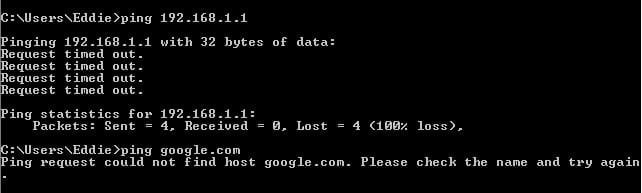
Next time you lose connection open a command prompt and type in ping 192.168.1.1 let us know the output.

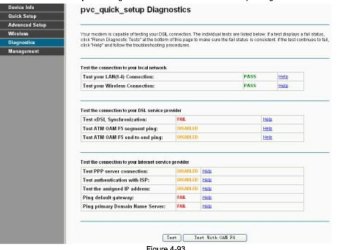
If you get a successful ping command you can go to your router's webGUI. by typing in http://192.168.1.1 in your web browser. From there you should see Diagnostics on the left side bar which can actually test everything for you like provided in the picture.
 

Attachments

  • Capture.JPG
    Capture.JPG
    43.7 KB · Views: 14

My Computer

OS
Windows 7 Ultimate x64
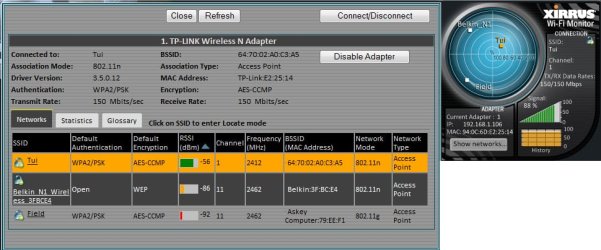
Here is my output from xirrus, my connection is highlighted. I'll post the results from the ping command next time theres a hiccup. A few questions in the meantime, would faulty wiring cause these issues? I'd like to test a cabled connection to see if the same issue keeps happening. I don't have that much rj-45 on me at the moment sadly :( It is pretty cheap however :)
 

Attachments

  • xirrusoutput.jpg
    xirrusoutput.jpg
    265.1 KB · Views: 17

My Computer

Computer Manufacturer/Model Number
Home made
OS
Windows 7 Home Premium 64 (6.1, Build 7601)
CPU
Intel(R) Core(TM) i5 CPU 750 @ 2.67GHz
Motherboard
Asus P7P55D-E PRO
Memory
2x 2gb Corsair DDR3 1333mhz (VS2GB1333D3)
Graphics Card(s)
MSi GTX 460 1gb
Sound Card
onboard
Monitor(s) Displays
Samsung SyncMaster 2494HS
Hard Drives
500gb Seagate sata 3gb's (st3500418as)
PSU
Antec 650w 'Truepower'
Case
Cooler Master Elite 333
Cooling
Stock Intel.
Keyboard
Logitech cordless
Mouse
Logitech cordless
Router ping timed out on the last hiccup.
 

Attachments

  • pingresults.JPG
    pingresults.JPG
    26.8 KB · Views: 13

My Computer

Computer Manufacturer/Model Number
Home made
OS
Windows 7 Home Premium 64 (6.1, Build 7601)
CPU
Intel(R) Core(TM) i5 CPU 750 @ 2.67GHz
Motherboard
Asus P7P55D-E PRO
Memory
2x 2gb Corsair DDR3 1333mhz (VS2GB1333D3)
Graphics Card(s)
MSi GTX 460 1gb
Sound Card
onboard
Monitor(s) Displays
Samsung SyncMaster 2494HS
Hard Drives
500gb Seagate sata 3gb's (st3500418as)
PSU
Antec 650w 'Truepower'
Case
Cooler Master Elite 333
Cooling
Stock Intel.
Keyboard
Logitech cordless
Mouse
Logitech cordless
I'm seeing no problems with the ipconfig/all or the Xirrus read out although looking at the ping test something appears to be blocking the connection.

If this problem is occurring on all devices connected to your router than I'd say that your wireless phone is causing this problem.

Either the router or the phone needs to be moved to a different location away from each other.
 

My Computer

Computer type
PC/Desktop
Computer Manufacturer/Model Number
Home built
OS
Windows 7 Ult, Windows 8.1 Pro,
CPU
Q9650-4.275GHz, E8600 4.5GHz, E6750-3.8GHz
Motherboard
Evga 780i FTW
Memory
G.Skill PC2 9600 1200Mhz 5 5 5 15 2T
Graphics Card(s)
GTX480
Sound Card
Asus Xonar D2
Monitor(s) Displays
HannsG
Screen Resolution
1680X1050
Hard Drives
GSkill Phoenix Pro 120GB SSD
PSU
ThermalTake Toughpower 1000Watt modular
Case
ThermalTake XaserV
Cooling
Xigmatek S1283
Keyboard
Logitech G15
Mouse
Logitech G9
Internet Speed
T1
I've been hoping to hear some feed back if moving the phone or router solved the issue. I guess I'm not very good at waiting.
 

My Computer

OS
Windows 7 Ultimate x64
The issue is not yet solved sadly, still experiencing the connection issues. I've noticed the odd pit on the xirrus histogram.
 

My Computer

Computer Manufacturer/Model Number
Home made
OS
Windows 7 Home Premium 64 (6.1, Build 7601)
CPU
Intel(R) Core(TM) i5 CPU 750 @ 2.67GHz
Motherboard
Asus P7P55D-E PRO
Memory
2x 2gb Corsair DDR3 1333mhz (VS2GB1333D3)
Graphics Card(s)
MSi GTX 460 1gb
Sound Card
onboard
Monitor(s) Displays
Samsung SyncMaster 2494HS
Hard Drives
500gb Seagate sata 3gb's (st3500418as)
PSU
Antec 650w 'Truepower'
Case
Cooler Master Elite 333
Cooling
Stock Intel.
Keyboard
Logitech cordless
Mouse
Logitech cordless
Interesting, is each device connected wireless?
If so try connecting one with a wired connection and see if you can get access to the internet and router.

If you still cant connect try looking on your routers manufacturers website for a firmware update, and update your router.

after you update your router and the issue still presents its self you should call your ISP and make sure they can see your modem. If they can't your modem then you will not be able to connect.
 

My Computer

OS
Windows 7 Ultimate x64
Yes every device is connected wirelessly, I've tried a wired connection for 2 days and didn't experience any issues. The router has the latest firmware for its hardware version. I will call my ISP at some point and see what they say about my connection.
Recently I had a look in the Event Viewer and saw a lot of dhcp-client and DNS client events.
This is the description from a dhcp-client event.
"The IP address lease 192.168.1.106 for the Network Card with network address 0x940C6DE22514 has been denied by the DHCP server 192.168.1.1 (The DHCP Server sent a DHCPNACK message).
Possible this is related?
 

My Computer

Computer Manufacturer/Model Number
Home made
OS
Windows 7 Home Premium 64 (6.1, Build 7601)
CPU
Intel(R) Core(TM) i5 CPU 750 @ 2.67GHz
Motherboard
Asus P7P55D-E PRO
Memory
2x 2gb Corsair DDR3 1333mhz (VS2GB1333D3)
Graphics Card(s)
MSi GTX 460 1gb
Sound Card
onboard
Monitor(s) Displays
Samsung SyncMaster 2494HS
Hard Drives
500gb Seagate sata 3gb's (st3500418as)
PSU
Antec 650w 'Truepower'
Case
Cooler Master Elite 333
Cooling
Stock Intel.
Keyboard
Logitech cordless
Mouse
Logitech cordless
Since your connection is running flawlessly its not an ISP issue, and they will tell you the exact same thing.

I actually wrote up the whole DHCP process, but i hit the wrong button on my PC and reloaded the page so i lost it all.

Anyways the only reason i can can see your getting an DHCPNACK (Reject from DHCP) is that (1) you dont actually need an IP address yet, (2) another PC on the network is using that address. This really isnt the cause of your connection problem since when you lose connection your cant even communicate with the dhcp server.

It could be a problem with your DHCP server though. I know I'm kind of confusing.

Do you use static addresses or DHCP to receive address for the network?

Is the ipconfig output on the first post when you have connection or when your connection is not working on a wireless connection?

If this when the connection is working post an output when the connection is not working.

After i get the answers to these two questions i want to do a few things depending on how your answer them.
 

My Computer

OS
Windows 7 Ultimate x64
Okay to start answering your questions, I don't have static ip's but a DHCP server is enabled. The initial ipconfig is from a working connection, it's rather tricker to get an ipconfig in when the connectoin is playing up, it's rather instantaneous and drops out for a brief moment then its fine again. The only way to tell that it's down is when webpages don't load or programs i.e "steam chat" drop in and out of connectivity. I'll add that I've had issues with conflicting IP adresses before, how ever it was on a different adsl router.
 

My Computer

Computer Manufacturer/Model Number
Home made
OS
Windows 7 Home Premium 64 (6.1, Build 7601)
CPU
Intel(R) Core(TM) i5 CPU 750 @ 2.67GHz
Motherboard
Asus P7P55D-E PRO
Memory
2x 2gb Corsair DDR3 1333mhz (VS2GB1333D3)
Graphics Card(s)
MSi GTX 460 1gb
Sound Card
onboard
Monitor(s) Displays
Samsung SyncMaster 2494HS
Hard Drives
500gb Seagate sata 3gb's (st3500418as)
PSU
Antec 650w 'Truepower'
Case
Cooler Master Elite 333
Cooling
Stock Intel.
Keyboard
Logitech cordless
Mouse
Logitech cordless
Some more info to help this investigation. Heres a screenshot from the router log. The router is definatly having DNS issues, but how to resolve them is beyond me.
 

Attachments

  • RouterLog.JPG
    RouterLog.JPG
    393.1 KB · Views: 8

My Computer

Computer Manufacturer/Model Number
Home made
OS
Windows 7 Home Premium 64 (6.1, Build 7601)
CPU
Intel(R) Core(TM) i5 CPU 750 @ 2.67GHz
Motherboard
Asus P7P55D-E PRO
Memory
2x 2gb Corsair DDR3 1333mhz (VS2GB1333D3)
Graphics Card(s)
MSi GTX 460 1gb
Sound Card
onboard
Monitor(s) Displays
Samsung SyncMaster 2494HS
Hard Drives
500gb Seagate sata 3gb's (st3500418as)
PSU
Antec 650w 'Truepower'
Case
Cooler Master Elite 333
Cooling
Stock Intel.
Keyboard
Logitech cordless
Mouse
Logitech cordless
Sorry for the late reply, I've been quite busy lately. Inside your router what DNS server are you pointing to? This wont effect the original problem of having a connection to your wireless router. It really could be a hardware problem on your router. Which stinks but probably the best solution is to purchase a new wireless router or even just an access point that you can hardwire to your router.

The DNS issue, you might want to try pointing your router to 8.8.8.8 and 8.8.4.4 for googles DNS servers. I'm just guessing here that you're using your ISP DNS server and sometimes they can be unreliable.
 

My Computer

OS
Windows 7 Ultimate x64
Heya Parman, my DNS servers were initially set to auto, so I guess those are the ones the ISP provides (Telecom NZ) I set them to google servers, while also changing the IPV4 settings in the adapter properties to use the google DNS servers (Not entirely sure if this is the right move) So for a while there were no dns failures in the log, however I did experience one DNS failure today and also a connectivity dropout, which wasn't related to the DNS failure as it happened to a different time that occured on the log.
I've attached a screenshot of the routers log.
 

Attachments

  • Log.JPG
    Log.JPG
    450.2 KB · Views: 7

My Computer

Computer Manufacturer/Model Number
Home made
OS
Windows 7 Home Premium 64 (6.1, Build 7601)
CPU
Intel(R) Core(TM) i5 CPU 750 @ 2.67GHz
Motherboard
Asus P7P55D-E PRO
Memory
2x 2gb Corsair DDR3 1333mhz (VS2GB1333D3)
Graphics Card(s)
MSi GTX 460 1gb
Sound Card
onboard
Monitor(s) Displays
Samsung SyncMaster 2494HS
Hard Drives
500gb Seagate sata 3gb's (st3500418as)
PSU
Antec 650w 'Truepower'
Case
Cooler Master Elite 333
Cooling
Stock Intel.
Keyboard
Logitech cordless
Mouse
Logitech cordless
I thought about this and your DNS issues are most likely caused by your connection dropping. I can see the picture with my phone to make out what it says.

I would bite the bullet and buy a new router.
 

My Computer

OS
Windows 7 Ultimate x64
Back
Top