connection icon in system tray always wrong

cromax

New member
Local time
8:06 AM
Messages
8
Hi everyone

I have a problem. The icone for connection state (image of a white screen with lan cable) of the menù bar below on the right near the clock even if the internet connection is ok, apperas always with a red cross. I have tried to use icone rebuild but the problem persists. The icone is wrong after I have try to install bluetooth driver. I have already tried to unistall this driver and to correct the register using glary utilities or Cclener but the problem is not solved.

Can you help me?

Thanks

cromax
 

Attachments

  • Immagine.jpg
    Immagine.jpg
    8.6 KB · Views: 3,014

My Computer My Computer

OS
windows seven 32bit
Without any further information, I would guess it's referring to a different network connection (i.e: 1394 connections show up as disconnected networks).

Please do the following, and tell me what we find:
> Click on the disconnected icon
> Open Network Sharing Center
> Change Adapter Settings (left pane)

Tell me what connections show up, and the status of each one (whether it says "connected" or "disconnected")
 

My Computer My Computer

Computer Manufacturer/Model Number
HP 6000 Pro Micro Tower
OS
W7 Professional x64
CPU
Core 2 Duo 2.93
Memory
2 GB
Graphics Card(s)
ATI Radeon 4695
Monitor(s) Displays
Two HP 17's
Hard Drives
150GB Sata Drive
Case
Tiny. Kinda cute.
Keyboard
HP Supplied. Surprisingly nice.
Mouse
Gateway Mouse from an E2610D
Internet Speed
45 mbps
thaks for your help
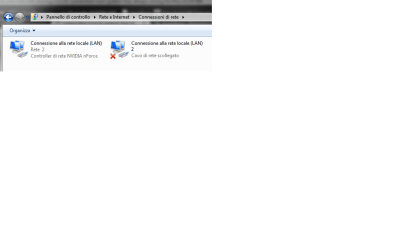
IHave two connection.

One is a controller NVIDEA NFORCE and is unabled (LAN)

The second one is a LAN connection and it does not work (red cross).

I have tryed to eliminate it but it is not possible. I have disablee (change in grey icone) it but the red cross on the icone on menu bar of the desktop does not disappear.


Internet works I am connected to internet but the icone has a red cross.

Can it be a icone problem? How can I fix it?

How can I remove this connection rete 2

thanks
 

Attachments

  • Immagine2.png
    Immagine2.png
    12.9 KB · Views: 122

My Computer My Computer

OS
windows seven 32bit
The second option for how to fix it:
By the icons in the corner is a little arrow pointing towards the top of your monitor. Click on that, and select "customize." You can then select to hide network notifications and icons from the drop down bar next to it.
When you tried this, are you sure you found the correct connection?
 
Last edited:

My Computer My Computer

Computer Manufacturer/Model Number
HP 6000 Pro Micro Tower
OS
W7 Professional x64
CPU
Core 2 Duo 2.93
Memory
2 GB
Graphics Card(s)
ATI Radeon 4695
Monitor(s) Displays
Two HP 17's
Hard Drives
150GB Sata Drive
Case
Tiny. Kinda cute.
Keyboard
HP Supplied. Surprisingly nice.
Mouse
Gateway Mouse from an E2610D
Internet Speed
45 mbps
thanks for your help but your solution does not work.
 

My Computer My Computer

OS
windows seven 32bit
thanks for your help but your solution does not work.
Sorry for the large delay. I take weekends off.

Which of my proposed solutions didn't work?
 

My Computer My Computer

Computer Manufacturer/Model Number
HP 6000 Pro Micro Tower
OS
W7 Professional x64
CPU
Core 2 Duo 2.93
Memory
2 GB
Graphics Card(s)
ATI Radeon 4695
Monitor(s) Displays
Two HP 17's
Hard Drives
150GB Sata Drive
Case
Tiny. Kinda cute.
Keyboard
HP Supplied. Surprisingly nice.
Mouse
Gateway Mouse from an E2610D
Internet Speed
45 mbps
I am sorry but I would mantain the icone active (without hide the icone) and your methods do not work.

I disabled the second connection and restarted win 7 but the problem remains and the second connection is always there.

Is it possible that I can not restore the connection icone (white screen icone without red cross).

I think that there is a way to choose the icone for connection. I have had a similar problem with the trash icone and I have restore it.
 
Last edited:

My Computer My Computer

OS
windows seven 32bit
I am sorry but i would mantain the icone active and your methods do not work.
I disabled the second connection and restarted win 7 but the problem remains.

Delete the icon I'm sorry. Possible that it can not restore it no longer forces as happened to me the right one for the trash icon.

how can I do?
I apologize if I sound rude, but what? I'm inable to garner any meaning from the end of this post.

Are you saying that the icon still appears, despite being disabled? And did you attempt my suggestion above to hide it from the notification tray?
 

My Computer My Computer

Computer Manufacturer/Model Number
HP 6000 Pro Micro Tower
OS
W7 Professional x64
CPU
Core 2 Duo 2.93
Memory
2 GB
Graphics Card(s)
ATI Radeon 4695
Monitor(s) Displays
Two HP 17's
Hard Drives
150GB Sata Drive
Case
Tiny. Kinda cute.
Keyboard
HP Supplied. Surprisingly nice.
Mouse
Gateway Mouse from an E2610D
Internet Speed
45 mbps
Thanks for your help

I have correct my post above

" am sorry but I would mantain the icone active (without hide the icone) and your methods do not work.

I disabled the second connection and restarted win 7 but the problem remains and the second connection is always there.

Is it possible that I can not restore the connection icone (white screen icone without red cross).

I think that there is a way to choose the icone for connection. I have had a similar problem with the trash icone and I have restore it. "


I do nto want hide the icone. I want fix the icone. I do not understand why only the icone with red cross appear also if the internet works.
 

My Computer My Computer

OS
windows seven 32bit
Well, I would suggest going onto Nvidia's website, and seeking updated drivers for your NForce network connection. Did you add a network card into this, or are you connected wirelessly? It appears that you're using some other connection rather than the hardwire for maintaining internet connectivity.
 

My Computer My Computer

Computer Manufacturer/Model Number
HP 6000 Pro Micro Tower
OS
W7 Professional x64
CPU
Core 2 Duo 2.93
Memory
2 GB
Graphics Card(s)
ATI Radeon 4695
Monitor(s) Displays
Two HP 17's
Hard Drives
150GB Sata Drive
Case
Tiny. Kinda cute.
Keyboard
HP Supplied. Surprisingly nice.
Mouse
Gateway Mouse from an E2610D
Internet Speed
45 mbps
thank you for your help I willtry it
 

My Computer My Computer

OS
windows seven 32bit
Where can i find the nvidea nforce driver for windows seven?

I do not understand how find the correct driver. I have asus striker extreme and asus 8800gt.

can you help me?
 

My Computer My Computer

OS
windows seven 32bit
Go to Nvidia.com and select your video card. :)
 

My Computer My Computer

Computer Manufacturer/Model Number
HP 6000 Pro Micro Tower
OS
W7 Professional x64
CPU
Core 2 Duo 2.93
Memory
2 GB
Graphics Card(s)
ATI Radeon 4695
Monitor(s) Displays
Two HP 17's
Hard Drives
150GB Sata Drive
Case
Tiny. Kinda cute.
Keyboard
HP Supplied. Surprisingly nice.
Mouse
Gateway Mouse from an E2610D
Internet Speed
45 mbps
thanks for your help but even if I have installed the new driver the wrong icone (white screen with red cross) appears again.


I want to try to modify the icone but i ca not find how
 

My Computer My Computer

OS
windows seven 32bit
Back
Top