Connection Issues with MSN

Hheat

New member
Local time
6:40 PM
Messages
6
Location
New Jersey
Hello everyone. Let me start off by introducing myself. My name is Kenny and i am a twenty one year old full time student. I found my way to this forum after encountering some connection issues with MSN messenger after purchasing a new PC. As you can tell, im a newbie to this forum and i wasn't sure where to post this topic, my apologies if it is in the wrong section. My computer skills are a little bit above average i would say but im no expert lol.

SPECS:
Operating system: Windows 7 Home Premium 64-bit (6.1, Build 7600)
System Model: HP Pavilion dv6 Notebook PC
Processor: Intel Core 2 Duo CPU T6600 @2.2 GHz
Memory: 4GB
(I hope this covers most of the information requested in the "How to Ask for Help" thread)

Problem:
After purchasing my new notebook, i downloaded the MSN messenger directly from the Microsoft website. I sign in and it run smoothly. About 30 second after successfully signing in, it immediately loses connection and signs me out. I keep signing back in and it keeps signing back out lol. I am hooked up to the internet directly with a wired connection.

I know there is nothing wrong with my internet connection itself because all other programs running dont have the connection issues and run smoothly. The messenger also worked perfectly on my old notebook without any connection issues. I have searched around for solutions and have tried many different things such as adjusting firewall settings and internet security settings as well with no success. I even turned the firewall off completely and it still had issues, so i know its not that. I don't really know what else to do.

I have uninstalled the messenger and even re-downloaded it with no success. I have run out of ideas and don't know what else to try. This is where i turn to this community for help. Its just a pain in the ass not being able to talk to friends. I think i have included all of the info needed, if not let me know and i will be happy to provide it.

Thanks-
Kenny R.
 

My Computer

OS
Windows 7
Hi Kenny,

Try my MSN Bandaid Batch, I keep updating it to fix multiple MSN issues.

Good Luck!

EDIT: Run as admin
 

Attachments

My Computer

Computer Manufacturer/Model Number
Custom Hack job
OS
Windows 7 Ultimate 64 bit
CPU
Intel(R) Core(TM)2 Quad CPU Q8200 @ 2.33GHz
Motherboard
GigaByte EP45-UD3
Memory
8 GB Kingston
Graphics Card(s)
Nvidia GeForce 9600GT
Sound Card
Soundblaster Audigy
Monitor(s) Displays
AOC x2 22"
Hard Drives
2 x Samsung 500GB (RAID)
2 x Samsung 2TB
1 x WD Green 2TB
1 x Seagate 1TB
1 x Samsung 500GB
PSU
Thermaltake QFan 750W
Case
CM Scout Gaming
Cooling
Coolermaster V10
Keyboard
Microsoft Wireless Keyboard 1000
Mouse
Microsoft Wireless Optical 2000
Internet Speed
320
Other Info
Winfast PVR2000CP
LG DVD-RAM DVD/RW/DL Super Multi
Linksys WMP300Nx2 Wireless Adapter
Ok so what exactly do i do. Just right click the file and "Run as Admin". I did this and nothing really happened.
 

My Computer

OS
Windows 7
Hi Kenny, very nice introduction and explanation of your problem. Incidentally, we are almost neighbors, I'm in CT, but I digress. Regarding your MSN problem, I am at a bit of a loss, since I really don't use those messenger appls anymore. I was able to come up with some information, right from the MSN website. It looks like it is pretty good information. If it does not help, there are plenty of younger people on this site, who I am sure are very familiar with MSN messenger and will be along to help. My first suggestion is to go to this site and maybe you will find out your problem.

MSN Messenger Help

My second suggestion is to try something like Yahoo Messenger. If it works then we know that the problem is with MSN and not your computer and we will know where to look.

If you decide to go that route make a system image or a system restore before installation, in that way when you want to uninstall, you will be sure that it is totally gone and will not bother you in the future.

Richard
 

My Computer

Computer type
PC/Desktop
Computer Manufacturer/Model Number
Dell XPS 420
OS
Windows 10, Home Clean Install
CPU
Intel Core2 processsor Q8200(2.33Ghz 1333FSB) Quad Core Tech
Motherboard
Dell
Memory
6 gb
Graphics Card(s)
ATI Radeon 256MB HD3650
Sound Card
Intergrated 7.1 Channel Audio
Monitor(s) Displays
Dell SP2009W 20"
Hard Drives
640 GB Serial ATA Hard drive
Cooling
Fan
Keyboard
Dell USB Keyboard
Mouse
Dell Premium Optical USB
Internet Speed
DSL 2.85
Ok so what exactly do i do. Just right click the file and "Run as Admin". I did this and nothing really happened.

Hi Kenny,

I should have said that nothing 'obvious' happens. ;)
The batch re-registers many of the dll's that messenger uses and delete's the repository at "%appdata%\microsoft\MSN Messenger" forcing MSN to build a new one when it next starts. The later is a known fix for the issue that you are experiencing. Try doing this manually with messenger turned off.

Then start messenger again, apologies for not explaining fully.
 

My Computer

Computer Manufacturer/Model Number
Custom Hack job
OS
Windows 7 Ultimate 64 bit
CPU
Intel(R) Core(TM)2 Quad CPU Q8200 @ 2.33GHz
Motherboard
GigaByte EP45-UD3
Memory
8 GB Kingston
Graphics Card(s)
Nvidia GeForce 9600GT
Sound Card
Soundblaster Audigy
Monitor(s) Displays
AOC x2 22"
Hard Drives
2 x Samsung 500GB (RAID)
2 x Samsung 2TB
1 x WD Green 2TB
1 x Seagate 1TB
1 x Samsung 500GB
PSU
Thermaltake QFan 750W
Case
CM Scout Gaming
Cooling
Coolermaster V10
Keyboard
Microsoft Wireless Keyboard 1000
Mouse
Microsoft Wireless Optical 2000
Internet Speed
320
Other Info
Winfast PVR2000CP
LG DVD-RAM DVD/RW/DL Super Multi
Linksys WMP300Nx2 Wireless Adapter
Ughh, nothing seems to work. I dont know what else to do. So frustrating
 

My Computer

OS
Windows 7
Hmm this is strange, did you download Windows LIVE Msn, the one now included in the windows live essentials pack?

It may be worthwhile UN-installing everything, then navigating to the following folders and deleting the 'Microsoft crumbs' left over.
NOTE: All folders may not exist on your system.
  • %userprofile%\AppData\Roaming\Microsoft\MSN Messenger
  • %userprofile%\AppData\Local\Microsoft\Messenger
  • C:\Program Files (x86)\Windows Live\Messenger
  • C:\Program Files\Windows Live\Messenger
Then reinstalling (the live essential version of course)
Good luck!

TIP: If you are paranoid about what you might delete (I usually am), then ensure that your recycle bin is configured so that you can recover them later and put them back.
 

My Computer

Computer Manufacturer/Model Number
Custom Hack job
OS
Windows 7 Ultimate 64 bit
CPU
Intel(R) Core(TM)2 Quad CPU Q8200 @ 2.33GHz
Motherboard
GigaByte EP45-UD3
Memory
8 GB Kingston
Graphics Card(s)
Nvidia GeForce 9600GT
Sound Card
Soundblaster Audigy
Monitor(s) Displays
AOC x2 22"
Hard Drives
2 x Samsung 500GB (RAID)
2 x Samsung 2TB
1 x WD Green 2TB
1 x Seagate 1TB
1 x Samsung 500GB
PSU
Thermaltake QFan 750W
Case
CM Scout Gaming
Cooling
Coolermaster V10
Keyboard
Microsoft Wireless Keyboard 1000
Mouse
Microsoft Wireless Optical 2000
Internet Speed
320
Other Info
Winfast PVR2000CP
LG DVD-RAM DVD/RW/DL Super Multi
Linksys WMP300Nx2 Wireless Adapter
You wouldn't happen to be running any add-ons for it, like msglive pluss or msgdiscovery?
 

My Computer

Computer Manufacturer/Model Number
Custom Build
OS
W7 RTM Ultimate x64
CPU
Intel Q8400 @ 2.66GHZ
Motherboard
Gigabyte GA-EG45M-UD2H
Memory
4GB DDR2-800
Graphics Card(s)
Gainward GTS 450 GLH 1GB Edition
Sound Card
Integrated 8 Channel
Monitor(s) Displays
AOC 23.6 Inch Widescreen LCD
Screen Resolution
1920x1080
Hard Drives
Seagate 500GB Internal
Western Digital 1TB Internal

Hitachi 1TB External
PSU
Apevia Java Power 500W
Case
Cooler Master HAF 922 Black
Cooling
Stock Intel CPU Fan
Keyboard
HP SK-2960 Multimedia Keyboard
Mouse
Logitech M350 Wireless Gaming Mouse
Internet Speed
1.5MB
Hey guys

So i tried everything that you guys suggested with no luck at all. Just for fun i went over my neighbors house and he let me use his internet. MSN worked perfectly with no connection issues at all. So now i know it has to be a problem with my internet connection, router, or firewall. Any suggestions on what to do ?
 

My Computer

OS
Windows 7
See if ipconfig /flushdns than ipconfig /renew works.

Those commands to be type into CMD btw.
 

My Computer

Computer Manufacturer/Model Number
Custom Build
OS
W7 RTM Ultimate x64
CPU
Intel Q8400 @ 2.66GHZ
Motherboard
Gigabyte GA-EG45M-UD2H
Memory
4GB DDR2-800
Graphics Card(s)
Gainward GTS 450 GLH 1GB Edition
Sound Card
Integrated 8 Channel
Monitor(s) Displays
AOC 23.6 Inch Widescreen LCD
Screen Resolution
1920x1080
Hard Drives
Seagate 500GB Internal
Western Digital 1TB Internal

Hitachi 1TB External
PSU
Apevia Java Power 500W
Case
Cooler Master HAF 922 Black
Cooling
Stock Intel CPU Fan
Keyboard
HP SK-2960 Multimedia Keyboard
Mouse
Logitech M350 Wireless Gaming Mouse
Internet Speed
1.5MB
Check registry (isDotNetProvider) for value of O = disabled, 1=enabled.

I think i had to enable mine due to work restrictions inorder to install Live Messenger.
 

My Computer

Computer Manufacturer/Model Number
Lenovo ThinkPad T60
OS
Windows 7 Ultimate 64Bit
CPU
GenuineIntel Intel(R) Core(TM) DuoCore T2400 @ 1.83GHz
Motherboard
Intel(R) 82801G (ICH7 Family)
Memory
2.00 GB
Graphics Card(s)
Mobile Intel(R) 945 Express Chipset
Sound Card
SoundMAX Integrated Digital HD Audio
Monitor(s) Displays
ThinkPad Display
Screen Resolution
1400x1050
Hard Drives
100Gb SATA
Keyboard
Standard Keyboard
Mouse
HID-compliant Mouse
Internet Speed
Cable Broadband - 54Mbps
Other Info
Intel(R) PRO/1000 PL Network Connection
11a/b/g Wireless LAN Mini PCI Express Adapter
Hey guys

So i tried everything that you guys suggested with no luck at all. Just for fun i went over my neighbors house and he let me use his internet. MSN worked perfectly with no connection issues at all. So now i know it has to be a problem with my internet connection, router, or firewall. Any suggestions on what to do ?

There are some more things to check, since we've ruled out the easy stuff.

If the problem is a firewall, it either works or it doesn't (closed or open) and your internet works correctly too. There could be an intermittent failing in the router or cabling, you could always reset the router and replace the cables but I'd try a couple of things first:

1. bring a friend with a laptop to your house, using your network and the same cables and router ports, use their PC and log in to MSN. If all works, the problem is on your PC.
2. Create a new user on your PC, log in with this user and see if MSN works, if it does, your local user files for MSN are corrupted.

Also I am wondering if your windows vault is corrupted, so you might want to delete your credentials and try to log on again.
control panel
useraccounts
manage your credentials
remove any credentials related to MSN

A complete virus scan might be on the cards too.

Check that windows protected files are in their original condition by opening an elevated command prompt and running SFC /SCANNOW.

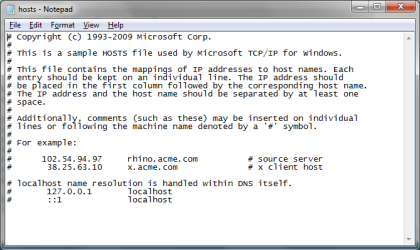
Lastly, I'm wondering if your hosts file has some dodgy entries and the site is being redirected.
1. Right click on notepad and run as administrator
2. On the file menu select OPEN
3. When the search box opens, change the file type (bottom right) from text documents to all files
4. Navigate to %SystemRoot%\system32\drivers\etc
5. open the file called 'hosts'
6. Unless you have spybot or something similar installed it should look exactly like mine attached. If it's not the same, you may want to post it up so we can have a look at it.
7. Delete any entries that should not be there (this was why we opened in Admin mode).

If all fails, there is always the messenger support team, instructions here https://windowslivehelp.com/community/t/28258.aspx
 

Attachments

  • hosts.png
    hosts.png
    16 KB · Views: 18

My Computer

Computer Manufacturer/Model Number
Custom Hack job
OS
Windows 7 Ultimate 64 bit
CPU
Intel(R) Core(TM)2 Quad CPU Q8200 @ 2.33GHz
Motherboard
GigaByte EP45-UD3
Memory
8 GB Kingston
Graphics Card(s)
Nvidia GeForce 9600GT
Sound Card
Soundblaster Audigy
Monitor(s) Displays
AOC x2 22"
Hard Drives
2 x Samsung 500GB (RAID)
2 x Samsung 2TB
1 x WD Green 2TB
1 x Seagate 1TB
1 x Samsung 500GB
PSU
Thermaltake QFan 750W
Case
CM Scout Gaming
Cooling
Coolermaster V10
Keyboard
Microsoft Wireless Keyboard 1000
Mouse
Microsoft Wireless Optical 2000
Internet Speed
320
Other Info
Winfast PVR2000CP
LG DVD-RAM DVD/RW/DL Super Multi
Linksys WMP300Nx2 Wireless Adapter
Thank you everyone for your help. I really appreciate it. I have tried literally everything that you guys have suggested and have spent the last hour doing so. I am having no luck at all. I have tried running it with my firewall completly off and it still disconnects after 30 seconds. All other instant messaging programs that i have work brilliantly. I am hooked up through the internet through a wired connection.

My neighbor gave me his password to his wireless connection, as soon as i connect to his internet, the messenger works brilliantly with no connection issues whatsoever. It has to be something with my router, but here is the interesting part, the msn messenger works no problem with all other PC's in my home. Just not mine!

I checked everything even the "host file" and it matches exactly. This computer is brand new, about 5 days old haha. I think im going to give up hahah

Thanks again for all your input! This forum is wonderful
 

My Computer

OS
Windows 7
Back
Top