
ZombieMcFly
New member
- Local time
- 9:19 AM
- Messages
- 2
Hello everyone and thanks in advance for any help,
I have searched for hours and tried any and all suggestions but I haven't been able to fix this, so here it is:
Problem
I have a good wifi connection but no internet access.
Details
I recently did a recovery on my Asus N53SV running Windows 7 Home Premium and ever since I have gotten intermittent internet access. Every other computer on my network is working fine, including this one on my Ubuntu partition. The wired ethernet connection gets exactly the same problem. In the moments with internet access I was able to update Windows to the latest updates. My firewall is down and I don't have an antivirus. I can ping myself and the router, but get a request timeout for google.com
What I have tried
First I tried basic troubleshooting, enable/disable the adapter, rebooting, rebooting the router and the computer. Then I updated the drivers on both the ethernet and wireless adapters. I also went to the command line with ipconfig /flushdns, ipconfig /renew... I fixed the DNS at 8.8.8.8, 8.8.4.4, I got a reserved IP in my network. Y tried the winsock restart, also setting the default gateway. Afterwards, I just cried for while, didn't work either.
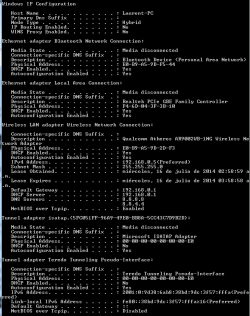
I'm attaching two images, the first is the ipconfig /all output I get now whith no access and the second is what I got last time I had internet access for a bit.
I'll appreciate any help, thank for reading.
I have searched for hours and tried any and all suggestions but I haven't been able to fix this, so here it is:
Problem
I have a good wifi connection but no internet access.
Details
I recently did a recovery on my Asus N53SV running Windows 7 Home Premium and ever since I have gotten intermittent internet access. Every other computer on my network is working fine, including this one on my Ubuntu partition. The wired ethernet connection gets exactly the same problem. In the moments with internet access I was able to update Windows to the latest updates. My firewall is down and I don't have an antivirus. I can ping myself and the router, but get a request timeout for google.com
What I have tried
First I tried basic troubleshooting, enable/disable the adapter, rebooting, rebooting the router and the computer. Then I updated the drivers on both the ethernet and wireless adapters. I also went to the command line with ipconfig /flushdns, ipconfig /renew... I fixed the DNS at 8.8.8.8, 8.8.4.4, I got a reserved IP in my network. Y tried the winsock restart, also setting the default gateway. Afterwards, I just cried for while, didn't work either.
I'm attaching two images, the first is the ipconfig /all output I get now whith no access and the second is what I got last time I had internet access for a bit.
I'll appreciate any help, thank for reading.
Attachments

My Computer
At a glance
- Computer type
- Laptop
- Computer Manufacturer/Model Number
- Asus-N53SV
- OS
- Windows 7 Home Premium x64
- Graphics Card(s)
- Nvidia GEFORCE GT 540M
- Antivirus
- MS Security Essentials
- Browser
- Chrome