
Connection problem. Webpages don't load, downloads still work.

darkdragon88

New member
Local time
7:56 AM
Messages
6
Hello everyone, I have this really odd problem with my internet connection that I hope can get fixed.

Sometimes it looks like my internet connection just stops working. The weird part is that I am still connected to my home network and if I have downloads going or a video streaming, it still downloads. I can't (for example) open a new tab and go to a webpage (chrome says the webpage is not available, firefox says server not found, IE says cannot display the webpage, but as long as the downloads were going before the connection messed up, they still keep going. Even utorrent can download when webpages don't load.

As for my network, the connection is the same that I've had for the past couple of years and never had this issue. My phone and my sister's laptop have no problems, so this has to be my laptop's issue.

My only way to repair is to diagnose the problem and my network adapter gets reset.

Some thing of note is that this never happened to me before until I had a problem and had to reformat my drive C.
I also updated my network drivers from my laptop company's page.
-another thing is that it seems to all work again after an hour or so

Thank you in advance for any help!

EDIT: I've noticed chrome says it is a DNS error. I hope this helps
 

Attachments
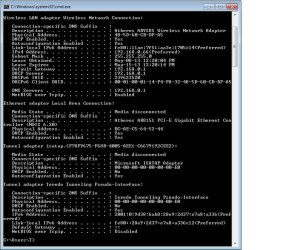
  • cmdipconfig.jpg
    cmdipconfig.jpg
    84.9 KB · Views: 6
Last edited:

My Computer My Computer

Computer type
Laptop
Computer Manufacturer/Model Number
Asus
OS
Windows 7 Home
CPU
K53E
Memory
6GB
Hard Drives
640GB HDD
240GB SSD
Antivirus
Avast
Browser
Chrome, Firefox
Hello dark dragon, the ipconfig looks fine other than it appears you aren't using a Windows 7 approved driver, if it were an approved WHQL driver then the Msoft Virtual WiFi miniport adaptor would be showing here. This is most likely the cause of this problem.

You might try going to the manufacture of your machine to look for an updated version of the driver for the Atheros AR9285 driver, or go to the Windows update Center to see if they have a driver for this adaptor.

Looks like you have Asus.
http://support.asus.com/ServiceHome.aspx?SLanguage=en
 

My Computer My Computer

Computer type
PC/Desktop
Computer Manufacturer/Model Number
Home built
OS
Windows 7 Ult, Windows 8.1 Pro,
CPU
Q9650-4.275GHz, E8600 4.5GHz, E6750-3.8GHz
Motherboard
Evga 780i FTW
Memory
G.Skill PC2 9600 1200Mhz 5 5 5 15 2T
Graphics Card(s)
GTX480
Sound Card
Asus Xonar D2
Monitor(s) Displays
HannsG
Screen Resolution
1680X1050
Hard Drives
GSkill Phoenix Pro 120GB SSD
PSU
ThermalTake Toughpower 1000Watt modular
Case
ThermalTake XaserV
Cooling
Xigmatek S1283
Keyboard
Logitech G15
Mouse
Logitech G9
Internet Speed
T1
Thank you for your help. I had to search a little harder for that driver but it is updated. The weird thing is that so far it seems like when I'm closer to my router, my connection is fine. When I go further away (like to my room), on Friday and Saturday night the web page loading error happened once on each night until I diagnosed -then it seems okay again.
 

My Computer My Computer

Computer type
Laptop
Computer Manufacturer/Model Number
Asus
OS
Windows 7 Home
CPU
K53E
Memory
6GB
Hard Drives
640GB HDD
240GB SSD
Antivirus
Avast
Browser
Chrome, Firefox

My Computer My Computer

Computer type
PC/Desktop
Computer Manufacturer/Model Number
Home built
OS
Windows 7 Ult, Windows 8.1 Pro,
CPU
Q9650-4.275GHz, E8600 4.5GHz, E6750-3.8GHz
Motherboard
Evga 780i FTW
Memory
G.Skill PC2 9600 1200Mhz 5 5 5 15 2T
Graphics Card(s)
GTX480
Sound Card
Asus Xonar D2
Monitor(s) Displays
HannsG
Screen Resolution
1680X1050
Hard Drives
GSkill Phoenix Pro 120GB SSD
PSU
ThermalTake Toughpower 1000Watt modular
Case
ThermalTake XaserV
Cooling
Xigmatek S1283
Keyboard
Logitech G15
Mouse
Logitech G9
Internet Speed
T1
The signal strength is between -66 dBm and -70 dBm (I tried changing the channel on my router last night from 6 to 11 but I had the same problem)

The anti virus I am running is avast

Thank you for your reply!

I had to edit in this connection test when my connection dropped again. I didn't test if a download worked but my web pages started loading after about 30 minutes -which is how I posted this.
 

Attachments

  • connectiontestresults.jpg
    connectiontestresults.jpg
    29 KB · Views: 1
Last edited:

My Computer My Computer

Computer type
Laptop
Computer Manufacturer/Model Number
Asus
OS
Windows 7 Home
CPU
K53E
Memory
6GB
Hard Drives
640GB HDD
240GB SSD
Antivirus
Avast
Browser
Chrome, Firefox
The signal strength is between -66 dBm and -70 dBm (I tried changing the channel on my router last night from 6 to 11 but I had the same problem)

The anti virus I am running is avast

Thank you for your reply!

I had to edit in this connection test when my connection dropped again. I didn't test if a download worked but my web pages started loading after about 30 minutes -which is how I posted this.

Honestly with the connection strength in that range you can pretty much expect the connection to drop out on a regular basis, for reliable wireless connection you need to be in the green, that's just how wireless works. There is no fix for this other than either moving closer to the router or installing another access point.
 

My Computer My Computer

Computer type
PC/Desktop
Computer Manufacturer/Model Number
Home built
OS
Windows 7 Ult, Windows 8.1 Pro,
CPU
Q9650-4.275GHz, E8600 4.5GHz, E6750-3.8GHz
Motherboard
Evga 780i FTW
Memory
G.Skill PC2 9600 1200Mhz 5 5 5 15 2T
Graphics Card(s)
GTX480
Sound Card
Asus Xonar D2
Monitor(s) Displays
HannsG
Screen Resolution
1680X1050
Hard Drives
GSkill Phoenix Pro 120GB SSD
PSU
ThermalTake Toughpower 1000Watt modular
Case
ThermalTake XaserV
Cooling
Xigmatek S1283
Keyboard
Logitech G15
Mouse
Logitech G9
Internet Speed
T1
The signal strength is between -66 dBm and -70 dBm (I tried changing the channel on my router last night from 6 to 11 but I had the same problem)

The anti virus I am running is avast

Thank you for your reply!

I had to edit in this connection test when my connection dropped again. I didn't test if a download worked but my web pages started loading after about 30 minutes -which is how I posted this.

Honestly with the connection strength in that range you can pretty much expect the connection to drop out on a regular basis, for reliable wireless connection you need to be in the green, that's just how wireless works. There is no fix for this other than either moving closer to the router or installing another access point.

Why did my connection not do this before my system restore, though?
 

My Computer My Computer

Computer type
Laptop
Computer Manufacturer/Model Number
Asus
OS
Windows 7 Home
CPU
K53E
Memory
6GB
Hard Drives
640GB HDD
240GB SSD
Antivirus
Avast
Browser
Chrome, Firefox
Back
Top