Connection Problems over Wi-fi "Unidentified Network", slow speeds

crawmerax

New member
Local time
3:30 PM
Messages
4
Connection Problems over Wi-fi "Unidentified Network", slow speeds

Hello all, I've been pulling my hair out for two days about my wireless connectivity issues.

I'm running Windows 7 Pro, SP1 (32 bit). I've got a custom built machine with a Realtek 8185 Extensible 802.11 b/g wireless device. I've got a wireless networking modem through Centurylink, an Actiontec C1000A.

Previously at my old place, I had cable internet through a modem and used a router to connect my PC to the wi-fi. Never really had too many problems.

Now, I've got this new setup with a DSL networking modem and I've got problems galore.

The most common issue is that the PC connects, but it's "Limited Access" and it usually shows "unidentified network" with the public network icon. It also says No internet access. And I can't get online. I can't even see the modem. I've called tech support numerous times and we've tried tons of things. On a few occasions, we've managed to get the thing online. Twice it was the built-in WPS on the modem that got it connected. Once it was disabling and re-enabling the wireless adapter on my PC.

But every time I was able to get online, my speeds are terrible (1 mbps or less, and this is a 40 meg connection). And if something causes my PC to lose wi-fi, like a restart or something, I can't get connected again. Very inconsistent, and always at super low speeds.

I officially have no idea what to do and have exhausted numerous troubleshooting avenues. Here's a few things also that would help rule out certain causes for my problem: I can connect other devices to the wi-fi just fine. I cannot connect my PC normally even when security is turned off. I've removed and re-added my wireless connections, created new connections in both the modem and on the PC, reset the modem, power-cycled the modem and forced the DNS. I've also checked for the latest drivers on my network card, and it's showing as up to date.

Help would be greatly appreciated. Thanks in advance!
 

My Computer My Computer

At a glance

Colorado
OS
Colorado
Are you sure that the modem is not one of those modem/routers combo units?

I believe the Actiontec is a combo unit... if you plugged your old router into this unit you need to plug from the LAN port on the Actiontec into the LAN port on your router "not WAN port", you will also need to turn off DHCP on your router and assign it an IP, usually in the range of 192.168.x.x depending on the default gateway and IP range of the Actiontec.

I'm just assuming that you plugged in your old router in or you wouldn't be having so many problems?

It would be helpful if I could see a screen shot of the ipconfig/all. :)
 

My Computer My Computer

At a glance

Windows 7 Ult, Windows 8.1 Pro,Q9650-4.275GHz, E8600 4.5GHz, E6750-3.8GHzG.Skill PC2 9600 1200Mhz 5 5 5 15 2TGTX480
Computer type
PC/Desktop
Computer Manufacturer/Model Number
Home built
OS
Windows 7 Ult, Windows 8.1 Pro,
CPU
Q9650-4.275GHz, E8600 4.5GHz, E6750-3.8GHz
Motherboard
Evga 780i FTW
Memory
G.Skill PC2 9600 1200Mhz 5 5 5 15 2T
Graphics Card(s)
GTX480
Sound Card
Asus Xonar D2
Monitor(s) Displays
HannsG
Screen Resolution
1680X1050
Hard Drives
GSkill Phoenix Pro 120GB SSD
PSU
ThermalTake Toughpower 1000Watt modular
Case
ThermalTake XaserV
Cooling
Xigmatek S1283
Keyboard
Logitech G15
Mouse
Logitech G9
Internet Speed
T1
Yes it is a modem/router (hence the "wireless networking modem" part).

No, I'm not using my old router on this connection.

I'm not sure if my ipconfig info will be of any help because I'm currently connected with my PC (I'm afraid to disconnect it for fear I won't be able to get it back online again without extensive effort).


But here it is anyway:
 

Attachments

  • ipconfig.JPG
    ipconfig.JPG
    45.9 KB · Views: 33

My Computer My Computer

At a glance

Colorado
OS
Colorado
Yes it is a modem/router (hence the "wireless networking modem" part).

No, I'm not using my old router on this connection.

I'm not sure if my ipconfig info will be of any help because I'm currently connected with my PC (I'm afraid to disconnect it for fear I won't be able to get it back online again without extensive effort).


But here it is anyway:

Ok good, no second router makes it easier. If I could see the ipconfig/all from the problem PC it would be better. Even if the machine if offline it will be helpful. :)

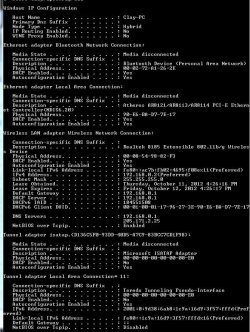
From what I can see in the ipconfig you have no DNS server showing up which is unusual. The DNS should be coming from the ISP automatically although there is probably a setting for this in the routers configuration page that may not be filled in so you might try that first.

On the problem PC,... you might try setting up a static DNS server address by going into the IPv4 properties and typing them in, Google is a good one to try at 8.8.8.8 and 8.8.4.4 , link below shows how.

http://www.sevenforums.com/tutorials/15037-dns-addressing-how-change-windows-7-a.html

Do you have iTunes installed on this PC?

Are there any virtual adaptors or Hamachi VPN installed?
 

My Computer My Computer

At a glance

Windows 7 Ult, Windows 8.1 Pro,Q9650-4.275GHz, E8600 4.5GHz, E6750-3.8GHzG.Skill PC2 9600 1200Mhz 5 5 5 15 2TGTX480
Computer type
PC/Desktop
Computer Manufacturer/Model Number
Home built
OS
Windows 7 Ult, Windows 8.1 Pro,
CPU
Q9650-4.275GHz, E8600 4.5GHz, E6750-3.8GHz
Motherboard
Evga 780i FTW
Memory
G.Skill PC2 9600 1200Mhz 5 5 5 15 2T
Graphics Card(s)
GTX480
Sound Card
Asus Xonar D2
Monitor(s) Displays
HannsG
Screen Resolution
1680X1050
Hard Drives
GSkill Phoenix Pro 120GB SSD
PSU
ThermalTake Toughpower 1000Watt modular
Case
ThermalTake XaserV
Cooling
Xigmatek S1283
Keyboard
Logitech G15
Mouse
Logitech G9
Internet Speed
T1
Okay, I'll try your static DNS suggestion....after this post in case something goes screwy :/ .

No, this PC is thankfully iTunes free.

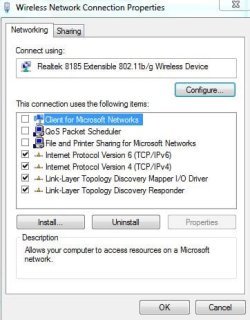
I don't have any VPNs on here either. As a bonus, my adapter properties screenshot is below :)


Here's my ipconfig/all screenshot as well:


THANKS!!
 

Attachments

  • adapter.JPG
    adapter.JPG
    36.9 KB · Views: 10
  • ipconfigall.JPG
    ipconfigall.JPG
    106 KB · Views: 23

My Computer My Computer

At a glance

Colorado
OS
Colorado
I'm wondering why Client for Microsoft Networks, QoS Packet Scheduler and file and printer sharing are turned off?

If you plan on sharing just about anything and for other good reasons you need those enabled.

As for the wireless problem, try the DNS settings but also try installing Xirrus software which will show me the wireless landscape in your area. Post a screen shot of the results here please.

Wi-Fi Inspector | Xirrus
 

My Computer My Computer

At a glance

Windows 7 Ult, Windows 8.1 Pro,Q9650-4.275GHz, E8600 4.5GHz, E6750-3.8GHzG.Skill PC2 9600 1200Mhz 5 5 5 15 2TGTX480
Computer type
PC/Desktop
Computer Manufacturer/Model Number
Home built
OS
Windows 7 Ult, Windows 8.1 Pro,
CPU
Q9650-4.275GHz, E8600 4.5GHz, E6750-3.8GHz
Motherboard
Evga 780i FTW
Memory
G.Skill PC2 9600 1200Mhz 5 5 5 15 2T
Graphics Card(s)
GTX480
Sound Card
Asus Xonar D2
Monitor(s) Displays
HannsG
Screen Resolution
1680X1050
Hard Drives
GSkill Phoenix Pro 120GB SSD
PSU
ThermalTake Toughpower 1000Watt modular
Case
ThermalTake XaserV
Cooling
Xigmatek S1283
Keyboard
Logitech G15
Mouse
Logitech G9
Internet Speed
T1
the unchecked stuff on the wireless adapter was one of those last resort efforts while I was on the phone with my ISP tech support. I shall recheck those.

As for xirrus, it'll take a bit to download with my snail-speed connection. I'll update this post when I have the info.

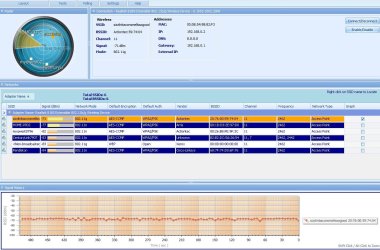
Update: The screenshot from Xirrus is below.
 

Attachments

  • xirrus.JPG
    xirrus.JPG
    156.6 KB · Views: 32

My Computer My Computer

At a glance

Colorado
OS
Colorado
the unchecked stuff on the wireless adapter was one of those last resort efforts while I was on the phone with my ISP tech support. I shall recheck those.

As for xirrus, it'll take a bit to download with my snail-speed connection. I'll update this post when I have the info.

Update: The screenshot from Xirrus is below.

The problems I see here are that your signal strength is not very good at all and the bigger problem is that it seems you and all of your neighbors are using channel 11. Between the two you will have a slow connection and drop outs.

You need to go into the routers set up page and find the wireless settings page, you can make adjustments to the channel from there. I would go with channel 1 or 6 in your case although some experimenting is usually required to find the best channel.

I'm not sure what to do about the weak signal but at the level I would not expect a very good connection.
 

My Computer My Computer

At a glance

Windows 7 Ult, Windows 8.1 Pro,Q9650-4.275GHz, E8600 4.5GHz, E6750-3.8GHzG.Skill PC2 9600 1200Mhz 5 5 5 15 2TGTX480
Computer type
PC/Desktop
Computer Manufacturer/Model Number
Home built
OS
Windows 7 Ult, Windows 8.1 Pro,
CPU
Q9650-4.275GHz, E8600 4.5GHz, E6750-3.8GHz
Motherboard
Evga 780i FTW
Memory
G.Skill PC2 9600 1200Mhz 5 5 5 15 2T
Graphics Card(s)
GTX480
Sound Card
Asus Xonar D2
Monitor(s) Displays
HannsG
Screen Resolution
1680X1050
Hard Drives
GSkill Phoenix Pro 120GB SSD
PSU
ThermalTake Toughpower 1000Watt modular
Case
ThermalTake XaserV
Cooling
Xigmatek S1283
Keyboard
Logitech G15
Mouse
Logitech G9
Internet Speed
T1
Back
Top