
Connection Speed Problems - Windows 7 Home Premium 64bit

Dudefish

New member
Local time
10:21 AM
Messages
3
Greetings, all.

I've just bought a brand new computer, set it all up, gotten the drivers sorted, but there's a problem.

Even with all the latest Firmware and Drivers, my router adapter (Netgear WPN111) does not seem to work beyond 200kb download speed on actual files with a 10MB connection.

I've changed commands in CMD in order to try and fix this, to no avail.

I've flushed the DNS, I've refreshed my IP, I've re-installed, uninstalled, re-installed, installed older versions, browsed topics for hours, but none of them are working for me.

I've downloaded the latest driver and firmware for this product, but nothing has changed.


Is there anything else I can change? Here's a test log from speedtest.net:
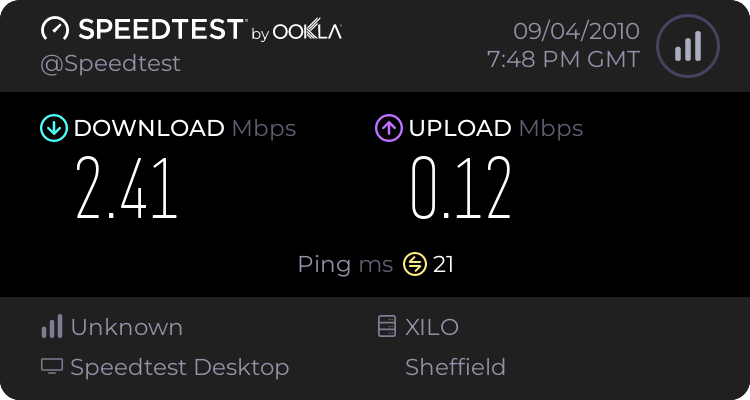
940760267.png


I can't think of anything else to change, and the "Troubleshooting" finds no problems.

I should also point out, that after being off overnight, for about 5 minutes I got full connection (9.7-10mb speed).

Also, my entire browsing slows down only when I am downloading. It's almost a snail crawl. If I am not downloading, my internet browsing is fast, but the download speed still remains capped on speedtest.net at 2mb, actual downloading is capped at 200

wowspeed.jpg


A typical download speed currently. :/
 

My Computer My Computer

At a glance

Windows 7 Home Premium 64 bitAMD Phenom(tm) II X6 1055T Processor 2.80 GHZ...4.00GBATI Sapphire Radeon 5830
Computer Manufacturer/Model Number
Overclockers UK
OS
Windows 7 Home Premium 64 bit
CPU
AMD Phenom(tm) II X6 1055T Processor 2.80 GHZ @ 3.8
Memory
4.00GB
Graphics Card(s)
ATI Sapphire Radeon 5830
Monitor(s) Displays
HP w19
Hard Drives
Seagate Barracuda 500GB
OCZ Vertex 60gb SSD
That particular network adaptor has been very problematic with Windows 7 for a long time now. Nothing but complaints about it not working with Windows 7 and this has been going on for a very long time now.

Your best bet is to try the latest drivers that are made for Windows 7.
Answer
 

My Computer My Computer

At a glance

Windows 7 Ult, Windows 8.1 Pro,Q9650-4.275GHz, E8600 4.5GHz, E6750-3.8GHzG.Skill PC2 9600 1200Mhz 5 5 5 15 2TGTX480
Computer type
PC/Desktop
Computer Manufacturer/Model Number
Home built
OS
Windows 7 Ult, Windows 8.1 Pro,
CPU
Q9650-4.275GHz, E8600 4.5GHz, E6750-3.8GHz
Motherboard
Evga 780i FTW
Memory
G.Skill PC2 9600 1200Mhz 5 5 5 15 2T
Graphics Card(s)
GTX480
Sound Card
Asus Xonar D2
Monitor(s) Displays
HannsG
Screen Resolution
1680X1050
Hard Drives
GSkill Phoenix Pro 120GB SSD
PSU
ThermalTake Toughpower 1000Watt modular
Case
ThermalTake XaserV
Cooling
Xigmatek S1283
Keyboard
Logitech G15
Mouse
Logitech G9
Internet Speed
T1
That particular network adaptor has been problematic with Windows 7 for a long time now. Your best bet is to try the latest drivers that are made for Windows 7.
Answer

No harm in trying this step again, I guess.

I'll edit this post shortly with results.

Edit:
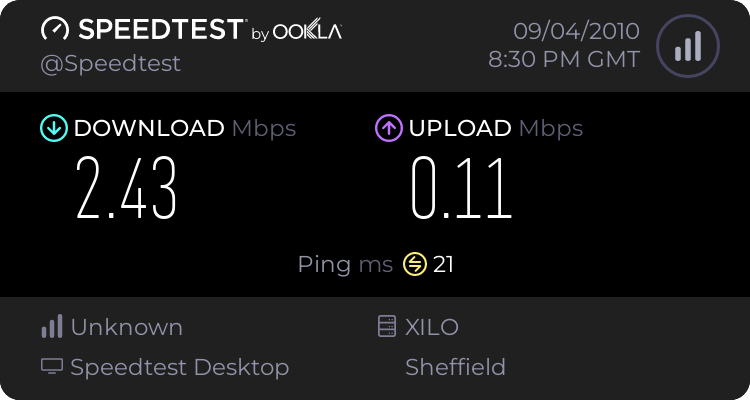
Yeah, it's still the same.

940797470.png


Can you please suggest a router (that comes with an adapter) that works with Win XP AND Windows 7, that is known for brilliant wireless connection? It's imperative that it works with WinXP also.

Regards,

-Stuart
 
Last edited:

My Computer My Computer

At a glance

Windows 7 Home Premium 64 bitAMD Phenom(tm) II X6 1055T Processor 2.80 GHZ...4.00GBATI Sapphire Radeon 5830
Computer Manufacturer/Model Number
Overclockers UK
OS
Windows 7 Home Premium 64 bit
CPU
AMD Phenom(tm) II X6 1055T Processor 2.80 GHZ @ 3.8
Memory
4.00GB
Graphics Card(s)
ATI Sapphire Radeon 5830
Monitor(s) Displays
HP w19
Hard Drives
Seagate Barracuda 500GB
OCZ Vertex 60gb SSD
my first concern is whether your hardware is screwing you over or if your windows settings are somehow screwing you up.

do you get your full 10MBit download when you're connected via ethernet with wireless turned off/and disabled?

if yes, then:

do you have another computer on your LAN that you can download a large file from?

if yes, then:

attempt to download the large file via wireless and see if the speed gets above 10mbits. if it can't get above 10mbits, then i'd certainly assume there's an issue with your hardware.

if even over wired you still get slow speeds, i'd likely blame it on some unknown configuration within windows..
 

My Computer My Computer

At a glance

Win 7 Pro x64AMD Phenom II X6 1090T (3200 Mhz)Corsair DOMINATOR 8 GB PC310666 (1333Mhz) CAS...2x NVIDIA GeForce 9800 GTX/9800 GTX+ (in SLI ...
Computer Manufacturer/Model Number
N/A - Custom Rig
OS
Win 7 Pro x64
CPU
AMD Phenom II X6 1090T (3200 Mhz)
Motherboard
ASUS M4N98TD EVO
Memory
Corsair DOMINATOR 8 GB PC310666 (1333Mhz) CAS: 7-7-7-20
Graphics Card(s)
2x NVIDIA GeForce 9800 GTX/9800 GTX+ (in SLI Mode)
Sound Card
N/A; Onboard VIA VT1708S chipset is good enuff
Monitor(s) Displays
23" LG W2361V (2ms Response Time) / 20" ASUS VE205N (5ms)
Screen Resolution
1920x1080 & 1600x900 respectively
Hard Drives
3x crappy ~150gb 7200rpm drives in fakeraid 5
PSU
Ultra X3 1000-Watt ATX/Modular/SLI&SATA Ready PSU (ULT40311)
Case
SILVERSTONE TEMJIN TJ06S-W (Silver) ATX Full Tower Case
Cooling
Nothing special; no overclocking. Stock heatsink & case fans
Keyboard
Saitek Eclipse II [broken due to numerous RaGe qUiTs] >:(
Mouse
some iHome laser (not optical) mouse
Internet Speed
I can only get ~1MBps sustained
Other Info
A+/N+/Security+ Certified. I break a lot of computer equipment because i get FURIOUSLY ANGRY! The next time some moron gloats about his SSD, ask him if it's SLC or MLC. Not only will he not know, it WILL be MLC because that kid at BestBuy took him to the CLEANERS!! If you don't know the response time on your primary monitor, you got owned. If you do and it's 5ms, you owned yourself.
if even over wired you still get slow speeds, i'd likely blame it on some unknown configuration within windows..


WPN111 is known for it's wrong doings. As I said, I changed the configurations for Win7 to run almost anything just fine, it's not doing it with the adapter in.

It bluescreens people, it freezes people, it disconnects on downloads quite frequently, but it behaves itself much better in win7. It's definitely the adapter, and I've found a way to make it work momentarily.

I'll be picking up a new router on Monday.

Suggestions?

(I'm in the UK)
 
Last edited:

My Computer My Computer

At a glance

Windows 7 Home Premium 64 bitAMD Phenom(tm) II X6 1055T Processor 2.80 GHZ...4.00GBATI Sapphire Radeon 5830
Computer Manufacturer/Model Number
Overclockers UK
OS
Windows 7 Home Premium 64 bit
CPU
AMD Phenom(tm) II X6 1055T Processor 2.80 GHZ @ 3.8
Memory
4.00GB
Graphics Card(s)
ATI Sapphire Radeon 5830
Monitor(s) Displays
HP w19
Hard Drives
Seagate Barracuda 500GB
OCZ Vertex 60gb SSD
Back
Top