
Connection to internet before login

ssd532

New member
Local time
11:36 PM
Messages
8
Hello Everybody,

Is there any way I can connect to my PPPoE internet before Login.
I want it for team viewer. I always use my home pc remotely from office. but if I want to restart or switch user then it get disconnected. Actually teamviewer has option to start it as windows service. So I am thinking it would start before login as many other services.
I want to confirm if it will get start before login. and How can I have PPPoE internet connection before login. so that I can access teamviewer.

Thank You.
 

My Computer

OS
Windows 7 64 bit Enterprise Edition
yes you can get a router and have the router automatically log you in so you keep a steady connection to the internet

then the NAT from the router will send the itnernet to your comptuer and usually your NIC card is turned on during the log in screen of the computer
 

My Computer

Computer Manufacturer/Model Number
HP Pavilion Elite HPE-410f
OS
Windows 7 Ultimate x64
CPU
AMD Phenom x6 1045t
Motherboard
N/A
Memory
8 GB
Graphics Card(s)
ATI Radeon HD 5570
Sound Card
Realtek Highdefinition Audio / 5.1 Dolby Setup
Monitor(s) Displays
HP w2207h Widescreen
Screen Resolution
1680*1050
Hard Drives
1 TB (fixed), 320 Portable maxtor, Server Hard drives
PSU
350 Watt
Case
HP CASE
Cooling
Bass
Keyboard
Logitech MX 5500
Mouse
Logitech MX 5500
Internet Speed
ROAD RUNNER 16MB D/512 U
Acurasd, i believe that's during login. :)
 

My Computer

Computer Manufacturer/Model Number
Lenovo ThinkPad T60
OS
Windows 7 Ultimate 64Bit
CPU
GenuineIntel Intel(R) Core(TM) DuoCore T2400 @ 1.83GHz
Motherboard
Intel(R) 82801G (ICH7 Family)
Memory
2.00 GB
Graphics Card(s)
Mobile Intel(R) 945 Express Chipset
Sound Card
SoundMAX Integrated Digital HD Audio
Monitor(s) Displays
ThinkPad Display
Screen Resolution
1400x1050
Hard Drives
100Gb SATA
Keyboard
Standard Keyboard
Mouse
HID-compliant Mouse
Internet Speed
Cable Broadband - 54Mbps
Other Info
Intel(R) PRO/1000 PL Network Connection
11a/b/g Wireless LAN Mini PCI Express Adapter
yes you can get a router and have the router automatically log you in so you keep a steady connection to the internet

then the NAT from the router will send the itnernet to your comptuer and usually your NIC card is turned on during the log in screen of the computer

Yes I am also thinking the same. Lets see when I get the router.
I am planning to buy one.

But still is there any other solution? .. without router?
 

My Computer

OS
Windows 7 64 bit Enterprise Edition
I use TeamViewer this way and it works fine - just set it to automatically load at Windows startup. You can even remotely reboot a machine - you lose the TeamViewer connection during the reboot, but when it gets to Windows login you should be able to login remotely. I have done this with no problems :)
 

My Computer

Computer Manufacturer/Model Number
Custom
OS
Windows 7 Enterprise x64
CPU
Intel i7 920
Motherboard
Asus P6T Deluxe v2
Memory
6 GB
Graphics Card(s)
nVidia GTX260 + nVidia 3D
Sound Card
Onboard
Monitor(s) Displays
Samsung SyncMaster 2233RZ
Screen Resolution
1680 x 1050
Hard Drives
1 x 64GB SSD primary
2 x 1 TB (mirrored)
PSU
700W
Other Info
Edimax 802.11n Wireless PCI Card
Netgear DG834G router
Hi guys,

I found this thread while googling for this issue, i have the same problem as ssd532 of connecting to another machine with teamviewer before win xp logs on.
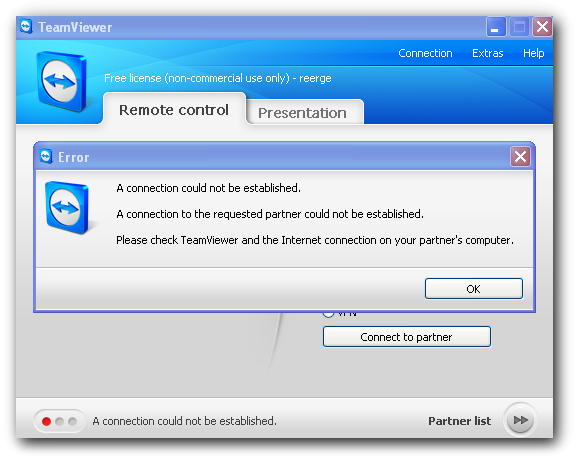
I have setup unattended access on the partner PC for teamviewer and both computers are connected to same router through NIC but when i try to connect through the permanent ID i cant connect and get this error
fKJfT.png


When the other pc logs into windows then teamviewer connects without any problem but i am not able connect before windows login, please help me with this , thanks.
 

My Computer

OS
XP 32
Have you set TeamViewer to load at Windows startup on both machines? It needs to be set to do this in the main window (Extras > Options > check the box next to "Start TeamViewer with Windows").
 

My Computer

Computer Manufacturer/Model Number
Custom
OS
Windows 7 Enterprise x64
CPU
Intel i7 920
Motherboard
Asus P6T Deluxe v2
Memory
6 GB
Graphics Card(s)
nVidia GTX260 + nVidia 3D
Sound Card
Onboard
Monitor(s) Displays
Samsung SyncMaster 2233RZ
Screen Resolution
1680 x 1050
Hard Drives
1 x 64GB SSD primary
2 x 1 TB (mirrored)
PSU
700W
Other Info
Edimax 802.11n Wireless PCI Card
Netgear DG834G router
I have solved the problem, i disabled static ip and let the router assign ips to both PCs, then i saved the Mac address, ip address and host name for both PCs listed under dhcp client list in the router and now it is working. But now i have a new problem, i am only getting about 2 mb/s file transfer speed , the router & both NICs support 100 mbps so i should be getting around 10-12 mbps transfer speed, both PCs are placed about 5 feet away from the router , could bad cat5 cable cause this?
 

My Computer

OS
XP 32
Back
Top