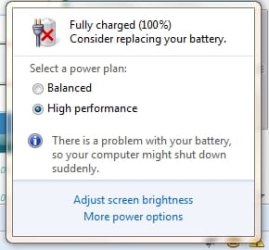
Consider Replacing battery?

Bituser

Banned
Local time
3:33 AM
Messages
279
Location
New Zealand
This morning my laptop decided to tell me to buy a new laptop battery. I know my battery works fine, so why does it keep reminding me to get a new battery?
 

My Computer

Computer Manufacturer/Model Number
Toshiba
OS
Windows 7 Home Premium x64
CPU
Celeron
Other Info
I will Fill in my Specs soon
I got the message "Consider replacing your battery." too, when hovering over the icon.

I switched to my Xp boot and it's fine.

Might look into this actually.
 

My Computer

Computer Manufacturer/Model Number
Lenovo ThinkPad T60
OS
Windows 7 Ultimate 64Bit
CPU
GenuineIntel Intel(R) Core(TM) DuoCore T2400 @ 1.83GHz
Motherboard
Intel(R) 82801G (ICH7 Family)
Memory
2.00 GB
Graphics Card(s)
Mobile Intel(R) 945 Express Chipset
Sound Card
SoundMAX Integrated Digital HD Audio
Monitor(s) Displays
ThinkPad Display
Screen Resolution
1400x1050
Hard Drives
100Gb SATA
Keyboard
Standard Keyboard
Mouse
HID-compliant Mouse
Internet Speed
Cable Broadband - 54Mbps
Other Info
Intel(R) PRO/1000 PL Network Connection
11a/b/g Wireless LAN Mini PCI Express Adapter
It problably needs to be refreshed - let the computer run until it is dead then do a full recharge before using.
 

My Computer

Computer type
PC/Desktop
Computer Manufacturer/Model Number
Apple 17" iMac MA199LL (Early 2006)
OS
Windows 8 Pro (32-bit)
CPU
1.83GHz Intel Core Duo
Memory
2GB 667MHz DDR2 SDRAM (PC2-5300) (upgrade)
Graphics Card(s)
ATI Radeon X1600 with 128MB GDDR3 memory
Monitor(s) Displays
17-inch TFT active-matrix LCD, millions of colors
Screen Resolution
1440 x 900
Hard Drives
Hitachi 320GB HDT721032SLA360 7200RPM SATA II (upgrade)
Keyboard
Microsoft Wired Keyboard 600
Mouse
Microsoft Basic Optical Mouse v2.0
Internet Speed
4 Mbps
Antivirus
Microsoft Security Essentials
Browser
Google Chrome
Other Info
WEI:
Base Score: 3.9 Processor: 4.4 Memory 4.7
Graphics: 3.9 Gaming Graphics: 4.1 Primary HD: 5.9
its very annoying.snip.jpg

EDIT: If I do that it will automatically hibernate, I guess I could disable hibernate.
 

My Computer

Computer Manufacturer/Model Number
Toshiba
OS
Windows 7 Home Premium x64
CPU
Celeron
Other Info
I will Fill in my Specs soon
Hello, I'm new to 7 and definitely not a computer expert. What I do know about is batteries. While your battery is fine, when they die, all sorts of weird things can happen. Not to the laptop but confusing it on what is really going on.

Soooo...when the battery is bad/dead, you might get strange power issues, messages and the like. If you start having problems in the future, suspect the battery. My HP laptop really came unglued a few weeks ago; battery would say it was charging, then AC power, not charging, back and forth. The blue power light would blink, etc. Turned out to be both the adapter cord end and a very dead battery. VK

 

My Computer

Computer Manufacturer/Model Number
Hp dv9743cl Laptop
OS
Win 7 Premium, 32 bit, upgraded from Vista Home
CPU
Intel Core 2 duo T 7250 @ 2.00 Ghz, Centrino, 3MB L2 Cache
Memory
3 GB RAM DDR2
Graphics Card(s)
NVIDIA GeForce Go 8600M GS
Monitor(s) Displays
17" WXGA+HD
Screen Resolution
1440 x 900
Hard Drives
320 GB (160GB +160GB) 5400 RPM
Internet Speed
DSL 54
Other Info
HP Pavilion Entertainment PC
If you're getting the message in Windows 7, but not in an alternative OS that you have installed in the same machine, the chances are that the battery is fine and that it is the power management driver that needs updating. Check the manufacturers website to see if they have an updated driver that will correct this anomoly.
 

My Computer

Computer type
PC/Desktop
Computer Manufacturer/Model Number
Dwarf Dwf/11/2012 r09/2013
OS
Windows 8.1 Pro RTM x64
CPU
Intel Core-i5-3570K 4-core @ 3.4GHz (Ivy Bridge) (OC 4.4GHz)
Motherboard
ASRock Z77 Extreme4-M
Memory
4 x 4GB DDR3-1600 Corsair Vengeance CMZ8GX3M2A1600C9B (16GB)
Graphics Card(s)
MSI GeForce GTX770 Gaming OC 2GB
Sound Card
Realtek High Definition on board solution (ALC 898)
Monitor(s) Displays
ViewSonic VA1912w Widescreen (VGA)
Screen Resolution
1440x900
Hard Drives
OCZ Agility 3 SSD 120GB SATA III x2 (RAID 0)
Samsung HD501LJ 500GB SATA II x2
Hitachi HDS721010CLA332 1TB SATA II
Iomega 1.5TB Ext USB 2.0
WD 2.0TB Ext USB 3.0
PSU
XFX Pro Series 850W Semi-Modular
Case
Gigabyte IF233
Cooling
1 x 120mm Front Inlet 1 x 120mm Rear Exhaust
Keyboard
Microsoft Comfort Curve Keyboard 3000 (USB)
Mouse
Microsoft Comfort Mouse 3000 for Business (USB)
Internet Speed
NetGear DG834Gv3 ADSL Modem/Router (Ethernet) ~4.0 Mb/s (O2)
Antivirus
Avast! 8.0.1497
Browser
IE 11
Other Info
Optical Drive: HL-DT-ST BD-RE BH10LS30 SATA Bluray
Lexmark S305 Printer/Scanner/Copier (USB)
WEI Score: 8.1/8.1/8.5/8.5/8.25
Asus Eee PC 1011PX Netbook (Windows 7 x86 Starter)
Back
Top