Consider Replacing your battery

Kathy

New member
Local time
9:03 PM
Messages
33
Location
Israel
HP Laptop
Pavilion dv5

i did opened a Administrator command prompt and typed
powercfg -energy -output c:\energy-report.html
and i got:

Energy efficiency problems were found

8 Erros
13 Warnings
19 Informational

and i attached the report file..
please help me! :S
 

Attachments

My Computer

Computer Manufacturer/Model Number
HP Pavilion Enterainment PC dv5
OS
Windows 7 Ultimate 32-bit SP1
CPU
Intel Core2 Duo T5800 @ 2.00GHz
Memory
2.0GB RAM
Graphics Card(s)
NVIDIA GeForce 9200M GS
Screen Resolution
12800x800
Internet Speed
3.1Mbps
My laptop is only 5 weeks old and i have:
10 Errors
8 Warnings
13 Informationals

Im not sure why, but if my laptop is new, and it has that many errors/warnings then im guessing yours is fine also.
 

My Computer

Computer Manufacturer/Model Number
HP Pavillion P7-1054
OS
Windows 7 Home Premium 64bit
CPU
AMD Athlon 645 II Quad Core 3.2MHz
Motherboard
Foxconn 2AB1
Memory
6GB DDR3 1333MHz
Graphics Card(s)
Radeon HD 4200
Sound Card
Realtek HD Audio
Monitor(s) Displays
HP S2031 20'
Screen Resolution
1600 x 900
Hard Drives
1TB
Internet Speed
18mb/s Down 2mb/s Up
My laptop is only 5 weeks old and i have:
10 Errors
8 Warnings
13 Informationals

Im not sure why, but if my laptop is new, and it has that many errors/warnings then im guessing yours is fine also.

:P loool ... thanks for ur personal support
 

My Computer

Computer Manufacturer/Model Number
HP Pavilion Enterainment PC dv5
OS
Windows 7 Ultimate 32-bit SP1
CPU
Intel Core2 Duo T5800 @ 2.00GHz
Memory
2.0GB RAM
Graphics Card(s)
NVIDIA GeForce 9200M GS
Screen Resolution
12800x800
Internet Speed
3.1Mbps

My Computer

Computer Manufacturer/Model Number
HP Pavillion P7-1054
OS
Windows 7 Home Premium 64bit
CPU
AMD Athlon 645 II Quad Core 3.2MHz
Motherboard
Foxconn 2AB1
Memory
6GB DDR3 1333MHz
Graphics Card(s)
Radeon HD 4200
Sound Card
Realtek HD Audio
Monitor(s) Displays
HP S2031 20'
Screen Resolution
1600 x 900
Hard Drives
1TB
Internet Speed
18mb/s Down 2mb/s Up
HP Laptop
Pavilion dv5

All is fairly well normal.

This program must have been written by a wet-behind-the-ears junior programmer with his Computer Science degree and absolutely zero real-word experience.

The report is a joke in my opinion and a good example of bad programming.

Now with that out of the way.

The one thing that worries me is the battery report.

do me a favor plug you computer in but turned off. The HP should indicate that power is on and that the battery is charging or fully charged. Ignore that green led and leave the computer plugged in as many hours as possible.

Still the battery reading may be dismal. Batteries have a fixed life-time, even sitting on a shelf. No telling how old that battery is.

Interesting would be plugging in a "new" battery and seeing what is reported.
 

My Computer

Computer Manufacturer/Model Number
Toshiba Satellite S875D-S7239 laptop
OS
MS Windows 7 Ultimate SP1 64-bit
CPU
AMD A10-4600M
Motherboard
AMD Pumori (Socket FT1)
Memory
6.00 GB Dual-Channel DDR3 @ 798MHz (11-11-12-28)
Graphics Card(s)
AMD Radeon HD 7660G
Sound Card
High Definition Audio Device
Monitor(s) Displays
Generic PnP Monitor (1600x900@60Hz)
Screen Resolution
1600x900@60Hz
Hard Drives
SSD 119GB Corsair CSSD-V128GB2 ATA Device
Keyboard
Standard PS/2 Keyboard
Mouse
HP Wireless Optical Mobile Mouse Model FHA-3410
Internet Speed
What the local pub, local coffee shop offers.
Other Info
Optical Drive:MATSHITA BD-CMB UJ160B ATA Device


Also have an Asus ha1002xp netbook with Win 7 Ultimate installed.
Me personally wouldn't worry if the battery was holding charge, if not then i would consider getting a new battery in the near future :).
 

My Computer

Computer type
PC/Desktop
Computer Manufacturer/Model Number
Self Built
OS
Windows 8.1 Pro x64
CPU
Intel Core i5-2500K @ 3.30GHz - S1155
Motherboard
Asus P8P67 LE Rev3, Intel P67, S115
Memory
8GB Corsair DDR3 XMS3, PC3-12800
Graphics Card(s)
NVIDIA GeForce GTX 650
Sound Card
On-Board
Monitor(s) Displays
3 x 24" {Extended Display}
Screen Resolution
1920 x 1080
Hard Drives
300GB Seagate Barracuda 7200
PSU
550W Coolermaster GX550
Case
Silverstone Precision PS04B
Cooling
Stock
Keyboard
Logitech K120
Mouse
World of Warcraft Cataclysm MMO Gaming Mouse
Internet Speed
80 MB
Antivirus
MSE / Windows Defender
Browser
Chrome
HP Laptop
Pavilion dv5

All is fairly well normal.

This program must have been written by a wet-behind-the-ears junior programmer with his Computer Science degree and absolutely zero real-word experience.

The report is a joke in my opinion and a good example of bad programming.

Now with that out of the way.

The one thing that worries me is the battery report.

do me a favor plug you computer in but turned off. The HP should indicate that power is on and that the battery is charging or fully charged. Ignore that green led and leave the computer plugged in as many hours as possible.

Still the battery reading may be dismal. Batteries have a fixed life-time, even sitting on a shelf. No telling how old that battery is.

Interesting would be plugging in a "new" battery and seeing what is reported.

I got a real problem with the battery...
sometimes when i leave the battery 100% charged.. and turn off the computer...
in the next day, when i need to turn it on ... it can;t be turned on ..

then, i take the battery off... and put it on ..many times... (plugged in)
when i see the light on ... i say ..THANKS GOD! .


and .. simetimes..
i leave the computer turned off + plugged in .. 14 hours ..
when i wake up .. i can't turn it on :S ...

i don't know what to do with the battery...
 

My Computer

Computer Manufacturer/Model Number
HP Pavilion Enterainment PC dv5
OS
Windows 7 Ultimate 32-bit SP1
CPU
Intel Core2 Duo T5800 @ 2.00GHz
Memory
2.0GB RAM
Graphics Card(s)
NVIDIA GeForce 9200M GS
Screen Resolution
12800x800
Internet Speed
3.1Mbps
Bad news. Solution: Replace battery. Buy via ebay or newegg and not via HP.
 

My Computer

Computer Manufacturer/Model Number
Toshiba Satellite S875D-S7239 laptop
OS
MS Windows 7 Ultimate SP1 64-bit
CPU
AMD A10-4600M
Motherboard
AMD Pumori (Socket FT1)
Memory
6.00 GB Dual-Channel DDR3 @ 798MHz (11-11-12-28)
Graphics Card(s)
AMD Radeon HD 7660G
Sound Card
High Definition Audio Device
Monitor(s) Displays
Generic PnP Monitor (1600x900@60Hz)
Screen Resolution
1600x900@60Hz
Hard Drives
SSD 119GB Corsair CSSD-V128GB2 ATA Device
Keyboard
Standard PS/2 Keyboard
Mouse
HP Wireless Optical Mobile Mouse Model FHA-3410
Internet Speed
What the local pub, local coffee shop offers.
Other Info
Optical Drive:MATSHITA BD-CMB UJ160B ATA Device


Also have an Asus ha1002xp netbook with Win 7 Ultimate installed.
It may be worth checking the contacts where the battery connects, make sure they are not dirty or bent, I'm saying this as you have mentioned you need to remove and replace the battery many times and then it works, maybe its a connection issue which would also result in the laptop not charging sometimes?

Although i think Karlsnooks is probably the more likely option :(

Regards,
JDobbsy1987
 

My Computer

Computer type
PC/Desktop
Computer Manufacturer/Model Number
Self Built
OS
Windows 8.1 Pro x64
CPU
Intel Core i5-2500K @ 3.30GHz - S1155
Motherboard
Asus P8P67 LE Rev3, Intel P67, S115
Memory
8GB Corsair DDR3 XMS3, PC3-12800
Graphics Card(s)
NVIDIA GeForce GTX 650
Sound Card
On-Board
Monitor(s) Displays
3 x 24" {Extended Display}
Screen Resolution
1920 x 1080
Hard Drives
300GB Seagate Barracuda 7200
PSU
550W Coolermaster GX550
Case
Silverstone Precision PS04B
Cooling
Stock
Keyboard
Logitech K120
Mouse
World of Warcraft Cataclysm MMO Gaming Mouse
Internet Speed
80 MB
Antivirus
MSE / Windows Defender
Browser
Chrome

My Computer

Computer Manufacturer/Model Number
HP Pavilion Enterainment PC dv5
OS
Windows 7 Ultimate 32-bit SP1
CPU
Intel Core2 Duo T5800 @ 2.00GHz
Memory
2.0GB RAM
Graphics Card(s)
NVIDIA GeForce 9200M GS
Screen Resolution
12800x800
Internet Speed
3.1Mbps
It may be worth checking the contacts where the battery connects, make sure they are not dirty or bent, I'm saying this as you have mentioned you need to remove and replace the battery many times and then it works, maybe its a connection issue which would also result in the laptop not charging sometimes?

Although i think Karlsnooks is probably the more likely option :(

Regards,
JDobbsy1987

Thanks, I'll check it too ! :)
 

My Computer

Computer Manufacturer/Model Number
HP Pavilion Enterainment PC dv5
OS
Windows 7 Ultimate 32-bit SP1
CPU
Intel Core2 Duo T5800 @ 2.00GHz
Memory
2.0GB RAM
Graphics Card(s)
NVIDIA GeForce 9200M GS
Screen Resolution
12800x800
Internet Speed
3.1Mbps
HP Laptop
Pavilion dv5

All is fairly well normal.

This program must have been written by a wet-behind-the-ears junior programmer with his Computer Science degree and absolutely zero real-word experience.

The report is a joke in my opinion and a good example of bad programming.

Now with that out of the way.

The one thing that worries me is the battery report.

do me a favor plug you computer in but turned off. The HP should indicate that power is on and that the battery is charging or fully charged. Ignore that green led and leave the computer plugged in as many hours as possible.

Still the battery reading may be dismal. Batteries have a fixed life-time, even sitting on a shelf. No telling how old that battery is.

Interesting would be plugging in a "new" battery and seeing what is reported.

I got a real problem with the battery...
sometimes when i leave the battery 100% charged.. and turn off the computer...
in the next day, when i need to turn it on ... it can;t be turned on ..

then, i take the battery off... and put it on ..many times... (plugged in)
when i see the light on ... i say ..THANKS GOD! .


and .. simetimes..
i leave the computer turned off + plugged in .. 14 hours ..
when i wake up .. i can't turn it on :S ...

i don't know what to do with the battery...
I guess is the amount of hours you leave the PC plugged with the battery... normally, if it is a 6 cell battery, it takes from 3 to 4 hours to fully re-charge... after that, if the battery continues receiving power, it can be neglected, but in my experience, that degrades the battery capacity.

My suggestion: replace your battery with a new one, and try to use your laptop without your battery anytime you can (for example, if you find any plug to work), keep your new battery stored with 50% of its capacity, that will keep your battery from degrading everytime you use it and charge it (just in case you use the battery very seldom...). Never expend more than the required time to fully recharge your battery, that can degrade it's capacity of energy storage. I should add that removing your battery and using AC power (plug) instead, among saving your battery from degrade, will make your laptop less hotter, so your internal components will suffer less the impact instead of using the battery with the AC power, just use your battery if you don't find any power source to plug your machine.

See ya!! :D
 

My Computer

Computer type
PC/Desktop
Computer Manufacturer/Model Number
Assembled Desktop PC
OS
Microsoft Windows 7 Home Premium SP1 64-bit Build 7600
CPU
AMD Athlon 64 X2 5200+ Dual Core CPU @ 2.7 Ghz (Brisbane)
Motherboard
PCChips A13G+ v3.0
Memory
2x2 GB DDR2 PC-5300 (667 Mhz) Kingston ValueRAM
Graphics Card(s)
XFX ATI Radeon HD 4350 GPU (512 MB + 512 MB HM)
Sound Card
Realtek High Definition Audio Driver ALC660 @ MCP61S
Monitor(s) Displays
HP S2031 20" LED HD Widescreen Display Monitor
Screen Resolution
1600 x 900 px
Hard Drives
Maxtor Diamond Max 10 (160 GB, 7200 RPM, SATA-II Hard Disk)
Western Digital Scorpion Blue (250 GB, 5400 RPM, SATA-II External Hard Disk - Personal Data)
Toshiba MQ01ABD050 (500 GB, 5400 RPM, SATA-II External Hard Disk - Software & ISOs)
PSU
Pixxo Transformer 850W 80+ Certification PSU
Case
Compaq 5BW353 Case
Cooling
Many solutions, see other info...
Keyboard
Green Leaf (Mitzu) Standard Keyboard
Mouse
Microsoft USB Lasser Pointing Device
Internet Speed
10 MB
Antivirus
Avast Antivirus Free
Browser
Firefox, Chrome, Internet Explorer
Other Info
Windows Experience Index Result: 3.8 of 7.9.

Cooling solutions:
- AVC @ 2000/5000 RPM Copper Heatpipes (For Athlon 64 X2 6000+ CPU used in an Athlon 64 X2 5200+)
- Rear Fan 80 mm @ 2700 RPM for heat extraction
- Manhatan Chipset Cooler @ 4700/7200 RPM (For nVidia Chipset in MoBo)
- Foxconn @ 2500 RPM (Old Pentium III heatsink fan) in XFX ATI Radeon HD 4350
All is fairly well normal.

This program must have been written by a wet-behind-the-ears junior programmer with his Computer Science degree and absolutely zero real-word experience.

The report is a joke in my opinion and a good example of bad programming.

Now with that out of the way.

The one thing that worries me is the battery report.

do me a favor plug you computer in but turned off. The HP should indicate that power is on and that the battery is charging or fully charged. Ignore that green led and leave the computer plugged in as many hours as possible.

Still the battery reading may be dismal. Batteries have a fixed life-time, even sitting on a shelf. No telling how old that battery is.

Interesting would be plugging in a "new" battery and seeing what is reported.

I got a real problem with the battery...
sometimes when i leave the battery 100% charged.. and turn off the computer...
in the next day, when i need to turn it on ... it can;t be turned on ..

then, i take the battery off... and put it on ..many times... (plugged in)
when i see the light on ... i say ..THANKS GOD! .


and .. simetimes..
i leave the computer turned off + plugged in .. 14 hours ..
when i wake up .. i can't turn it on :S ...

i don't know what to do with the battery...
I guess is the amount of hours you leave the PC plugged with the battery... normally, if it is a 6 cell battery, it takes from 3 to 4 hours to fully re-charge... after that, if the battery continues receiving power, it can be neglected, but in my experience, that degrades the battery capacity.

My suggestion: replace your battery with a new one, and try to use your laptop without your battery anytime you can (for example, if you find any plug to work), keep your new battery stored with 50% of its capacity, that will keep your battery from degrading everytime you use it and charge it. Never expend more than the required time to fully recharge your battery, that can degrade it's capacity of energy storage. I should add that removing your battery and using AC power (plug) instead, among saving your battery from degrade, will make your laptop less hotter, so your internal components will suffer less the impact instead of using the battery with the AC power, just use your battery if you don't find any power source to plug your machine.

See ya!! :D


Thank youuuuuuuu !! :) See you
 

My Computer

Computer Manufacturer/Model Number
HP Pavilion Enterainment PC dv5
OS
Windows 7 Ultimate 32-bit SP1
CPU
Intel Core2 Duo T5800 @ 2.00GHz
Memory
2.0GB RAM
Graphics Card(s)
NVIDIA GeForce 9200M GS
Screen Resolution
12800x800
Internet Speed
3.1Mbps

My Computer

Computer type
PC/Desktop
Computer Manufacturer/Model Number
Assembled Desktop PC
OS
Microsoft Windows 7 Home Premium SP1 64-bit Build 7600
CPU
AMD Athlon 64 X2 5200+ Dual Core CPU @ 2.7 Ghz (Brisbane)
Motherboard
PCChips A13G+ v3.0
Memory
2x2 GB DDR2 PC-5300 (667 Mhz) Kingston ValueRAM
Graphics Card(s)
XFX ATI Radeon HD 4350 GPU (512 MB + 512 MB HM)
Sound Card
Realtek High Definition Audio Driver ALC660 @ MCP61S
Monitor(s) Displays
HP S2031 20" LED HD Widescreen Display Monitor
Screen Resolution
1600 x 900 px
Hard Drives
Maxtor Diamond Max 10 (160 GB, 7200 RPM, SATA-II Hard Disk)
Western Digital Scorpion Blue (250 GB, 5400 RPM, SATA-II External Hard Disk - Personal Data)
Toshiba MQ01ABD050 (500 GB, 5400 RPM, SATA-II External Hard Disk - Software & ISOs)
PSU
Pixxo Transformer 850W 80+ Certification PSU
Case
Compaq 5BW353 Case
Cooling
Many solutions, see other info...
Keyboard
Green Leaf (Mitzu) Standard Keyboard
Mouse
Microsoft USB Lasser Pointing Device
Internet Speed
10 MB
Antivirus
Avast Antivirus Free
Browser
Firefox, Chrome, Internet Explorer
Other Info
Windows Experience Index Result: 3.8 of 7.9.

Cooling solutions:
- AVC @ 2000/5000 RPM Copper Heatpipes (For Athlon 64 X2 6000+ CPU used in an Athlon 64 X2 5200+)
- Rear Fan 80 mm @ 2700 RPM for heat extraction
- Manhatan Chipset Cooler @ 4700/7200 RPM (For nVidia Chipset in MoBo)
- Foxconn @ 2500 RPM (Old Pentium III heatsink fan) in XFX ATI Radeon HD 4350
For your general edification,
I leave my laptop plugged in 24/7 with the battery in except for those times where no power is available.

I've never had a batter die but I have had laptops become dinosaurs.

As a side remark: I'm a retired electrical engineer who several times had to select batteries to be used in equipment which would be on assembly lines.

There are many factors that influence battery life. I will not enumerate those here nor become involved in a wordy, technical discussion.

Simply put: use the laptop, don't worry about battery life, if the battery goes south, then replace the battery.
 

My Computer

Computer Manufacturer/Model Number
Toshiba Satellite S875D-S7239 laptop
OS
MS Windows 7 Ultimate SP1 64-bit
CPU
AMD A10-4600M
Motherboard
AMD Pumori (Socket FT1)
Memory
6.00 GB Dual-Channel DDR3 @ 798MHz (11-11-12-28)
Graphics Card(s)
AMD Radeon HD 7660G
Sound Card
High Definition Audio Device
Monitor(s) Displays
Generic PnP Monitor (1600x900@60Hz)
Screen Resolution
1600x900@60Hz
Hard Drives
SSD 119GB Corsair CSSD-V128GB2 ATA Device
Keyboard
Standard PS/2 Keyboard
Mouse
HP Wireless Optical Mobile Mouse Model FHA-3410
Internet Speed
What the local pub, local coffee shop offers.
Other Info
Optical Drive:MATSHITA BD-CMB UJ160B ATA Device


Also have an Asus ha1002xp netbook with Win 7 Ultimate installed.
HP Laptop
Pavilion dv5

i did opened a Administrator command prompt and typed
powercfg -energy -output c:\energy-report.html
and i got:

Energy efficiency problems were found

8 Erros
13 Warnings
19 Informational

and i attached the report file..
please help me! :S


CMD does not work for me:(
 

Attachments

  • Capture.JPG
    Capture.JPG
    38.4 KB · Views: 32

My Computer

Computer Manufacturer/Model Number
Gateway/NV7923u & NV79C52u Laptops
OS
windows 7 professional & ultimate 64bit laptops
CPU
2.27 boost to 2.53 & 2.53 boost to 2.80
Motherboard
Mobile Intel® HM55 Express Chipset ???
Memory
4GB
Graphics Card(s)
Intel® Graphics Media Accelerator HD
Sound Card
realtek High-definition audio support
Monitor(s) Displays
17.3 " HD 1600 x 900
Hard Drives
hatachi Travelstar 5400 500GB & west digital 500GB
Internet Speed
35MB fios
For your general edification,
I leave my laptop plugged in 24/7 with the battery in except for those times where no power is available.

I've never had a batter die but I have had laptops become dinosaurs.

As a side remark: I'm a retired electrical engineer who several times had to select batteries to be used in equipment which would be on assembly lines.

There are many factors that influence battery life. I will not enumerate those here nor become involved in a wordy, technical discussion.

Simply put: use the laptop, don't worry about battery life, if the battery goes south, then replace the battery.


Well, you're right.. :D .thanks :P
 

My Computer

Computer Manufacturer/Model Number
HP Pavilion Enterainment PC dv5
OS
Windows 7 Ultimate 32-bit SP1
CPU
Intel Core2 Duo T5800 @ 2.00GHz
Memory
2.0GB RAM
Graphics Card(s)
NVIDIA GeForce 9200M GS
Screen Resolution
12800x800
Internet Speed
3.1Mbps
HP Laptop
Pavilion dv5

i did opened a Administrator command prompt and typed
powercfg -energy -output c:\energy-report.html
and i got:

Energy efficiency problems were found

8 Erros
13 Warnings
19 Informational

and i attached the report file..
please help me! :S


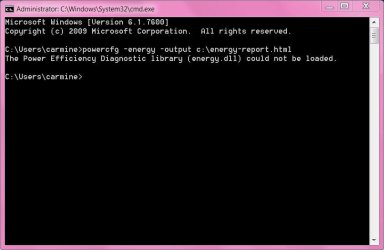
CMD does not work for me:(


how do I load the .dll needed to run the diagnostic?
 

My Computer

Computer Manufacturer/Model Number
Gateway/NV7923u & NV79C52u Laptops
OS
windows 7 professional & ultimate 64bit laptops
CPU
2.27 boost to 2.53 & 2.53 boost to 2.80
Motherboard
Mobile Intel® HM55 Express Chipset ???
Memory
4GB
Graphics Card(s)
Intel® Graphics Media Accelerator HD
Sound Card
realtek High-definition audio support
Monitor(s) Displays
17.3 " HD 1600 x 900
Hard Drives
hatachi Travelstar 5400 500GB & west digital 500GB
Internet Speed
35MB fios
It's easy dude..

Click Start
Type CMD
Right-click on it, Run as Administrator
type there powercfg -energy -output c:\energy-report.html
And wait for the results ;)
 

My Computer

Computer Manufacturer/Model Number
HP Pavilion Enterainment PC dv5
OS
Windows 7 Ultimate 32-bit SP1
CPU
Intel Core2 Duo T5800 @ 2.00GHz
Memory
2.0GB RAM
Graphics Card(s)
NVIDIA GeForce 9200M GS
Screen Resolution
12800x800
Internet Speed
3.1Mbps
sorry, it won't work
 

Attachments

  • Capture.JPG
    Capture.JPG
    87.7 KB · Views: 14

My Computer

Computer Manufacturer/Model Number
Gateway/NV7923u & NV79C52u Laptops
OS
windows 7 professional & ultimate 64bit laptops
CPU
2.27 boost to 2.53 & 2.53 boost to 2.80
Motherboard
Mobile Intel® HM55 Express Chipset ???
Memory
4GB
Graphics Card(s)
Intel® Graphics Media Accelerator HD
Sound Card
realtek High-definition audio support
Monitor(s) Displays
17.3 " HD 1600 x 900
Hard Drives
hatachi Travelstar 5400 500GB & west digital 500GB
Internet Speed
35MB fios
Back
Top