

Hello all; I'd appreciate your help in solving this problem as quick as possible. A friend of mine recently reinstalled his copy of Windows on a fresh new drive; All other components are the same. After a reformat and reinstallation, everything went smoothly until he installed his graphics drivers. Each time he restarted the computer, he got a BSOD before reaching the desktop. He didn't appear to have any restore points, so he hard to start over at square one, but avoided installing the graphics drivers until later.
Well, today, he went ahead and installed some older drivers, hoping they didn't give him issue, but lo and behold, they did. I had him create a restore point before installing the drivers in case they didn't work, but he apparently can't restore the system as the restore point he made "isn't compatible with the version of Windows." He's running a copy of Windows 7 Home Premium 64-bit (I thinkhe has Service Pack 1, but he cannot verify this). He's running an Nvidia GeForce GTX 660 Ti. The drivers he tried the first time around were the 331.82 set. The last ones he installed were the 320.49 set.
I'd include the requested dump files, but like I said, we can't access the desktop, and he didn't have Windows automatically create the dump files, so we have no way of accessing them. We're happy to post any information needed; We just want to get this fixed so he can have a usable system again!
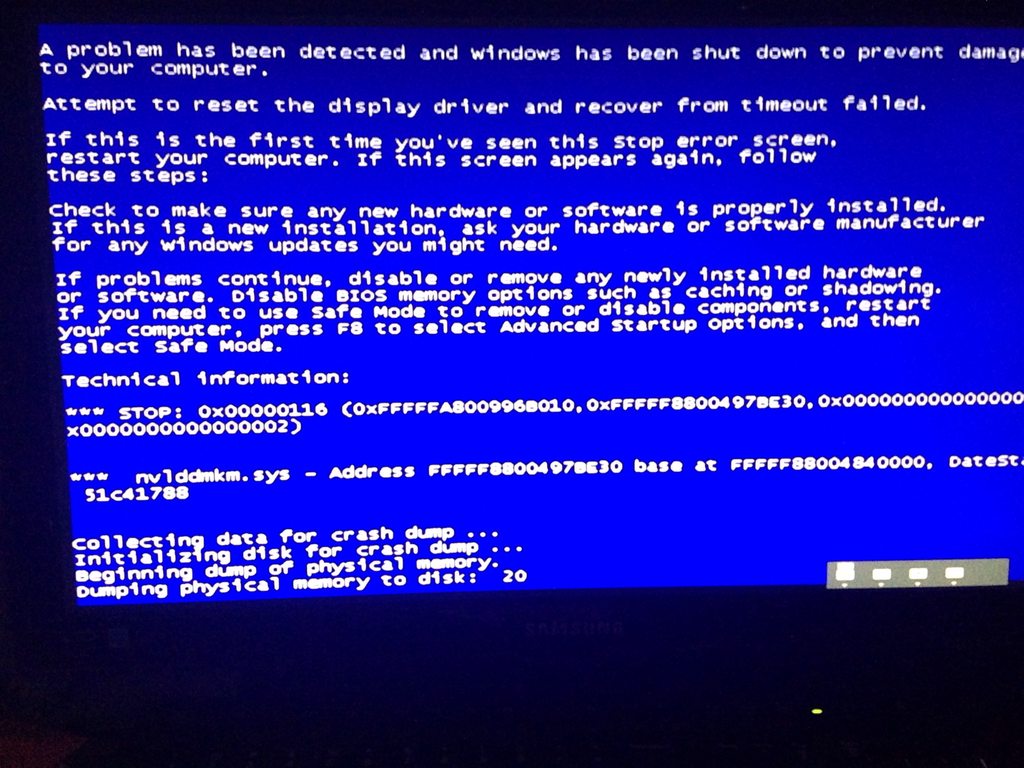
Below is the BSOD he receives:
Well, today, he went ahead and installed some older drivers, hoping they didn't give him issue, but lo and behold, they did. I had him create a restore point before installing the drivers in case they didn't work, but he apparently can't restore the system as the restore point he made "isn't compatible with the version of Windows." He's running a copy of Windows 7 Home Premium 64-bit (I thinkhe has Service Pack 1, but he cannot verify this). He's running an Nvidia GeForce GTX 660 Ti. The drivers he tried the first time around were the 331.82 set. The last ones he installed were the 320.49 set.
I'd include the requested dump files, but like I said, we can't access the desktop, and he didn't have Windows automatically create the dump files, so we have no way of accessing them. We're happy to post any information needed; We just want to get this fixed so he can have a usable system again!
Below is the BSOD he receives:
My Computer
At a glance
Windows 7 Home Premium Edition, 64-bitIntel Core i5-2500k, 2nd generation8 GB CorsairEVGA NVIDIA GeForce GTX 570
- OS
- Windows 7 Home Premium Edition, 64-bit
- CPU
- Intel Core i5-2500k, 2nd generation
- Motherboard
- GIGABYTE GA-Z68-UD3H-B3
- Memory
- 8 GB Corsair
- Graphics Card(s)
- EVGA NVIDIA GeForce GTX 570
- Monitor(s) Displays
- LG Flatron Wide
- Screen Resolution
- 1440x900
- Hard Drives
- 1.5 TB Samsung HDD, 5200 RPM
- PSU
- Antec 620w
- Case
- BitFēnix Survivor
- Cooling
- BitFēnix Spectre (2)
- Keyboard
- Logitech K-270
- Mouse
- Microsoft Optical Wheel Mouse USB
- Internet Speed
- 20 MB/s download, 5 MB/s upload

 .
.