Hello!
I normally have been getting BSOD every time I close the lid or put the laptop to sleep but I have ignored this for months since there was no other inconvenience while using my computer.
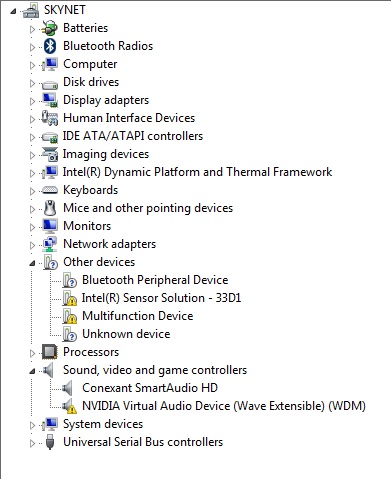
Today I had slight lags when playing Dota 2, so I decided to check for some driver updates. Drivermax found 11 and I'm not sure but I think it found 2 unidentified ones; Intel sensor solution and multifunction device. I didn't do anything and downloaded Intel's own driver updater. I tried to update wireless, graphics and bluetooth. Somewhere in between computer crashed. After several attempts to reinstall the drivers (I could use the PC for a while), I stopped being able to load into my desktop at all. It even crashed in safe mode once. I'm in network enabled safe mode right now.
I deleted everything I installed today from add/remove programs and then I installed them from Asus's own site but it's still happening. I will add my dump files.
I normally have been getting BSOD every time I close the lid or put the laptop to sleep but I have ignored this for months since there was no other inconvenience while using my computer.
Today I had slight lags when playing Dota 2, so I decided to check for some driver updates. Drivermax found 11 and I'm not sure but I think it found 2 unidentified ones; Intel sensor solution and multifunction device. I didn't do anything and downloaded Intel's own driver updater. I tried to update wireless, graphics and bluetooth. Somewhere in between computer crashed. After several attempts to reinstall the drivers (I could use the PC for a while), I stopped being able to load into my desktop at all. It even crashed in safe mode once. I'm in network enabled safe mode right now.
I deleted everything I installed today from add/remove programs and then I installed them from Asus's own site but it's still happening. I will add my dump files.
My Computer
At a glance
Windows 7 Ultimate 64bit
- Computer type
- PC/Desktop
- OS
- Windows 7 Ultimate 64bit