Solved Constant BSODs the past week or so

Chimi

New member
Local time
6:27 AM
Messages
47
I've been getting a BSOD or two almost every day for the past week or so. I tried upgrading to the new Nvidia driver and it seemed to make it worse so I rolled it back to the one I had. I followed the directions on this site to properly install the drivers so that I wouldn't have any conflicts but it seems to still be happening.

I've also tested my RAM many times and haven't had any errors come up.

It seems I get the biggest issue while playing games or watching videos. Tends to crash when I go between screens but that might just be coincidence.

Any help would be greatly appreciated.
 

My Computer My Computer

At a glance

Windows 7 Home Premium 64biti5 2500kCORSAIR Vengeance LP 4GB x 2 - 1600EVGA nVidia 570gtx Superclocked
Computer type
PC/Desktop
Computer Manufacturer/Model Number
Custom
OS
Windows 7 Home Premium 64bit
CPU
i5 2500k
Motherboard
ASROCK Z77 extreme4
Memory
CORSAIR Vengeance LP 4GB x 2 - 1600
Graphics Card(s)
EVGA nVidia 570gtx Superclocked
Sound Card
Integrated
Monitor(s) Displays
Samsung Syncmaster p2770
Screen Resolution
1920 x 1080
Hard Drives
Crucial m4 128GB SSD
Western Digital Black 1TB (two of these)
PSU
Cooler Master Extreme Power Plus - 700W
Case
Cooler Master HAF 322
Cooling
Cooler Master Hyper 212 EVO
Keyboard
Logitech G510
Mouse
Razor Naga
Antivirus
Microsoft Security Essentials
Browser
Chrome
Chimi, I checked the last 5 dumps you had. 4 of the 5 listed the same thing. However, they were all different stop codes, which indicates a memory problem from my experience. I need to know all of your system specs, as specific as possible. We often have to look up a component and need all of the components with the Manufacturer and model. The following will tell you how to do it. Just please include your PSU and CPU cooler. Also, please put them in the place provided.
Please fill out your System Specs

   Information
Your System Specs will help us to help you, and doing it in this manner will make them available to all helpers in every post and keep us from hunting for them. We ask that you fill them out in as much detail as possible including Desktop or Laptop, Model number if it is an OEM computer and all components with the Manufacturer and Model number if possible.

If you will go to your last post and click the 'System Specs' in the bottom left of the post, you will find a link to update your system specs. Please fill those out in as much detail as possible, making sure to click save at the bottom of the page. If you would like to know what we would like, you can click 'My System Specs' at the bottom left of this post to see mine. If you do not know what your components are, this will help you accomplish this task. http://www.sevenforums.com/tutorials/180324-system-info-see-your-system-specs.html

I also would like any information you have on what causes the BSODs. If it is always playing games, or if playing a particular game or using some particular program, that would help a lot.

The dump files listed

Code:
fffff880`09cc47a8  fffff880`0f5ac5edUnable to load image \SystemRoot\system32\DRIVERS\nvlddmkm.sys, Win32 error 0n2
*** WARNING: Unable to verify timestamp for [COLOR=red]nvlddmkm.sys[/COLOR]
*** ERROR: Module load completed but symbols could not be loaded for nvlddmkm.sys

That, of course, is your graphics card driver. I would like you to update it again, but after downloading it, please do it like this details and only install the Graphics driver and the PhysX driver. Nothing else.
http://www.sevenforums.com/tutorials/327414-nvidia-drivers-avoid-problems.html

The other dump file listed

Code:
fffff880`0338c238  fffff880`048b9500Unable to load image \SystemRoot\system32\DRIVERS\k57nd60a.sys, Win32 error 0n2
*** WARNING: Unable to verify timestamp for[COLOR=red] k57nd60a.sys[/COLOR]
*** ERROR: Module load completed but symbols could not be loaded for k57nd60a.sys

Code:
 k57nd60a
start             end                 module name
fffff880`04876000 fffff880`048e8000   k57nd60a T (no symbols)           
    Loaded symbol image file: k57nd60a.sys
    Image path: \SystemRoot\system32\DRIVERS\k57nd60a.sys
    Image name: k57nd60a.sys
    Timestamp:        [COLOR=red]Fri Jul 26 03:01:03 2013[/COLOR] (51F22CBF)
    CheckSum:         0007FEC2
    ImageSize:        00072000
    Translations:     0000.04b0 0000.04e4 0409.04b0 0409.04e4

That is your Broadcom NetLink Gigabit Ethernet NDIS6.x Unified Driver and as you can see, it is in need of updating. Please update that. I believe it should be a part of your Motherboard drivers and can be downloaded from your Motherboard's web site for your particular board. Otherwise, you can try at http://www.broadcom.com/support/ethernet_nic/downloaddrivers.php

Please try those and supply the requested information and we will see if the problem improves any and see where we need to go from there.
 

My Computers My Computers

  • At a glance

    Windows 11 ProRyzen 9 5900X32GB G Skill DDR4-3600EVGA RTX 3080 FTW 3 Ultra
    Computer type
    PC/Desktop
    Computer Manufacturer/Model Number
    ALWAYS UNDER CONSTRUCTION
    OS
    Windows 11 Pro
    CPU
    Ryzen 9 5900X
    Motherboard
    Asus X570 Crosshair Viii Hero
    Memory
    32GB G Skill DDR4-3600
    Graphics Card(s)
    EVGA RTX 3080 FTW 3 Ultra
    Sound Card
    On Board/Sennheiser PC37X Headset
    Monitor(s) Displays
    3 X Asus 27"
    Screen Resolution
    2560x1440
    Hard Drives
    2 X 1 TB NVME drives
    PSU
    EVGA 850
    Case
    Phanteks Eclipse P400A
    Cooling
    EVGA 280 AIO
    Keyboard
    Logitech G510s/ Logitech G13
    Mouse
    Logitech G502
    Internet Speed
    24/1
    Antivirus
    ESET/MBAM Pro/SAS Pro
    Browser
    Chrome/ Firefox/ Edge
  • At a glance

    Windows 11 ProIntel Ultra 9 288V32 GB LPDDR5X 8533
    Computer type
    Laptop
    System Manufacturer/Model Number
    Dell 16 Plus
    OS
    Windows 11 Pro
    CPU
    Intel Ultra 9 288V
    Memory
    32 GB LPDDR5X 8533
    Monitor(s) Displays
    16" Mini-LED HDR600 Touch 90 Hz
    Screen Resolution
    2560X1600
    Hard Drives
    1 TB NVME
I updated my system specs. If you need any more detail on anything, I'll do my best to get it for you.

I went to update the Netlink driver and it appears the one I have is up to date. I have the same one as they have listed on their website and when I try to update anyway, Windows tells me I have the latest version already.

I'll try installing the new nvidia driver. I'm also going to run another Memtest over night and see how it goes. I had memory corruption last year and the RAM I have now are brand new. But I'll go ahead and run it anyway just to see if maybe something got missed somewhere.

I'll let you know what the results are. Could memory corruption be caused by the video card?
 

My Computer My Computer

At a glance

Windows 7 Home Premium 64biti5 2500kCORSAIR Vengeance LP 4GB x 2 - 1600EVGA nVidia 570gtx Superclocked
Computer type
PC/Desktop
Computer Manufacturer/Model Number
Custom
OS
Windows 7 Home Premium 64bit
CPU
i5 2500k
Motherboard
ASROCK Z77 extreme4
Memory
CORSAIR Vengeance LP 4GB x 2 - 1600
Graphics Card(s)
EVGA nVidia 570gtx Superclocked
Sound Card
Integrated
Monitor(s) Displays
Samsung Syncmaster p2770
Screen Resolution
1920 x 1080
Hard Drives
Crucial m4 128GB SSD
Western Digital Black 1TB (two of these)
PSU
Cooler Master Extreme Power Plus - 700W
Case
Cooler Master HAF 322
Cooling
Cooler Master Hyper 212 EVO
Keyboard
Logitech G510
Mouse
Razor Naga
Antivirus
Microsoft Security Essentials
Browser
Chrome
Yes, that's possible, but it's hard to pin down. When you finish updating the drivers using the method I linked to, download and run the factory preset extreme of Heaven Heaven Benchmark | Unigine: real-time 3D engine (game, simulation, visualization and VR). The free version, the second option which I'll show you is a graphics card stress test/benchmark. Set it the way I'll show you and run the benchmark. Once the test downloads and starts moving, click the benchmark button in the top left of the screen. Just watch your temps and stop the test if temps get too high. Watch for artifacts too. But this is the setup. After selecting the extreme button, click run and once it loads and starts running, click benchmark.

View attachment 348597
 

My Computers My Computers

  • At a glance

    Windows 11 ProRyzen 9 5900X32GB G Skill DDR4-3600EVGA RTX 3080 FTW 3 Ultra
    Computer type
    PC/Desktop
    Computer Manufacturer/Model Number
    ALWAYS UNDER CONSTRUCTION
    OS
    Windows 11 Pro
    CPU
    Ryzen 9 5900X
    Motherboard
    Asus X570 Crosshair Viii Hero
    Memory
    32GB G Skill DDR4-3600
    Graphics Card(s)
    EVGA RTX 3080 FTW 3 Ultra
    Sound Card
    On Board/Sennheiser PC37X Headset
    Monitor(s) Displays
    3 X Asus 27"
    Screen Resolution
    2560x1440
    Hard Drives
    2 X 1 TB NVME drives
    PSU
    EVGA 850
    Case
    Phanteks Eclipse P400A
    Cooling
    EVGA 280 AIO
    Keyboard
    Logitech G510s/ Logitech G13
    Mouse
    Logitech G502
    Internet Speed
    24/1
    Antivirus
    ESET/MBAM Pro/SAS Pro
    Browser
    Chrome/ Firefox/ Edge
  • At a glance

    Windows 11 ProIntel Ultra 9 288V32 GB LPDDR5X 8533
    Computer type
    Laptop
    System Manufacturer/Model Number
    Dell 16 Plus
    OS
    Windows 11 Pro
    CPU
    Intel Ultra 9 288V
    Memory
    32 GB LPDDR5X 8533
    Monitor(s) Displays
    16" Mini-LED HDR600 Touch 90 Hz
    Screen Resolution
    2560X1600
    Hard Drives
    1 TB NVME
Alright, I will do that and let you know the results.

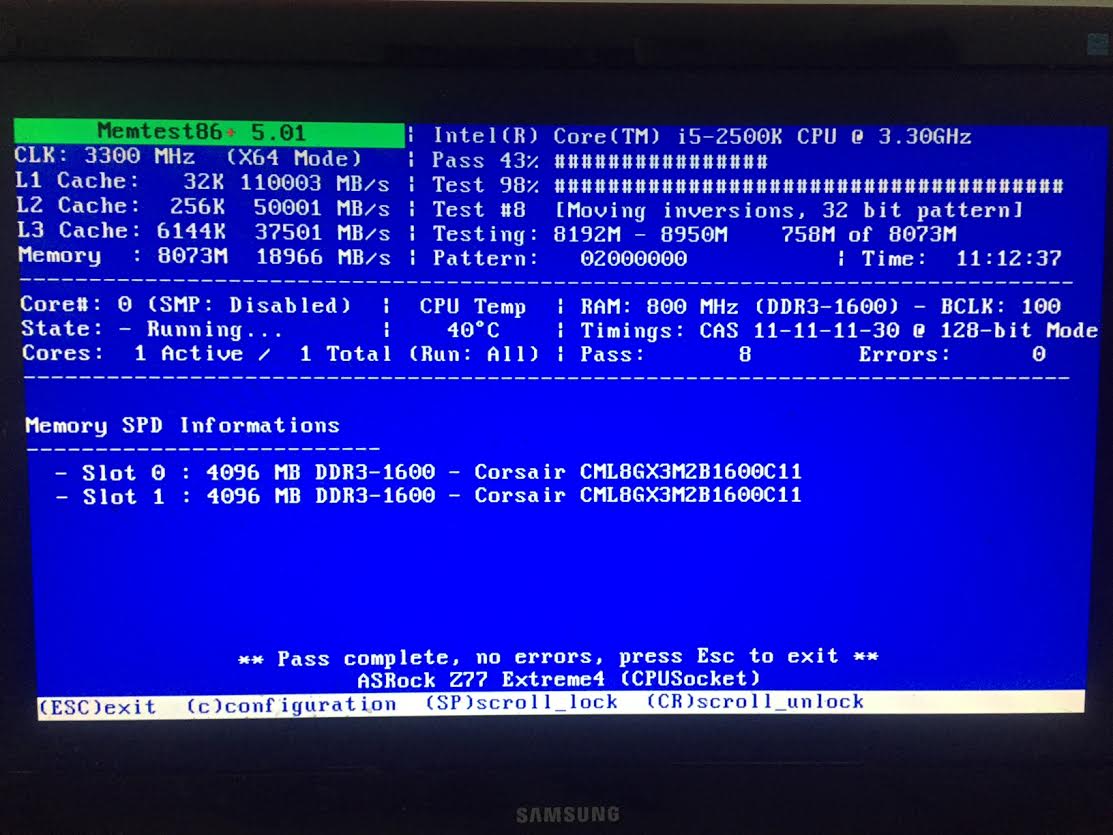
I did do a Memtest over night and let it run for a while. Here is a picture of my screen before I turned it off. Just in case there is something on it that I might not be aware of.

s5Ptfu0.jpg
 

My Computer My Computer

At a glance

Windows 7 Home Premium 64biti5 2500kCORSAIR Vengeance LP 4GB x 2 - 1600EVGA nVidia 570gtx Superclocked
Computer type
PC/Desktop
Computer Manufacturer/Model Number
Custom
OS
Windows 7 Home Premium 64bit
CPU
i5 2500k
Motherboard
ASROCK Z77 extreme4
Memory
CORSAIR Vengeance LP 4GB x 2 - 1600
Graphics Card(s)
EVGA nVidia 570gtx Superclocked
Sound Card
Integrated
Monitor(s) Displays
Samsung Syncmaster p2770
Screen Resolution
1920 x 1080
Hard Drives
Crucial m4 128GB SSD
Western Digital Black 1TB (two of these)
PSU
Cooler Master Extreme Power Plus - 700W
Case
Cooler Master HAF 322
Cooling
Cooler Master Hyper 212 EVO
Keyboard
Logitech G510
Mouse
Razor Naga
Antivirus
Microsoft Security Essentials
Browser
Chrome
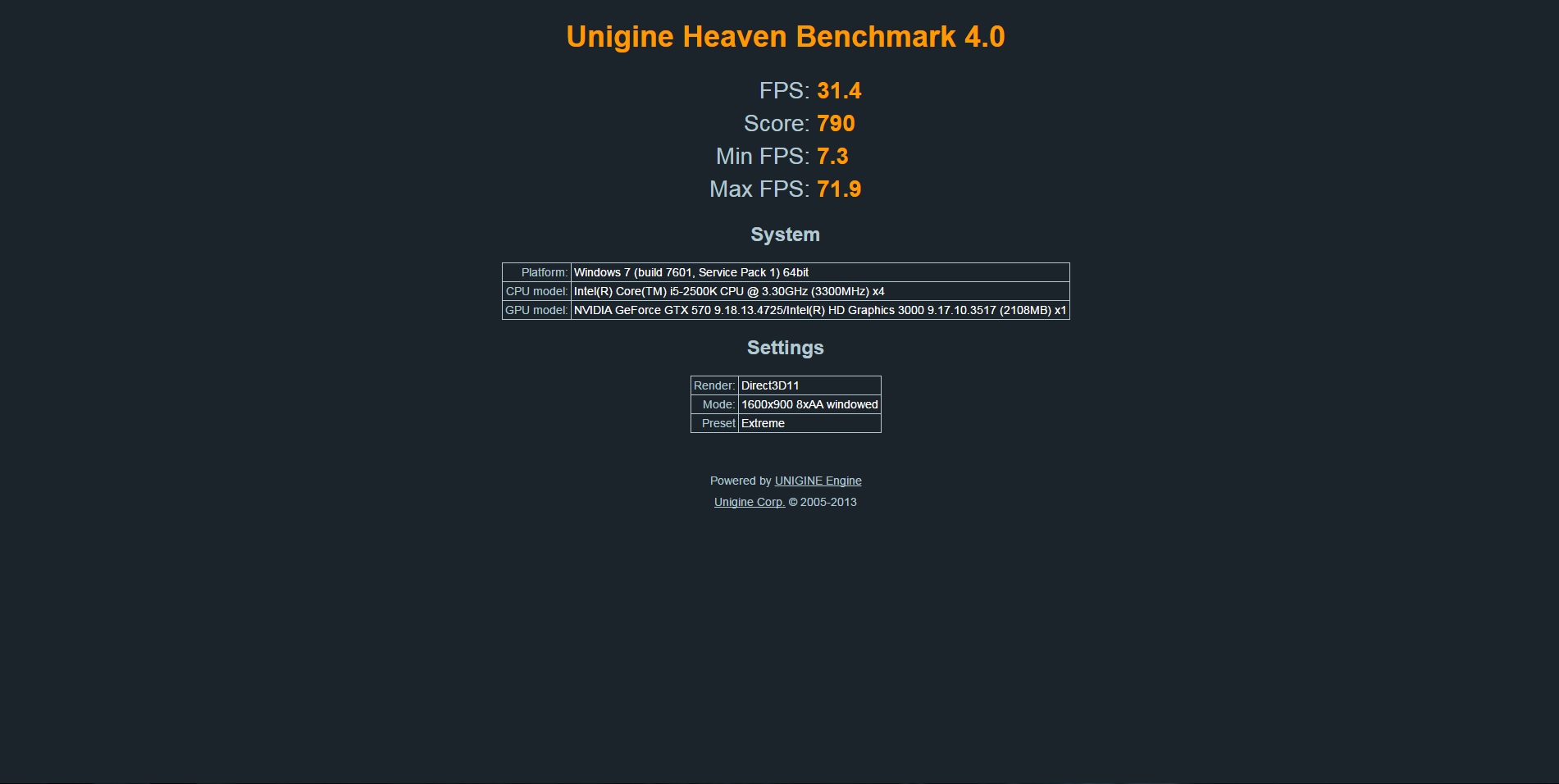
Here is the result from the benchmark. As for temps, they were between 79-81 degrees.

s2k0wnD.jpg
 

My Computer My Computer

At a glance

Windows 7 Home Premium 64biti5 2500kCORSAIR Vengeance LP 4GB x 2 - 1600EVGA nVidia 570gtx Superclocked
Computer type
PC/Desktop
Computer Manufacturer/Model Number
Custom
OS
Windows 7 Home Premium 64bit
CPU
i5 2500k
Motherboard
ASROCK Z77 extreme4
Memory
CORSAIR Vengeance LP 4GB x 2 - 1600
Graphics Card(s)
EVGA nVidia 570gtx Superclocked
Sound Card
Integrated
Monitor(s) Displays
Samsung Syncmaster p2770
Screen Resolution
1920 x 1080
Hard Drives
Crucial m4 128GB SSD
Western Digital Black 1TB (two of these)
PSU
Cooler Master Extreme Power Plus - 700W
Case
Cooler Master HAF 322
Cooling
Cooler Master Hyper 212 EVO
Keyboard
Logitech G510
Mouse
Razor Naga
Antivirus
Microsoft Security Essentials
Browser
Chrome
Had another crash. Here is the updated log.
 

My Computer My Computer

At a glance

Windows 7 Home Premium 64biti5 2500kCORSAIR Vengeance LP 4GB x 2 - 1600EVGA nVidia 570gtx Superclocked
Computer type
PC/Desktop
Computer Manufacturer/Model Number
Custom
OS
Windows 7 Home Premium 64bit
CPU
i5 2500k
Motherboard
ASROCK Z77 extreme4
Memory
CORSAIR Vengeance LP 4GB x 2 - 1600
Graphics Card(s)
EVGA nVidia 570gtx Superclocked
Sound Card
Integrated
Monitor(s) Displays
Samsung Syncmaster p2770
Screen Resolution
1920 x 1080
Hard Drives
Crucial m4 128GB SSD
Western Digital Black 1TB (two of these)
PSU
Cooler Master Extreme Power Plus - 700W
Case
Cooler Master HAF 322
Cooling
Cooler Master Hyper 212 EVO
Keyboard
Logitech G510
Mouse
Razor Naga
Antivirus
Microsoft Security Essentials
Browser
Chrome
Chimi, have you gone to Asrock's web site for your board and updated all of your drivers? You should. All of the drivers on the DVD they sent are outdated and the web site will have more current drivers. But I am still getting your Nvidia card as being a fault. I also want you to make sure all of the Windows updates have been run and installed.

Code:
*******************************************************************************
*                                                                             *
*                        Bugcheck Analysis                                    *
*                                                                             *
*******************************************************************************
Use !analyze -v to get detailed debugging information.
BugCheck 3B, {c0000005, fffff88001a4b277, fffff8800acf18b0, 0}
Probably caused by : tcpip.sys ( tcpip!TcpPortPoolQueryLocalAddressFunction+27 )
Followup: MachineOwner

Also

Code:
fffff880`0acf13b8  fffff880`05baacfdUnable to load image \SystemRoot\system32\DRIVERS\nvlddmkm.sys, Win32 error 0n2
*** WARNING: Unable to verify timestamp for nvlddmkm.sys
*** ERROR: Module load completed but symbols could not be loaded for nvlddmkm.sys

[CODEnvlddmkm
start end module name
fffff880`05adb000 fffff880`064e9000 nvlddmkm T (no symbols)
Loaded symbol image file: nvlddmkm.sys
Image path: \SystemRoot\system32\DRIVERS\nvlddmkm.sys
Image name: nvlddmkm.sys
Timestamp: Fri Jan 09 16:22:06 2015 (54B0548E)
CheckSum: 009D73FA
ImageSize: 00A0E000
Translations: 0000.04b0 0000.04e4 0409.04b0 0409.04e4][/CODE]

I also know that Asrock provides Dameon Tools on their DVD. If you installed that please uninstall it, then do this. Dameon tools and a few other things are known causes of BSODs.

Daemon Tools, Alcohol 120% and Power Archiver Pro uses SCSI Pass Through Direct (SPTD), which is a well known cause of BSOD's.

1. Uninstall Daemon Tools.
2. Download the SPTD standalone installer and follow these steps:
- Double click the executable to open it
- Click the button shown below


If the button it is grayed out, as shown in the image, there is no more SPTD installation on your system, and you can just close the window.
 

My Computers My Computers

  • At a glance

    Windows 11 ProRyzen 9 5900X32GB G Skill DDR4-3600EVGA RTX 3080 FTW 3 Ultra
    Computer type
    PC/Desktop
    Computer Manufacturer/Model Number
    ALWAYS UNDER CONSTRUCTION
    OS
    Windows 11 Pro
    CPU
    Ryzen 9 5900X
    Motherboard
    Asus X570 Crosshair Viii Hero
    Memory
    32GB G Skill DDR4-3600
    Graphics Card(s)
    EVGA RTX 3080 FTW 3 Ultra
    Sound Card
    On Board/Sennheiser PC37X Headset
    Monitor(s) Displays
    3 X Asus 27"
    Screen Resolution
    2560x1440
    Hard Drives
    2 X 1 TB NVME drives
    PSU
    EVGA 850
    Case
    Phanteks Eclipse P400A
    Cooling
    EVGA 280 AIO
    Keyboard
    Logitech G510s/ Logitech G13
    Mouse
    Logitech G502
    Internet Speed
    24/1
    Antivirus
    ESET/MBAM Pro/SAS Pro
    Browser
    Chrome/ Firefox/ Edge
  • At a glance

    Windows 11 ProIntel Ultra 9 288V32 GB LPDDR5X 8533
    Computer type
    Laptop
    System Manufacturer/Model Number
    Dell 16 Plus
    OS
    Windows 11 Pro
    CPU
    Intel Ultra 9 288V
    Memory
    32 GB LPDDR5X 8533
    Monitor(s) Displays
    16" Mini-LED HDR600 Touch 90 Hz
    Screen Resolution
    2560X1600
    Hard Drives
    1 TB NVME
Sorry, I don't see your image with the button I should be looking for.

I have updated all drivers from their website plus whatever updated ones I could find from manufacturers. I went through maybe a month or two ago and found as many driver updates as I possibly could to fix some BSODs I was having back then. It helped for a few weeks but then the BSODs started again recently. Though these BSODs now seem to only happen when I'm watching video or playing games while the ones back then would just happen for no good reason at all, even when my computer was sitting idle overnight.
 

My Computer My Computer

At a glance

Windows 7 Home Premium 64biti5 2500kCORSAIR Vengeance LP 4GB x 2 - 1600EVGA nVidia 570gtx Superclocked
Computer type
PC/Desktop
Computer Manufacturer/Model Number
Custom
OS
Windows 7 Home Premium 64bit
CPU
i5 2500k
Motherboard
ASROCK Z77 extreme4
Memory
CORSAIR Vengeance LP 4GB x 2 - 1600
Graphics Card(s)
EVGA nVidia 570gtx Superclocked
Sound Card
Integrated
Monitor(s) Displays
Samsung Syncmaster p2770
Screen Resolution
1920 x 1080
Hard Drives
Crucial m4 128GB SSD
Western Digital Black 1TB (two of these)
PSU
Cooler Master Extreme Power Plus - 700W
Case
Cooler Master HAF 322
Cooling
Cooler Master Hyper 212 EVO
Keyboard
Logitech G510
Mouse
Razor Naga
Antivirus
Microsoft Security Essentials
Browser
Chrome
Had another BSOD. This time it was while I was at work and the computer was just sitting idle.
 

My Computer My Computer

At a glance

Windows 7 Home Premium 64biti5 2500kCORSAIR Vengeance LP 4GB x 2 - 1600EVGA nVidia 570gtx Superclocked
Computer type
PC/Desktop
Computer Manufacturer/Model Number
Custom
OS
Windows 7 Home Premium 64bit
CPU
i5 2500k
Motherboard
ASROCK Z77 extreme4
Memory
CORSAIR Vengeance LP 4GB x 2 - 1600
Graphics Card(s)
EVGA nVidia 570gtx Superclocked
Sound Card
Integrated
Monitor(s) Displays
Samsung Syncmaster p2770
Screen Resolution
1920 x 1080
Hard Drives
Crucial m4 128GB SSD
Western Digital Black 1TB (two of these)
PSU
Cooler Master Extreme Power Plus - 700W
Case
Cooler Master HAF 322
Cooling
Cooler Master Hyper 212 EVO
Keyboard
Logitech G510
Mouse
Razor Naga
Antivirus
Microsoft Security Essentials
Browser
Chrome
Here's the results

Code:
fffff880`0acf92b8  fffff880`0155a373*** WARNING: Unable to verify timestamp for MpFilter.sys
*** ERROR: Module load completed but[COLOR=red] symbols could not be loaded for MpFilter.sys[/COLOR]

That is the Microsoft Windows AntiMalware protection system

Please run a complete scan with Microsoft security essentials. After that please run:

Scan with Kaspersky TDSSKiller:
Anti-rootkit utility TDSSKiller
ESET online scanner:
Free Virus Scan | Online Virus Scanner from ESET
Free Online Virus Scanner | ESET

Also install Malwarebytes and do a complete scan. During the install process uncheck the real time protection trial and just use it as an on demand scanner. Malwarebytes | Free Anti-Malware & Internet Security Software

Then download and run Superantispyware SUPERAntiSpyware | Remove Malware | Remove Spyware - AntiMalware, AntiSpyware, AntiAdware! Watch out for any add ons they may want to include. Just uncheck them. Run a complete scan, and let me know the results please.
 

My Computers My Computers

  • At a glance

    Windows 11 ProRyzen 9 5900X32GB G Skill DDR4-3600EVGA RTX 3080 FTW 3 Ultra
    Computer type
    PC/Desktop
    Computer Manufacturer/Model Number
    ALWAYS UNDER CONSTRUCTION
    OS
    Windows 11 Pro
    CPU
    Ryzen 9 5900X
    Motherboard
    Asus X570 Crosshair Viii Hero
    Memory
    32GB G Skill DDR4-3600
    Graphics Card(s)
    EVGA RTX 3080 FTW 3 Ultra
    Sound Card
    On Board/Sennheiser PC37X Headset
    Monitor(s) Displays
    3 X Asus 27"
    Screen Resolution
    2560x1440
    Hard Drives
    2 X 1 TB NVME drives
    PSU
    EVGA 850
    Case
    Phanteks Eclipse P400A
    Cooling
    EVGA 280 AIO
    Keyboard
    Logitech G510s/ Logitech G13
    Mouse
    Logitech G502
    Internet Speed
    24/1
    Antivirus
    ESET/MBAM Pro/SAS Pro
    Browser
    Chrome/ Firefox/ Edge
  • At a glance

    Windows 11 ProIntel Ultra 9 288V32 GB LPDDR5X 8533
    Computer type
    Laptop
    System Manufacturer/Model Number
    Dell 16 Plus
    OS
    Windows 11 Pro
    CPU
    Intel Ultra 9 288V
    Memory
    32 GB LPDDR5X 8533
    Monitor(s) Displays
    16" Mini-LED HDR600 Touch 90 Hz
    Screen Resolution
    2560X1600
    Hard Drives
    1 TB NVME
Alright, just got done running all those scans. ESET, Malwarebytes, and SUPERAntiSpyware all found stuff. I think in total there was about 130 things found between the three with the bulk being tracking cookies from SUPERAntiSpyware.

Other things were...

Win32/Somoto.C
Win32/DownWare.L
NSIS/TrojanDownloader.Adload.AA trojan
Win32/OutBrowse.BU
Win32/Spigot.A

So all that stuff got quarantined/deleted.
 

My Computer My Computer

At a glance

Windows 7 Home Premium 64biti5 2500kCORSAIR Vengeance LP 4GB x 2 - 1600EVGA nVidia 570gtx Superclocked
Computer type
PC/Desktop
Computer Manufacturer/Model Number
Custom
OS
Windows 7 Home Premium 64bit
CPU
i5 2500k
Motherboard
ASROCK Z77 extreme4
Memory
CORSAIR Vengeance LP 4GB x 2 - 1600
Graphics Card(s)
EVGA nVidia 570gtx Superclocked
Sound Card
Integrated
Monitor(s) Displays
Samsung Syncmaster p2770
Screen Resolution
1920 x 1080
Hard Drives
Crucial m4 128GB SSD
Western Digital Black 1TB (two of these)
PSU
Cooler Master Extreme Power Plus - 700W
Case
Cooler Master HAF 322
Cooling
Cooler Master Hyper 212 EVO
Keyboard
Logitech G510
Mouse
Razor Naga
Antivirus
Microsoft Security Essentials
Browser
Chrome
Reboot and run the online ones again..
 

My Computers My Computers

  • At a glance

    Windows 11 ProRyzen 9 5900X32GB G Skill DDR4-3600EVGA RTX 3080 FTW 3 Ultra
    Computer type
    PC/Desktop
    Computer Manufacturer/Model Number
    ALWAYS UNDER CONSTRUCTION
    OS
    Windows 11 Pro
    CPU
    Ryzen 9 5900X
    Motherboard
    Asus X570 Crosshair Viii Hero
    Memory
    32GB G Skill DDR4-3600
    Graphics Card(s)
    EVGA RTX 3080 FTW 3 Ultra
    Sound Card
    On Board/Sennheiser PC37X Headset
    Monitor(s) Displays
    3 X Asus 27"
    Screen Resolution
    2560x1440
    Hard Drives
    2 X 1 TB NVME drives
    PSU
    EVGA 850
    Case
    Phanteks Eclipse P400A
    Cooling
    EVGA 280 AIO
    Keyboard
    Logitech G510s/ Logitech G13
    Mouse
    Logitech G502
    Internet Speed
    24/1
    Antivirus
    ESET/MBAM Pro/SAS Pro
    Browser
    Chrome/ Firefox/ Edge
  • At a glance

    Windows 11 ProIntel Ultra 9 288V32 GB LPDDR5X 8533
    Computer type
    Laptop
    System Manufacturer/Model Number
    Dell 16 Plus
    OS
    Windows 11 Pro
    CPU
    Intel Ultra 9 288V
    Memory
    32 GB LPDDR5X 8533
    Monitor(s) Displays
    16" Mini-LED HDR600 Touch 90 Hz
    Screen Resolution
    2560X1600
    Hard Drives
    1 TB NVME
Everything is coming up clean now except for SUPERAntiSpyware. Did a scan and it came up with 91 tracking cookies and wouldn't remove them. Ended up Googling the problem and found something saying to update it. Ended up updating it and it finally removed all of them except for 2 pesky ones that tend to stick around and won't get removed no matter how many times I try and run the scan.

The two that refuse to delete are called imrworldwide.com and doubleclick.net
 

My Computer My Computer

At a glance

Windows 7 Home Premium 64biti5 2500kCORSAIR Vengeance LP 4GB x 2 - 1600EVGA nVidia 570gtx Superclocked
Computer type
PC/Desktop
Computer Manufacturer/Model Number
Custom
OS
Windows 7 Home Premium 64bit
CPU
i5 2500k
Motherboard
ASROCK Z77 extreme4
Memory
CORSAIR Vengeance LP 4GB x 2 - 1600
Graphics Card(s)
EVGA nVidia 570gtx Superclocked
Sound Card
Integrated
Monitor(s) Displays
Samsung Syncmaster p2770
Screen Resolution
1920 x 1080
Hard Drives
Crucial m4 128GB SSD
Western Digital Black 1TB (two of these)
PSU
Cooler Master Extreme Power Plus - 700W
Case
Cooler Master HAF 322
Cooling
Cooler Master Hyper 212 EVO
Keyboard
Logitech G510
Mouse
Razor Naga
Antivirus
Microsoft Security Essentials
Browser
Chrome
I'm not familiar with the first one, but Doubleclick should remove easily unless you have it embedded in a program on your computer, I would think.
 

My Computers My Computers

  • At a glance

    Windows 11 ProRyzen 9 5900X32GB G Skill DDR4-3600EVGA RTX 3080 FTW 3 Ultra
    Computer type
    PC/Desktop
    Computer Manufacturer/Model Number
    ALWAYS UNDER CONSTRUCTION
    OS
    Windows 11 Pro
    CPU
    Ryzen 9 5900X
    Motherboard
    Asus X570 Crosshair Viii Hero
    Memory
    32GB G Skill DDR4-3600
    Graphics Card(s)
    EVGA RTX 3080 FTW 3 Ultra
    Sound Card
    On Board/Sennheiser PC37X Headset
    Monitor(s) Displays
    3 X Asus 27"
    Screen Resolution
    2560x1440
    Hard Drives
    2 X 1 TB NVME drives
    PSU
    EVGA 850
    Case
    Phanteks Eclipse P400A
    Cooling
    EVGA 280 AIO
    Keyboard
    Logitech G510s/ Logitech G13
    Mouse
    Logitech G502
    Internet Speed
    24/1
    Antivirus
    ESET/MBAM Pro/SAS Pro
    Browser
    Chrome/ Firefox/ Edge
  • At a glance

    Windows 11 ProIntel Ultra 9 288V32 GB LPDDR5X 8533
    Computer type
    Laptop
    System Manufacturer/Model Number
    Dell 16 Plus
    OS
    Windows 11 Pro
    CPU
    Intel Ultra 9 288V
    Memory
    32 GB LPDDR5X 8533
    Monitor(s) Displays
    16" Mini-LED HDR600 Touch 90 Hz
    Screen Resolution
    2560X1600
    Hard Drives
    1 TB NVME
Looked like we were doing pretty good and I was having no problems over the past two days and then I woke up this morning and it had crashed over night. :-/ Here is the new log from it.
 

My Computer My Computer

At a glance

Windows 7 Home Premium 64biti5 2500kCORSAIR Vengeance LP 4GB x 2 - 1600EVGA nVidia 570gtx Superclocked
Computer type
PC/Desktop
Computer Manufacturer/Model Number
Custom
OS
Windows 7 Home Premium 64bit
CPU
i5 2500k
Motherboard
ASROCK Z77 extreme4
Memory
CORSAIR Vengeance LP 4GB x 2 - 1600
Graphics Card(s)
EVGA nVidia 570gtx Superclocked
Sound Card
Integrated
Monitor(s) Displays
Samsung Syncmaster p2770
Screen Resolution
1920 x 1080
Hard Drives
Crucial m4 128GB SSD
Western Digital Black 1TB (two of these)
PSU
Cooler Master Extreme Power Plus - 700W
Case
Cooler Master HAF 322
Cooling
Cooler Master Hyper 212 EVO
Keyboard
Logitech G510
Mouse
Razor Naga
Antivirus
Microsoft Security Essentials
Browser
Chrome
This is what the dump file says

Code:
Use !analyze -v to get detailed debugging information.
BugCheck 1E, {ffffffffc0000005, fffff8800af3dca0, 0, 0}
Probably caused by : [COLOR=red]NETIO.SYS[/COLOR] ( NETIO!FsbFree+2b )
Followup: MachineOwner
---------

That is a windows update and has to do with your Networking and internet. I would try to update your Lan and Chipset drivers and make sure all of your Windows Updates are installed and up to date.
 

My Computers My Computers

  • At a glance

    Windows 11 ProRyzen 9 5900X32GB G Skill DDR4-3600EVGA RTX 3080 FTW 3 Ultra
    Computer type
    PC/Desktop
    Computer Manufacturer/Model Number
    ALWAYS UNDER CONSTRUCTION
    OS
    Windows 11 Pro
    CPU
    Ryzen 9 5900X
    Motherboard
    Asus X570 Crosshair Viii Hero
    Memory
    32GB G Skill DDR4-3600
    Graphics Card(s)
    EVGA RTX 3080 FTW 3 Ultra
    Sound Card
    On Board/Sennheiser PC37X Headset
    Monitor(s) Displays
    3 X Asus 27"
    Screen Resolution
    2560x1440
    Hard Drives
    2 X 1 TB NVME drives
    PSU
    EVGA 850
    Case
    Phanteks Eclipse P400A
    Cooling
    EVGA 280 AIO
    Keyboard
    Logitech G510s/ Logitech G13
    Mouse
    Logitech G502
    Internet Speed
    24/1
    Antivirus
    ESET/MBAM Pro/SAS Pro
    Browser
    Chrome/ Firefox/ Edge
  • At a glance

    Windows 11 ProIntel Ultra 9 288V32 GB LPDDR5X 8533
    Computer type
    Laptop
    System Manufacturer/Model Number
    Dell 16 Plus
    OS
    Windows 11 Pro
    CPU
    Intel Ultra 9 288V
    Memory
    32 GB LPDDR5X 8533
    Monitor(s) Displays
    16" Mini-LED HDR600 Touch 90 Hz
    Screen Resolution
    2560X1600
    Hard Drives
    1 TB NVME
According to the Broadcom website, I have the most updated driver. I downloaded it again and tried to install it but Windows tells me it's already the most current driver. Could it be going bad, the LAN port on my computer?
 

My Computer My Computer

At a glance

Windows 7 Home Premium 64biti5 2500kCORSAIR Vengeance LP 4GB x 2 - 1600EVGA nVidia 570gtx Superclocked
Computer type
PC/Desktop
Computer Manufacturer/Model Number
Custom
OS
Windows 7 Home Premium 64bit
CPU
i5 2500k
Motherboard
ASROCK Z77 extreme4
Memory
CORSAIR Vengeance LP 4GB x 2 - 1600
Graphics Card(s)
EVGA nVidia 570gtx Superclocked
Sound Card
Integrated
Monitor(s) Displays
Samsung Syncmaster p2770
Screen Resolution
1920 x 1080
Hard Drives
Crucial m4 128GB SSD
Western Digital Black 1TB (two of these)
PSU
Cooler Master Extreme Power Plus - 700W
Case
Cooler Master HAF 322
Cooling
Cooler Master Hyper 212 EVO
Keyboard
Logitech G510
Mouse
Razor Naga
Antivirus
Microsoft Security Essentials
Browser
Chrome

My Computers My Computers

  • At a glance

    Windows 11 ProRyzen 9 5900X32GB G Skill DDR4-3600EVGA RTX 3080 FTW 3 Ultra
    Computer type
    PC/Desktop
    Computer Manufacturer/Model Number
    ALWAYS UNDER CONSTRUCTION
    OS
    Windows 11 Pro
    CPU
    Ryzen 9 5900X
    Motherboard
    Asus X570 Crosshair Viii Hero
    Memory
    32GB G Skill DDR4-3600
    Graphics Card(s)
    EVGA RTX 3080 FTW 3 Ultra
    Sound Card
    On Board/Sennheiser PC37X Headset
    Monitor(s) Displays
    3 X Asus 27"
    Screen Resolution
    2560x1440
    Hard Drives
    2 X 1 TB NVME drives
    PSU
    EVGA 850
    Case
    Phanteks Eclipse P400A
    Cooling
    EVGA 280 AIO
    Keyboard
    Logitech G510s/ Logitech G13
    Mouse
    Logitech G502
    Internet Speed
    24/1
    Antivirus
    ESET/MBAM Pro/SAS Pro
    Browser
    Chrome/ Firefox/ Edge
  • At a glance

    Windows 11 ProIntel Ultra 9 288V32 GB LPDDR5X 8533
    Computer type
    Laptop
    System Manufacturer/Model Number
    Dell 16 Plus
    OS
    Windows 11 Pro
    CPU
    Intel Ultra 9 288V
    Memory
    32 GB LPDDR5X 8533
    Monitor(s) Displays
    16" Mini-LED HDR600 Touch 90 Hz
    Screen Resolution
    2560X1600
    Hard Drives
    1 TB NVME
When I run the Intel Driver Update Utility, it tells me there is a new Chipset driver that was made available last month and has my current one as being old. However when I try to update the driver, it won't update. It tells me it installs correctly but then when I look at the Utility, it tells me that it still needs to be updated.

It tells me my current version is 9.2.0.1026 and on Intel's website the current version is 10.0.24. I'm not sure why it's not updating properly, even using their own update utility.

The hard drive stuff came back alright though.
 

My Computer My Computer

At a glance

Windows 7 Home Premium 64biti5 2500kCORSAIR Vengeance LP 4GB x 2 - 1600EVGA nVidia 570gtx Superclocked
Computer type
PC/Desktop
Computer Manufacturer/Model Number
Custom
OS
Windows 7 Home Premium 64bit
CPU
i5 2500k
Motherboard
ASROCK Z77 extreme4
Memory
CORSAIR Vengeance LP 4GB x 2 - 1600
Graphics Card(s)
EVGA nVidia 570gtx Superclocked
Sound Card
Integrated
Monitor(s) Displays
Samsung Syncmaster p2770
Screen Resolution
1920 x 1080
Hard Drives
Crucial m4 128GB SSD
Western Digital Black 1TB (two of these)
PSU
Cooler Master Extreme Power Plus - 700W
Case
Cooler Master HAF 322
Cooling
Cooler Master Hyper 212 EVO
Keyboard
Logitech G510
Mouse
Razor Naga
Antivirus
Microsoft Security Essentials
Browser
Chrome
Back
Top