Constant errors from all browsers "Cannot load webpage" please help

metaturbo707

New member
Local time
4:22 AM
Messages
25
Constant errors from all browsers "Cannot load webpage" please help

Hello,

I have a HP Pavilion tx1308nr notebook computer that I upgraded from Vista to 7 several years ago. The laptop is about 8 years old now, but was working ok until about a few months ago.

I have a horrible problem right now that has developed. Web browsers will not display webpages! In particular, Chrome gives the "Aw Snap something went wrong..." error on just about every web page I try to load. I have also tried Opera (a little better), IE (about the same) and Firefox (somewhat better). The internet speed is fine because I have 3 other newer devices that work fast on my wifi, however, I switched to an ethernet cable and there was no improvement, if anything it's worse.

Its really awful, I cant use the internet anymore! I tried reinstalling the network driver and the graphics card driver from the HP website for the product, there was no effect. I thought maybe the graphics card went bad or was incapable of keeping up with all the data (NVIDIA GeForce Go 6150, 128MB memory internal) on webpages compared to when it was designed probably 9 years ago.

Sometimes I see stray horizontal black lines on the monitor, an external 22" display. Something doesn't seem to be working right, but I can't figure out what it is. The internet speed is fine because using other devices it is fast. I have a new hard drive with 25GB free, and added memory (4GB total). I have also tried starting in Safemode with Networking but the browser behavior was exactly the same.

The problem happens all the time, regardless of the memory or CPU usage. I wonder if some hardware went bad... Maybe the network adapter?

I'd like to diagnose the graphics card and network adapter if possible. I already ran the Windows memory test and hard drive checkdisk and other tests. Nothing was found. What can you do to diagnose for a network card or a graphics card?

Can someone please help me? My laptop has become unusable.


Thanks,
Stephen.
 
Last edited:

My Computer

Computer type
Laptop
Computer Manufacturer/Model Number
HP Pavillion Notebook PC tx1308nr upgraded from Vista to 7
OS
Windows 7 Home Premium 32 bit SP1
CPU
AMD Turion 64 X2 Mobile Technology TL-58 1.90GHz (stock)
Motherboard
(stock)
Memory
2GB (stock)
Graphics Card(s)
NVIDIA GeForce Go 6150 Driver version 179.67 (Stock)
Monitor(s) Displays
Sanmsung 23"
Hard Drives
320 GB, stock drive replaced due to failure of stock drive, 1 TB backup drive.
Keyboard
Logitech cordless
Mouse
Logitech cordless
Antivirus
Avast (previously Norton)
Browser
Explorer, Chrome, Opera
email working as it should???
Put some screen shots up here
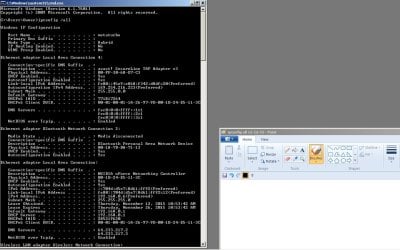
IPCONFIG /ALL would be a good start along with a shot of the browser screens, just need a couple really
 

My Computer

Computer type
PC/Desktop
Computer Manufacturer/Model Number
custom build
OS
Microsoft Windows 7 Ultimate 64-bit 7601 Multiprocessor Free Service Pack 1
CPU
AMD FX(tm)-6100 Six-Core Processor
Motherboard
ASUSTeK Computer INC. M5A78L-M LX PLUS
Memory
4.00 GB
Graphics Card(s)
AMD Radeon HD 6450
Sound Card
(1) AMD High Definition Audio Device (2) Realtek High Defi
Monitor(s) Displays
Toshiba 47ZV650U 47" LCD 240Hz
Screen Resolution
1920 x 1080 x 32 bits (4294967296 colors) @ 60 Hz
Hard Drives
(1) HDT722516DLA380 ATA Device (2) Hitachi HDS721025CLA382 ATA Device (3) ST4000VN000-1H4168 ATA Device (4) Generic STORAGE DEVICE USB Device (5) Generic STORAGE DEVICE USB Device (6) Generic STORAGE DEVICE USB Device (7) Generic STORAGE
PSU
Corsair CX430M
Case
WMI (Waste Management Incorporated)
Cooling
Yes, it's very cool.
Keyboard
Bluetooth KB & Mousepad
Internet Speed
Fios 15/5 and it sucks when Verizon is throttling it down
Antivirus
Avast, MSE and Malwarebytes
Browser
Firefox v.41.0.2 and IE 11
Other Info
2 years old and so far this rig still kicks butt
Thanks for replying. Webpages seem to work ok if I get them loaded, if they will load, but it seems if a link is connected to something complex it will immediately crash showing the cannot display webpage error. I can open most pages in Firefox, but the Firefox browser itself crashes often and I have to restart it. It doesn't give the "cannot display webpage error". However, Chrome, Opera, and IE do. If I get Gmail to load (in firefox only) then it works fine. Also Outlook works as normal in Firefox only.

I attached the screen shots you requested.

As a summary these are the actions I have taken so far:

1. Tried different browsers and websites
2. Checked internet connection speed - other devices are fine and fast on wifi.
3. Connect directly to ethernet cable.
4. Reinstalled HP NVIDIA graphics card driver.
5. Reinstalled HP Broadcom networking driver.
6. Ran win7 hard drive test CHKDSK.
7. Ran win7 hard drive de-frag.
8. Ran win7 memory test.
9. Restart in Safe Mode with Networking.
10. Created new user profile with Admin privileges.
11. Ran ipconfig /release, ipconfig /renew.
12. Adjusted various settings in Chrome browser per troubleshooting info found.
13. Posted to NVIDIA, HP, Chrome, SevenForums, Broadcom forums.
14. Extended chat with NVIDIA rep.

I contacted NVIDIA because I noticed there was a "NVIDIA nForce Networking Controller" listed under Network adapters in Device Manager. Also, the graphics card for this machine, GeForce Go 6150 is known to have overheating problems per "internet searching" the issue. I was told the networking controller is an embedded chip. But of course the rep didn't think the problem was related to the graphics card at all.

Thanks for your help,
Stephen.
 

Attachments

  • aw snap.png
    aw snap.png
    60.6 KB · Views: 0
  • ipconfig-all 11-12-15.jpg
    ipconfig-all 11-12-15.jpg
    113 KB · Views: 3
  • ipconfig-all 11-12-15 2.jpg
    ipconfig-all 11-12-15 2.jpg
    105.2 KB · Views: 1
Last edited:

My Computer

Computer type
Laptop
Computer Manufacturer/Model Number
HP Pavillion Notebook PC tx1308nr upgraded from Vista to 7
OS
Windows 7 Home Premium 32 bit SP1
CPU
AMD Turion 64 X2 Mobile Technology TL-58 1.90GHz (stock)
Motherboard
(stock)
Memory
2GB (stock)
Graphics Card(s)
NVIDIA GeForce Go 6150 Driver version 179.67 (Stock)
Monitor(s) Displays
Sanmsung 23"
Hard Drives
320 GB, stock drive replaced due to failure of stock drive, 1 TB backup drive.
Keyboard
Logitech cordless
Mouse
Logitech cordless
Antivirus
Avast (previously Norton)
Browser
Explorer, Chrome, Opera
Another thing I can do is post a log from the performance monitor if anyone knows what I should look at.

Thanks again.
 

My Computer

Computer type
Laptop
Computer Manufacturer/Model Number
HP Pavillion Notebook PC tx1308nr upgraded from Vista to 7
OS
Windows 7 Home Premium 32 bit SP1
CPU
AMD Turion 64 X2 Mobile Technology TL-58 1.90GHz (stock)
Motherboard
(stock)
Memory
2GB (stock)
Graphics Card(s)
NVIDIA GeForce Go 6150 Driver version 179.67 (Stock)
Monitor(s) Displays
Sanmsung 23"
Hard Drives
320 GB, stock drive replaced due to failure of stock drive, 1 TB backup drive.
Keyboard
Logitech cordless
Mouse
Logitech cordless
Antivirus
Avast (previously Norton)
Browser
Explorer, Chrome, Opera
Is Java up to date?
Are security settings in IE tools set to defaults or have any settings been played with?
Try disabling Adobe Flash, it's not really needed for everything, but it and Adobe like to think it is. Adobe Flash will be gone sometime next year. New http protocols don't need it.
You're going to check your work with screenshots in the future, those are way to small. I was able to blow them up.
The one that says AW SNAP suggest closing apps and tabs that arent needed, you might not have any available RAM to prefetch and load additional windows. Yes catch screens of resource monitor making sure to focus on RAM
 

My Computer

Computer type
PC/Desktop
Computer Manufacturer/Model Number
custom build
OS
Microsoft Windows 7 Ultimate 64-bit 7601 Multiprocessor Free Service Pack 1
CPU
AMD FX(tm)-6100 Six-Core Processor
Motherboard
ASUSTeK Computer INC. M5A78L-M LX PLUS
Memory
4.00 GB
Graphics Card(s)
AMD Radeon HD 6450
Sound Card
(1) AMD High Definition Audio Device (2) Realtek High Defi
Monitor(s) Displays
Toshiba 47ZV650U 47" LCD 240Hz
Screen Resolution
1920 x 1080 x 32 bits (4294967296 colors) @ 60 Hz
Hard Drives
(1) HDT722516DLA380 ATA Device (2) Hitachi HDS721025CLA382 ATA Device (3) ST4000VN000-1H4168 ATA Device (4) Generic STORAGE DEVICE USB Device (5) Generic STORAGE DEVICE USB Device (6) Generic STORAGE DEVICE USB Device (7) Generic STORAGE
PSU
Corsair CX430M
Case
WMI (Waste Management Incorporated)
Cooling
Yes, it's very cool.
Keyboard
Bluetooth KB & Mousepad
Internet Speed
Fios 15/5 and it sucks when Verizon is throttling it down
Antivirus
Avast, MSE and Malwarebytes
Browser
Firefox v.41.0.2 and IE 11
Other Info
2 years old and so far this rig still kicks butt
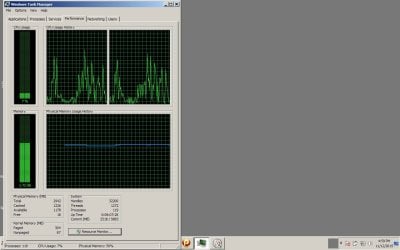
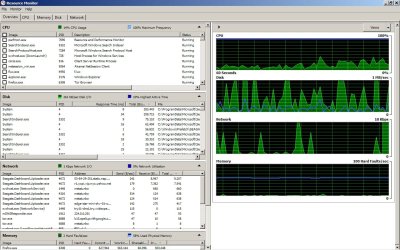
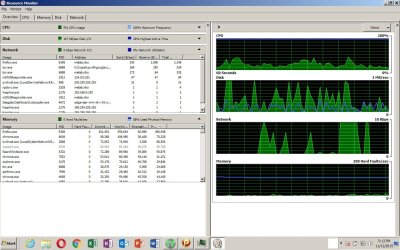
My mistake, I used paint and the canvas was set too large. I uploaded new images. I have 4GB ram installed. There was 2GB originally. Display errors don't seem to be correlated to the memory usage, I have looked at that often, but I will include a screen shot. Java has updated many times. I turned off prefetching in Chrome and it had no effect. I attached resource monitor screens of the overview and memory tabs when only Firefox was open, but 8 tabs were open on Firefox.

Are the images better ?

Thanks.
 

Attachments

  • task manager - performance tab.jpg
    task manager - performance tab.jpg
    97 KB · Views: 3
  • resource monitor overview 1.jpg
    resource monitor overview 1.jpg
    158.2 KB · Views: 2
  • resource monitor overview 2.jpg
    resource monitor overview 2.jpg
    145.4 KB · Views: 2
Last edited:

My Computer

Computer type
Laptop
Computer Manufacturer/Model Number
HP Pavillion Notebook PC tx1308nr upgraded from Vista to 7
OS
Windows 7 Home Premium 32 bit SP1
CPU
AMD Turion 64 X2 Mobile Technology TL-58 1.90GHz (stock)
Motherboard
(stock)
Memory
2GB (stock)
Graphics Card(s)
NVIDIA GeForce Go 6150 Driver version 179.67 (Stock)
Monitor(s) Displays
Sanmsung 23"
Hard Drives
320 GB, stock drive replaced due to failure of stock drive, 1 TB backup drive.
Keyboard
Logitech cordless
Mouse
Logitech cordless
Antivirus
Avast (previously Norton)
Browser
Explorer, Chrome, Opera
metaturbo707, I see 119 processes running, you might want to look into that. You are really tying up a lot of resources right there.
Yhe screen shots look like possibly you are showing me from 2 different machines, because in one instance there is 3 gb RAM and the other there is 4 gb. What gives?
I am pasting here a side by side of resource meter, you on the left, me on the right. I have 65 processes running, you 119. I have 4 gb RAM, yours looks like 3 gb. I have I have 9 tabs open in firefox, I don't know what you have. I have Win Live Mail running with 7 messages open most are threads on this site with plenty of content, but emails don't cost much, it's the application that does
Regarding the screenshots, it took a while, but I was finally convinced to use the snipper tool and works much better than paint.

View attachment 375776
 
Last edited:

My Computer

Computer type
PC/Desktop
Computer Manufacturer/Model Number
custom build
OS
Microsoft Windows 7 Ultimate 64-bit 7601 Multiprocessor Free Service Pack 1
CPU
AMD FX(tm)-6100 Six-Core Processor
Motherboard
ASUSTeK Computer INC. M5A78L-M LX PLUS
Memory
4.00 GB
Graphics Card(s)
AMD Radeon HD 6450
Sound Card
(1) AMD High Definition Audio Device (2) Realtek High Defi
Monitor(s) Displays
Toshiba 47ZV650U 47" LCD 240Hz
Screen Resolution
1920 x 1080 x 32 bits (4294967296 colors) @ 60 Hz
Hard Drives
(1) HDT722516DLA380 ATA Device (2) Hitachi HDS721025CLA382 ATA Device (3) ST4000VN000-1H4168 ATA Device (4) Generic STORAGE DEVICE USB Device (5) Generic STORAGE DEVICE USB Device (6) Generic STORAGE DEVICE USB Device (7) Generic STORAGE
PSU
Corsair CX430M
Case
WMI (Waste Management Incorporated)
Cooling
Yes, it's very cool.
Keyboard
Bluetooth KB & Mousepad
Internet Speed
Fios 15/5 and it sucks when Verizon is throttling it down
Antivirus
Avast, MSE and Malwarebytes
Browser
Firefox v.41.0.2 and IE 11
Other Info
2 years old and so far this rig still kicks butt
Ok, thanks for continuing to work with me. I can't find where it shows I have 4GB of memory, where do you see that? It's the same machine. I bought it with 2GB, and added 2GB per Crucial.com. It worked fine after installing it, until recently of course. I read that not all of the added memory is typically available, I forget how much, but I expected less than 4GB total... Now you make me wonder about that, I will check into the memory I added again. I have a lot of programs installed, I've had it for 8 years so there's been a lot installed, but I don't know why they all have to be running. I'll check into that more. I have never seen it above 2.05GB in use per task manager performance tab chart, but EVERYTHING slows down when a lot of memory is in use near 2GB.

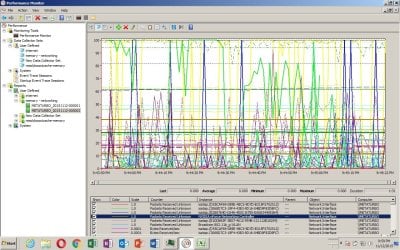
I took a log with the performance monitor. For counters, I selected all of the counters in "Network Interface", "Memory", "Event Tracing for Windows Session" (I don't know what that is), "Cache", and "Browser". There's 218 counters (variables) in the dataset1, about 2 minutes of data. I attached the list of counters, and a screenshot of the data graph with everything selected.

I haven't used Perfmon to diagnose a computer problem before, but am familiar with data and datasets as I'm an engineer (automotive/mechanical not computer).

What I did was:

1. Started the data collection at 1 sample/second (fastest rate).
2. Launched Chrome, which tried to load Google.com as the homepage, and got the Aw Snap error.
3. Reloaded Google.com, but I forget if it crashed again, I think it did.
4. Tried to load Youtube.com, which loaded successfully (very very rare).
5. Clicked on a video to load, and it gave the display error again.
6. Stopped the datalogging.

So I think you can see these events in sequence in the dataset1. I just don't know what variables (counters) to look at to see what's going on. Do you have any idea?

Also I think I can send you or post the actual data as a CSV file if you want.

Thanks,
Stephen
 

Attachments

  • dataset1.txt
    dataset1.txt
    16 KB · Views: 1
  • perfmon dataset1 - cannot display webpage.jpg
    perfmon dataset1 - cannot display webpage.jpg
    224.2 KB · Views: 2
Last edited:

My Computer

Computer type
Laptop
Computer Manufacturer/Model Number
HP Pavillion Notebook PC tx1308nr upgraded from Vista to 7
OS
Windows 7 Home Premium 32 bit SP1
CPU
AMD Turion 64 X2 Mobile Technology TL-58 1.90GHz (stock)
Motherboard
(stock)
Memory
2GB (stock)
Graphics Card(s)
NVIDIA GeForce Go 6150 Driver version 179.67 (Stock)
Monitor(s) Displays
Sanmsung 23"
Hard Drives
320 GB, stock drive replaced due to failure of stock drive, 1 TB backup drive.
Keyboard
Logitech cordless
Mouse
Logitech cordless
Antivirus
Avast (previously Norton)
Browser
Explorer, Chrome, Opera
Stephen, I think
we had a miss on the wording. I only see 3 g available on your kernel memory and when 2 g is in use your are probably peaking out the capacity of he bus.
Probably time to clean out the cobwebs from years of adding on and not taking off what you dont use. You never should see 119 processes going onless you have beefier processor and loads of memory. Just my opinion and what works best for me. Shop around and pick some more brains, I'm by no means an expert like some of the folks on here. I have no formal education in this field. All my knowledge is from reading and breaking my own stuff so I can troubleshoot and fix. Live and die bye the sword you might say.
 

My Computer

Computer type
PC/Desktop
Computer Manufacturer/Model Number
custom build
OS
Microsoft Windows 7 Ultimate 64-bit 7601 Multiprocessor Free Service Pack 1
CPU
AMD FX(tm)-6100 Six-Core Processor
Motherboard
ASUSTeK Computer INC. M5A78L-M LX PLUS
Memory
4.00 GB
Graphics Card(s)
AMD Radeon HD 6450
Sound Card
(1) AMD High Definition Audio Device (2) Realtek High Defi
Monitor(s) Displays
Toshiba 47ZV650U 47" LCD 240Hz
Screen Resolution
1920 x 1080 x 32 bits (4294967296 colors) @ 60 Hz
Hard Drives
(1) HDT722516DLA380 ATA Device (2) Hitachi HDS721025CLA382 ATA Device (3) ST4000VN000-1H4168 ATA Device (4) Generic STORAGE DEVICE USB Device (5) Generic STORAGE DEVICE USB Device (6) Generic STORAGE DEVICE USB Device (7) Generic STORAGE
PSU
Corsair CX430M
Case
WMI (Waste Management Incorporated)
Cooling
Yes, it's very cool.
Keyboard
Bluetooth KB & Mousepad
Internet Speed
Fios 15/5 and it sucks when Verizon is throttling it down
Antivirus
Avast, MSE and Malwarebytes
Browser
Firefox v.41.0.2 and IE 11
Other Info
2 years old and so far this rig still kicks butt
Stephen, I spent some looking for this particular tutorial primarily for optimizing start- up and what services and processes must be on and what you can change to run only when you are going to the running. I hope this might be of some help, i know it's a lot to cover but it is one of the most popular optimization tut's on here and most other sites have similar guides.

http://www.sevenforums.com/tutorials/11728-optimize-windows-7-a.html?filter
 

My Computer

Computer type
PC/Desktop
Computer Manufacturer/Model Number
custom build
OS
Microsoft Windows 7 Ultimate 64-bit 7601 Multiprocessor Free Service Pack 1
CPU
AMD FX(tm)-6100 Six-Core Processor
Motherboard
ASUSTeK Computer INC. M5A78L-M LX PLUS
Memory
4.00 GB
Graphics Card(s)
AMD Radeon HD 6450
Sound Card
(1) AMD High Definition Audio Device (2) Realtek High Defi
Monitor(s) Displays
Toshiba 47ZV650U 47" LCD 240Hz
Screen Resolution
1920 x 1080 x 32 bits (4294967296 colors) @ 60 Hz
Hard Drives
(1) HDT722516DLA380 ATA Device (2) Hitachi HDS721025CLA382 ATA Device (3) ST4000VN000-1H4168 ATA Device (4) Generic STORAGE DEVICE USB Device (5) Generic STORAGE DEVICE USB Device (6) Generic STORAGE DEVICE USB Device (7) Generic STORAGE
PSU
Corsair CX430M
Case
WMI (Waste Management Incorporated)
Cooling
Yes, it's very cool.
Keyboard
Bluetooth KB & Mousepad
Internet Speed
Fios 15/5 and it sucks when Verizon is throttling it down
Antivirus
Avast, MSE and Malwarebytes
Browser
Firefox v.41.0.2 and IE 11
Other Info
2 years old and so far this rig still kicks butt
Back
Top