Constant low on memory warnings and crashes with Google chrome

Gorilla Fingerz

New member
Local time
11:36 PM
Messages
5
Location
Cebu
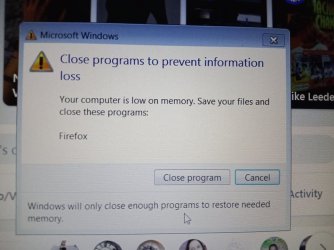
Can anyone point me in the right direction on how to solve the issue of constant out of memory warnings. Despite having 73.7GB of free space on my C drive and 8GB of ram I can only go 10 min. without a 'low on memory' warning that results in a crash and having to reboot or close out of Chrome or Firefox.

Previously (last month) I was able to browse with up to 20 tabs open and multiple programs (Photoshop, Maya, Zbrush) running and not so much as a blip from the system. But all of a sudden it's crash galore. :(

Where should I begin looking for the problem(s)?
 

My Computers My Computers

  • At a glance

    Windows 7 Pro 64 bitIntel Core i-7 4800MQ8GBIntel HD Graphics 4600
    Computer type
    Laptop
    Computer Manufacturer/Model Number
    Dell Latitude E6540
    OS
    Windows 7 Pro 64 bit
    CPU
    Intel Core i-7 4800MQ
    Motherboard
    Dell Inc. 0725FP
    Memory
    8GB
    Graphics Card(s)
    Intel HD Graphics 4600
    Hard Drives
    Local disk: C
    NTFS
    238GB
    Antivirus
    Avast, Microsoft Security Essentials
    Browser
    Google Chrome, Firefox
  • Computer type
    PC/Desktop
    Antivirus
    Avast, Windows Security Essentials
next time you start up, open task manager - processes tab, watch the memory values, hopefully it wont be a svchost.exe, we'll go from there
 

My Computer My Computer

At a glance

W7 home premium 32bit/W7HP 64bit/w10 tp insid...E5300 dual core3gbNvidia Geforce 7100 Nforce 630i
Computer type
PC/Desktop
Computer Manufacturer/Model Number
medionl/Aspire 6930G/acer x55a
OS
W7 home premium 32bit/W7HP 64bit/w10 tp insider ring
CPU
E5300 dual core
Motherboard
medion MS7366
Memory
3gb
Graphics Card(s)
Nvidia Geforce 7100 Nforce 630i
Monitor(s) Displays
avixc
Internet Speed
n (isp resticted to 72)
Antivirus
mse/pands
Browser
palemoon
Other Info
Belkin Fd7050 n USB using Railink RT2870 drivers, more upto date
next time you start up, open task manager - processes tab, watch the memory values, hopefully it wont be a svchost.exe, we'll go from there

Ok will do. I'll screen shot the processes.

- - - Updated - - -

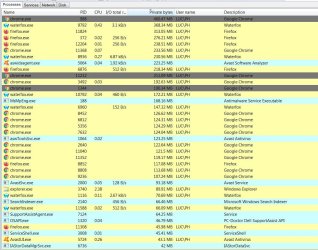
Here are the screenshots just after start up from a crash.

1) screenshot of processes from task manager:
Flickr

2) screenshot of processes from Process Hacker app
Alex Cantelou has shared 1 photo with you! | Flickr
 

My Computers My Computers

  • At a glance

    Windows 7 Pro 64 bitIntel Core i-7 4800MQ8GBIntel HD Graphics 4600
    Computer type
    Laptop
    Computer Manufacturer/Model Number
    Dell Latitude E6540
    OS
    Windows 7 Pro 64 bit
    CPU
    Intel Core i-7 4800MQ
    Motherboard
    Dell Inc. 0725FP
    Memory
    8GB
    Graphics Card(s)
    Intel HD Graphics 4600
    Hard Drives
    Local disk: C
    NTFS
    238GB
    Antivirus
    Avast, Microsoft Security Essentials
    Browser
    Google Chrome, Firefox
  • Computer type
    PC/Desktop
    Antivirus
    Avast, Windows Security Essentials
hi,
those values dont look extremely high, how long was google open for 8/9 mins would be ideal time so its just before freeze/crash, it does have 14 running exes, i use waterfox only got 4

other comments,
see you have skype/dropbox and ccleaner running, i tend NOT to have them run on start up
Avast and MSE are both running not a good idea -
(if you do not use the extras in avast turn them off)
IntelProset is not required bloatware in my opinion
dell pcdoc, as your not going to get anymore updates from them - change to manual or remove
 

My Computer My Computer

At a glance

W7 home premium 32bit/W7HP 64bit/w10 tp insid...E5300 dual core3gbNvidia Geforce 7100 Nforce 630i
Computer type
PC/Desktop
Computer Manufacturer/Model Number
medionl/Aspire 6930G/acer x55a
OS
W7 home premium 32bit/W7HP 64bit/w10 tp insider ring
CPU
E5300 dual core
Motherboard
medion MS7366
Memory
3gb
Graphics Card(s)
Nvidia Geforce 7100 Nforce 630i
Monitor(s) Displays
avixc
Internet Speed
n (isp resticted to 72)
Antivirus
mse/pands
Browser
palemoon
Other Info
Belkin Fd7050 n USB using Railink RT2870 drivers, more upto date
It is important to understand what low memory warnings actually mean. It isn't what most people think. It means the commit charge is approaching the commit limit. It has nothing to do with RAM usage and Windows doesn't even have a warning for that. The Commit charge is what you need to look at.

When investigating memory issues usually Performance tab is more useful than the processes. The problem may not be a process at all.
 

My Computer My Computer

At a glance

Windows 7 Pro 64 bitXeon W35208 GBNvidia Geforce 210
Computer type
PC/Desktop
Computer Manufacturer/Model Number
HP
OS
Windows 7 Pro 64 bit
CPU
Xeon W3520
Memory
8 GB
Graphics Card(s)
Nvidia Geforce 210
i use waterfox only got 4

- I've installed Waterfox now, I'll see how it goes.
you have skype/dropbox

- removed them from startup items.

ccleaner running

Did you mean Catalyst Control Center? I've since disabled it... apparently bloatware.
Avast and MSE are both running not a good idea

- removed MSE kept Avast running but turned off most of the extras.

IntelProset is not required bloatware in my opinion

- removed
dell pcdoc

-removed

I'll take some screen shots and post up. Thanks. Much appreciated!

- - - Updated - - -

It is important to understand what low memory warnings actually mean. It isn't what most people think. It means the commit charge is approaching the commit limit. It has nothing to do with RAM usage and Windows doesn't even have a warning for that. The Commit charge is what you need to look at.
When investigating memory issues usually Performance tab is more useful than the processes. The problem may not be a process at all.

Yes, I was a bit unsure of what to be looking for. I'll have a look and take a screenshot. Thanks!
 

My Computers My Computers

  • At a glance

    Windows 7 Pro 64 bitIntel Core i-7 4800MQ8GBIntel HD Graphics 4600
    Computer type
    Laptop
    Computer Manufacturer/Model Number
    Dell Latitude E6540
    OS
    Windows 7 Pro 64 bit
    CPU
    Intel Core i-7 4800MQ
    Motherboard
    Dell Inc. 0725FP
    Memory
    8GB
    Graphics Card(s)
    Intel HD Graphics 4600
    Hard Drives
    Local disk: C
    NTFS
    238GB
    Antivirus
    Avast, Microsoft Security Essentials
    Browser
    Google Chrome, Firefox
  • Computer type
    PC/Desktop
    Antivirus
    Avast, Windows Security Essentials
System manufactures like to have all of their crap running all of the time but I don't. Also many other programs like to have processes running all of the time. I like to trim those and turn what I don't need off-or uninstall-and run what is only "important" to me for daily use. I've even created bat files to start up and start processes for programs I don't use a lot such as (as an example) itunes. I don't really run it a lot and the processes are only needed if you have an iphone connected. I also turn off some not so necessary Windows processes such as bluetooth or print spooler. The most memory I use is when I run a virtual machine. I just wanted to share that.

Also I don't trust chrome on my personal system. You might want to look into other derivatives.
 
Last edited:

My Computers My Computers

  • At a glance

    Windows 7 pro/Windows 10 ProIntel i7 860 Quad core 2.8 ghz8 gbATI Radeon HD 5770 1 gb ram
    Computer type
    PC/Desktop
    Computer Manufacturer/Model Number
    HP Pavillion Elite HPE-250f
    OS
    Windows 7 pro/Windows 10 Pro
    CPU
    Intel i7 860 Quad core 2.8 ghz
    Memory
    8 gb
    Graphics Card(s)
    ATI Radeon HD 5770 1 gb ram
    Monitor(s) Displays
    Alienware 25 AW2521HF & Viewsonic
    Screen Resolution
    1920 x1080 & 1680x1050
    Hard Drives
    WD blue 1 tb & 500 gb.
    Browser
    FF of course.
    Other Info
    https://www.bestbuy.com/site/hp-pavilion-elite-desktop-intel-core-i7-processor-8gb-memory-1tb-hard-drive/9921493.p?skuId=9921493
  • At a glance

    Windows 2012 R2 Data center/Linux Minti3 9100 3.6GHz, 8M cache, 4C/4T8GB 2666MT/s DDR4 ECC UDIMM
    Computer type
    PC/Desktop
    System Manufacturer/Model Number
    Dell Poweredge T140
    OS
    Windows 2012 R2 Data center/Linux Mint
    CPU
    i3 9100 3.6GHz, 8M cache, 4C/4T
    Memory
    8GB 2666MT/s DDR4 ECC UDIMM
    Monitor(s) Displays
    Viewsonic
    Screen Resolution
    1680x1050
    Hard Drives
    1 TB & 750 GB
    Other Info
    https://www.dell.com/en-us/work/shop/productdetailstxn/poweredge-t140?~ck=bt
Windows processes such as bluetooth or print spooler. The most memory I use is when I run a virtual machine. I just wanted to share that.

Also I don't trust chrome on my personal system. You might want to look into other derivatives.

Thanks for the heads up. I've shut off print spooler, Bluetooth and the Apple stuff as well as I don't use any of it. I've also switched over to Waterfox to see how it goes.

___________________________________________________________________________________________________

- - - Updated - - -


D'oh! I've crashed out again.

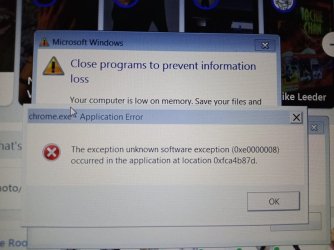
Though this time it only out of Google Chrome and not my entire system (and I made it through the entire day... not crashing out every five minutes or so like yesterday), I didn't have to restart. At the time of the crash I was setting up my Waterfox browser so I had Chrome, Waterfox, Firefox running at the same time.

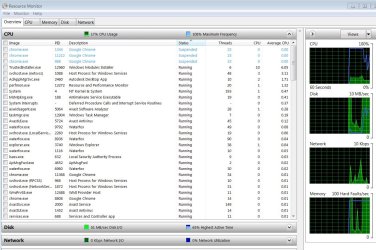
I took some shots of the error windows as well as the the processes running and the performance tabs - in hopes someone may have further insight into what might be the cause. It was again a running out of memory error according to Windows.

Also I noticed under processes that despite turning off Microsoft Security Essentials that the process "MsMpEng.exe" which is listed as Antimalware Service Executable is still shown as running. Should I be concerned about that?

error windows:

241157119_183204830463311_5008368058673175258_n.jpg241268047_387916422719062_337688630516248243_n.jpg

processes running:

new crash 2.JPGnew crash.JPG

performance windows:

new crash 4.JPGnew crash 3.JPG
 
Last edited:

My Computers My Computers

  • At a glance

    Windows 7 Pro 64 bitIntel Core i-7 4800MQ8GBIntel HD Graphics 4600
    Computer type
    Laptop
    Computer Manufacturer/Model Number
    Dell Latitude E6540
    OS
    Windows 7 Pro 64 bit
    CPU
    Intel Core i-7 4800MQ
    Motherboard
    Dell Inc. 0725FP
    Memory
    8GB
    Graphics Card(s)
    Intel HD Graphics 4600
    Hard Drives
    Local disk: C
    NTFS
    238GB
    Antivirus
    Avast, Microsoft Security Essentials
    Browser
    Google Chrome, Firefox
  • Computer type
    PC/Desktop
    Antivirus
    Avast, Windows Security Essentials
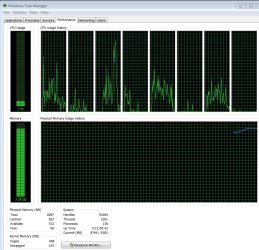
A small point, since you've got 8GB RAM and the last screenshot shows you have a commit charge of 8796 / 9383, that leaves about 1GB of spare space to run your programs. A possible way out is to increase your pagefile allocation, as it can supplement your existing RAM if you've got some spare disk space..

In addition to that, it seems you have quite a few tabs with heavy websites opened at once, which seems too much for your system (no idea if it's a reasonable assumption or just a too hungry browser). Try closing some tabs.

As stated before, using two antiviruses is always a bad idea (only one is bad enough). Uninstall at least one of them and see if it lowers your RAM usage.
 

My Computer My Computer

At a glance

Windows 7 Ultimate x64Intel Core i7-740QM8 GB DDR3NVIDIA GeForce 330GT
Computer type
Laptop
Computer Manufacturer/Model Number
Toshiba Sattelite A665-S6092
OS
Windows 7 Ultimate x64
CPU
Intel Core i7-740QM
Memory
8 GB DDR3
Graphics Card(s)
NVIDIA GeForce 330GT
Screen Resolution
1366x768
Hard Drives
Samsung 840 SSD 500GB
1TB USB3 external HD
Cooling
Coolermaster Notepal U3 notebook cooling pad
Internet Speed
3mbps ASDL
Antivirus
ClamWin 0.98.7
Browser
Opera 12.17 x86 (main), Firefox 38 (sec), IE11 (last resort)
A possible way out is to increase your pagefile allocation, as it can supplement your existing RAM if you've got some spare disk space..

When I checked it was manually set to that amount. I've reset it to the default of letting Windows manage the page file allocation for all drives - in this case I only have a C drive. Let's see if that works better. After setting it to the default of allowing the system to manage it I looked in the performance monitor and it shows:

Commit (MB) 4493/9383

That seems an improvement in how that ratio is supposed to work. I think.


Try closing some tabs.

Yes, I'll try to be more tab economic.

As stated before, using two antiviruses is always a bad idea (only one is bad enough). Uninstall at least one of them and see if it lowers your RAM usage.

I don't seem to be able to stop the Windows Antimalware from running. Despite several attempts it seems to always appear in the processes. I'll see if I can find a tutorial on turning it off entirely.
 

My Computers My Computers

  • At a glance

    Windows 7 Pro 64 bitIntel Core i-7 4800MQ8GBIntel HD Graphics 4600
    Computer type
    Laptop
    Computer Manufacturer/Model Number
    Dell Latitude E6540
    OS
    Windows 7 Pro 64 bit
    CPU
    Intel Core i-7 4800MQ
    Motherboard
    Dell Inc. 0725FP
    Memory
    8GB
    Graphics Card(s)
    Intel HD Graphics 4600
    Hard Drives
    Local disk: C
    NTFS
    238GB
    Antivirus
    Avast, Microsoft Security Essentials
    Browser
    Google Chrome, Firefox
  • Computer type
    PC/Desktop
    Antivirus
    Avast, Windows Security Essentials
If you are referring to Windows defender that is only antispyware on 7 and not a full AVS. You shouldn't have both MSE and AVAST installed though. You should be fine running it although that will free up some memory. Try this though: Windows Defender - Turning Off & On You really need to watch your browsers though. You can try viper's guide to reduce memory consumption by windows. Black Viper's Windows 7 Service Pack 1 Service Configurations - Black Viper | BlackViper.Com If you absolutely have to have all that running at once you might want to get more ram. As shown you did run out. You can increase pagefile size but it is no where near as fast as memory, even on a SSD.
 

My Computers My Computers

  • At a glance

    Windows 7 pro/Windows 10 ProIntel i7 860 Quad core 2.8 ghz8 gbATI Radeon HD 5770 1 gb ram
    Computer type
    PC/Desktop
    Computer Manufacturer/Model Number
    HP Pavillion Elite HPE-250f
    OS
    Windows 7 pro/Windows 10 Pro
    CPU
    Intel i7 860 Quad core 2.8 ghz
    Memory
    8 gb
    Graphics Card(s)
    ATI Radeon HD 5770 1 gb ram
    Monitor(s) Displays
    Alienware 25 AW2521HF & Viewsonic
    Screen Resolution
    1920 x1080 & 1680x1050
    Hard Drives
    WD blue 1 tb & 500 gb.
    Browser
    FF of course.
    Other Info
    https://www.bestbuy.com/site/hp-pavilion-elite-desktop-intel-core-i7-processor-8gb-memory-1tb-hard-drive/9921493.p?skuId=9921493
  • At a glance

    Windows 2012 R2 Data center/Linux Minti3 9100 3.6GHz, 8M cache, 4C/4T8GB 2666MT/s DDR4 ECC UDIMM
    Computer type
    PC/Desktop
    System Manufacturer/Model Number
    Dell Poweredge T140
    OS
    Windows 2012 R2 Data center/Linux Mint
    CPU
    i3 9100 3.6GHz, 8M cache, 4C/4T
    Memory
    8GB 2666MT/s DDR4 ECC UDIMM
    Monitor(s) Displays
    Viewsonic
    Screen Resolution
    1680x1050
    Hard Drives
    1 TB & 750 GB
    Other Info
    https://www.dell.com/en-us/work/shop/productdetailstxn/poweredge-t140?~ck=bt
hi,
the screenshot showing google failing due to a software error is likely due to an Add-on,
open your google settings options, and uninstall all, then add them back 1 by 1 to find the culprit

notes
Avast will have added a browser guard within it, not sure if it will show in the google list, check in the Avast logs to see if its blocking anything
Adobe Acorobat does the same
if you would like to check, run this program, its a Reputable malware tool --
Download Farbar Recovery Scan Tool
 

My Computer My Computer

At a glance

W7 home premium 32bit/W7HP 64bit/w10 tp insid...E5300 dual core3gbNvidia Geforce 7100 Nforce 630i
Computer type
PC/Desktop
Computer Manufacturer/Model Number
medionl/Aspire 6930G/acer x55a
OS
W7 home premium 32bit/W7HP 64bit/w10 tp insider ring
CPU
E5300 dual core
Motherboard
medion MS7366
Memory
3gb
Graphics Card(s)
Nvidia Geforce 7100 Nforce 630i
Monitor(s) Displays
avixc
Internet Speed
n (isp resticted to 72)
Antivirus
mse/pands
Browser
palemoon
Other Info
Belkin Fd7050 n USB using Railink RT2870 drivers, more upto date
Back
Top