Constant refresh of network

omegaman7

New member
The one and only thing about XP that I miss, was that XP never had to refresh the network. What I mean by this is when transferring files, or streaming content, the network seems to want to want to refresh itself. Even if I leave a browsing window open. If I walk away for a few minutes, the network needs to refresh. Usually it can take anywhere from 10 - 30 seconds to refresh. Is it my router causing this? I don't know much about routers yet :( Even when playing an mp3 over the network, it causes like a lag in the audio. Disabling IPV6 had no effect. The problem does not lie there. The only thing different about the XP setup, was no router. It was a mere crossover cable connecting the two computers. Which is why I suspect the router/switch. Is there any way to speed up this association? The switch is definitely fast enough. It's a NETGEAR GS605 10/100/1000Mbps.
Any and all help appreciated ;)
 

My Computer

OS
Windows 7 Ultimate X64
CPU
Phenom II 965 @ 3.9Ghz
Motherboard
Gigabyte 790XTA-UD4
Memory
Ripjaws F3-12800CL7D-4GBRM 8,8,8,24 1T 1.65V
Graphics Card(s)
Nvidia Geforce GTX260(216 cores)
Sound Card
N/A
Monitor(s) Displays
Samsung 2433BW
Hard Drives
Velociraptor 150Gb 1500HLFS
PSU
Corsair HX750W
Case
CM HAF932
Cooling
ECO-R120 (ALC)
Perhaps I should clarify. My router is a Qwest DSL modem(Actiontec GT701). The switch is what I mentioned in the first post. I was simply trying to rule out the Switch as the culprit. Highly unlikely. Could the Router/modem be my problem is what I'm asking :)

My DSL modem can be called a router correct? If not, perhaps I should simply call it a modem LOL!

My main concern is knowing that windows 7 is not the issue. Surely others are not exhibiting this problem...
 

My Computer

OS
Windows 7 Ultimate X64
CPU
Phenom II 965 @ 3.9Ghz
Motherboard
Gigabyte 790XTA-UD4
Memory
Ripjaws F3-12800CL7D-4GBRM 8,8,8,24 1T 1.65V
Graphics Card(s)
Nvidia Geforce GTX260(216 cores)
Sound Card
N/A
Monitor(s) Displays
Samsung 2433BW
Hard Drives
Velociraptor 150Gb 1500HLFS
PSU
Corsair HX750W
Case
CM HAF932
Cooling
ECO-R120 (ALC)
I'm not familior with that router-modem? but updating the firmware would be my first option if it was a router but if it's one of those modem router combo's then I'm not so sure.

I doubt the switch would be causing any problems unless your modem is just a modem and not a router in which case adding a real router to your network would fix the problem.

Have you tried plugging directly into the modem to see if the problem persists?
 

My Computer

Computer type
PC/Desktop
Computer Manufacturer/Model Number
Home built
OS
Windows 7 Ult, Windows 8.1 Pro,
CPU
Q9650-4.275GHz, E8600 4.5GHz, E6750-3.8GHz
Motherboard
Evga 780i FTW
Memory
G.Skill PC2 9600 1200Mhz 5 5 5 15 2T
Graphics Card(s)
GTX480
Sound Card
Asus Xonar D2
Monitor(s) Displays
HannsG
Screen Resolution
1680X1050
Hard Drives
GSkill Phoenix Pro 120GB SSD
PSU
ThermalTake Toughpower 1000Watt modular
Case
ThermalTake XaserV
Cooling
Xigmatek S1283
Keyboard
Logitech G15
Mouse
Logitech G9
Internet Speed
T1
according to actiontec.com, it appears to be a Modem and a router rolled into one. From what I've read about routers, they sound like highly similar devices to modems. I have trouble seeing the differences between the two LOL!
http://www.actiontec.com/products/product.php?pid=70

Perhaps I should look to others who have my modem/router and see what they've done with windows 7. This is highly irritating. My brother has a very similar network. Both of us would like to get to the bottom of this ;)
 

My Computer

OS
Windows 7 Ultimate X64
CPU
Phenom II 965 @ 3.9Ghz
Motherboard
Gigabyte 790XTA-UD4
Memory
Ripjaws F3-12800CL7D-4GBRM 8,8,8,24 1T 1.65V
Graphics Card(s)
Nvidia Geforce GTX260(216 cores)
Sound Card
N/A
Monitor(s) Displays
Samsung 2433BW
Hard Drives
Velociraptor 150Gb 1500HLFS
PSU
Corsair HX750W
Case
CM HAF932
Cooling
ECO-R120 (ALC)
I've seen certain modems that require an update or a different modem to work properly with Windows 7 but it's a rare problem. Modems and routers aren't really the same at all.

Modems are very limited in what they can do and those combo modem routers aren't usually the way to go if you want a decent network although it may not have anything to do with the problem.

I would try pluggin directly into the modem-router "without the switch" to see if the problem persists. If your brother is having similar problems with Windows 7 and the same modem I would try using just a plain old modem without the router, or see if your ISP has an updated version.
 

My Computer

Computer type
PC/Desktop
Computer Manufacturer/Model Number
Home built
OS
Windows 7 Ult, Windows 8.1 Pro,
CPU
Q9650-4.275GHz, E8600 4.5GHz, E6750-3.8GHz
Motherboard
Evga 780i FTW
Memory
G.Skill PC2 9600 1200Mhz 5 5 5 15 2T
Graphics Card(s)
GTX480
Sound Card
Asus Xonar D2
Monitor(s) Displays
HannsG
Screen Resolution
1680X1050
Hard Drives
GSkill Phoenix Pro 120GB SSD
PSU
ThermalTake Toughpower 1000Watt modular
Case
ThermalTake XaserV
Cooling
Xigmatek S1283
Keyboard
Logitech G15
Mouse
Logitech G9
Internet Speed
T1
I can't eliminate the switch, without eliminating the network. The modem only has one ethernet port. In order to have my network, I have to have the switch. The problem probably lies in the firmware, or in the settings. Since the firmware is apparently up to date, I'll have to look for another option. Perhaps I should look to a new modem/router.
 

My Computer

OS
Windows 7 Ultimate X64
CPU
Phenom II 965 @ 3.9Ghz
Motherboard
Gigabyte 790XTA-UD4
Memory
Ripjaws F3-12800CL7D-4GBRM 8,8,8,24 1T 1.65V
Graphics Card(s)
Nvidia Geforce GTX260(216 cores)
Sound Card
N/A
Monitor(s) Displays
Samsung 2433BW
Hard Drives
Velociraptor 150Gb 1500HLFS
PSU
Corsair HX750W
Case
CM HAF932
Cooling
ECO-R120 (ALC)
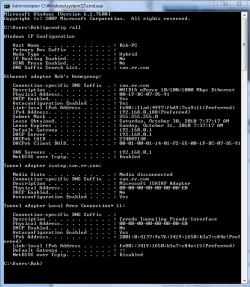
If you can type ipconfig /all into your command prompt then hit enter and post the results here it might be helpful. It will look like the picture below, I use the snipping tool for this.
 

Attachments

  • My ipconfig all.PNG
    My ipconfig all.PNG
    85.7 KB · Views: 13

My Computer

Computer type
PC/Desktop
Computer Manufacturer/Model Number
Home built
OS
Windows 7 Ult, Windows 8.1 Pro,
CPU
Q9650-4.275GHz, E8600 4.5GHz, E6750-3.8GHz
Motherboard
Evga 780i FTW
Memory
G.Skill PC2 9600 1200Mhz 5 5 5 15 2T
Graphics Card(s)
GTX480
Sound Card
Asus Xonar D2
Monitor(s) Displays
HannsG
Screen Resolution
1680X1050
Hard Drives
GSkill Phoenix Pro 120GB SSD
PSU
ThermalTake Toughpower 1000Watt modular
Case
ThermalTake XaserV
Cooling
Xigmatek S1283
Keyboard
Logitech G15
Mouse
Logitech G9
Internet Speed
T1
lol. I've had to do that multiple times for other troubleshooting.

Something interesting, now it seems to be behaving. I've noticed how windows 7 seems to adapt. Is that strange to believe? I'm streaming an AVCHD folder to one of my media players without hiccup. I may have to play with his network this weekend. He doesn't access his network very often, so it's possible, windows 7 hasn't had to resolve an issue for him yet. Myself, I'm constantly doing stuff ;)

I'll also have to run some other tests. His problem seemed to be streaming MP3's to Windows media player...
Thank you very much for your continuing efforts :D
Ipconfig.png
 

My Computer

OS
Windows 7 Ultimate X64
CPU
Phenom II 965 @ 3.9Ghz
Motherboard
Gigabyte 790XTA-UD4
Memory
Ripjaws F3-12800CL7D-4GBRM 8,8,8,24 1T 1.65V
Graphics Card(s)
Nvidia Geforce GTX260(216 cores)
Sound Card
N/A
Monitor(s) Displays
Samsung 2433BW
Hard Drives
Velociraptor 150Gb 1500HLFS
PSU
Corsair HX750W
Case
CM HAF932
Cooling
ECO-R120 (ALC)
A couple of things seem a bit strange in the ipconfig, it says domain actdlstmp? Is that the name of your ISP server or are you connected to a Domain?

Another thing is that besides the usual default gateway of 192.168.0.1 for DNS servers which would point back to the router, I noticed a secondary DNS below it of 205.171.3.25, this may or may not cause problems. Did you add any type of DNS address to your IPv4 properties?
 

My Computer

Computer type
PC/Desktop
Computer Manufacturer/Model Number
Home built
OS
Windows 7 Ult, Windows 8.1 Pro,
CPU
Q9650-4.275GHz, E8600 4.5GHz, E6750-3.8GHz
Motherboard
Evga 780i FTW
Memory
G.Skill PC2 9600 1200Mhz 5 5 5 15 2T
Graphics Card(s)
GTX480
Sound Card
Asus Xonar D2
Monitor(s) Displays
HannsG
Screen Resolution
1680X1050
Hard Drives
GSkill Phoenix Pro 120GB SSD
PSU
ThermalTake Toughpower 1000Watt modular
Case
ThermalTake XaserV
Cooling
Xigmatek S1283
Keyboard
Logitech G15
Mouse
Logitech G9
Internet Speed
T1
I have made no manual alterations. And I'm not sure what you mean by Domain. I'm extremely NewB when it comes to this area of computing:o

Something worth noting. I just changed out a bad motherboard in my brothers computer. It's possible that the audio problems over the network, could have been due to a faulty mobo/Northbridge. Myself, I've never had problems really streaming. It's simply annoying that it has to refresh the network, if not in use for more than 3-5min.
 

My Computer

OS
Windows 7 Ultimate X64
CPU
Phenom II 965 @ 3.9Ghz
Motherboard
Gigabyte 790XTA-UD4
Memory
Ripjaws F3-12800CL7D-4GBRM 8,8,8,24 1T 1.65V
Graphics Card(s)
Nvidia Geforce GTX260(216 cores)
Sound Card
N/A
Monitor(s) Displays
Samsung 2433BW
Hard Drives
Velociraptor 150Gb 1500HLFS
PSU
Corsair HX750W
Case
CM HAF932
Cooling
ECO-R120 (ALC)
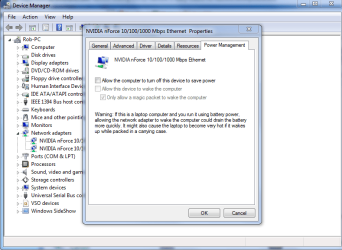
Maybe try the power options for the network adaptor, make sure they dont turn it off to save power, there are more power saving options for most network adaptors in device manager that can also cause problems. The pictures below shows you were to check.
 

Attachments

  • network adaptor turn off to save power.PNG
    network adaptor turn off to save power.PNG
    121.9 KB · Views: 14
  • power plan network adaptor settings.PNG
    power plan network adaptor settings.PNG
    44.3 KB · Views: 7

My Computer

Computer type
PC/Desktop
Computer Manufacturer/Model Number
Home built
OS
Windows 7 Ult, Windows 8.1 Pro,
CPU
Q9650-4.275GHz, E8600 4.5GHz, E6750-3.8GHz
Motherboard
Evga 780i FTW
Memory
G.Skill PC2 9600 1200Mhz 5 5 5 15 2T
Graphics Card(s)
GTX480
Sound Card
Asus Xonar D2
Monitor(s) Displays
HannsG
Screen Resolution
1680X1050
Hard Drives
GSkill Phoenix Pro 120GB SSD
PSU
ThermalTake Toughpower 1000Watt modular
Case
ThermalTake XaserV
Cooling
Xigmatek S1283
Keyboard
Logitech G15
Mouse
Logitech G9
Internet Speed
T1
mmm hmm. I'm aware of the advanced power options. Had to shut off hard drive idle. Even more irritating then the network refresh. I like to think I'm a patient person, but darn it! When I'm in a hurry, I just want it to work LOL!
I shut off the power management in the device manager. Doesn't seem to be effected. But it did refresh rather quickly last time. Perhaps time will tell. And as long as it streams without hiccup, I'll be happy.
Thanks for your help. Much appreciated. I learned some new stuff today :)
 

My Computer

OS
Windows 7 Ultimate X64
CPU
Phenom II 965 @ 3.9Ghz
Motherboard
Gigabyte 790XTA-UD4
Memory
Ripjaws F3-12800CL7D-4GBRM 8,8,8,24 1T 1.65V
Graphics Card(s)
Nvidia Geforce GTX260(216 cores)
Sound Card
N/A
Monitor(s) Displays
Samsung 2433BW
Hard Drives
Velociraptor 150Gb 1500HLFS
PSU
Corsair HX750W
Case
CM HAF932
Cooling
ECO-R120 (ALC)
Back
Top