Solved Constant System Configuration Message at Startup

Injust

Banned
Local time
3:08 PM
Messages
418
Hey,

I've made some changes to my startup configuration in MSCONFIG.
(BTW, I'm running Windows Vista 32-bit on this computer, not my original rig)
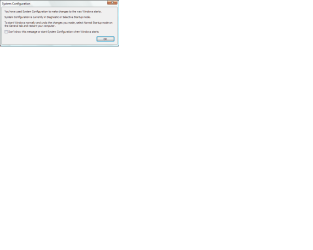
But now, every time I start my computer, I get this message.

I always check the box for "never show this message again", but it doesn't work.

Plz help, thanks!
 

Attachments
  • System Configuration.png
    System Configuration.png
    40.7 KB · Views: 20

My Computer

OS
N/A
Have you attempted resetting the configuration as suggested in the error message? What setting did you change in your msconfig?
 

My Computer

Computer type
Laptop
I just disabled some programs that started and some unnecessary services.
 

My Computer

OS
N/A
Yup, Windows boots awesome :D

I can't post screenshot, because the MSCONFIG window doesn't maximize, so not everything could be shown in the screenshot.

So, PROGRAMS.
Brother Status Monitor Application
ControlCenter

SERVICES
Remote Access Auto Connection Manager
Remote Access Connection Manager
Remote Registry
Smart Card
Smart Card Removal Policy
Windows Backup
Windows Defender
Parental Controls
Windows CardSpace
Tablet PC Input Service
ReadyBoost
 

My Computer

OS
N/A
From my first message, this is not my original rig, this is another rig of mine.
Custom built, completely installed by myself with NO crapware :D
 

My Computer

OS
N/A
Do these services and programs even make any difference with the startup performance?
 

My Computer

Computer type
Laptop
Not that noticeably, but the programs I've disabled used to keep nagging me at startup about how my printer was disconnected (I keep my printer off unless I use it).
 

My Computer

OS
N/A
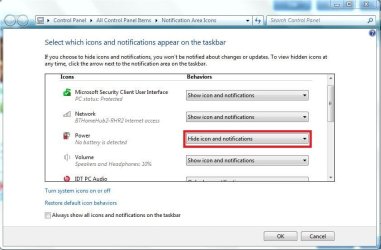
Then just hide the icon and notification, and it won't bother you anymore, just drop a post if you don't know how to hide notifications from the system tray.
 

My Computer

Computer type
Laptop
:(
I've tried hiding them, they just pop back up.
It's not the ICON I wanna hide, it's the MESSAGES and the POPUPS :D
 

My Computer

OS
N/A
Did you change the setting to this? (See Screenshot)
 

Attachments

  • Capture.JPG
    Capture.JPG
    108.2 KB · Views: 8

My Computer

Computer type
Laptop
I have Windows VISTA, not my original 7 rig.
I'm just temporarily using this computer until I can decrypt my Truecrypt-system-wide-encrypted hard drive and repair a corrupted part.
 

My Computer

OS
N/A
I know, but the settings should be the same or very similar to Windows 7, are you accessing the system tray?
 

My Computer

Computer type
Laptop
Yeah, but it doesn't work :P

I'd prefer it if you could help me find a solution to the MSCONFIG message instead of switching back to Normal boot mode T.T

Just my 2 cents :S

(And yes, I luv using emotes :P)
 

My Computer

OS
N/A
I've got one last idea, why don't you revert the settings back to the original in msconfig, and then use a third-program such as CCleaner (see my sig) to disable the start-up programs, then maybe you won't get the error message.

How to Disable Startup Programs in Windows - How-To Geek

The tutorial outlines how to disable the programs using CCleaner.

Hope this helps,

Harry
 

My Computer

Computer type
Laptop
Been there, done that :D
Well, at least it looks like the pop-up message doesn't appear anymore :)
Marking as solved.
 

My Computer

OS
N/A
Just a reminder.
I highly recommend not messing with Windows Services.
I'm curious what all these P S TT and what knots are.
 

My Computer

Computer type
PC/Desktop
Computer Manufacturer/Model Number
Home made Desktop
OS
Windows 10 Pro. 64/ version 1709 Windows 7 Pro/64
CPU
Intel i7-6800K @ 4.3
Motherboard
ASUS X-99 Deluxe II
Memory
Corsair Platinum 16 gig @2400
Graphics Card(s)
EVGA GTX 1070 OC
Monitor(s) Displays
Asus 27" LED LCD/VE278Q
Screen Resolution
1920-1080 or 1280-720 HDMI
Hard Drives
INTEL SSD 730-240 Gb Sata 3.0/
PSU
EVGA Platium 1200W
Case
Phanteks Luxe Tempered Glass 8 fans/ one radiator
Cooling
XSPC/ Water Cooled CPU
Keyboard
Das 4 Professional
Mouse
Logitech M705/MX Anywhere 2-S
Internet Speed
100 mbits
Antivirus
Microsoft Security Essentials/ Malwarebytes Premium 3.0/ SAS
Browser
I.E. 11 default/Firefox/ ISP Time Warner Cable/Spectrum
Other Info
LG BluRay Burner/
Sound system-KLipsch-THX/
Icy Dock ssd Hot Swap bays.
Back
Top