Solved Constant Windows Update Error 80070308

smcnally

New member
Local time
5:13 AM
Messages
4
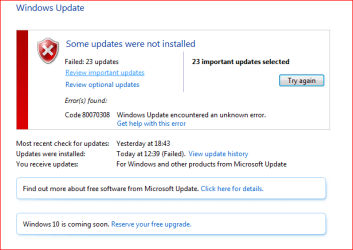
Everytime I try and load windows updates I get error message 80070308.

Now have 24 updates which cannot be loaded.

Also cannot download iTunes as I get the same 80070308 error message.

Tried to follow some of your previous threads recommendations without success.

Desperately need help as the Windows website is useless
 

My Computer

Computer type
PC/Desktop
Computer Manufacturer/Model Number
Acer Aspire 5750Z
OS
Windows 7 Home Premium

My Computer

Computer type
PC/Desktop
Computer Manufacturer/Model Number
Home made Desktop
OS
Windows 10 Pro. 64/ version 1709 Windows 7 Pro/64
CPU
Intel i7-6800K @ 4.3
Motherboard
ASUS X-99 Deluxe II
Memory
Corsair Platinum 16 gig @2400
Graphics Card(s)
EVGA GTX 1070 OC
Monitor(s) Displays
Asus 27" LED LCD/VE278Q
Screen Resolution
1920-1080 or 1280-720 HDMI
Hard Drives
INTEL SSD 730-240 Gb Sata 3.0/
PSU
EVGA Platium 1200W
Case
Phanteks Luxe Tempered Glass 8 fans/ one radiator
Cooling
XSPC/ Water Cooled CPU
Keyboard
Das 4 Professional
Mouse
Logitech M705/MX Anywhere 2-S
Internet Speed
100 mbits
Antivirus
Microsoft Security Essentials/ Malwarebytes Premium 3.0/ SAS
Browser
I.E. 11 default/Firefox/ ISP Time Warner Cable/Spectrum
Other Info
LG BluRay Burner/
Sound system-KLipsch-THX/
Icy Dock ssd Hot Swap bays.
Copy of screenshot showing error code after update failure and CBS log as requested
 

Attachments

  • Capture.PNG
    Capture.PNG
    12 KB · Views: 24

My Computer

Computer type
PC/Desktop
Computer Manufacturer/Model Number
Acer Aspire 5750Z
OS
Windows 7 Home Premium
...and the rest of the requested data?
 

My Computer

Computer type
Laptop
Computer Manufacturer/Model Number
Asus K52F or Lenovo B51-80
OS
Win 7 x64 Home Premium (and x86 VirtualBox VM)/Win10
CPU
i3 370M/i7 6500U
Motherboard
Asus/Lenovo
Memory
8GB - finally :)/8GB
Graphics Card(s)
it's an i3, dude!/dual Intel&nVidia
Sound Card
onboard
Monitor(s) Displays
15.6" built-in
Screen Resolution
1366x768/1920x1080
Hard Drives
750GB Seagate internal
Sundry external drives attached to other computers on the local network
1TB SSD on the Lenovo
PSU
n/a
Internet Speed
as much as I can get - usually on a dongle/phone, so <1MB/s
Antivirus
MSE/Defender
Browser
IE11/12/Edge/Chrome/FF(if I must)
1. Ran SURT - keeps downloading Hotfix for Windows (KB947821) but makes no difference
2. Ran SFC scan - makes some fixes but large number of fixes cannot be made
3. Windows Error Code - 80070308 always appears and updates fail - screenshot previously sent
4. Log Collection - zip copy previously enclosed in post
 

My Computer

Computer type
PC/Desktop
Computer Manufacturer/Model Number
Acer Aspire 5750Z
OS
Windows 7 Home Premium
That's only the CBS.log - we need the rest of the collected data as well.
 

My Computer

Computer type
Laptop
Computer Manufacturer/Model Number
Asus K52F or Lenovo B51-80
OS
Win 7 x64 Home Premium (and x86 VirtualBox VM)/Win10
CPU
i3 370M/i7 6500U
Motherboard
Asus/Lenovo
Memory
8GB - finally :)/8GB
Graphics Card(s)
it's an i3, dude!/dual Intel&nVidia
Sound Card
onboard
Monitor(s) Displays
15.6" built-in
Screen Resolution
1366x768/1920x1080
Hard Drives
750GB Seagate internal
Sundry external drives attached to other computers on the local network
1TB SSD on the Lenovo
PSU
n/a
Internet Speed
as much as I can get - usually on a dongle/phone, so <1MB/s
Antivirus
MSE/Defender
Browser
IE11/12/Edge/Chrome/FF(if I must)
The remaining errors in the SFC scan can be ignored - they will be fixed once you install the latest updates from MS.
CheckSUR is clear,

There is an error on the CBS log indicating a reboot is set - ant it appears not to be properly clearing.

Open an Elevated Command Prompt, and run the following commands


Code:
REG LOAD HKLM\COMPONENTS C:\Windows\System32\config\COMPONENTS
REG DELETE HKLM\COMPONENTS /V PendingRequired
 
.
then reboot, and try Windows Update again.
 

My Computer

Computer type
Laptop
Computer Manufacturer/Model Number
Asus K52F or Lenovo B51-80
OS
Win 7 x64 Home Premium (and x86 VirtualBox VM)/Win10
CPU
i3 370M/i7 6500U
Motherboard
Asus/Lenovo
Memory
8GB - finally :)/8GB
Graphics Card(s)
it's an i3, dude!/dual Intel&nVidia
Sound Card
onboard
Monitor(s) Displays
15.6" built-in
Screen Resolution
1366x768/1920x1080
Hard Drives
750GB Seagate internal
Sundry external drives attached to other computers on the local network
1TB SSD on the Lenovo
PSU
n/a
Internet Speed
as much as I can get - usually on a dongle/phone, so <1MB/s
Antivirus
MSE/Defender
Browser
IE11/12/Edge/Chrome/FF(if I must)
Back
Top