Context menu bloat

hethoofd

New member
Power User
Local time
6:59 AM
Messages
155
Are there more people that hate the Windows Explorer context menu bloat after you've installed a few programs like WinRAR and NOD32?

You can disable the program specific menu items most of the times, but the menu is huge anyway:

2vmeres.png


I removed the NOD32 items and I made the WinRAR items go into a submenu, so imagine how big that menu would have been with those items directly visible. Wait, let me post a picture of that:

201120x.png


It's HUGE!

I bet the menu could be a lot more compact :huh:
 

My Computer

Computer Manufacturer/Model Number
Dell Vostro 1510
OS
Windows 7 Build 7100 32-bit, Windows Vista 32-bit
CPU
Intel Core Duo T8100 2,1GHz
Memory
3GB
Graphics Card(s)
NVIDIA GeForce 8400M GS
Screen Resolution
1440x900
Hard Drives
250GB
Yes, I tend to agree, the context-menu is a bit out of hand, especially like you say once you install a few 3rd party apps that make use of it. I'd almost like a way to have two context menus, access one with a short right-click, access the other with a long right-click. That might be too confusing for the average user, but I know I could deal with it. And more importantly, I'd really like to see a way to customize the menu, easily. (not regedit)
 

My Computer

Computer Manufacturer/Model Number
Dell 8400
OS
Windows 7 Beta 1 b7000
CPU
Intel Pentium 4
Memory
4GB
Graphics Card(s)
ATI Radeon HD3450
Sound Card
Creative SoundBlaster Audigy 2
Monitor(s) Displays
Acer AL2016W
Screen Resolution
1680x1050
Hard Drives
1x500GB
1x100GB
Case
Dell 8400
Cooling
Standard
Keyboard
Dell Multimedia Keyboard
Mouse
Logitech MediaPlay
Internet Speed
Comcastic!
Yeah, two menus would be useful. Or, instead of the space taking seperators, they could use some different (light) colors to seperate things.
 

My Computer

Computer Manufacturer/Model Number
Dell Vostro 1510
OS
Windows 7 Build 7100 32-bit, Windows Vista 32-bit
CPU
Intel Core Duo T8100 2,1GHz
Memory
3GB
Graphics Card(s)
NVIDIA GeForce 8400M GS
Screen Resolution
1440x900
Hard Drives
250GB
favex4.png
 

My Computer

Computer Manufacturer/Model Number
Dell Vostro 1510
OS
Windows 7 Build 7100 32-bit, Windows Vista 32-bit
CPU
Intel Core Duo T8100 2,1GHz
Memory
3GB
Graphics Card(s)
NVIDIA GeForce 8400M GS
Screen Resolution
1440x900
Hard Drives
250GB
it's not that hard to control. both nod32 and winrar have options to remove and/or trim down the shell menu entries they add.

for other apps, and for windows itself, there are programs that help you turn things off. the best are ShellMenuView and ShellExView from NirSoft (just google it)

alternatively, a little registry magic will make your menus very tidy.

of course, i use Directory Opus which lets me customize the right-click menu of every filetype individually:

51rgk2.png


there are other apps out there for adding/moving/removing items from your context menus. have a search at lifehacker or ghacks and you'll find some nice freeware to help keep your menus under control...
 

My Computer

OS
7600 x86
CPU
Core 2 Duo e7200, 2.53 ghz
Motherboard
Micro-Star MS-7529
Memory
2x DDR2 PC5300 1gb, 667 mhz
Graphics Card(s)
GeForce 9500gt, 512mb
Monitor(s) Displays
22" LG Flatron w2234s
Screen Resolution
1680x1050
Hard Drives
Excelstor SATA-II 250gb 7200rpm, 8mb cache
PSU
CoolerMaster M520
Internet Speed
30/20 mbits
That doesn't solve the menu bloat for mainstream users. I don't see them going through NOD32s and WinRARs options and through all those registry settings. The fact that such measures exist indicate that the menus are just too bloated.
 

My Computer

Computer Manufacturer/Model Number
Dell Vostro 1510
OS
Windows 7 Build 7100 32-bit, Windows Vista 32-bit
CPU
Intel Core Duo T8100 2,1GHz
Memory
3GB
Graphics Card(s)
NVIDIA GeForce 8400M GS
Screen Resolution
1440x900
Hard Drives
250GB
Right, there are ways to do it, I'm not saying there aren't. I'd like to see it built in to Windows, however. Like something in the control panel or something similar.

hethoofd said:
hethoofd, I really like what you came up with there
 

My Computer

Computer Manufacturer/Model Number
Dell 8400
OS
Windows 7 Beta 1 b7000
CPU
Intel Pentium 4
Memory
4GB
Graphics Card(s)
ATI Radeon HD3450
Sound Card
Creative SoundBlaster Audigy 2
Monitor(s) Displays
Acer AL2016W
Screen Resolution
1680x1050
Hard Drives
1x500GB
1x100GB
Case
Dell 8400
Cooling
Standard
Keyboard
Dell Multimedia Keyboard
Mouse
Logitech MediaPlay
Internet Speed
Comcastic!
Right, there are ways to do it, I'm not saying there aren't. I'd like to see it built in to Windows, however. Like something in the control panel or something similar.


hethoofd, I really like what you came up with there
The colors looked a little lighter in Photoshop :p

Feel free to improve if you can think of something :)
 

My Computer

Computer Manufacturer/Model Number
Dell Vostro 1510
OS
Windows 7 Build 7100 32-bit, Windows Vista 32-bit
CPU
Intel Core Duo T8100 2,1GHz
Memory
3GB
Graphics Card(s)
NVIDIA GeForce 8400M GS
Screen Resolution
1440x900
Hard Drives
250GB
but seriously, it's only persnickety geeks like us that care about what our context menus look like. and we are capable of running apps or tweaking the registry to cut down the bloat.

chances are, the average user doesn't care one bit about what's in the menus. i bet most people don't even notice.
 

My Computer

OS
7600 x86
CPU
Core 2 Duo e7200, 2.53 ghz
Motherboard
Micro-Star MS-7529
Memory
2x DDR2 PC5300 1gb, 667 mhz
Graphics Card(s)
GeForce 9500gt, 512mb
Monitor(s) Displays
22" LG Flatron w2234s
Screen Resolution
1680x1050
Hard Drives
Excelstor SATA-II 250gb 7200rpm, 8mb cache
PSU
CoolerMaster M520
Internet Speed
30/20 mbits
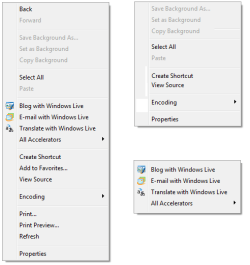
True, they probably don't notice, or even care if they do notice, but if Microsoft's all about trimming the UI and making Windows more usable, like they claim (and have largely accomplished with 7), then they should also work on cutting out extra bloat and extraneous functions. Not adding to it like they have with "Accelerators" ...

Take for example the browser's context menu. Do we really need Back, Forward, and Refresh there when they are A) easily accessible to begin with, B) most mice have back/forward buttons built in?

I'd prefer to see something like what I came up with real quickly below, where the left is the original context menu, and the right side represents what I'd like to achieve with a short right-click (the top half), and a long right-click (giving me the bottom half). Or even with mouse gestures. Right-click gets the top half, Right-click plus mouse movement (any direction?) gets the bottom half.
 

Attachments

  • context.png
    context.png
    8 KB · Views: 52

My Computer

Computer Manufacturer/Model Number
Dell 8400
OS
Windows 7 Beta 1 b7000
CPU
Intel Pentium 4
Memory
4GB
Graphics Card(s)
ATI Radeon HD3450
Sound Card
Creative SoundBlaster Audigy 2
Monitor(s) Displays
Acer AL2016W
Screen Resolution
1680x1050
Hard Drives
1x500GB
1x100GB
Case
Dell 8400
Cooling
Standard
Keyboard
Dell Multimedia Keyboard
Mouse
Logitech MediaPlay
Internet Speed
Comcastic!
Back
Top