Context Menu (Desktop) has no Aero/transparency effect?

ECH

Banned
Local time
7:58 PM
Messages
63
Like the title suggests, I've noticed that the context menu (the menu you see when you right click on desktop) offers no visual aero (or what other effects apply) visual effects. It looks similar to how XP look. Is there a way to enable such effect for the context menu?

Side note:
I've tried to Find and fix transparency and other visual effects but it found no problem.


image47.png

As you can see, the visual effects are the same as found in XP. Is there a hidden feature that enable this to look like the rest of your desktop? Or is there a feature I overlooked?
 

My Computer

OS
Win7
That looks normal to me. Have you seen a better one?
 

My Computer

Computer Manufacturer/Model Number
Custom
OS
Windows 7 Professional x64
CPU
Intel i7 2600K OC'd @ 4620 MHz
Motherboard
Asus P8Z68-V Pro
Memory
16GB GSkill Sniper 2133 Mhz (4x4GB)
Graphics Card(s)
EVGA GeForce GTX 480 SuperClocked+
Sound Card
Realtek High Definition Audio
Monitor(s) Displays
2x Acer S273HLbmii 27"
Screen Resolution
2 x 1920x1080
Hard Drives
64GB Crucial M4 SSD

Storage: Hitachi 1TB 5400RPM, Samsung 1.5TB 5400RPM
PSU
Corsair HW Series 750w (modular)
Case
Cooler Master HAF 932 Advanced Blue Edition
Cooling
CM Hyper 212+ CPU cooler, 3x 230mm + 1x 140mm case fans
Keyboard
Logitech MK320 (wireless)
Mouse
Logitech MK320 (wireless)
Internet Speed
30 Mb/s : 2 Mb/s
My post wasn't in regards if it was normal or not. Therefore, I cannot engage in that discussion. However, I did ask why there is no transparency or other Aero effects for the Context Menu. If you have any information regarding that I would be more then happy to read about it.
 

My Computer

OS
Win7
Because it doesn't...and never had...nor is it required to have... :huh:
 

My Computer

Computer type
PC/Desktop
Computer Manufacturer/Model Number
Alienware Aurora ALX R4
OS
Windows 10 Pro (x64)
CPU
Intel Core i7-3930K (3.2GHz - 4.5GHz)
Motherboard
Alienware Aurora-R4 x79
Memory
4x Samsung 4GB PC3-12800 DDR3 (16GB 1600MHz)
Graphics Card(s)
Nvidia Geforce GTX 690
Sound Card
SteelSeries Siberia Elite
Monitor(s) Displays
Dell UltraSharp U3011
Screen Resolution
2560x1600
Hard Drives
Samsung 850 Pro 256 GB, Seagate 1TB Desktop Hybrid HDD, 2x Western Digital 4TB Green HDD
PSU
875W Some Dell PSU <.<
Case
Alienware Aurora ALX
Cooling
Custom Liquid Cooling (EK CPU & GPU blocks) dual EK 480RAD
Keyboard
Logitech G710+ Mechanical
Mouse
Logitech G700s
Internet Speed
Verizon Fios (50 mbps average)
Other Info
Server: Intel NUC D54250WYK: i5-4250U, 16GB, 256 GB mSATA, Windows Server 2012 R2
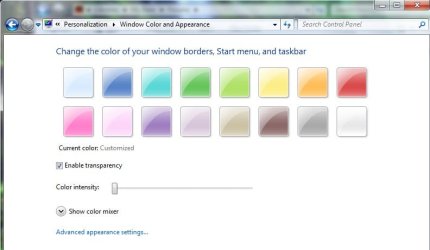
Is this what you're looking for?
 

Attachments

  • personal settings.jpg
    personal settings.jpg
    30.1 KB · Views: 98

My Computer

Computer type
PC/Desktop
Computer Manufacturer/Model Number
Bruce ... somewhere in his 40's
OS
Windows 7 Ultimate 32bit SP1
CPU
Intel(R) Core(TM)2 Quad CPU @ 2.40GHz, 2400 MHz
Motherboard
INTEL/D975XBX2
Memory
4 GB
Graphics Card(s)
ATI Radeon HD 2600 Pro
Monitor(s) Displays
Samsung SyncMaster 914v
Screen Resolution
1280 x 1024
Hard Drives
2/500GB each ... ST3500630AS ATA Device.
One is not connected
PSU
Rocketfish 700 W
Case
G.Skill Gigabyte Chassis
Keyboard
Standard PS/2 Keyboard
Mouse
Microsoft PS/2 Mouse
Internet Speed
DSL
Antivirus
Avira Internet Security
Browser
IE 11
Other Info
ATI HDMI Audio

My Computer

OS
Windows 7
CPU
Intel Core2Quad Q9400
Motherboard
Gigabyte P35-DS3
Memory
3GB Kingston DDR2
Graphics Card(s)
nVidia GForce 8600GT
Monitor(s) Displays
Samsung Syncmaster 2243NW
Screen Resolution
1680x1050 + 1440x900
Hard Drives
WD 640GB
WD 160GB
WB 80GB
Keyboard
Razer Tarantula
Mouse
Razer Lachesis
Internet Speed
2MB/s
Back
Top