
Context Menu -> Remove item (uninstalled program)

Burgurne

Danish Viking
Member
VIP
Local time
1:44 AM
Messages
134
Location
Denmark
Greetings.
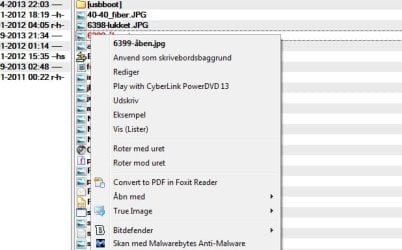
I had some time ago installed Cyberlinks PowerDVD, but not anymore. I have uninstalled it, clearet reg.database, temp-files aso, but I still get the choise to "Play with Cyberlink PowerDVD 13" when rightclick on a .jpg, .avi, .mpg and more.

How do I edit the context menu for media-files, so I don't have the PowerDVD option there anymore?

TIA
 

Attachments
  • menu.jpg
    menu.jpg
    110.5 KB · Views: 32
Last edited:

My Computer

Computer type
PC/Desktop
Computer Manufacturer/Model Number
homebrewed
OS
Windows 7 Ultimate x64 retail
CPU
Core i5 3570K @ 4,4Ghz
Motherboard
MSI Z77A GD65
Memory
16Gbyte Corsair C9 1866mhz
Graphics Card(s)
MSI Lightning GTX 770
Sound Card
Auzentech
Monitor(s) Displays
BenQ 24"
Screen Resolution
1920x1200
Hard Drives
Samsung 840 EVO SSD, Samsung SSD 830 256Gbyte, Seagate 3Tbyte HDD, WD 4 Tbyte HDD.
PSU
Zahlmann 850HP
Case
Corsair Carbide 500R
Keyboard
G15 logitech
Mouse
Logitech Laser MX1000
Internet Speed
60/60
Antivirus
Bitdefender
Browser
Chrome
Hello Burgurne,

The free program ShellMenuView may help make removing this context menu item easier.

Hope this helps, :)
Shawn
 

My Computer

Computer type
PC/Desktop
Computer Manufacturer/Model Number
Self built custom
OS
64-bit Windows 11 Pro for Workstations
CPU
Intel i7-8700K OC'd to 5 GHz
Motherboard
ASUS ROG Maximus XI Formula Z390
Memory
64 GB (4x16GB) G.SKILL TridentZ RGB DDR4 3600 MHz
Graphics Card(s)
ASUS ROG-STRIX-GTX1080TI-O11G-GAMING
Sound Card
Integrated
Monitor(s) Displays
2 x Samsung Odyssey G7 27"
Screen Resolution
2560x1440
Hard Drives
1TB Samsung 990 PRO M.2,
4TB Samsung 990 PRO PRO M.2,
TerraMaster F8 SSD Plus NAS
PSU
Seasonic Prime Titanium 850W
Case
Thermaltake Core P3
Cooling
Corsair Hydro H115i
Keyboard
Logitech wireless K800
Mouse
Logitech MX Master 4
Internet Speed
2 Gb/s Download and 100 Mb/s Upload
Antivirus
Malwarebyte Anti-Malware Premium
Browser
Google Chrome
Other Info
Logitech Z625 speaker system,
Logitech BRIO 4K Pro webcam,
HP Color LaserJet Pro MFP M477fdn,
APC SMART-UPS RT 1000 XL - SURT1000XLI,
Galaxy S23 Plus phone
Sorry, but no. ShellMenuView does not show anything related to PowerDVD or Cyberlink. It seems to show only the _default_ chosen programs for a specific filetype like .jpg.

If you look at the picture in post 0, you will see the problem in line 4 "Play with Cyberlink PowerDVD 13". If I go to "Open with ..." there is no PowerDVD there, only at line 4 of the first menu.
 

My Computer

Computer type
PC/Desktop
Computer Manufacturer/Model Number
homebrewed
OS
Windows 7 Ultimate x64 retail
CPU
Core i5 3570K @ 4,4Ghz
Motherboard
MSI Z77A GD65
Memory
16Gbyte Corsair C9 1866mhz
Graphics Card(s)
MSI Lightning GTX 770
Sound Card
Auzentech
Monitor(s) Displays
BenQ 24"
Screen Resolution
1920x1200
Hard Drives
Samsung 840 EVO SSD, Samsung SSD 830 256Gbyte, Seagate 3Tbyte HDD, WD 4 Tbyte HDD.
PSU
Zahlmann 850HP
Case
Corsair Carbide 500R
Keyboard
G15 logitech
Mouse
Logitech Laser MX1000
Internet Speed
60/60
Antivirus
Bitdefender
Browser
Chrome
Go ahead and export your .jpg and .jpegfile registry keys under HKEY_CLASSES_ROOT, and upload them here. I'll be happy to take a look at it to see what entry may be for this PowerDVD, and post back a .reg file or way to remove them. :)
 

My Computer

Computer type
PC/Desktop
Computer Manufacturer/Model Number
Self built custom
OS
64-bit Windows 11 Pro for Workstations
CPU
Intel i7-8700K OC'd to 5 GHz
Motherboard
ASUS ROG Maximus XI Formula Z390
Memory
64 GB (4x16GB) G.SKILL TridentZ RGB DDR4 3600 MHz
Graphics Card(s)
ASUS ROG-STRIX-GTX1080TI-O11G-GAMING
Sound Card
Integrated
Monitor(s) Displays
2 x Samsung Odyssey G7 27"
Screen Resolution
2560x1440
Hard Drives
1TB Samsung 990 PRO M.2,
4TB Samsung 990 PRO PRO M.2,
TerraMaster F8 SSD Plus NAS
PSU
Seasonic Prime Titanium 850W
Case
Thermaltake Core P3
Cooling
Corsair Hydro H115i
Keyboard
Logitech wireless K800
Mouse
Logitech MX Master 4
Internet Speed
2 Gb/s Download and 100 Mb/s Upload
Antivirus
Malwarebyte Anti-Malware Premium
Browser
Google Chrome
Other Info
Logitech Z625 speaker system,
Logitech BRIO 4K Pro webcam,
HP Color LaserJet Pro MFP M477fdn,
APC SMART-UPS RT 1000 XL - SURT1000XLI,
Galaxy S23 Plus phone
OK, here are .jpg and .jpeg from HKEY_CLASSES_ROOT

Thanks for your time :)
 

Attachments

My Computer

Computer type
PC/Desktop
Computer Manufacturer/Model Number
homebrewed
OS
Windows 7 Ultimate x64 retail
CPU
Core i5 3570K @ 4,4Ghz
Motherboard
MSI Z77A GD65
Memory
16Gbyte Corsair C9 1866mhz
Graphics Card(s)
MSI Lightning GTX 770
Sound Card
Auzentech
Monitor(s) Displays
BenQ 24"
Screen Resolution
1920x1200
Hard Drives
Samsung 840 EVO SSD, Samsung SSD 830 256Gbyte, Seagate 3Tbyte HDD, WD 4 Tbyte HDD.
PSU
Zahlmann 850HP
Case
Corsair Carbide 500R
Keyboard
G15 logitech
Mouse
Logitech Laser MX1000
Internet Speed
60/60
Antivirus
Bitdefender
Browser
Chrome
Not in those. I also need to see the jpegfile key that's listed down past the top list of file types. It'll most likely be in it. :)
 

My Computer

Computer type
PC/Desktop
Computer Manufacturer/Model Number
Self built custom
OS
64-bit Windows 11 Pro for Workstations
CPU
Intel i7-8700K OC'd to 5 GHz
Motherboard
ASUS ROG Maximus XI Formula Z390
Memory
64 GB (4x16GB) G.SKILL TridentZ RGB DDR4 3600 MHz
Graphics Card(s)
ASUS ROG-STRIX-GTX1080TI-O11G-GAMING
Sound Card
Integrated
Monitor(s) Displays
2 x Samsung Odyssey G7 27"
Screen Resolution
2560x1440
Hard Drives
1TB Samsung 990 PRO M.2,
4TB Samsung 990 PRO PRO M.2,
TerraMaster F8 SSD Plus NAS
PSU
Seasonic Prime Titanium 850W
Case
Thermaltake Core P3
Cooling
Corsair Hydro H115i
Keyboard
Logitech wireless K800
Mouse
Logitech MX Master 4
Internet Speed
2 Gb/s Download and 100 Mb/s Upload
Antivirus
Malwarebyte Anti-Malware Premium
Browser
Google Chrome
Other Info
Logitech Z625 speaker system,
Logitech BRIO 4K Pro webcam,
HP Color LaserJet Pro MFP M477fdn,
APC SMART-UPS RT 1000 XL - SURT1000XLI,
Galaxy S23 Plus phone
Maybe this one? :)
 

Attachments

My Computer

Computer type
PC/Desktop
Computer Manufacturer/Model Number
homebrewed
OS
Windows 7 Ultimate x64 retail
CPU
Core i5 3570K @ 4,4Ghz
Motherboard
MSI Z77A GD65
Memory
16Gbyte Corsair C9 1866mhz
Graphics Card(s)
MSI Lightning GTX 770
Sound Card
Auzentech
Monitor(s) Displays
BenQ 24"
Screen Resolution
1920x1200
Hard Drives
Samsung 840 EVO SSD, Samsung SSD 830 256Gbyte, Seagate 3Tbyte HDD, WD 4 Tbyte HDD.
PSU
Zahlmann 850HP
Case
Corsair Carbide 500R
Keyboard
G15 logitech
Mouse
Logitech Laser MX1000
Internet Speed
60/60
Antivirus
Bitdefender
Browser
Chrome

My Computer

Computer type
PC/Desktop
Computer Manufacturer/Model Number
Self built custom
OS
64-bit Windows 11 Pro for Workstations
CPU
Intel i7-8700K OC'd to 5 GHz
Motherboard
ASUS ROG Maximus XI Formula Z390
Memory
64 GB (4x16GB) G.SKILL TridentZ RGB DDR4 3600 MHz
Graphics Card(s)
ASUS ROG-STRIX-GTX1080TI-O11G-GAMING
Sound Card
Integrated
Monitor(s) Displays
2 x Samsung Odyssey G7 27"
Screen Resolution
2560x1440
Hard Drives
1TB Samsung 990 PRO M.2,
4TB Samsung 990 PRO PRO M.2,
TerraMaster F8 SSD Plus NAS
PSU
Seasonic Prime Titanium 850W
Case
Thermaltake Core P3
Cooling
Corsair Hydro H115i
Keyboard
Logitech wireless K800
Mouse
Logitech MX Master 4
Internet Speed
2 Gb/s Download and 100 Mb/s Upload
Antivirus
Malwarebyte Anti-Malware Premium
Browser
Google Chrome
Other Info
Logitech Z625 speaker system,
Logitech BRIO 4K Pro webcam,
HP Color LaserJet Pro MFP M477fdn,
APC SMART-UPS RT 1000 XL - SURT1000XLI,
Galaxy S23 Plus phone
Nope, nothing in it either.

As a test, download and merge the .reg file for each affected file extension with this in the tutorial below, restart the PC, then see if it's still there.

http://www.sevenforums.com/tutorials/19449-default-file-type-associations-restore.html

I have tried this now, but only for .jpg filetype as a test. This did not help. The "Play with "Cyberlink PowerDVD 13" is still there when I rightclick a .jpg-file.

Or do I have to do it with every single filetype for this to work? I don't know all media filetypes, that can be played with PowerDVD.

This is my last post for tonight. It is 4:40 am here, and I'm getting tired :sleepy:
But I will read your answer tomorrow :)
 

My Computer

Computer type
PC/Desktop
Computer Manufacturer/Model Number
homebrewed
OS
Windows 7 Ultimate x64 retail
CPU
Core i5 3570K @ 4,4Ghz
Motherboard
MSI Z77A GD65
Memory
16Gbyte Corsair C9 1866mhz
Graphics Card(s)
MSI Lightning GTX 770
Sound Card
Auzentech
Monitor(s) Displays
BenQ 24"
Screen Resolution
1920x1200
Hard Drives
Samsung 840 EVO SSD, Samsung SSD 830 256Gbyte, Seagate 3Tbyte HDD, WD 4 Tbyte HDD.
PSU
Zahlmann 850HP
Case
Corsair Carbide 500R
Keyboard
G15 logitech
Mouse
Logitech Laser MX1000
Internet Speed
60/60
Antivirus
Bitdefender
Browser
Chrome
Back
Top