
New Context Menu - Remove & Restore Default Menu Items

How to Remove and Restore the Default "New" Context Menu Items in Windows 7 and Windows 8


   Information
This will show you how to either remove or restore the default New context menu items in Windows 7 and Windows 8. These include the NEW - Folder, Shortcut, Bitmap image, Contact, Journal Document, Rich Text Document, Library, Text Document, Compressed (zipped) Folder, and Briefcase context menu items.

You must be logged in as an administrator to be able to do the steps in the tutorial below.

   Note
You will only have Folder available in the New context menu in the root directory of the C: drive, C:\Windows folder, C:\Program Files folder, C:\Program Files (x86) folder, and C:\Users folder.


EXAMPLE: "New" Context Menu
NOTE: You can only see this New context menu when you right click on a empty space on the desktop or on a empty space in a Windows Explorer window.
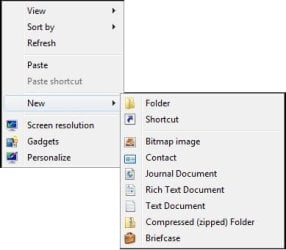
Default.jpg
EXAMPLE: "New" Context Menu in Ribbon
NOTE: This is only available in the Home tab in the Windows 8 File Explorer Ribbon.
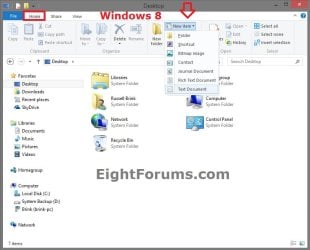
Windows-8.jpg
EXAMPLE: "New" Context Menu in Root Directory
NOTE: In the C: drive, C:\Program Files, C:\Program Files (x86), and C:\Windows root directory folders and all of their subfolders, you will only have New - Folder available.
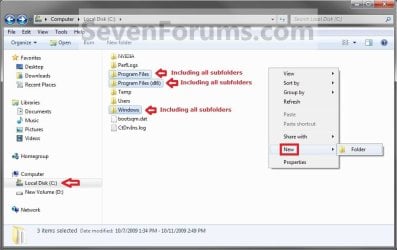
Root_Directory_New_Context_Menu.jpg
EXAMPLE: "New" Context Menu in Libraries
NOTE: In the Libraries folder, you will only have New - Library available. However, in the included folders in a library, you will still have the default New context menu items available.
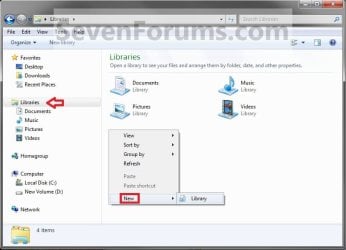
Libraries_New_Context_Menu.jpg


Here's How:
1. To Remove or Restore "Bitmap image"
A) Click/tap on the download button below to download the file below.
Bitmap_image_New_Context_Menu_Item.zip

Download


2. To Remove or Restore "Briefcase"
NOTE: This item is not in the "New" context menu in Windows 8 by default, but can be added with this step.
A) Click/tap on the download button below to download the below.
Briefcase_New_Context_Menu_Item.zip

Download


3. To Remove or Restore "Compressed (zipped) Folder"
A) Click/tap on the download button below to download the below.
Compressed_(zipped)_Folder_New_Context_Menu_Item.zip

Download


4. To Remove or Restore "Contact"
A) Click/tap on the download button below to download the below.
Contact_New_Context_Menu_Item.zip

Download


5. To Remove or Restore "Folder"
A) Click/tap on the download button below to download the below.
Folder_New_Context_Menu_Item.zip

Download


6. To Remove or Restore "Journal Document"
A) Click/tap on the download button below to download the below.
Journal_Document_New_Context_Menu_Item.zip

Download


7. To Remove or Restore "Library"
A) Click/tap on the download button below to download the below.
Library_New_Context_Menu_Item.zip

Download


8. To Remove or Restore "Rich Text Document"
A) Click/tap on the download button below to download the below.
NOTE: This is for a WordPad .rtf document file. If you have Office Word installed, then it may be set to be the default program instead of WordPad to open RTF files with and would remove Rich Text Document if so, and you may have Microsoft Word Document instead.
Rich_Text_Document_New_Context_Menu_Item.zip

Download


9. To Remove or Restore "Shortcut"
A) Click/tap on the download button below to download the below.
Shortcut_New_Context_Menu_Item.zip

Download


10. To Remove or Restore "Text Document"
A) Click/tap on the download button below to download the below.
Text_Document_New_Context_Menu_Item.zip

Download


11. Save the .zip file to the desktop.

12. Open the downloaded .zip file and extract (drag and drop) the .reg file (remove or restore) that you want to use to your desktop.

13. Double click/tap on the extracted .reg file to merge it.

14. When prompted, click/tap on Run, Yes (UAC), Yes, and OK to approve merging the .reg file.

15. You can now delete the downloaded ZIP and REG files if you like.

16. Sometimes it may take a moment before the missing New context menu item to reappear. If not, then restart the computer to apply.
That's it,
Shawn


Attachments

Last edited:
Well, other than a system restore...

You might check the programs' options to see if there's a setting to toggle off and on to add the context menu items back. If not, then either reinstalling the program to act as a repair install of the program, or uninstalling and reinstalling the program should add them back.
 

My Computer

Computer type
PC/Desktop
Computer Manufacturer/Model Number
Self built custom
OS
64-bit Windows 11 Pro for Workstations
CPU
Intel i7-8700K OC'd to 5 GHz
Motherboard
ASUS ROG Maximus XI Formula Z390
Memory
64 GB (4x16GB) G.SKILL TridentZ RGB DDR4 3600 MHz
Graphics Card(s)
ASUS ROG-STRIX-GTX1080TI-O11G-GAMING
Sound Card
Integrated
Monitor(s) Displays
2 x Samsung Odyssey G7 27"
Screen Resolution
2560x1440
Hard Drives
1TB Samsung 990 PRO M.2,
4TB Samsung 990 PRO PRO M.2,
TerraMaster F8 SSD Plus NAS
PSU
Seasonic Prime Titanium 850W
Case
Thermaltake Core P3
Cooling
Corsair Hydro H115i
Keyboard
Logitech wireless K800
Mouse
Logitech MX Master 4
Internet Speed
2 Gb/s Download and 100 Mb/s Upload
Antivirus
Malwarebyte Anti-Malware Premium
Browser
Google Chrome
Other Info
Logitech Z625 speaker system,
Logitech BRIO 4K Pro webcam,
HP Color LaserJet Pro MFP M477fdn,
APC SMART-UPS RT 1000 XL - SURT1000XLI,
Galaxy S23 Plus phone
Thanks Shawn. Well I decided your suggestion was much better than a system restore, so I started off by installing MagicISO again. I got a little distracted and all of a sudden it was 1am, so I hibernated my computer and went to bed. When I turned it on this morning everything was back to normal :party: I don't know what happened, or how it happened, but it did

Tom
 

My Computer

Computer type
PC/Desktop
Computer Manufacturer/Model Number
Build #1
OS
Windows 8.1 Pro x64
CPU
Intel i7 3770K @4.5GHz
Motherboard
ASUS P8Z77-V PRO
Memory
Corsair Vengeance 2x4GB DDR3 1600MHz Low Profile (White)
Graphics Card(s)
Gigabyte Radeon HD 7850 (2GB GDDR5)
Sound Card
Integrated on motherboard
Monitor(s) Displays
23" LG LCD/LED IPS
Screen Resolution
1920*1080
Hard Drives
Samsung EVO 128GB SSD
Seagate Barracuda 2GB 7200rpm
2x Seagate FreeAgent [500gb]
PSU
Corsair TX650W V2 (80+ Bronze)
Case
NZXT Phantom 410 White
Cooling
Corsair H100 Water Cooler
Keyboard
Microsoft Desktop 2000 Wireless Keyboard
Mouse
Microsoft Desktop 2000 Wireless Mouse
Internet Speed
95 Mb/s Download 70 Mb/s Upload
Antivirus
MSE + MBAM Pro
Browser
Firefox
That's great news Tom. I'm still not sure what may have caused it though since the tut should have only affected the "New" context menu items.
 

My Computer

Computer type
PC/Desktop
Computer Manufacturer/Model Number
Self built custom
OS
64-bit Windows 11 Pro for Workstations
CPU
Intel i7-8700K OC'd to 5 GHz
Motherboard
ASUS ROG Maximus XI Formula Z390
Memory
64 GB (4x16GB) G.SKILL TridentZ RGB DDR4 3600 MHz
Graphics Card(s)
ASUS ROG-STRIX-GTX1080TI-O11G-GAMING
Sound Card
Integrated
Monitor(s) Displays
2 x Samsung Odyssey G7 27"
Screen Resolution
2560x1440
Hard Drives
1TB Samsung 990 PRO M.2,
4TB Samsung 990 PRO PRO M.2,
TerraMaster F8 SSD Plus NAS
PSU
Seasonic Prime Titanium 850W
Case
Thermaltake Core P3
Cooling
Corsair Hydro H115i
Keyboard
Logitech wireless K800
Mouse
Logitech MX Master 4
Internet Speed
2 Gb/s Download and 100 Mb/s Upload
Antivirus
Malwarebyte Anti-Malware Premium
Browser
Google Chrome
Other Info
Logitech Z625 speaker system,
Logitech BRIO 4K Pro webcam,
HP Color LaserJet Pro MFP M477fdn,
APC SMART-UPS RT 1000 XL - SURT1000XLI,
Galaxy S23 Plus phone
Yes it does seem strange. Maybe it was just an incredible coincidence that something else went wrong at the same time then ;)

Tom
 

My Computer

Computer type
PC/Desktop
Computer Manufacturer/Model Number
Build #1
OS
Windows 8.1 Pro x64
CPU
Intel i7 3770K @4.5GHz
Motherboard
ASUS P8Z77-V PRO
Memory
Corsair Vengeance 2x4GB DDR3 1600MHz Low Profile (White)
Graphics Card(s)
Gigabyte Radeon HD 7850 (2GB GDDR5)
Sound Card
Integrated on motherboard
Monitor(s) Displays
23" LG LCD/LED IPS
Screen Resolution
1920*1080
Hard Drives
Samsung EVO 128GB SSD
Seagate Barracuda 2GB 7200rpm
2x Seagate FreeAgent [500gb]
PSU
Corsair TX650W V2 (80+ Bronze)
Case
NZXT Phantom 410 White
Cooling
Corsair H100 Water Cooler
Keyboard
Microsoft Desktop 2000 Wireless Keyboard
Mouse
Microsoft Desktop 2000 Wireless Mouse
Internet Speed
95 Mb/s Download 70 Mb/s Upload
Antivirus
MSE + MBAM Pro
Browser
Firefox
Maybe. :p
 

My Computer

Computer type
PC/Desktop
Computer Manufacturer/Model Number
Self built custom
OS
64-bit Windows 11 Pro for Workstations
CPU
Intel i7-8700K OC'd to 5 GHz
Motherboard
ASUS ROG Maximus XI Formula Z390
Memory
64 GB (4x16GB) G.SKILL TridentZ RGB DDR4 3600 MHz
Graphics Card(s)
ASUS ROG-STRIX-GTX1080TI-O11G-GAMING
Sound Card
Integrated
Monitor(s) Displays
2 x Samsung Odyssey G7 27"
Screen Resolution
2560x1440
Hard Drives
1TB Samsung 990 PRO M.2,
4TB Samsung 990 PRO PRO M.2,
TerraMaster F8 SSD Plus NAS
PSU
Seasonic Prime Titanium 850W
Case
Thermaltake Core P3
Cooling
Corsair Hydro H115i
Keyboard
Logitech wireless K800
Mouse
Logitech MX Master 4
Internet Speed
2 Gb/s Download and 100 Mb/s Upload
Antivirus
Malwarebyte Anti-Malware Premium
Browser
Google Chrome
Other Info
Logitech Z625 speaker system,
Logitech BRIO 4K Pro webcam,
HP Color LaserJet Pro MFP M477fdn,
APC SMART-UPS RT 1000 XL - SURT1000XLI,
Galaxy S23 Plus phone
I can only seem to get this to work during safe mode, once back on my admin account when I right click the desktop and go to new, I still only see Folder
 

My Computer

Computer Manufacturer/Model Number
Samsung RF511-S02UK
OS
Microsoft Windows 7 Home Premium 64-bit 7601 Multiprocessor Free Service Pack 1
CPU
Intel Core i5 2410M CPU @ 2.30GHz
Motherboard
SAMSUNG ELECTRONICS CO., LTD. RF511/RF411/RF711
Memory
6GB
Graphics Card(s)
(1) Intel(R) HD Graphics Family (2) NVIDIA GeForce GT 540M
Sound Card
(1) Realtek High Definition Audio (2) Bluetooth Hands-free
Screen Resolution
1366x768
Hard Drives
640GB
Other Info
15.6"
Hello Nicole,

What happens when you use the REG files in your administrator account?
 

My Computer

Computer type
PC/Desktop
Computer Manufacturer/Model Number
Self built custom
OS
64-bit Windows 11 Pro for Workstations
CPU
Intel i7-8700K OC'd to 5 GHz
Motherboard
ASUS ROG Maximus XI Formula Z390
Memory
64 GB (4x16GB) G.SKILL TridentZ RGB DDR4 3600 MHz
Graphics Card(s)
ASUS ROG-STRIX-GTX1080TI-O11G-GAMING
Sound Card
Integrated
Monitor(s) Displays
2 x Samsung Odyssey G7 27"
Screen Resolution
2560x1440
Hard Drives
1TB Samsung 990 PRO M.2,
4TB Samsung 990 PRO PRO M.2,
TerraMaster F8 SSD Plus NAS
PSU
Seasonic Prime Titanium 850W
Case
Thermaltake Core P3
Cooling
Corsair Hydro H115i
Keyboard
Logitech wireless K800
Mouse
Logitech MX Master 4
Internet Speed
2 Gb/s Download and 100 Mb/s Upload
Antivirus
Malwarebyte Anti-Malware Premium
Browser
Google Chrome
Other Info
Logitech Z625 speaker system,
Logitech BRIO 4K Pro webcam,
HP Color LaserJet Pro MFP M477fdn,
APC SMART-UPS RT 1000 XL - SURT1000XLI,
Galaxy S23 Plus phone
It says successfully added to the registry for them all but still nothing, even after a few attempts and restarts.
 

My Computer

Computer Manufacturer/Model Number
Samsung RF511-S02UK
OS
Microsoft Windows 7 Home Premium 64-bit 7601 Multiprocessor Free Service Pack 1
CPU
Intel Core i5 2410M CPU @ 2.30GHz
Motherboard
SAMSUNG ELECTRONICS CO., LTD. RF511/RF411/RF711
Memory
6GB
Graphics Card(s)
(1) Intel(R) HD Graphics Family (2) NVIDIA GeForce GT 540M
Sound Card
(1) Realtek High Definition Audio (2) Bluetooth Hands-free
Screen Resolution
1366x768
Hard Drives
640GB
Other Info
15.6"

My Computer

Computer type
PC/Desktop
Computer Manufacturer/Model Number
Self built custom
OS
64-bit Windows 11 Pro for Workstations
CPU
Intel i7-8700K OC'd to 5 GHz
Motherboard
ASUS ROG Maximus XI Formula Z390
Memory
64 GB (4x16GB) G.SKILL TridentZ RGB DDR4 3600 MHz
Graphics Card(s)
ASUS ROG-STRIX-GTX1080TI-O11G-GAMING
Sound Card
Integrated
Monitor(s) Displays
2 x Samsung Odyssey G7 27"
Screen Resolution
2560x1440
Hard Drives
1TB Samsung 990 PRO M.2,
4TB Samsung 990 PRO PRO M.2,
TerraMaster F8 SSD Plus NAS
PSU
Seasonic Prime Titanium 850W
Case
Thermaltake Core P3
Cooling
Corsair Hydro H115i
Keyboard
Logitech wireless K800
Mouse
Logitech MX Master 4
Internet Speed
2 Gb/s Download and 100 Mb/s Upload
Antivirus
Malwarebyte Anti-Malware Premium
Browser
Google Chrome
Other Info
Logitech Z625 speaker system,
Logitech BRIO 4K Pro webcam,
HP Color LaserJet Pro MFP M477fdn,
APC SMART-UPS RT 1000 XL - SURT1000XLI,
Galaxy S23 Plus phone
I followed that and merged what you said however contact and jnt wouldn't merge. It hasn't changed the menu items problem though.
 

My Computer

Computer Manufacturer/Model Number
Samsung RF511-S02UK
OS
Microsoft Windows 7 Home Premium 64-bit 7601 Multiprocessor Free Service Pack 1
CPU
Intel Core i5 2410M CPU @ 2.30GHz
Motherboard
SAMSUNG ELECTRONICS CO., LTD. RF511/RF411/RF711
Memory
6GB
Graphics Card(s)
(1) Intel(R) HD Graphics Family (2) NVIDIA GeForce GT 540M
Sound Card
(1) Realtek High Definition Audio (2) Bluetooth Hands-free
Screen Resolution
1366x768
Hard Drives
640GB
Other Info
15.6"
As a test, create a new administrator account to see how the New context menu works while logged on to it.

If it still does not work, then you could try doing a system restore using a restore point dated before this started to hopefully undo and fix it.
 

My Computer

Computer type
PC/Desktop
Computer Manufacturer/Model Number
Self built custom
OS
64-bit Windows 11 Pro for Workstations
CPU
Intel i7-8700K OC'd to 5 GHz
Motherboard
ASUS ROG Maximus XI Formula Z390
Memory
64 GB (4x16GB) G.SKILL TridentZ RGB DDR4 3600 MHz
Graphics Card(s)
ASUS ROG-STRIX-GTX1080TI-O11G-GAMING
Sound Card
Integrated
Monitor(s) Displays
2 x Samsung Odyssey G7 27"
Screen Resolution
2560x1440
Hard Drives
1TB Samsung 990 PRO M.2,
4TB Samsung 990 PRO PRO M.2,
TerraMaster F8 SSD Plus NAS
PSU
Seasonic Prime Titanium 850W
Case
Thermaltake Core P3
Cooling
Corsair Hydro H115i
Keyboard
Logitech wireless K800
Mouse
Logitech MX Master 4
Internet Speed
2 Gb/s Download and 100 Mb/s Upload
Antivirus
Malwarebyte Anti-Malware Premium
Browser
Google Chrome
Other Info
Logitech Z625 speaker system,
Logitech BRIO 4K Pro webcam,
HP Color LaserJet Pro MFP M477fdn,
APC SMART-UPS RT 1000 XL - SURT1000XLI,
Galaxy S23 Plus phone
The system restore worked, thank you :)
 

My Computer

Computer Manufacturer/Model Number
Samsung RF511-S02UK
OS
Microsoft Windows 7 Home Premium 64-bit 7601 Multiprocessor Free Service Pack 1
CPU
Intel Core i5 2410M CPU @ 2.30GHz
Motherboard
SAMSUNG ELECTRONICS CO., LTD. RF511/RF411/RF711
Memory
6GB
Graphics Card(s)
(1) Intel(R) HD Graphics Family (2) NVIDIA GeForce GT 540M
Sound Card
(1) Realtek High Definition Audio (2) Bluetooth Hands-free
Screen Resolution
1366x768
Hard Drives
640GB
Other Info
15.6"
You're most welcome Nicole. I'm happy to hear that you got it sorted. :)
 

My Computer

Computer type
PC/Desktop
Computer Manufacturer/Model Number
Self built custom
OS
64-bit Windows 11 Pro for Workstations
CPU
Intel i7-8700K OC'd to 5 GHz
Motherboard
ASUS ROG Maximus XI Formula Z390
Memory
64 GB (4x16GB) G.SKILL TridentZ RGB DDR4 3600 MHz
Graphics Card(s)
ASUS ROG-STRIX-GTX1080TI-O11G-GAMING
Sound Card
Integrated
Monitor(s) Displays
2 x Samsung Odyssey G7 27"
Screen Resolution
2560x1440
Hard Drives
1TB Samsung 990 PRO M.2,
4TB Samsung 990 PRO PRO M.2,
TerraMaster F8 SSD Plus NAS
PSU
Seasonic Prime Titanium 850W
Case
Thermaltake Core P3
Cooling
Corsair Hydro H115i
Keyboard
Logitech wireless K800
Mouse
Logitech MX Master 4
Internet Speed
2 Gb/s Download and 100 Mb/s Upload
Antivirus
Malwarebyte Anti-Malware Premium
Browser
Google Chrome
Other Info
Logitech Z625 speaker system,
Logitech BRIO 4K Pro webcam,
HP Color LaserJet Pro MFP M477fdn,
APC SMART-UPS RT 1000 XL - SURT1000XLI,
Galaxy S23 Plus phone
This worked for me!

Thanks Shawn. I dealt with this problem for months. There were work-a-rounds but now resolution.

I had to actually "remove" the default menu first and then "restore" it. That's probably what the instructions said to do in the first place...right?

Thanks again.

Gramps98
 

My Computer

OS
Windows 7 Professional x64
Hello Gramps, and welcome to Seven Forums.

Im happy to hear that you got it sorted. Normally, you would only need to remove it first if it wasn't working by just adding it. :)
 

My Computer

Computer type
PC/Desktop
Computer Manufacturer/Model Number
Self built custom
OS
64-bit Windows 11 Pro for Workstations
CPU
Intel i7-8700K OC'd to 5 GHz
Motherboard
ASUS ROG Maximus XI Formula Z390
Memory
64 GB (4x16GB) G.SKILL TridentZ RGB DDR4 3600 MHz
Graphics Card(s)
ASUS ROG-STRIX-GTX1080TI-O11G-GAMING
Sound Card
Integrated
Monitor(s) Displays
2 x Samsung Odyssey G7 27"
Screen Resolution
2560x1440
Hard Drives
1TB Samsung 990 PRO M.2,
4TB Samsung 990 PRO PRO M.2,
TerraMaster F8 SSD Plus NAS
PSU
Seasonic Prime Titanium 850W
Case
Thermaltake Core P3
Cooling
Corsair Hydro H115i
Keyboard
Logitech wireless K800
Mouse
Logitech MX Master 4
Internet Speed
2 Gb/s Download and 100 Mb/s Upload
Antivirus
Malwarebyte Anti-Malware Premium
Browser
Google Chrome
Other Info
Logitech Z625 speaker system,
Logitech BRIO 4K Pro webcam,
HP Color LaserJet Pro MFP M477fdn,
APC SMART-UPS RT 1000 XL - SURT1000XLI,
Galaxy S23 Plus phone
Hi, this helped a lot. I was able to restore my Notepad link in the context menu. :thumbsup:
 

My Computer

Computer type
PC/Desktop
Computer Manufacturer/Model Number
Custom Build
OS
Windows 7 Ultimate x64
CPU
AMD Phenom II X4 B60
Motherboard
ASUS M4N68T-M-LE-V2
Memory
8 GB DDR3
Graphics Card(s)
NVIDIA GeForce 210
Sound Card
Creative Audigy SE
Monitor(s) Displays
DELL S2240L
Screen Resolution
1920 x 1080
Hard Drives
Seagate 250 GB
Keyboard
iball Powerkey Designer
Mouse
Genius NetScroll 120
Antivirus
Avira Free
Browser
Chrome, Firefox, IE
Windows 7 Fodlers

This fix for restoring folders worked perfectly! Thank you!
 

My Computer

Computer type
Laptop
Computer Manufacturer/Model Number
Asus
OS
windows 7
Thanks a lot Brink! This helped me fix the "can't create new folder" on my father's laptop. :)
 

My Computer

Computer type
PC/Desktop
OS
Windows 7
Back
Top