Context Menu - Right Click vs Shift Right Click

How to Expand the Windows 7 Context Menu for More Options

   Information
This will show you how to expand the Windows 7 context menu to see more available options to select from for a file, folder, desktop, Windows Explorer root window, Windows Explorer window, and the Send To menu.


Here's How:


   Note

  • Default Context Menu (Left screenshots below)
    • Right click on item.
  • Expanded Context Menu (Right screenshots below)
    • Press Shift and hold while right clicking on item.
    • Select the item, and press Shift + Menu button on keyboard (if available)
      NOTE: Sometimes you may also need to press the FN (function) key along with the Menu button.
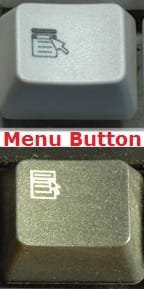
Menu-button.jpg

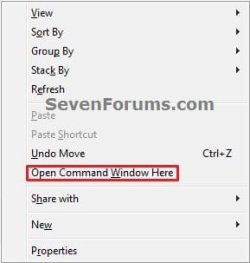
1. Desktop Context Menu
Desktop.jpgDesktop-Shift.jpg
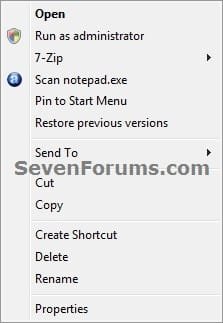
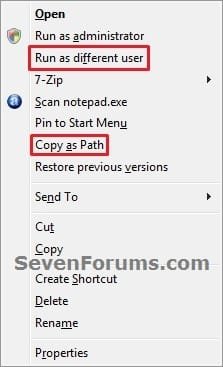
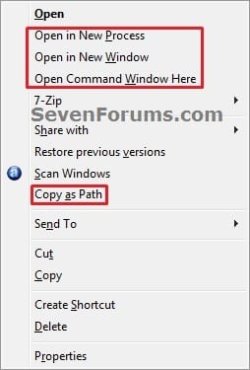
2. File Context Menu
File_Right_Click.jpgFile_Shift_Right_Click.jpg
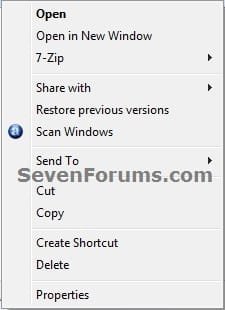
3. Folder Context Menu
Folder_Right_Click.jpgFolder_Shift_Right_Click.jpg
4. Windows Explorer Root Window Context Menu
Windows-Explorer-1_Right_Click.jpgWindows-Explorer-1_Shift_Right_Click.jpg
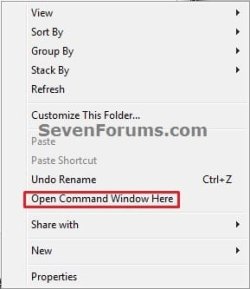
5. Windows Explorer Window Context Menu
Windows-Explorer-2_Right_Click.jpgWindows-Explorer-2_Shift_Right_Click.jpg
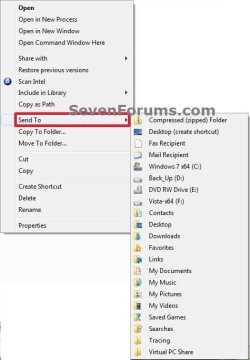
6. File or Folder "Send To" Context Menu
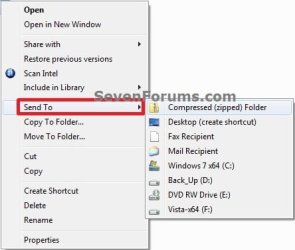
Send_To.jpgSend_To_Shift.jpg
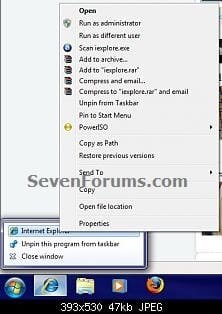
7. Taskbar Icon Context Menu
NOTE: This addition by Mr GRiM.
Right Click:
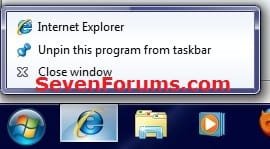
Normal.jpgnormal_2.jpg

Shift + Right Click or Shift + Menu button
Shift.jpgShift_2.jpg

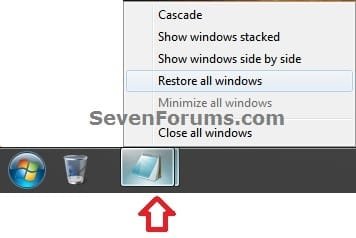
Grouped_Taskbar_Icon.jpg


Last edited:
Hey Shawn

I wonder if there's a way to make this behaviour the default one...instead of having to hold the Shift key and right click, just right click for the expanded context menu. I'll have to look thru the contextmenuhandlers an see if this can be accomplished.
 

My Computer

Computer Manufacturer/Model Number
Personal Build
OS
Vista Ult 64bit - Windows 7 Ult 7264 64bit
CPU
Intel Core 2 Duo E6750
Motherboard
Asus Commando
Memory
4 G's Crucial Ballistix Tracer
Graphics Card(s)
BFG Nvidia 8800 GTS 340
Sound Card
Creative Sound Blaster X-FI Platinum FATAL1TY
Monitor(s) Displays
2-22" HP W2207 LCD
Screen Resolution
1920 x 1080
Hard Drives
3 x 500G WD Caviar SATA II
PSU
Enermax Noise Taker II 600W
Case
NZXT Lexa Classic (dual doored & windowed)
Cooling
Zalman 9700 CPU cooler - 4 x 120mm, 1 x 90mm fans
Keyboard
Logitech MX 5500
Mouse
Logitech MX Revolution
Internet Speed
Blazing...
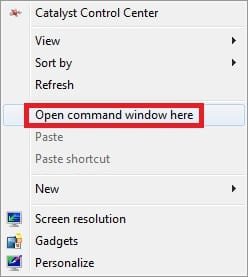
Here are some more extras when using Shift + Right Click

Without Shift

With Shift
 
Last edited by a moderator:

My Computer

Computer Manufacturer/Model Number
Home Brew
OS
Windows 7 Ultimate Vista Ultimate x64
CPU
Core 2 Duo E8500 3.16Ghz @ 3.8Ghz
Motherboard
eVGA 750i FTW
Memory
2x2Gigs Patriot PC2-6400 LL
Graphics Card(s)
Inno3D GeForce GTX260 216 SP
Monitor(s) Displays
ASUS VW222U 22" 2ms Response time
Screen Resolution
1680x1050
Hard Drives
SATA 150GB
SATA II 250GB
USB IDE 750GB Ext.
PSU
HYTEC 600W & Thermaltake 650W Toughpower Power Exp
Case
Thermaltake Armor LCS (Liquid Cooling System)
Cooling
Liquid Cooling System
Keyboard
Logitech G15 Gaming Keyboard
Mouse
Logitech G9 Gaming Mouse
Thank you Mr GRiM.

Added. ;)
 

My Computer

Computer type
PC/Desktop
Computer Manufacturer/Model Number
Self built custom
OS
64-bit Windows 11 Pro for Workstations
CPU
Intel i7-8700K OC'd to 5 GHz
Motherboard
ASUS ROG Maximus XI Formula Z390
Memory
64 GB (4x16GB) G.SKILL TridentZ RGB DDR4 3600 MHz
Graphics Card(s)
ASUS ROG-STRIX-GTX1080TI-O11G-GAMING
Sound Card
Integrated
Monitor(s) Displays
2 x Samsung Odyssey G7 27"
Screen Resolution
2560x1440
Hard Drives
1TB Samsung 990 PRO M.2,
4TB Samsung 990 PRO PRO M.2,
TerraMaster F8 SSD Plus NAS
PSU
Seasonic Prime Titanium 850W
Case
Thermaltake Core P3
Cooling
Corsair Hydro H115i
Keyboard
Logitech wireless K800
Mouse
Logitech MX Master 4
Internet Speed
2 Gb/s Download and 100 Mb/s Upload
Antivirus
Malwarebyte Anti-Malware Premium
Browser
Google Chrome
Other Info
Logitech Z625 speaker system,
Logitech BRIO 4K Pro webcam,
HP Color LaserJet Pro MFP M477fdn,
APC SMART-UPS RT 1000 XL - SURT1000XLI,
Galaxy S23 Plus phone
Your welcome Shawn.
 

My Computer

Computer Manufacturer/Model Number
Home Brew
OS
Windows 7 Ultimate Vista Ultimate x64
CPU
Core 2 Duo E8500 3.16Ghz @ 3.8Ghz
Motherboard
eVGA 750i FTW
Memory
2x2Gigs Patriot PC2-6400 LL
Graphics Card(s)
Inno3D GeForce GTX260 216 SP
Monitor(s) Displays
ASUS VW222U 22" 2ms Response time
Screen Resolution
1680x1050
Hard Drives
SATA 150GB
SATA II 250GB
USB IDE 750GB Ext.
PSU
HYTEC 600W & Thermaltake 650W Toughpower Power Exp
Case
Thermaltake Armor LCS (Liquid Cooling System)
Cooling
Liquid Cooling System
Keyboard
Logitech G15 Gaming Keyboard
Mouse
Logitech G9 Gaming Mouse
Send To - Reveal All Hidden User Folders

Right click on a file and hover over Send To.You will see a limited number of available locations to Send To. Repeat while holding down the shift key. Now you will see all available locations revealed.​


That's it.
Limneos
 
Last edited by a moderator:

My Computer

Computer Manufacturer/Model Number
ENIAC
OS
Windows 7 RC 7100 32bit/64bit
CPU
Intel Core2Duo E4500 2.20 GHz
Motherboard
ASUS P5LD2-X/1333
Memory
2x1GB Kinsgston DDR2 800MHz
Graphics Card(s)
Nvidia 8500GT
Sound Card
Onboard High Definition Audio Device
Monitor(s) Displays
Sony Bravia 42"
Case
LINKW 2222
Cooling
Standard Intel
Keyboard
Some cheap one
Mouse
Microsoft Intellimouse something
Internet Speed
24MBps ADSL
This is a good one! Nice find Limneos. ;)
 

My Computer

Computer Manufacturer/Model Number
Custom Build
OS
Windows 7 Build 7048 x64
CPU
Athlon 64 X2 Dual Core 4600+
Motherboard
EMX-AMD750G-PRO
Memory
4 x 1GB Kingston 400MHz 6-6-6-18 (800MHz)
Graphics Card(s)
ATI Radeon 3650
Sound Card
Realtek HD Audio
Monitor(s) Displays
22" AOC 2216Vw
Screen Resolution
1680x1050
Cooling
Arctic Cooling Freezer 64 Pro PWM
Keyboard
Generic Enhanced Natural Keyboard
Mouse
Logitech VX Nano
Other Info
Edifier M1550
Limneos,

Thank you for the addition. It has been added. :)
 

My Computer

Computer type
PC/Desktop
Computer Manufacturer/Model Number
Self built custom
OS
64-bit Windows 11 Pro for Workstations
CPU
Intel i7-8700K OC'd to 5 GHz
Motherboard
ASUS ROG Maximus XI Formula Z390
Memory
64 GB (4x16GB) G.SKILL TridentZ RGB DDR4 3600 MHz
Graphics Card(s)
ASUS ROG-STRIX-GTX1080TI-O11G-GAMING
Sound Card
Integrated
Monitor(s) Displays
2 x Samsung Odyssey G7 27"
Screen Resolution
2560x1440
Hard Drives
1TB Samsung 990 PRO M.2,
4TB Samsung 990 PRO PRO M.2,
TerraMaster F8 SSD Plus NAS
PSU
Seasonic Prime Titanium 850W
Case
Thermaltake Core P3
Cooling
Corsair Hydro H115i
Keyboard
Logitech wireless K800
Mouse
Logitech MX Master 4
Internet Speed
2 Gb/s Download and 100 Mb/s Upload
Antivirus
Malwarebyte Anti-Malware Premium
Browser
Google Chrome
Other Info
Logitech Z625 speaker system,
Logitech BRIO 4K Pro webcam,
HP Color LaserJet Pro MFP M477fdn,
APC SMART-UPS RT 1000 XL - SURT1000XLI,
Galaxy S23 Plus phone
Your welcome, Shawn!

Since it's embedded here, I would like to add that if you type in start -> search: shell:sendto , it opens the SendTo folder without having to navigate to the whole path
(C:\Users\youruser name\AppData\Roaming\Microsoft\Windows\SendTo) , where you can drag and drop or paste new shortcuts for the SendTo menu.

Cheers
 
Last edited by a moderator:

My Computer

Computer Manufacturer/Model Number
ENIAC
OS
Windows 7 RC 7100 32bit/64bit
CPU
Intel Core2Duo E4500 2.20 GHz
Motherboard
ASUS P5LD2-X/1333
Memory
2x1GB Kinsgston DDR2 800MHz
Graphics Card(s)
Nvidia 8500GT
Sound Card
Onboard High Definition Audio Device
Monitor(s) Displays
Sony Bravia 42"
Case
LINKW 2222
Cooling
Standard Intel
Keyboard
Some cheap one
Mouse
Microsoft Intellimouse something
Internet Speed
24MBps ADSL
I wonder if there's a way to make this behaviour the default one...instead of having to hold the Shift key and right click, just right click for the expanded context menu. I'll have to look thru the contextmenuhandlers an see if this can be accomplished.
Yes, find in the registry the one you always want to show, in the right hand pane, delete the string value "Extended"
 

My Computer

Computer Manufacturer/Model Number
Averatec 6130HS-20
OS
Windows 7 Professional 32-bit (6.1, Build 7600)
CPU
Intel(R) Pentium(R) 4 3.00 GHz HT
Memory
2.0 GB
Graphics Card(s)
ATI Mobility Radeon 9600 64MB
Sound Card
Realtek AC'97 Audio
Screen Resolution
1280 x 800
Hard Drives
Seagate 96023A 60GB 7200RPM -
Seagate FreeAgentDesktop 250GB
Cooling
20 Inch Box Fan
Mouse
Targus PAWM10 Wireless Optical Laptop Mouse
I wonder if there's a way to make this behaviour the default one...instead of having to hold the Shift key and right click, just right click for the expanded context menu. I'll have to look thru the contextmenuhandlers an see if this can be accomplished.
Yes, find in the registry the one you always want to show, in the right hand pane, delete the string value "Extended"

Hey! I'm not very familiar with the registry (at least not enough to browse it and find stuff), but I wouldn't mind having the right-click on open windows in my taskbar to be default 'shifted'. Where can I find the taskbar 'Extended' in the registry? Thanks.
 

My Computer

OS
Vista and Seven
I'm sorry if this has been answered in another thread but I haven't seen a solution anywhere.

1) Is there a way to have the right-click context menu pop up where you right click instead of always above the program?

2) If not, is there a way to permanently enable the shift + right click behavior for the Win7 taskbar without having to hold shift down? I find the location of the new context menus to be annoying. I like the old way where the menu would pop up where I right click and not always in the same spot above the taskbar.
 

My Computer

Computer Manufacturer/Model Number
Self built
OS
Win7 HP x64
CPU
Intel i7 920 @ 4GHz
Motherboard
Asus P6T Delux
Memory
6GB OCZ DDR3
Graphics Card(s)
HD4870 1GB
Sound Card
On board
Monitor(s) Displays
24" BenQ
Hard Drives
2x WD640
1x WD 1TB
PSU
Corsair 850w
Case
Cosmos
Cooling
H50 liquid cooling
Thanks

Thanks Greg S. This was the only thing that was driving me nuts with Windows 7. Now it is perfect! I am a programmer and work a lot in the CMD window!

Happy New Year to you and everyone else! Be Safe!!
 

My Computer

OS
XP and Win 7
I wonder if there's a way to make this behaviour the default one...instead of having to hold the Shift key and right click, just right click for the expanded context menu. I'll have to look thru the contextmenuhandlers an see if this can be accomplished.
Yes, find in the registry the one you always want to show, in the right hand pane, delete the string value "Extended"

Hey! I'm not very familiar with the registry (at least not enough to browse it and find stuff), but I wouldn't mind having the right-click on open windows in my taskbar to be default 'shifted'. Where can I find the taskbar 'Extended' in the registry? Thanks.

Thanks Greg S. This was the only thing that was driving me nuts with Windows 7. Now it is perfect! I am a programmer and work a lot in the CMD window!

Happy New Year to you and everyone else! Be Safe!!


Hey dude, as I mentioned earlier, I'm not familiar enough with the registry to find my own solution. Can you help me? Where is the string value "Extended" located?

Happy 2010!
 

My Computer

OS
Vista and Seven
Yes, find in the registry the one you always want to show, in the right hand pane, delete the string value "Extended"

Hey! I'm not very familiar with the registry (at least not enough to browse it and find stuff), but I wouldn't mind having the right-click on open windows in my taskbar to be default 'shifted'. Where can I find the taskbar 'Extended' in the registry? Thanks.

Thanks Greg S. This was the only thing that was driving me nuts with Windows 7. Now it is perfect! I am a programmer and work a lot in the CMD window!

Happy New Year to you and everyone else! Be Safe!!


Hey dude, as I mentioned earlier, I'm not familiar enough with the registry to find my own solution. Can you help me? Where is the string value "Extended" located?

Happy 2010!
I'm not in Win 7 at the moment. I've searched for something that might make it easier for you. Have a look at this brief outline on ShellMenuView
Access and Customize Windows 7's Extended Context Menu - TechSpot
lol, I'm glad I searched that for you because I've used ShellMenuView before and never noticed the extended menu part of it.
 

My Computer

Computer Manufacturer/Model Number
Averatec 6130HS-20
OS
Windows 7 Professional 32-bit (6.1, Build 7600)
CPU
Intel(R) Pentium(R) 4 3.00 GHz HT
Memory
2.0 GB
Graphics Card(s)
ATI Mobility Radeon 9600 64MB
Sound Card
Realtek AC'97 Audio
Screen Resolution
1280 x 800
Hard Drives
Seagate 96023A 60GB 7200RPM -
Seagate FreeAgentDesktop 250GB
Cooling
20 Inch Box Fan
Mouse
Targus PAWM10 Wireless Optical Laptop Mouse
This is a good one! Nice find Limneos.
wink.gif
 

My Computer

OS
江苏省
As usual, nice work Brink. :)

I knew about the command window trick, but I didn't realise that there were so many other hidden options.
 

My Computer

Computer type
PC/Desktop
Computer Manufacturer/Model Number
n/a
OS
W7 Ultimate SP1, LM19.2 MATE, W10 Home 1703, W10 Pro 1703 VM, #All 64 bit
CPU
AMD Phenom II x6 1100T, 3.3 GHz
Motherboard
ASUS M4A88T-M/USB3 (AM3)
Memory
12GB DDR3 1333 G-Skill (4GB x 2), G-Skill (2GB x 2)
Graphics Card(s)
NVIDIA GeForce GTX 660
Sound Card
Realtek?
Monitor(s) Displays
Samsung S23B350
Screen Resolution
1920x1080
Hard Drives
WD Green 2TB (SATA), WD Green 3TB (SATA), WD Blue 4TB (SATA), WD Blue 6TB (SATA)
PSU
Cooler Master
Case
Antec GX300 Tower
Cooling
3x Antec TRICOOL 120mm Fans
Mouse
Wired Optical
Internet Speed
DSL
Antivirus
Avast
Browser
Pale Moon (64 bit)
Other Info
2018-12-27 Upgraded HDDs
2015-12-10 Upgraded case, graphics card, storage
2015-08-15 Upgraded motherboard & RAM
2015-07-15 Upgraded LM17.1 to LM17.2
Thank you Lehnerus. :)
 

My Computer

Computer type
PC/Desktop
Computer Manufacturer/Model Number
Self built custom
OS
64-bit Windows 11 Pro for Workstations
CPU
Intel i7-8700K OC'd to 5 GHz
Motherboard
ASUS ROG Maximus XI Formula Z390
Memory
64 GB (4x16GB) G.SKILL TridentZ RGB DDR4 3600 MHz
Graphics Card(s)
ASUS ROG-STRIX-GTX1080TI-O11G-GAMING
Sound Card
Integrated
Monitor(s) Displays
2 x Samsung Odyssey G7 27"
Screen Resolution
2560x1440
Hard Drives
1TB Samsung 990 PRO M.2,
4TB Samsung 990 PRO PRO M.2,
TerraMaster F8 SSD Plus NAS
PSU
Seasonic Prime Titanium 850W
Case
Thermaltake Core P3
Cooling
Corsair Hydro H115i
Keyboard
Logitech wireless K800
Mouse
Logitech MX Master 4
Internet Speed
2 Gb/s Download and 100 Mb/s Upload
Antivirus
Malwarebyte Anti-Malware Premium
Browser
Google Chrome
Other Info
Logitech Z625 speaker system,
Logitech BRIO 4K Pro webcam,
HP Color LaserJet Pro MFP M477fdn,
APC SMART-UPS RT 1000 XL - SURT1000XLI,
Galaxy S23 Plus phone
Keyboard Menu button

This also works using the "Menu button" on the keyboard (i.e. "Shift + Menu button" also brings up the extended context menu).
 
Last edited:

My Computer

Computer type
PC/Desktop
Computer Manufacturer/Model Number
n/a
OS
W7 Ultimate SP1, LM19.2 MATE, W10 Home 1703, W10 Pro 1703 VM, #All 64 bit
CPU
AMD Phenom II x6 1100T, 3.3 GHz
Motherboard
ASUS M4A88T-M/USB3 (AM3)
Memory
12GB DDR3 1333 G-Skill (4GB x 2), G-Skill (2GB x 2)
Graphics Card(s)
NVIDIA GeForce GTX 660
Sound Card
Realtek?
Monitor(s) Displays
Samsung S23B350
Screen Resolution
1920x1080
Hard Drives
WD Green 2TB (SATA), WD Green 3TB (SATA), WD Blue 4TB (SATA), WD Blue 6TB (SATA)
PSU
Cooler Master
Case
Antec GX300 Tower
Cooling
3x Antec TRICOOL 120mm Fans
Mouse
Wired Optical
Internet Speed
DSL
Antivirus
Avast
Browser
Pale Moon (64 bit)
Other Info
2018-12-27 Upgraded HDDs
2015-12-10 Upgraded case, graphics card, storage
2015-08-15 Upgraded motherboard & RAM
2015-07-15 Upgraded LM17.1 to LM17.2
Thank you Lehnerus. I forgot about that one. Added. :)
 

My Computer

Computer type
PC/Desktop
Computer Manufacturer/Model Number
Self built custom
OS
64-bit Windows 11 Pro for Workstations
CPU
Intel i7-8700K OC'd to 5 GHz
Motherboard
ASUS ROG Maximus XI Formula Z390
Memory
64 GB (4x16GB) G.SKILL TridentZ RGB DDR4 3600 MHz
Graphics Card(s)
ASUS ROG-STRIX-GTX1080TI-O11G-GAMING
Sound Card
Integrated
Monitor(s) Displays
2 x Samsung Odyssey G7 27"
Screen Resolution
2560x1440
Hard Drives
1TB Samsung 990 PRO M.2,
4TB Samsung 990 PRO PRO M.2,
TerraMaster F8 SSD Plus NAS
PSU
Seasonic Prime Titanium 850W
Case
Thermaltake Core P3
Cooling
Corsair Hydro H115i
Keyboard
Logitech wireless K800
Mouse
Logitech MX Master 4
Internet Speed
2 Gb/s Download and 100 Mb/s Upload
Antivirus
Malwarebyte Anti-Malware Premium
Browser
Google Chrome
Other Info
Logitech Z625 speaker system,
Logitech BRIO 4K Pro webcam,
HP Color LaserJet Pro MFP M477fdn,
APC SMART-UPS RT 1000 XL - SURT1000XLI,
Galaxy S23 Plus phone
Back
Top