
Context menu too crowded

motim

New member
Local time
8:45 AM
Messages
109
Hello Forum
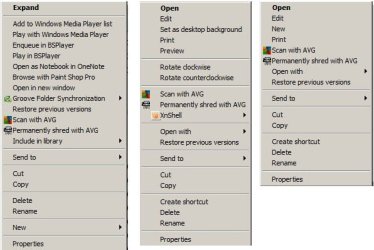
Lately my context menus became too crowded, I used two tools: "shell extention manager" and
"shell extention view", but could not find the real text / sentence which appears on the context menu.
I do not want to make guesswork mistakes (in the registry) that cannot be repaired.
So if you can help me how to get rid of some entries in the context menu.
As examples I here attach some screenshots from menus pointing at a folder, picture file and plain file.
Thanks
Moti
 

Attachments
  • Context menus.jpg
    Context menus.jpg
    35.6 KB · Views: 30

My Computer

Computer type
PC/Desktop
Computer Manufacturer/Model Number
custom built
OS
Windows 7 Pro 32 bit
CPU
intel celeron 2.66GH 2.56GH
Memory
2.00 GB
Graphics Card(s)
Nvidia fx5500
Hard Drives
Western digital
Antivirus
AVG
Browser
firefox
Hello
Thanks for the answer. First, the problem is not BS player context menu, its the rest entries which do not know what created them. However, I downloaded the "Context Menu Editor" as recommended above and ran it (as admin), but in the "remove" option it found nothing, not even one item !
I will keep on searching for an answer.
Thank again.
Moti
 

My Computer

Computer type
PC/Desktop
Computer Manufacturer/Model Number
custom built
OS
Windows 7 Pro 32 bit
CPU
intel celeron 2.66GH 2.56GH
Memory
2.00 GB
Graphics Card(s)
Nvidia fx5500
Hard Drives
Western digital
Antivirus
AVG
Browser
firefox
Could you state which ones exactly? Which ones do you want removed, that would be more helpful
 

My Computer

Computer type
PC/Desktop
OS
Windows 7 Ultimate x64
Run regedit to open the Registry Editor and navigate to the following key:​
(BE EXTREMELY CAREFUL WHILE IN THE REGISTRY!!)
HKEY_CLASSES_ROOT\*\shellex\ContextMenuHandlers
Here you need to simply delete the keys you don’t want. There are other registry locations too where this data may be stored.​
How did you get so many entries. Never seen it that crowded.​
Good luck. :cool:
 

My Computer

Computer type
Laptop
OS
Windows 7

My Computer

Computer type
PC/Desktop
Computer Manufacturer/Model Number
Home made Desktop
OS
Windows 10 Pro. 64/ version 1709 Windows 7 Pro/64
CPU
Intel i7-6800K @ 4.3
Motherboard
ASUS X-99 Deluxe II
Memory
Corsair Platinum 16 gig @2400
Graphics Card(s)
EVGA GTX 1070 OC
Monitor(s) Displays
Asus 27" LED LCD/VE278Q
Screen Resolution
1920-1080 or 1280-720 HDMI
Hard Drives
INTEL SSD 730-240 Gb Sata 3.0/
PSU
EVGA Platium 1200W
Case
Phanteks Luxe Tempered Glass 8 fans/ one radiator
Cooling
XSPC/ Water Cooled CPU
Keyboard
Das 4 Professional
Mouse
Logitech M705/MX Anywhere 2-S
Internet Speed
100 mbits
Antivirus
Microsoft Security Essentials/ Malwarebytes Premium 3.0/ SAS
Browser
I.E. 11 default/Firefox/ ISP Time Warner Cable/Spectrum
Other Info
LG BluRay Burner/
Sound system-KLipsch-THX/
Icy Dock ssd Hot Swap bays.
"That's it."? That's a book. I think your registry is the easiest and quickest way to go as I said above.
But what do I know? :banghead:

Sorry. Didn't see this had 10 pages of help already.:o
 

My Computer

Computer type
Laptop
OS
Windows 7
Back
Top