Continual Restarts / Freezing. No obvious cause.

Jedzi

New member
Local time
4:07 PM
Messages
13
For the last few days my computer has been causing me big problems as it won't stay up for longer than about 10 minutes. It BSOD'ed 2 or 3 times, unfortunately I didn't get the error message. Now it has stopped doing that and either:

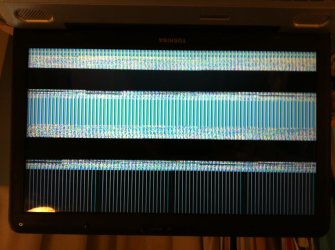
- Freezes with a combination of black and grey vertical and horizontal lines on the screen, along with some areas of colour
- Suddenly reboots, without warning or an error message.

Currently it isn't giving me a dump, although it was earlier. I've pasted the most recent minidump below. The BCC code has varied (eg one time it was d1, another time it was 7f)

A few things I've done to try and pin it down:

  • It hasn't (yet) fallen over while I'm in Safe Mode with Networking
  • Nothing new has been installed that I'm aware of.
  • The laptop lasts up to about 10 minutes before falling over.
  • The video driver is up to date.
  • Memtest was fine
  • A Malwarebytes scan was clear
  • I watched the temperature during one 10 minute period. It peaked at around 60 deg C, but was around 40 to 50 most of the time (including when it froze).

Thanks,

Jedzi


Minidump:

Dump File : 111015-21184-01.dmp
Crash Time : 10/11/2015 11:41:19
Bug Check String : UNEXPECTED_KERNEL_MODE_TRAP
Bug Check Code : 0x0000007f
Parameter 1 : 00000000`00000008
Parameter 2 : 00000000`80050031
Parameter 3 : 00000000`000406f8
Parameter 4 : fffff800`02d0fa32
Caused By Driver : ntoskrnl.exe
Caused By Address : ntoskrnl.exe+74200
File Description : NT Kernel & System
Product Name : Microsoft® Windows® Operating System
Company : Microsoft Corporation
File Version : 6.1.7601.19018 (win7sp1_gdr.150928-1507)
Processor : x64
Crash Address : ntoskrnl.exe+74200
Stack Address 1 :
Stack Address 2 :
Stack Address 3 :
Computer Name :
Full Path : C:\Windows\Minidump\111015-21184-01.dmp
Processors Count : 2
Major Version : 15
Minor Version : 7601
Dump File Size : 277,152
Dump File Time : 10/11/2015 11:42:33
 

My Computer

Computer type
Laptop
Computer Manufacturer/Model Number
Toshiba Satellite L500-1WG
OS
Microsoft Windows 7 Professional 64-bit 7601 Multiprocessor Free Service Pack 1
CPU
Pentium(R) Dual-Core CPU T4400 @ 2.20GHz
Motherboard
TOSHIBA KSWAA
Memory
4.00 GB
Graphics Card(s)
(1) Mobile Intel(R) 4 Series Express Chipset Family (2) Mo
Sound Card
(1) High Definition Audio Device (2) Intel(R) High Definit
Hard Drives
ST9320325AS ATA Device

My Computer

Computer type
PC/Desktop
Computer Manufacturer/Model Number
Pauly Special
OS
Win7 Ultimate X64
CPU
Intel i5 3570K
Motherboard
Gigabyte Z77X-DS3H
Memory
8GB DDR3 1600
Graphics Card(s)
Onboard
Sound Card
Onboard
Screen Resolution
1280x1024
Hard Drives
Samsung 840 Evo SSD (OS)
1TB Spinner (Data)
PSU
800W Arctic
Case
Cooler Master
Cooling
3x120mm Fans
Keyboard
MS Wireless
Mouse
MS Wireless
Internet Speed
20M
Hi there,

I hadn't reposted as for 3 or 4 days the laptop was OK. However it's now playing-up again (agghh). I've had 2 blue screens and a couple of times the machine has frozen and I've had the vertical black & white lines. Screen shot attached.

I've also posted the requested log files.

Any help would be much appreciated.

Jedzi
 

Attachments

My Computer

Computer type
Laptop
Computer Manufacturer/Model Number
Toshiba Satellite L500-1WG
OS
Microsoft Windows 7 Professional 64-bit 7601 Multiprocessor Free Service Pack 1
CPU
Pentium(R) Dual-Core CPU T4400 @ 2.20GHz
Motherboard
TOSHIBA KSWAA
Memory
4.00 GB
Graphics Card(s)
(1) Mobile Intel(R) 4 Series Express Chipset Family (2) Mo
Sound Card
(1) High Definition Audio Device (2) Intel(R) High Definit
Hard Drives
ST9320325AS ATA Device
all you have posted is a single dump file, there is much missing from your upload, please run the tool again and wait for a couple minutes for files to be collected before uploading
Have a look at someone elses BSOD upload to get an idea of what should be in there
also manually check your %system root%/windows/minidump folder and see how many dumps are in there
 

My Computer

Computer type
PC/Desktop
Computer Manufacturer/Model Number
Pauly Special
OS
Win7 Ultimate X64
CPU
Intel i5 3570K
Motherboard
Gigabyte Z77X-DS3H
Memory
8GB DDR3 1600
Graphics Card(s)
Onboard
Sound Card
Onboard
Screen Resolution
1280x1024
Hard Drives
Samsung 840 Evo SSD (OS)
1TB Spinner (Data)
PSU
800W Arctic
Case
Cooler Master
Cooling
3x120mm Fans
Keyboard
MS Wireless
Mouse
MS Wireless
Internet Speed
20M
Sorry about that, I'd slightly misread the instructions. Hopefully I've now got the right file attached.

I've looked in the minidumps folder and there's only one file in there. This may be because I ran ccleaner last week, if I remember correctly it was when I thought my problems were over (... which in retrospect was probably a mistake).

Jedzi
 

Attachments

My Computer

Computer type
Laptop
Computer Manufacturer/Model Number
Toshiba Satellite L500-1WG
OS
Microsoft Windows 7 Professional 64-bit 7601 Multiprocessor Free Service Pack 1
CPU
Pentium(R) Dual-Core CPU T4400 @ 2.20GHz
Motherboard
TOSHIBA KSWAA
Memory
4.00 GB
Graphics Card(s)
(1) Mobile Intel(R) 4 Series Express Chipset Family (2) Mo
Sound Card
(1) High Definition Audio Device (2) Intel(R) High Definit
Hard Drives
ST9320325AS ATA Device
Unfortunately a few dumps are generally required to look for a pattern in the crashes, your only dump is reporting an 0x7F error which is not conclusive
After more crashes post your files again. For the moment you could try running an sfc scan and memtest on your ram to check for errors

http://www.sevenforums.com/tutorials/1538-sfc-scannow-command-system-file-checker.html
http://www.sevenforums.com/tutorials/105647-ram-test-memtest86.html

Seeing as you are suffering serious gfx errors it may be worth reinstalling/updating your gfx drivers also
 

My Computer

Computer type
PC/Desktop
Computer Manufacturer/Model Number
Pauly Special
OS
Win7 Ultimate X64
CPU
Intel i5 3570K
Motherboard
Gigabyte Z77X-DS3H
Memory
8GB DDR3 1600
Graphics Card(s)
Onboard
Sound Card
Onboard
Screen Resolution
1280x1024
Hard Drives
Samsung 840 Evo SSD (OS)
1TB Spinner (Data)
PSU
800W Arctic
Case
Cooler Master
Cooling
3x120mm Fans
Keyboard
MS Wireless
Mouse
MS Wireless
Internet Speed
20M
Apologies for the delay in replying - I've been tied-up a couple of things, along with investigating this further. Last week I got to the point where I'd made no progress, so I tried re-installing Windows 7 with the intention of reverting to an old backup ... however it didn't sort things out, but I did get a number of BSODs (rather than freezes) so it has allowed me to gather the dumps, pls see attached.

I've also done a number of other things:

  • I ran SFC. It came-up clean
  • I ran Memtest. It did 8 passes with no errors.

Based on a couple of things I read I tried running Prime95 and the Intel Burn Test:

  • The first time I started running Prime95 it ran fine for half an hour, then the system went to sleep as I'd forgotten to change the power setting. I resumed Windows and the test restarted. After about 10 minutes Worker #2 got an error, which I think was "rounding was 0.5 less than 0.4". I immediately tried to get a screenshot and then open Windows Explorer but it BSOD'd. I rebooted. It BSOD'd again as soon as it had booted-up. I started in safe mode, then rebooted and re-ran Prime95. All in all I had 3 BSODs, each had a different BCC code.
  • I then ran Prime 95 for 9 1/2 hours with no problem. Both the machine and the temperature were stable. The previous error didn't recurr.
  • The Intel Burn Test completed successfully, 10 passes in 1751 seconds.

The machine is very unpredictable in how quickly it crashes. When I had that error with Prime95 it stayed-up for about 20 seconds after it restarted. It then did the same thing again. However after that it stayed-up for about 10 hours while I was running Prime95.

Jedzi
 

Attachments

My Computer

Computer type
Laptop
Computer Manufacturer/Model Number
Toshiba Satellite L500-1WG
OS
Microsoft Windows 7 Professional 64-bit 7601 Multiprocessor Free Service Pack 1
CPU
Pentium(R) Dual-Core CPU T4400 @ 2.20GHz
Motherboard
TOSHIBA KSWAA
Memory
4.00 GB
Graphics Card(s)
(1) Mobile Intel(R) 4 Series Express Chipset Family (2) Mo
Sound Card
(1) High Definition Audio Device (2) Intel(R) High Definit
Hard Drives
ST9320325AS ATA Device
Are you using readyboost ? if so stop for a while until you get this issue resolved.

As the crashes have carried over to a fresh install I would start with some more hardware testing (or you have carried over a dodgy driver etc)
Get windows upto date (you don't have SP1 installed) rerun SFC then work through some hardware tests, check HDD/GFX etc but GFX in particular as you had gfx issues in picture above and keep an eye on those temperatures, try installing speccy or similar which will give cpu/mobo/gfx/hdd temps to keep an eye on
 

My Computer

Computer type
PC/Desktop
Computer Manufacturer/Model Number
Pauly Special
OS
Win7 Ultimate X64
CPU
Intel i5 3570K
Motherboard
Gigabyte Z77X-DS3H
Memory
8GB DDR3 1600
Graphics Card(s)
Onboard
Sound Card
Onboard
Screen Resolution
1280x1024
Hard Drives
Samsung 840 Evo SSD (OS)
1TB Spinner (Data)
PSU
800W Arctic
Case
Cooler Master
Cooling
3x120mm Fans
Keyboard
MS Wireless
Mouse
MS Wireless
Internet Speed
20M
... so my laptop became stable for no obvious reason, hurray! I took the opportunity to revert to a backup image of Windows 7 and all was well for a couple of weeks. Now the BSODs have come back with a vengance; the machine is effectively unusable again. Ahhhhhh

Before I re-imaged it I ran a number of couple of other tests in a vain attempt to try and pin the problem down:
  • I ran the Major Geeks Stability Test for 5 1/2 hours with no problems.
  • I saw the Video Card Stability Test on Major Geeks . I'm slightly suspicious that about the video / graphics driver side of things, so I ran it. Although I got pretty jerky movement on the globes, it ran OK. However if I open another window (eg Windows Explorer or Core Temp) it then fails immediately with this message: "Stability Test Failed. Perhaps the video card switched into low-accelerated mode. If you overclocked your video card, you need to lower your GPU and Mem frequency. After reboot please launch a test again"

I've attached the high level dumps from the crashes since it became stable again. 3 of them mention ntoskrnl.exe. I don't know if that's coincidence or if my RAM is dodgy. Although, if it is I don't understand how it could have passed a couple of memory tests.

Jedzi
 

Attachments

My Computer

Computer type
Laptop
Computer Manufacturer/Model Number
Toshiba Satellite L500-1WG
OS
Microsoft Windows 7 Professional 64-bit 7601 Multiprocessor Free Service Pack 1
CPU
Pentium(R) Dual-Core CPU T4400 @ 2.20GHz
Motherboard
TOSHIBA KSWAA
Memory
4.00 GB
Graphics Card(s)
(1) Mobile Intel(R) 4 Series Express Chipset Family (2) Mo
Sound Card
(1) High Definition Audio Device (2) Intel(R) High Definit
Hard Drives
ST9320325AS ATA Device
One thing that had my laptop crashing (I mostly use it in a docking station) was overheating. The air vents and fan had gotten plugged with dust. Some canned air blew the dust out and the crashes stopped.

You may have a completely different problem, but this may be useful info for others. Good luck.
 

My Computer

Computer type
Laptop
Computer Manufacturer/Model Number
Lenovo
OS
Win 7 Pro 64
CPU
Core i5 M540
Memory
4Gb
Hard Drives
Seagate 1Tb SSHD
Jedzi you should try furmark as it will stress your gpu and give better stability info. FurMark download | Geeks3D Just run it at stock settings (burn-in test) and watch the temps on the bottom of the graph it shows and if you see any artifacting stop the test. I would run it for only like 5 minutes at first depending on the temps it shows.
 

Attachments

  • gpu temp.PNG
    gpu temp.PNG
    53.2 KB · Views: 0

My Computer

Computer type
PC/Desktop
Computer Manufacturer/Model Number
Custom
OS
10 Pro x64
CPU
Ryzen 9 3900X
Motherboard
Asrock x370 Tachi
Memory
64GB(4x16GB) DDR4
Graphics Card(s)
EVGA 1080ti FTW3
Sound Card
ASUS Xonar Essence STX (V4 Bursons), ODAC rev B, NFB-11, O2
Monitor(s) Displays
3xASUS PB278Q/R, Optoma HD142X
Screen Resolution
3x1440p, 1080p
Hard Drives
512GB 850 EVO(OS, Programs)
4TB (Movies)
3TB (Downloads)
3TB (Programs)
1TB HDD (Games)
2x6TB R1 (videos)
PSU
AX760
Case
Fractal Define R5
Cooling
NH-D15S
Keyboard
Massdrop Ctrl with Box Navy's
Mouse
G903, Alioth XXL Mat
Internet Speed
280/40
Antivirus
MBAM, ESET
Browser
Canary 64 Bit
Other Info
I also own a Thinkpad P50 Xeon 4K, X220T, X1C5
I've checked the fan and the temperature and both are OK.

I'm still having the problem, so I've attached a new set of error logs. Since I last posted I've tried a number of things:

  • I downloaded ‘Sea Tools for Windows’ and ran their long check, with fix enabled. It ran normally while in Windows, so didn’t require rebooting (not sure if that matters). It took about two hours to run and passed.
  • I ran Furmarks for about 35 minutes. While the movement is a bit slow & jerky, about one movement every 2 seconds, there are no errors.
  • I've changed Avast for Windows Defender.
  • I've tried new RAM, however it made no difference; I still get the BSODs.

Any further help would be appreciated; I've spent ages on this & don't seem to be getting anywhere.

Jedzi
 

Attachments

My Computer

Computer type
Laptop
Computer Manufacturer/Model Number
Toshiba Satellite L500-1WG
OS
Microsoft Windows 7 Professional 64-bit 7601 Multiprocessor Free Service Pack 1
CPU
Pentium(R) Dual-Core CPU T4400 @ 2.20GHz
Motherboard
TOSHIBA KSWAA
Memory
4.00 GB
Graphics Card(s)
(1) Mobile Intel(R) 4 Series Express Chipset Family (2) Mo
Sound Card
(1) High Definition Audio Device (2) Intel(R) High Definit
Hard Drives
ST9320325AS ATA Device
By jerky do you mean it is showing like 2FPS, also to test for fluidity download and run this tool on the basic preset and see what it says your fps is for us. https://unigine.com/products/benchmarks/heaven/ if you want you can run the benchmark it has in the top left of the program when it's opened.
 

My Computer

Computer type
PC/Desktop
Computer Manufacturer/Model Number
Custom
OS
10 Pro x64
CPU
Ryzen 9 3900X
Motherboard
Asrock x370 Tachi
Memory
64GB(4x16GB) DDR4
Graphics Card(s)
EVGA 1080ti FTW3
Sound Card
ASUS Xonar Essence STX (V4 Bursons), ODAC rev B, NFB-11, O2
Monitor(s) Displays
3xASUS PB278Q/R, Optoma HD142X
Screen Resolution
3x1440p, 1080p
Hard Drives
512GB 850 EVO(OS, Programs)
4TB (Movies)
3TB (Downloads)
3TB (Programs)
1TB HDD (Games)
2x6TB R1 (videos)
PSU
AX760
Case
Fractal Define R5
Cooling
NH-D15S
Keyboard
Massdrop Ctrl with Box Navy's
Mouse
G903, Alioth XXL Mat
Internet Speed
280/40
Antivirus
MBAM, ESET
Browser
Canary 64 Bit
Other Info
I also own a Thinkpad P50 Xeon 4K, X220T, X1C5
Hi there,

I've downloaded Unigine Heaven. When I click on it to load it I get an error message:

Can't set video mode

D3D9AppWindow::create_context(): required multisample is not supported
Engine::video_restart(): can't set 1280x720 windowed video mode


The error message has OK & Cancel buttons. If I click on OK, it opens up a new window and tries to load. Then, after a minute or two it has (in this order): frozen, automatically rebooted, automatically rebooted.

Curious ...

Jedzi
 

My Computer

Computer type
Laptop
Computer Manufacturer/Model Number
Toshiba Satellite L500-1WG
OS
Microsoft Windows 7 Professional 64-bit 7601 Multiprocessor Free Service Pack 1
CPU
Pentium(R) Dual-Core CPU T4400 @ 2.20GHz
Motherboard
TOSHIBA KSWAA
Memory
4.00 GB
Graphics Card(s)
(1) Mobile Intel(R) 4 Series Express Chipset Family (2) Mo
Sound Card
(1) High Definition Audio Device (2) Intel(R) High Definit
Hard Drives
ST9320325AS ATA Device
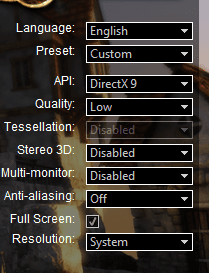
Set it to these settings and see if it will run.
 

Attachments

  • heaven settings.PNG
    heaven settings.PNG
    20.5 KB · Views: 18

My Computer

Computer type
PC/Desktop
Computer Manufacturer/Model Number
Custom
OS
10 Pro x64
CPU
Ryzen 9 3900X
Motherboard
Asrock x370 Tachi
Memory
64GB(4x16GB) DDR4
Graphics Card(s)
EVGA 1080ti FTW3
Sound Card
ASUS Xonar Essence STX (V4 Bursons), ODAC rev B, NFB-11, O2
Monitor(s) Displays
3xASUS PB278Q/R, Optoma HD142X
Screen Resolution
3x1440p, 1080p
Hard Drives
512GB 850 EVO(OS, Programs)
4TB (Movies)
3TB (Downloads)
3TB (Programs)
1TB HDD (Games)
2x6TB R1 (videos)
PSU
AX760
Case
Fractal Define R5
Cooling
NH-D15S
Keyboard
Massdrop Ctrl with Box Navy's
Mouse
G903, Alioth XXL Mat
Internet Speed
280/40
Antivirus
MBAM, ESET
Browser
Canary 64 Bit
Other Info
I also own a Thinkpad P50 Xeon 4K, X220T, X1C5
Thanks for that.

Well ... I didn't get the error message this time. I entered the settings above and clicked 'Run'. That bought up a new screen from the game with a 'Loading' message.

I tried it 3 times. After about 1 minute, the machine (in this order):

1. Rebooted
2. Immediately shut down, with no warning or message.
3. Froze, but with a weird flickering pattern on the screen (pls see attached still photo).

Jedzi
 

Attachments

  • photo.JPG
    photo.JPG
    703.8 KB · Views: 0

My Computer

Computer type
Laptop
Computer Manufacturer/Model Number
Toshiba Satellite L500-1WG
OS
Microsoft Windows 7 Professional 64-bit 7601 Multiprocessor Free Service Pack 1
CPU
Pentium(R) Dual-Core CPU T4400 @ 2.20GHz
Motherboard
TOSHIBA KSWAA
Memory
4.00 GB
Graphics Card(s)
(1) Mobile Intel(R) 4 Series Express Chipset Family (2) Mo
Sound Card
(1) High Definition Audio Device (2) Intel(R) High Definit
Hard Drives
ST9320325AS ATA Device
Yeah it unfortunately looks like your gpu and mobo has kicked the bucket. You will need a new one like this toshiba satellite l500-1wg motherboard - toshiba satellite l500-1wg laptop motherboard . You can see how to replace it like this if your laptop does indeed look like this. toshiba satellite l500-1wg motherboard - toshiba satellite l500-1wg laptop motherboard You would also need TIM for the cpu and gpu on the new board. I would test all the the other components first though to make sure it is the only problem or if another issue is causing this one. First test your RAM with this test (let it complete 8 passes if possible). http://www.sevenforums.com/tutorials/105647-ram-test-memtest86.html .
 

My Computer

Computer type
PC/Desktop
Computer Manufacturer/Model Number
Custom
OS
10 Pro x64
CPU
Ryzen 9 3900X
Motherboard
Asrock x370 Tachi
Memory
64GB(4x16GB) DDR4
Graphics Card(s)
EVGA 1080ti FTW3
Sound Card
ASUS Xonar Essence STX (V4 Bursons), ODAC rev B, NFB-11, O2
Monitor(s) Displays
3xASUS PB278Q/R, Optoma HD142X
Screen Resolution
3x1440p, 1080p
Hard Drives
512GB 850 EVO(OS, Programs)
4TB (Movies)
3TB (Downloads)
3TB (Programs)
1TB HDD (Games)
2x6TB R1 (videos)
PSU
AX760
Case
Fractal Define R5
Cooling
NH-D15S
Keyboard
Massdrop Ctrl with Box Navy's
Mouse
G903, Alioth XXL Mat
Internet Speed
280/40
Antivirus
MBAM, ESET
Browser
Canary 64 Bit
Other Info
I also own a Thinkpad P50 Xeon 4K, X220T, X1C5
I was beginning to suspect it might be that. I've never had another computer problem where I've put so much time in, but got nowhere in terms of finding the cause.

The laptop was mid-price and is getting on for 6 years old, so I think it's probably time to retire it. I don't think it would be worth the time & money to replace the motherboard, when it's a 1/4 the price of a similar new laptop.

Thanks for your help,

Michael
 

My Computer

Computer type
Laptop
Computer Manufacturer/Model Number
Toshiba Satellite L500-1WG
OS
Microsoft Windows 7 Professional 64-bit 7601 Multiprocessor Free Service Pack 1
CPU
Pentium(R) Dual-Core CPU T4400 @ 2.20GHz
Motherboard
TOSHIBA KSWAA
Memory
4.00 GB
Graphics Card(s)
(1) Mobile Intel(R) 4 Series Express Chipset Family (2) Mo
Sound Card
(1) High Definition Audio Device (2) Intel(R) High Definit
Hard Drives
ST9320325AS ATA Device
I would have to agree with your on that, especially since if you don't do it yourself you have to factor in labor costs as well.
 

My Computer

Computer type
PC/Desktop
Computer Manufacturer/Model Number
Custom
OS
10 Pro x64
CPU
Ryzen 9 3900X
Motherboard
Asrock x370 Tachi
Memory
64GB(4x16GB) DDR4
Graphics Card(s)
EVGA 1080ti FTW3
Sound Card
ASUS Xonar Essence STX (V4 Bursons), ODAC rev B, NFB-11, O2
Monitor(s) Displays
3xASUS PB278Q/R, Optoma HD142X
Screen Resolution
3x1440p, 1080p
Hard Drives
512GB 850 EVO(OS, Programs)
4TB (Movies)
3TB (Downloads)
3TB (Programs)
1TB HDD (Games)
2x6TB R1 (videos)
PSU
AX760
Case
Fractal Define R5
Cooling
NH-D15S
Keyboard
Massdrop Ctrl with Box Navy's
Mouse
G903, Alioth XXL Mat
Internet Speed
280/40
Antivirus
MBAM, ESET
Browser
Canary 64 Bit
Other Info
I also own a Thinkpad P50 Xeon 4K, X220T, X1C5
Back
Top