Continuous data upload in sleep mode?

brianz

New member
Local time
7:03 PM
Messages
9
Location
Atlanta
Hi, I have a question.

I have a software application that collects data via USB from other nearby hardware (a weather station console) in my office and continuously uploads it to a website. I am going out of town and would thus like to monitor this data on the website, but I don't relish the idea of leaving my extremely resource intensive PC on 24/7 for two weeks simply for the uploading.

Is there any way to put in a low power state, such as sleep or hybrid sleep, without disrupting the data collection and uploading? Or is that a pipe dream?

Thanks for any suggestions.

Brian
 

My Computer

Computer Manufacturer/Model Number
Self built
OS
windows 7 64
CPU
i7 980x
Motherboard
Asus P6X58D Premium
Memory
12 GB Corsair 1600 MHz 9-9-9-24
Graphics Card(s)
Asus GTX 470
Sound Card
Onboard
Monitor(s) Displays
NEC Multisync 2690
Screen Resolution
1920x1200
Hard Drives
Intel 160 GB SSD G2
PSU
Corsair 850TX
Case
Cooler Master 932
Cooling
Fans
Hi Brianz,

The obvious thing that springs to mind is turning off the monitor/monitors. Do you have a feel what uses the resources on your PC at the moment?

Consider turning off Windows automatic updates whilst you are away : some updates force a reboot of your PC which may intefere with the data collection programme.

Regards,
Golden
 

My Computer

Computer type
PC/Desktop
Computer Manufacturer/Model Number
Golden Mk. I.4
OS
Windows 10 Pro x64 ; Xubuntu x64
CPU
Intel i7 860 @ 2.80 GHz O/C'ed to 4.0GHz
Motherboard
Gigabyte P55A-UD3R Rev.1. Award BIOS F13
Memory
16GB Corsair Vengance DDR3 @ 661 MHz Dual Channel (9-9-9-24)
Graphics Card(s)
EVGA NVidia GTX 560 1024MB
Sound Card
Realtek Integrated
Monitor(s) Displays
Dual Samsung SyncMaster 2494HS
Screen Resolution
1920*1080 and 1920*1080
Hard Drives
1*Samsung 840 EVO 120GB SSD;
1*OCZ Vertex 2 60GB SSD;
2*Samsung F3 SpinPoint 1TB in RAID0;
1*Samsung F1 SpinPoint 1TB;
2*Western Digital 1TB External USB 3.0
1*Western Digital 500GB External USB 3.0
1*Seagate 500GB External USB 2.0
PSU
Thermaltake ToughPower QFan 750W
Case
Thermaltake Element S VK60001W2Z
Cooling
Corsair H60 Water Cooling, 2*230mm and 2*80mm case fans
Keyboard
Logitech G110
Mouse
Logitech MX518
Hi Brianz,

The obvious thing that springs to mind is turning off the monitor/monitors. Do you have a feel what uses the resources on your PC at the moment?

Consider turning off Windows automatic updates whilst you are away : some updates force a reboot of your PC which may intefere with the data collection programme.

Regards,
Golden

Thanks Golden. I'll definitely keep the monitor powered off. Good idea on Windows updates.

The PC is a high end audio/video machine with four fans, 12 GB RAM, and GTX 470 graphics card. In summer, the whole room gets notably warmer when it's on. I'm sure it'll be fine if I leave it on for a couple weeks, but it feels like a major appliance...
 

My Computer

Computer Manufacturer/Model Number
Self built
OS
windows 7 64
CPU
i7 980x
Motherboard
Asus P6X58D Premium
Memory
12 GB Corsair 1600 MHz 9-9-9-24
Graphics Card(s)
Asus GTX 470
Sound Card
Onboard
Monitor(s) Displays
NEC Multisync 2690
Screen Resolution
1920x1200
Hard Drives
Intel 160 GB SSD G2
PSU
Corsair 850TX
Case
Cooler Master 932
Cooling
Fans
Get a slightly under powered computer to do that task? Dunno..
 

My Computer

Computer type
PC/Desktop
Computer Manufacturer/Model Number
Alienware Aurora ALX R4
OS
Windows 10 Pro (x64)
CPU
Intel Core i7-3930K (3.2GHz - 4.5GHz)
Motherboard
Alienware Aurora-R4 x79
Memory
4x Samsung 4GB PC3-12800 DDR3 (16GB 1600MHz)
Graphics Card(s)
Nvidia Geforce GTX 690
Sound Card
SteelSeries Siberia Elite
Monitor(s) Displays
Dell UltraSharp U3011
Screen Resolution
2560x1600
Hard Drives
Samsung 850 Pro 256 GB, Seagate 1TB Desktop Hybrid HDD, 2x Western Digital 4TB Green HDD
PSU
875W Some Dell PSU <.<
Case
Alienware Aurora ALX
Cooling
Custom Liquid Cooling (EK CPU & GPU blocks) dual EK 480RAD
Keyboard
Logitech G710+ Mechanical
Mouse
Logitech G700s
Internet Speed
Verizon Fios (50 mbps average)
Other Info
Server: Intel NUC D54250WYK: i5-4250U, 16GB, 256 GB mSATA, Windows Server 2012 R2
+1 on Golden's suggestions. Also, is the PC on a power backup system? If optioned with a smart link, these will shut down a PC too. You can change the power off function for the UPS and/or Windows to power back on after a loss of power. Your weather software would need to be in the Start-up group.

On a side bar, what weather station are you using? I've been looking at those for a while but I want to collect the data on-site. Even though my rain gauge has been empty for quite some time and I know it's HOT, I'd still like to track the weather. :)
 

My Computer

Computer type
PC/Desktop
Computer Manufacturer/Model Number
Built 2/11/2011
OS
Windows 7 Pro-x64
CPU
i7-2600 3.4GHz - 3.8GHz Turbo
Motherboard
Intel DH67BL-B3
Memory
8Gb - 2x4GB, Muskin 991770 PC3-1333
Graphics Card(s)
Integrated Intel HD 2000
Sound Card
Integrated Intel 10.1 HD, RealTek ALC892
Monitor(s) Displays
Asus LCD VH222H, Haier HL24XSL2a
Screen Resolution
1920x1080, 1920x1080
Hard Drives
Crucial SSD C300-128Gb,
Western Digital WD5002AALX - 500Gb,
Western Digital WD7501AALS - 750Gb
PSU
Seasonic 650W 80+ Gold Modular
Case
Rosewill Defender
Cooling
Stock CPU, Four 120mm case fans, PCH fan added
Keyboard
Logitech EX100 Y-RBH94 Wireless
Mouse
Logitech EX100 M-RCE95 Wireless
Internet Speed
3.0/1.5 Mbs
Antivirus
Microsoft Security Essentials
Browser
Microsoft Internet Explorer 11
Other Info
Antec Veris Premier-Multimedia IR Station,
Cyber Accoustics-3602 Speakers,
AFT XM-5U Card Reader,
Hauppauge TV-HVR-2250,
Sony LX300 USB Turntable
I leave mine on 24/7 with no problems. The disabling updates is a good suggestion and all other automated tasks except for virus scans. Win 7's auto defrag could be disabled while you are away too.
 

My Computer

Computer type
PC/Desktop
Computer Manufacturer/Model Number
Home Built Desktop By DataTech
OS
Windows 7 Ultimate X64 SP1
CPU
Intel i5-2550K, Differing ~4.4-4.8GHz No built in GPU
Motherboard
ASUS P8Z68-V PRO/GEN3
Memory
16GB G.Skill Sniper 1866MHz @ 2133MHz 2x8GB
Graphics Card(s)
ASUS GTX650TIB-DC2OC-2GD5, (650TI Boost)
Sound Card
Onboard Realtek 5-1
Monitor(s) Displays
Samsung P2570HD
Screen Resolution
1920x1080
Hard Drives
Samsung 840 Pro 256GB SSD for OS, 500GB Seagate Constellation (Enterprise drive) for Data
PSU
Corsair HX650W
Case
Inwin Dragon Rider
Cooling
Hyper 212 EVO w/two Noctua fans, push-pull, @1300 RPM
Keyboard
E-Z Eyes, bright yellow keys with large characters
Mouse
steelseries SENSEI Laser Pro Gaming
Internet Speed
48-51Mbs Mbs down, 11 Mbs up Xfinity Cable
Antivirus
Norton Internet Security 2013
Browser
IE 10, Opera, Pale Moon if needed
Other Info
4 case fans, LG BluRay-RE, ASUS DVD-RW, Mr. Fusion power supply, 1.21 gigawatts.
Thanks Golden. I'll definitely keep the monitor powered off. Good idea on Windows updates.

The PC is a high end audio/video machine with four fans, 12 GB RAM, and GTX 470 graphics card. In summer, the whole room gets notably warmer when it's on. I'm sure it'll be fine if I leave it on for a couple weeks, but it feels like a major appliance...

I'll expand on the suggestion from Golden - you need to turn off ALL updates from ALL programs (e.g., Abode stuff like Flash and Reader, any antivirus program updates, etc.).

I would take the system off line from the Internet by unplugging it from your modem/router/access point (whatever). If you use a firewall like ZoneAlarm, enable the Internet lock as one more step.

Given your brief description of the system, your mobo/CPU may have CPU speed throttling based on load - it would be in the BIOS setup. Enable it (or verify it is enabled) to throttle back the CPU speed thus using less power under light load.

Regards,
GEWB
 

My Computer

Computer type
PC/Desktop
Computer Manufacturer/Model Number
(7 different computers booting up to 10 systems)
OS
Linux Mint / XP / Win7 Home, Pro, Ultimate / Win8.1 / Win10
Other Info
Four desktops, two laptops, one notebook and one tablet
Good idea on the backup power supply, I've been too lazy to look into it. Maybe I should build another barebones PC to work as a server for all my A/V and data collection/uploading...

Carwiz, it's a Davis Vantage Vue. Good prosumer level type of station and display. I use their Weatherlink software and just set up my station on Wunderground to get data automatically, so that I can peek at precipitation levels when I travel. It's fun to store data, compare year-over-year data, and of course build snazzy charts. And it's given my wife lots of material for her stand-up act with friends and family...
 

My Computer

Computer Manufacturer/Model Number
Self built
OS
windows 7 64
CPU
i7 980x
Motherboard
Asus P6X58D Premium
Memory
12 GB Corsair 1600 MHz 9-9-9-24
Graphics Card(s)
Asus GTX 470
Sound Card
Onboard
Monitor(s) Displays
NEC Multisync 2690
Screen Resolution
1920x1200
Hard Drives
Intel 160 GB SSD G2
PSU
Corsair 850TX
Case
Cooler Master 932
Cooling
Fans
Hi,

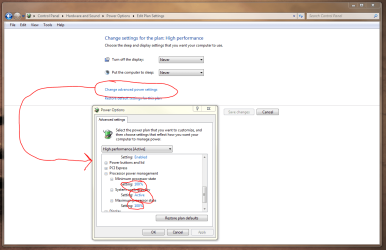
One of the things you might want to experiment with is the Power Options settings. These allow you set various states for the processor, the colloing and so on and so forth. Gieven that the PC sounds as if it doesn't actually have a huge workload, these might be ideal for your purposes. There are quite a few settings you can manipulate.

Regards,
Golden
 

Attachments

  • Capture.PNG
    Capture.PNG
    64.2 KB · Views: 21

My Computer

Computer type
PC/Desktop
Computer Manufacturer/Model Number
Golden Mk. I.4
OS
Windows 10 Pro x64 ; Xubuntu x64
CPU
Intel i7 860 @ 2.80 GHz O/C'ed to 4.0GHz
Motherboard
Gigabyte P55A-UD3R Rev.1. Award BIOS F13
Memory
16GB Corsair Vengance DDR3 @ 661 MHz Dual Channel (9-9-9-24)
Graphics Card(s)
EVGA NVidia GTX 560 1024MB
Sound Card
Realtek Integrated
Monitor(s) Displays
Dual Samsung SyncMaster 2494HS
Screen Resolution
1920*1080 and 1920*1080
Hard Drives
1*Samsung 840 EVO 120GB SSD;
1*OCZ Vertex 2 60GB SSD;
2*Samsung F3 SpinPoint 1TB in RAID0;
1*Samsung F1 SpinPoint 1TB;
2*Western Digital 1TB External USB 3.0
1*Western Digital 500GB External USB 3.0
1*Seagate 500GB External USB 2.0
PSU
Thermaltake ToughPower QFan 750W
Case
Thermaltake Element S VK60001W2Z
Cooling
Corsair H60 Water Cooling, 2*230mm and 2*80mm case fans
Keyboard
Logitech G110
Mouse
Logitech MX518
A better solution than turning off Windows Updates is to put your weather software in startup so that the machine can continue to updated, reboot and continue performing your task. I NEVER advocate turning off Windows Updates even for a short time.
 

My Computer

Computer Manufacturer/Model Number
Custom
OS
Windows 7 Ultimate RTM (Technet)
CPU
3.00 gigahertz Intel Core2 Duo E8400
Motherboard
ASUSTeK Computer INC. P5K/EPU Rev 1.xx
Memory
4GB
Graphics Card(s)
ATI Radeon X1950 Pro
Sound Card
Built in HD Audio
Monitor(s) Displays
22" Gateway LCD
Screen Resolution
1920 x 1200
Hard Drives
ST3160023A [Hard drive] (160.04 GB) -- drive 0, rev 8.01, ST3500630AS [Hard drive] (500.11 GB) -- drive 2, rev 3.AAK
ST3500630AS [Hard drive] (500.11 GB) -- drive 1, rev 3.AAK
Keyboard
Logitech G11
Mouse
Microsoft Wireless Laser Mouse 5000
Internet Speed
13.44 Mbps
Back
Top