Continuous Installation

Tousdae

New member
Member
VIP
Local time
2:36 PM
Messages
351
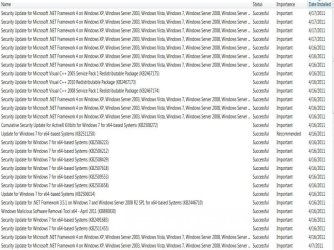
"Security Update for Microsoft .NET framework 4 on Windows XP, Windows Server 2003, Windows Vista, Windows 7, Windows Server 2008, Windows Server 2008 R2 for X64 based systems (KB2446709)"

That is what has been installed on my PC ELEVEN times since the 15th. The icon that I have an important installation is on my bar now waiting for me to install it again. I was not paying attention to what I was installing. I have a new pc and was expecting a bunch of updates to happen.

Why is this thing insisting on installing so many times?
Could it potentially do something negative to my system?
Is there a way to ... get rid of all these updates?
Is there a way to stop this thing from wanting to install?

Thank you
 

My Computer

Computer type
PC/Desktop
Computer Manufacturer/Model Number
(1) Hitachi HDP725050GLA360 ATA Device (2) ST31000528AS ATA Device (3) Generic USB CF Reader USB
OS
Windows 7 Professional 64 bit
CPU
AMD Phenom(tm) II X4 955 Processor
Motherboard
ASUSTeK Computer INC. M3A78-CM
Memory
8 GB
Graphics Card(s)
XFX Radeon R7 260 X 1GB
Sound Card
AMD High Definition Audio Device
Monitor(s) Displays
Westinghouse TV 26"
Screen Resolution
1366x768
Hard Drives
1TB SATA
PSU
Corsair CX 750 ATX 80 Plus
Keyboard
Standard PS/2
Mouse
Standard
Internet Speed
80-100
Antivirus
Defender
Browser
Opera and Firefox
I wasn't sure which link to download. I started with the 2nd, but it turns out it didn't matter. After I downloaded the item and clicked to run it, it said it wasn't applicable to my computer. The other 2 said the same thing after I downloaded them. :(
 

My Computer

Computer type
PC/Desktop
Computer Manufacturer/Model Number
(1) Hitachi HDP725050GLA360 ATA Device (2) ST31000528AS ATA Device (3) Generic USB CF Reader USB
OS
Windows 7 Professional 64 bit
CPU
AMD Phenom(tm) II X4 955 Processor
Motherboard
ASUSTeK Computer INC. M3A78-CM
Memory
8 GB
Graphics Card(s)
XFX Radeon R7 260 X 1GB
Sound Card
AMD High Definition Audio Device
Monitor(s) Displays
Westinghouse TV 26"
Screen Resolution
1366x768
Hard Drives
1TB SATA
PSU
Corsair CX 750 ATX 80 Plus
Keyboard
Standard PS/2
Mouse
Standard
Internet Speed
80-100
Antivirus
Defender
Browser
Opera and Firefox
  1. Open Windows Update by clicking the Start button
    4f6cbd09-148c-4dd8-b1f2-48f232a2fd33.jpg
    . In the search box, type Update, and then, in the list of results, click Windows Update.
  2. In the left pane, click View update history.
  3. Find the failed update. If an error has occurred, an error code and a link to Help will be displayed. If there isn't a specific Help topic for that error, you can use the error code to search online for help.
  4. Please post the error code here.
 

My Computer

Computer Manufacturer/Model Number
Dell Studio 15
OS
Windows 7 Ultimate 64 bit
They all succeeded in the update.
 

Attachments

  • Update.jpg
    Update.jpg
    101.2 KB · Views: 31

My Computer

Computer type
PC/Desktop
Computer Manufacturer/Model Number
(1) Hitachi HDP725050GLA360 ATA Device (2) ST31000528AS ATA Device (3) Generic USB CF Reader USB
OS
Windows 7 Professional 64 bit
CPU
AMD Phenom(tm) II X4 955 Processor
Motherboard
ASUSTeK Computer INC. M3A78-CM
Memory
8 GB
Graphics Card(s)
XFX Radeon R7 260 X 1GB
Sound Card
AMD High Definition Audio Device
Monitor(s) Displays
Westinghouse TV 26"
Screen Resolution
1366x768
Hard Drives
1TB SATA
PSU
Corsair CX 750 ATX 80 Plus
Keyboard
Standard PS/2
Mouse
Standard
Internet Speed
80-100
Antivirus
Defender
Browser
Opera and Firefox
I had a malware thing on here. It was taken care of. Nothing has changed though. I'm going to call tech support for help on Monday if I can get the time. Thanks for your help. :)

If I can ask something else here ....... someone once told me how to stop the messages that come up when you want to open a program. I forgot how to stop that. I don't want to be bothered with giving permission to open programs that I use all the time. Do you know how I can stop that?
 

My Computer

Computer type
PC/Desktop
Computer Manufacturer/Model Number
(1) Hitachi HDP725050GLA360 ATA Device (2) ST31000528AS ATA Device (3) Generic USB CF Reader USB
OS
Windows 7 Professional 64 bit
CPU
AMD Phenom(tm) II X4 955 Processor
Motherboard
ASUSTeK Computer INC. M3A78-CM
Memory
8 GB
Graphics Card(s)
XFX Radeon R7 260 X 1GB
Sound Card
AMD High Definition Audio Device
Monitor(s) Displays
Westinghouse TV 26"
Screen Resolution
1366x768
Hard Drives
1TB SATA
PSU
Corsair CX 750 ATX 80 Plus
Keyboard
Standard PS/2
Mouse
Standard
Internet Speed
80-100
Antivirus
Defender
Browser
Opera and Firefox
Try this utility for repairing Windows Updates:
Repair & Fix Windows Updates with Fix WU Utility | The Windows Club

If malware was found, you should run additional scans to make certain that your computer is clean.


ESET Online Scanner:

Note: You can use either Internet Explorer or Mozilla FireFox for this scan. You will however need to disable your current installed Anti-Virus, how to do so can be read here.

Vista/Windows 7 users: You will need to to right-click on the either the IE or FF icon in the Start Menu or Quick Launch Bar on the Taskbar and select Run as Administrator from the context menu.


  • Please go here to run the scan.
    Note: If using Mozilla Firefox you will need to download esetsmartinstaller_enu.exe when prompted then double click on it to install.
    All of the below instructions are compatible with either Internet Explorer or Mozilla FireFox.
  • Select the option YES, I accept the Terms of Use then click on:
    EOLS2.gif
  • When prompted allow the Add-On/Active X to install.
  • Make sure that the option Remove found threats is NOT checked, and the option Scan archives is checked.
  • Now click on Advanced Settings and select the following:


    • Scan for potentially unwanted applications
    • Scan for potentially unsafe applications
    • Enable Anti-Stealth Technology
  • Now click on:
    EOLS3.gif
  • The virus signature database... will begin to download. Be patient this make take some time depending on the speed of your Internet Connection.
  • When completed the Online Scan will begin automatically.
  • Do not touch either the Mouse or keyboard during the scan otherwise it may stall.
  • When completed select Uninstall application on close if you so wish, make sure you copy the logfile first!
  • Now click on:
    EOLS4.gif
  • Use notepad to open the logfile located at C:\Program Files\ESET\EsetOnlineScanner\log.txt.
  • Copy and paste that log as a reply to this topic.


Note: Do not forget to re-enable your Anti-Virus application after running the above scan!
 

My Computer

Computer Manufacturer/Model Number
Dell Studio 15
OS
Windows 7 Ultimate 64 bit
I'm not trying to be difficult because I'm asking for help ... but why do I need that particular program when I have my own??

I've talked to microsoft who referred me to the pc manufacturer whose solution was to have Windows ask me what I want to download and install. That's how it was on my old pc, which I liked. So we changed the settings and I rebooted and everything was fine for oooh ... 3 minutes maybe and then the update came back up. So there it is, sitting on my bar again and not going away although I'm not choosing to install it. It's the small things that make me nuts ... :huh:
 

My Computer

Computer type
PC/Desktop
Computer Manufacturer/Model Number
(1) Hitachi HDP725050GLA360 ATA Device (2) ST31000528AS ATA Device (3) Generic USB CF Reader USB
OS
Windows 7 Professional 64 bit
CPU
AMD Phenom(tm) II X4 955 Processor
Motherboard
ASUSTeK Computer INC. M3A78-CM
Memory
8 GB
Graphics Card(s)
XFX Radeon R7 260 X 1GB
Sound Card
AMD High Definition Audio Device
Monitor(s) Displays
Westinghouse TV 26"
Screen Resolution
1366x768
Hard Drives
1TB SATA
PSU
Corsair CX 750 ATX 80 Plus
Keyboard
Standard PS/2
Mouse
Standard
Internet Speed
80-100
Antivirus
Defender
Browser
Opera and Firefox
I'm not trying to be difficult because I'm asking for help ... but why do I need that particular program when I have my own??

I never take issue with someone asking questions. :)

From the troubleshooting article I referred you to earlier:
This problem occurs when one of the following conditions is true:

An error occurred during installation. The update was not installed.
The update was installed. However, a file was not updated when the computer restarted.

We know that the update was installed, so I think one or more files were not properly registered.

"This utility will re-register a total of 114 .dll, ocx and .ax files which are required for the proper functioning of Windows Updates."
 

My Computer

Computer Manufacturer/Model Number
Dell Studio 15
OS
Windows 7 Ultimate 64 bit
Alright. I'm in the middle of working, so in a few hours I'll get this program and go thru the things you want me to do. :)

TY.. be back later.
 

My Computer

Computer type
PC/Desktop
Computer Manufacturer/Model Number
(1) Hitachi HDP725050GLA360 ATA Device (2) ST31000528AS ATA Device (3) Generic USB CF Reader USB
OS
Windows 7 Professional 64 bit
CPU
AMD Phenom(tm) II X4 955 Processor
Motherboard
ASUSTeK Computer INC. M3A78-CM
Memory
8 GB
Graphics Card(s)
XFX Radeon R7 260 X 1GB
Sound Card
AMD High Definition Audio Device
Monitor(s) Displays
Westinghouse TV 26"
Screen Resolution
1366x768
Hard Drives
1TB SATA
PSU
Corsair CX 750 ATX 80 Plus
Keyboard
Standard PS/2
Mouse
Standard
Internet Speed
80-100
Antivirus
Defender
Browser
Opera and Firefox
I can't do this thing. It doesn't scan online. I had to put my name and email in. It then sent me a trial name and password with a link to download the trial. When I went to download it Windows security came up with fields to put my name and password in but told me that the company wants my name and password and it'll be sent over an "unsecure manner". Is there any other way?
 

My Computer

Computer type
PC/Desktop
Computer Manufacturer/Model Number
(1) Hitachi HDP725050GLA360 ATA Device (2) ST31000528AS ATA Device (3) Generic USB CF Reader USB
OS
Windows 7 Professional 64 bit
CPU
AMD Phenom(tm) II X4 955 Processor
Motherboard
ASUSTeK Computer INC. M3A78-CM
Memory
8 GB
Graphics Card(s)
XFX Radeon R7 260 X 1GB
Sound Card
AMD High Definition Audio Device
Monitor(s) Displays
Westinghouse TV 26"
Screen Resolution
1366x768
Hard Drives
1TB SATA
PSU
Corsair CX 750 ATX 80 Plus
Keyboard
Standard PS/2
Mouse
Standard
Internet Speed
80-100
Antivirus
Defender
Browser
Opera and Firefox
Greg, are you suggesting that I'm infected with a virus versus it's a system problem? I use McAfee and set it to scan every night. Nothing has come up. I'm used to it catching things right away and handling the problem. What's your thoughts on McAfee? I'll look into the 2 you suggested in the mean time. I have McAfee scanning again now.

When I scanned last night and it found 1 infection and got rid of it, I was using Malwarebytes.

Btw, I don't use Windows Firewall. I use McAfee's firewall.
 

My Computer

Computer type
PC/Desktop
Computer Manufacturer/Model Number
(1) Hitachi HDP725050GLA360 ATA Device (2) ST31000528AS ATA Device (3) Generic USB CF Reader USB
OS
Windows 7 Professional 64 bit
CPU
AMD Phenom(tm) II X4 955 Processor
Motherboard
ASUSTeK Computer INC. M3A78-CM
Memory
8 GB
Graphics Card(s)
XFX Radeon R7 260 X 1GB
Sound Card
AMD High Definition Audio Device
Monitor(s) Displays
Westinghouse TV 26"
Screen Resolution
1366x768
Hard Drives
1TB SATA
PSU
Corsair CX 750 ATX 80 Plus
Keyboard
Standard PS/2
Mouse
Standard
Internet Speed
80-100
Antivirus
Defender
Browser
Opera and Firefox
We solve a lot of performance problems here by uninstalling the MucAfee software. It is bloatware which weighs down Win7 performance and can cause strange issues which resolve by uninstalling it.

After uninstalling MucAfee see if the Update anomaly clears us. If not, Carolyn can help you finish troubleshooting it.
 
Did you download and run FixWU?
 

My Computer

Computer Manufacturer/Model Number
Dell Studio 15
OS
Windows 7 Ultimate 64 bit
I have to agree that McAfee is probably on the bottom of the list as being useful.

Malwarebytes works best in SAFE Mode ;)
 

My Computer

Computer type
PC/Desktop
Computer Manufacturer/Model Number
Built them myself, Science Experiments !
OS
Win7 Enterprise, Win7 x86 (Ult 7600), Win7 x64 Ult 7600, TechNet RTM on AMD x64 (2.8Ghz)
CPU
AMD fx8350 4ghz, AMD-32 2400mhz, AMD-64 3200mhz, AMDx64 2.8G
Motherboard
SIS 755, ECS-K8M890M-M (Ult 7600), GigaByte & others
Memory
2gb, 4gb on the Ult 7600, 4gb on Technet RTM, 32gb on FX8350
Graphics Card(s)
Draw my own Graphics, several nVidia cards
Sound Card
on motherboard
Monitor(s) Displays
19" flat scr, 28" I-Inc widescr,22" Emprex Widescr, 23" Acer
Screen Resolution
1280 x 1024, 1440 x 900, 1920 x 1080
Hard Drives
6 pata Ide HD's & 2 Sata HD's
added 80gb external on Ult 7600 computer,
numerous extra 1tb, 2TB, 3Tb SATA HD's
A collection of ext HD Docks w/ HDs
PSU
430w, 550w, 600w, 700, 800, etc
Case
All Generic Full Towers
Cooling
Open Air & a few fans, some w/ colored LEDs
Keyboard
Compaq & Dell recycled from GoodWill
Mouse
Made in China Optical Wired Mouse
Internet Speed
Fast Cable InterNet
Antivirus
AVG Free on 24 different Desktops, NO Problems!
Browser
IE 8 is preferred, but use FireFox sometimes
Other Info
Linksys Routers, switches, & Hubs
Too Many USB Flash Drives to count, Biggest is 64GB !
Eight computers in my home network.
Sixteen computers at my business network.
Linked via TeamViewer !
Lots of old used spare computer parts everywhere!
The developers of Malwarebytes' Anti-Malware do not recommend running the program in Safe Mode unless you are unable to run it in Normal Mode.
 

My Computer

Computer Manufacturer/Model Number
Dell Studio 15
OS
Windows 7 Ultimate 64 bit
Oh that's nice. A program that costs me $80 per year. :huh:

Carolyn, I somehow missed your FixWU ... well to tell you the truth, I get frustrated easily with this computer technical stuff so I probably haven't been reading everything fully. I'll finish work, read about the FixWu and research those 2 programs that Greg spoke about.

I use Game Booster. It comes with things that scan your pc for issues (IObit Security 360 and Advanced System Care). I never use the programs. I did today and it caught a security hazard with that .Net thing that is constantly downloading. Now I'm confused. My system now says it's downloaded successfully 15 times, but this program is saying there is a hole in my security. Is the update installed or not?
 

My Computer

Computer type
PC/Desktop
Computer Manufacturer/Model Number
(1) Hitachi HDP725050GLA360 ATA Device (2) ST31000528AS ATA Device (3) Generic USB CF Reader USB
OS
Windows 7 Professional 64 bit
CPU
AMD Phenom(tm) II X4 955 Processor
Motherboard
ASUSTeK Computer INC. M3A78-CM
Memory
8 GB
Graphics Card(s)
XFX Radeon R7 260 X 1GB
Sound Card
AMD High Definition Audio Device
Monitor(s) Displays
Westinghouse TV 26"
Screen Resolution
1366x768
Hard Drives
1TB SATA
PSU
Corsair CX 750 ATX 80 Plus
Keyboard
Standard PS/2
Mouse
Standard
Internet Speed
80-100
Antivirus
Defender
Browser
Opera and Firefox
Back
Top