Solved Continuous post beeping after PSU replacement

ADeV

New member
Local time
9:26 PM
Messages
21
So first I had this problem which I think I may have solved. http://www.sevenforums.com/general-discussion/206144-windows-will-not-load-into-beyond-login.html

Now I have replaced the video card with this one. Newegg.com - SAPPHIRE 100292DDR3L Radeon HD 5450 1GB 64-bit DDR3 PCI Express 2.1 x16 HDCP Ready Low Profile Ready Video Card

After replacing the video card the computer was non-responsive, after testing the PSU I found out it had gone bad. I found it weird that it blew up at the same time I replaced the video card. I did take the proper precautions with an anti-static wrist band while doing both jobs.

This is what I replaced the original PSU with. Newegg.com - Rosewill Stallion Series RD450-2-SB 450W ATX V2.2 Power Supply

Now with all of this having been done when I try to start the computer I get 17 post beeps. I have tried to search Google and my documentation for an explanation of the beeps with no luck. I don't know what to do now, everything has been plugged back in exactly as it was before. Any help is appreciated.
 

My Computer

OS
64 bit Win 7
CPU
AMD Athlon II X4
Motherboard
Gigabyte GA-790XTA-UD4
Memory
G-Skill ripjaw 4GB
Graphics Card(s)
Sapphire 100292DDR3L Radeon HD 5450
Sound Card
On board
Hard Drives
Seagate 500 GB
PSU
Rosewill Stallion Series RD450-2-SB 450W ATX V2.2
Keyboard
Logitech EX100
Mouse
Logitech EX100
Internet Speed
3MB/s
do you still have the old video card ? if so try replacing it and let us no what happens.


scrooge
 

My Computer

Computer Manufacturer/Model Number
home build
OS
win 7 ( 64 bit)
CPU
Intel Core i7-870 Lynnfield 2.93GHz 8MB L3 Cache LGA 1156 95
Motherboard
ASUS P7P55 LX LGA 1156
Memory
G.SKILL Sniper Series 16GB (4 x 4GB) 240-Pin DDR3 SDRAM
Graphics Card(s)
ATI Radeon HD6800 Series
Sound Card
hdmi
Monitor(s) Displays
42" lg 3d tv
Screen Resolution
1920 x 1080
Hard Drives
1 ssd pci-e revodrive
4 seagate 1.5 tb
PSU
Rosewill BRONZE Series RBR1000-M 1000W Continuous@40°C, 80Pl
Case
CoolMaster 922
Cooling
CORSAIR CWCH60 Hydro Series H60 High Performance Liquid CPU
Keyboard
logtech
Mouse
logitect
Internet Speed
5 mbit
The old video card is fried, I'm concerned If I put it back in the computer I'll end up starting this process all over again.
 

My Computer

OS
64 bit Win 7
CPU
AMD Athlon II X4
Motherboard
Gigabyte GA-790XTA-UD4
Memory
G-Skill ripjaw 4GB
Graphics Card(s)
Sapphire 100292DDR3L Radeon HD 5450
Sound Card
On board
Hard Drives
Seagate 500 GB
PSU
Rosewill Stallion Series RD450-2-SB 450W ATX V2.2
Keyboard
Logitech EX100
Mouse
Logitech EX100
Internet Speed
3MB/s
found this link with beep code error numbers maybe it will help you.
POST Beep Codes


scrooge
 

My Computer

Computer Manufacturer/Model Number
home build
OS
win 7 ( 64 bit)
CPU
Intel Core i7-870 Lynnfield 2.93GHz 8MB L3 Cache LGA 1156 95
Motherboard
ASUS P7P55 LX LGA 1156
Memory
G.SKILL Sniper Series 16GB (4 x 4GB) 240-Pin DDR3 SDRAM
Graphics Card(s)
ATI Radeon HD6800 Series
Sound Card
hdmi
Monitor(s) Displays
42" lg 3d tv
Screen Resolution
1920 x 1080
Hard Drives
1 ssd pci-e revodrive
4 seagate 1.5 tb
PSU
Rosewill BRONZE Series RBR1000-M 1000W Continuous@40°C, 80Pl
Case
CoolMaster 922
Cooling
CORSAIR CWCH60 Hydro Series H60 High Performance Liquid CPU
Keyboard
logtech
Mouse
logitect
Internet Speed
5 mbit
found this link with beep code error numbers maybe it will help you.
POST Beep Codes


scrooge

That is actually one of the the search results from Google, but having looked through it there isn't anything that has an answer for 17 beeps. Also I am not sure of my BOIS version.
 

My Computer

OS
64 bit Win 7
CPU
AMD Athlon II X4
Motherboard
Gigabyte GA-790XTA-UD4
Memory
G-Skill ripjaw 4GB
Graphics Card(s)
Sapphire 100292DDR3L Radeon HD 5450
Sound Card
On board
Hard Drives
Seagate 500 GB
PSU
Rosewill Stallion Series RD450-2-SB 450W ATX V2.2
Keyboard
Logitech EX100
Mouse
Logitech EX100
Internet Speed
3MB/s
so it's 17 beeps in a row ? are you shore it's not more then 1 error being beeped out ?


scrooge
 

My Computer

Computer Manufacturer/Model Number
home build
OS
win 7 ( 64 bit)
CPU
Intel Core i7-870 Lynnfield 2.93GHz 8MB L3 Cache LGA 1156 95
Motherboard
ASUS P7P55 LX LGA 1156
Memory
G.SKILL Sniper Series 16GB (4 x 4GB) 240-Pin DDR3 SDRAM
Graphics Card(s)
ATI Radeon HD6800 Series
Sound Card
hdmi
Monitor(s) Displays
42" lg 3d tv
Screen Resolution
1920 x 1080
Hard Drives
1 ssd pci-e revodrive
4 seagate 1.5 tb
PSU
Rosewill BRONZE Series RBR1000-M 1000W Continuous@40°C, 80Pl
Case
CoolMaster 922
Cooling
CORSAIR CWCH60 Hydro Series H60 High Performance Liquid CPU
Keyboard
logtech
Mouse
logitect
Internet Speed
5 mbit
can you take out the video card and boot and let us no how many beeps it gives with the card out.
also do you have another computer you can test the video card on?

scrooge
 

My Computer

Computer Manufacturer/Model Number
home build
OS
win 7 ( 64 bit)
CPU
Intel Core i7-870 Lynnfield 2.93GHz 8MB L3 Cache LGA 1156 95
Motherboard
ASUS P7P55 LX LGA 1156
Memory
G.SKILL Sniper Series 16GB (4 x 4GB) 240-Pin DDR3 SDRAM
Graphics Card(s)
ATI Radeon HD6800 Series
Sound Card
hdmi
Monitor(s) Displays
42" lg 3d tv
Screen Resolution
1920 x 1080
Hard Drives
1 ssd pci-e revodrive
4 seagate 1.5 tb
PSU
Rosewill BRONZE Series RBR1000-M 1000W Continuous@40°C, 80Pl
Case
CoolMaster 922
Cooling
CORSAIR CWCH60 Hydro Series H60 High Performance Liquid CPU
Keyboard
logtech
Mouse
logitect
Internet Speed
5 mbit
Your motherboard manual states

The following Award BIOS beep code descriptions may help you identify possible computer problems.
(For reference only.)
1 short: System boots successfully
2 short: CMOS setting error
1 long, 1 short: Memory or motherboard error
1 long, 2 short: Monitor or graphics card error
1 long, 3 short: Keyboard error
1 long, 9 short: BIOS ROM error
Continuous long beeps: Graphics card not inserted properly
Continuous short beeps: Power error

So long or short beeps?
Long beeps, try taking the graphics card out and use the onboard graphics.
When you replaced the power supply you did plug in the 8pin 12V connector?
 

My Computer

Computer Manufacturer/Model Number
Self built
OS
Windows 7 Ultimate x64
CPU
Intel Pentium Dual Core E5200 2.5GHz (3.77GHz OC)
Motherboard
Asus P5Q-E
Memory
Corsair 4GB DDR2 (4x1GB CM2X1024-6400C4)
Graphics Card(s)
Palit GeForce GTS 250 (1024MB)
Sound Card
On Board (ADI AD2000B 8ch HD)
Monitor(s) Displays
Samsung 32in LCD TV
Screen Resolution
1360x768
Hard Drives
2 x 1TB Samsung 103SJ (Raid0)
2 x External 500GB Samsung 502IJ (NexStar 3 HD Enclosures)
PSU
550W Antec Neo HE 550
Case
Antec P180
Cooling
Xigmatex Red Scorpion CPU Cooler. 3x120mm Fans
Keyboard
Logitech MX5000 Laser (Combo)
Mouse
Logitech MX5000 Laser (Combo)
Internet Speed
ADSL2+ (avg 10 Mbps Down, 0.80 Mbps up)
Other Info
Gigabyte GN-WP01GS 54g Wireless Lan Card
+1^

If it is short continuous beeps then it sounds like you do not have the power supply connections installed correctly. The Gigabyte motherboard has a 24 pin main power connector and the Rosewill has a 20+4 connector. Be sure that both the 20 pin connector and that green 4 pin connector are plugged in and that the orientation is correct.
Most times the connectors will only go in orientated one way but we have seen one too many times the situation where someone has forced it in wrong.

Be sure the 8 pin 12v connector is plugged in next to the CPU.
 

My Computer

Computer type
PC/Desktop
Computer Manufacturer/Model Number
Home Built - Jan 2013
OS
Windows 7 64 Bit Home Premium SP1
CPU
i7-3820
Motherboard
Asus P9X79-PRO - Bios 4608
Memory
GSkill F3-14900CL9Q - 16GB
Graphics Card(s)
EVGA GeForce GTX660 - Driver 352.86
Sound Card
On board Realtek ALC898
Monitor(s) Displays
Acer S271HL
Screen Resolution
1920 x 1080
Hard Drives
#1- Samsung 840 Pro Series
#2- Western Digital WD1002FAEX Sata3 Black
#3- Western Digital WD1002FAEX Sata3 Black
PSU
Corsair CMPSU-850TX-V2 - 850 watt (by Seasonic)
Case
Corsair Obsidian 550D
Cooling
Standard 3 120mm case fans, Cooler Master Hyper 212 EVO
Keyboard
MS KC-0405
Mouse
Intellimouse 5-button
Internet Speed
56 Mbits/Sec (on a good day)
Antivirus
Avast & Malwarebytes
Browser
Firefox
Other Info
Asus DVD - DRW-24B1ST 24X
so it's 17 beeps in a row ? are you shore it's not more then 1 error being beeped out ?


scrooge

Yep 17 short beeps. I've let it run the cycle 4 times before I shut it down.

can you take out the video card and boot and let us no how many beeps it gives with the card out.
also do you have another computer you can test the video card on?

scrooge

I just took the video card out I tried to start it up again. Same results, 17 beeps, unfortunately I do not have another computer to try this on all of the other computers in the house are notebooks.

Your motherboard manual states

The following Award BIOS beep code descriptions may help you identify possible computer problems.
(For reference only.)
1 short: System boots successfully
2 short: CMOS setting error
1 long, 1 short: Memory or motherboard error
1 long, 2 short: Monitor or graphics card error
1 long, 3 short: Keyboard error
1 long, 9 short: BIOS ROM error
Continuous long beeps: Graphics card not inserted properly
Continuous short beeps: Power error

So long or short beeps?
Long beeps, try taking the graphics card out and use the onboard graphics.
When you replaced the power supply you did plug in the 8pin 12V connector?

You Sir are a god, Where did you find those I poured through that book and found nothing on those codes + rep for you!

+1^

If it is short continuous beeps then it sounds like you do not have the power supply connections installed correctly. The Gigabyte motherboard has a 24 pin main power connector and the Rosewill has a 20+4 connector. Be sure that both the 20 pin connector and that green 4 pin connector are plugged in and that the orientation is correct.
Most times the connectors will only go in orientated one way but we have seen one too many times the situation where someone has forced it in wrong.

Be sure the 8 pin 12v connector is plugged in next to the CPU.

All plugs are installed correctly the 20+4 and the 4 pin up near the I/O plate. I've tried with both the 4 and 8 pin connector, the first PSU I used only had a 4 available. I'm not sure if that is the Northbridge or the South. There is only one difference with this PSU VS the previous The -5 V pin number 20 has been omitted. I compared them side by side and confirmed all colors and voltages. This is from my Rosewill manual "-5V is a legacy output and has been removed from all power distribution requirement since version 1.2. Only some M/B dated 1993 or older use -5Vfor ISA slot."

Thank you all for your help. I am really just lost on what to do now.
 

My Computer

OS
64 bit Win 7
CPU
AMD Athlon II X4
Motherboard
Gigabyte GA-790XTA-UD4
Memory
G-Skill ripjaw 4GB
Graphics Card(s)
Sapphire 100292DDR3L Radeon HD 5450
Sound Card
On board
Hard Drives
Seagate 500 GB
PSU
Rosewill Stallion Series RD450-2-SB 450W ATX V2.2
Keyboard
Logitech EX100
Mouse
Logitech EX100
Internet Speed
3MB/s
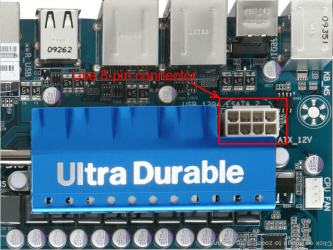
Some boards need the 8-pin connector connected, either two 4-pin Or one 8-pin. This is the EPS-12V connector near the CPU and the back I/O panel, connect both of your 4-pins there. The 4-pin for your mainpower should be with the main one.
8pin.png
 

My Computer

Computer type
PC/Desktop
Computer Manufacturer/Model Number
Home Built Desktop By DataTech
OS
Windows 7 Ultimate X64 SP1
CPU
Intel i5-2550K, Differing ~4.4-4.8GHz No built in GPU
Motherboard
ASUS P8Z68-V PRO/GEN3
Memory
16GB G.Skill Sniper 1866MHz @ 2133MHz 2x8GB
Graphics Card(s)
ASUS GTX650TIB-DC2OC-2GD5, (650TI Boost)
Sound Card
Onboard Realtek 5-1
Monitor(s) Displays
Samsung P2570HD
Screen Resolution
1920x1080
Hard Drives
Samsung 840 Pro 256GB SSD for OS, 500GB Seagate Constellation (Enterprise drive) for Data
PSU
Corsair HX650W
Case
Inwin Dragon Rider
Cooling
Hyper 212 EVO w/two Noctua fans, push-pull, @1300 RPM
Keyboard
E-Z Eyes, bright yellow keys with large characters
Mouse
steelseries SENSEI Laser Pro Gaming
Internet Speed
48-51Mbs Mbs down, 11 Mbs up Xfinity Cable
Antivirus
Norton Internet Security 2013
Browser
IE 10, Opera, Pale Moon if needed
Other Info
4 case fans, LG BluRay-RE, ASUS DVD-RW, Mr. Fusion power supply, 1.21 gigawatts.
You Sir are a god, Where did you find those I poured through that book and found nothing on those codes + rep for you!
I downloaded the manual from the Gigabyte website and the codes were listed in the FAQ's.

As Britton30 mentions above connect a 8 pin connector to the ATX 12V power connector in the picture above and a 20+4 pin Main Connector (24pins total) to the ATX main power connector.

Next I'd clear the CMOS. Using the CLR_CMOS jumper near the battery or by removing the battery.
From the manual:
To clear the CMOS values, place a jumper cap on the two pins to temporarily short the two pins or use a metal object like a screwdriver to touch the two pins for a few seconds

Warnings
• Always turn off your computer and unplug the power cord from the power outlet before clearing the CMOS values.
• After clearing the CMOS values and before turning on your computer, be sure to remove the jumper cap from the jumper. Failure to do so may cause damage to the motherboard.
• After system restart, go to BIOS Setup to load factory defaults (select Load Optimized Defaults) or manually configure
I don't think these will be the issue but for reference
From the manual again:
• To meet expansion requirements, it is recommended that a power supply that can withstand high power consumption be used (500W or greater). If a power supply is used that does not provide the required power, the result can lead to an unstable or unbootable system.
• The power connectors are compatible with power supplies with 2x2 12V and 2x10 power connectors. When using a power supply providing a 2x4 12V and a 2x12 power connector, remove the protective covers from the 12V power connector and the main power connector on the motherboard. Do not insert the power supply cables into pins under the protective covers when using a power supply providing a 2x2 12V and a 2x10 power connector.
If someone you know has a PSU greater than 500W you could borrow, you could try that but I wouldn't think it would be required to just run the MB and a few fans.

If the above fails then I'm sorry to say but it sounds like your MB is stuffed, you may consider contacting Gigabyte and see what they say, they may have a better idea about the beeps.
 

My Computer

Computer Manufacturer/Model Number
Self built
OS
Windows 7 Ultimate x64
CPU
Intel Pentium Dual Core E5200 2.5GHz (3.77GHz OC)
Motherboard
Asus P5Q-E
Memory
Corsair 4GB DDR2 (4x1GB CM2X1024-6400C4)
Graphics Card(s)
Palit GeForce GTS 250 (1024MB)
Sound Card
On Board (ADI AD2000B 8ch HD)
Monitor(s) Displays
Samsung 32in LCD TV
Screen Resolution
1360x768
Hard Drives
2 x 1TB Samsung 103SJ (Raid0)
2 x External 500GB Samsung 502IJ (NexStar 3 HD Enclosures)
PSU
550W Antec Neo HE 550
Case
Antec P180
Cooling
Xigmatex Red Scorpion CPU Cooler. 3x120mm Fans
Keyboard
Logitech MX5000 Laser (Combo)
Mouse
Logitech MX5000 Laser (Combo)
Internet Speed
ADSL2+ (avg 10 Mbps Down, 0.80 Mbps up)
Other Info
Gigabyte GN-WP01GS 54g Wireless Lan Card
Some boards need the 8-pin connector connected, either two 4-pin Or one 8-pin. This is the EPS-12V connector near the CPU and the back I/O panel, connect both of your 4-pins there. The 4-pin for your mainpower should be with the main one.
View attachment 195238


Both of my connectors are plugged in as they should be, the 8 pin and the 20+4.

Duzzy thank you again for the help, I was thinking maybe the CMOS should be cleared as the last time this computer ran with no problems it had a PCI-E six pin in use. I thought maybe that developed a memory or something like that. As for the minimum 500W PSU, This could also be my problem because I replaced a 550W with a 450W. I recalculated with the newegg calculator and came up with a much lower requirement for what I have in this case. I don't remember why I picked the 550 it must have looked cool.

I'll reset the CMOS and see what happens. If nothing works still I probably just contact Gigabyte.
 

My Computer

OS
64 bit Win 7
CPU
AMD Athlon II X4
Motherboard
Gigabyte GA-790XTA-UD4
Memory
G-Skill ripjaw 4GB
Graphics Card(s)
Sapphire 100292DDR3L Radeon HD 5450
Sound Card
On board
Hard Drives
Seagate 500 GB
PSU
Rosewill Stallion Series RD450-2-SB 450W ATX V2.2
Keyboard
Logitech EX100
Mouse
Logitech EX100
Internet Speed
3MB/s
Thanks for the feedback.
As I said I think a 450W would be fine. I think there referring to higher for use with add-on cards, dvd burner etc...
To meet expansion requirements
Well let us know how things go and what fixes it.
 

My Computer

Computer Manufacturer/Model Number
Self built
OS
Windows 7 Ultimate x64
CPU
Intel Pentium Dual Core E5200 2.5GHz (3.77GHz OC)
Motherboard
Asus P5Q-E
Memory
Corsair 4GB DDR2 (4x1GB CM2X1024-6400C4)
Graphics Card(s)
Palit GeForce GTS 250 (1024MB)
Sound Card
On Board (ADI AD2000B 8ch HD)
Monitor(s) Displays
Samsung 32in LCD TV
Screen Resolution
1360x768
Hard Drives
2 x 1TB Samsung 103SJ (Raid0)
2 x External 500GB Samsung 502IJ (NexStar 3 HD Enclosures)
PSU
550W Antec Neo HE 550
Case
Antec P180
Cooling
Xigmatex Red Scorpion CPU Cooler. 3x120mm Fans
Keyboard
Logitech MX5000 Laser (Combo)
Mouse
Logitech MX5000 Laser (Combo)
Internet Speed
ADSL2+ (avg 10 Mbps Down, 0.80 Mbps up)
Other Info
Gigabyte GN-WP01GS 54g Wireless Lan Card
I have a dodgy Gigabyte board too which developed a no POST no boot issue and I was constantly resetting CMOS. In frustration I removed all but one stick of RAM and it worked fine, shut down and put it all back.

Gigabyte support can be frustrating due to language barrier but I did finally get some useful info from them.
 

My Computer

Computer type
PC/Desktop
Computer Manufacturer/Model Number
Home Built Desktop By DataTech
OS
Windows 7 Ultimate X64 SP1
CPU
Intel i5-2550K, Differing ~4.4-4.8GHz No built in GPU
Motherboard
ASUS P8Z68-V PRO/GEN3
Memory
16GB G.Skill Sniper 1866MHz @ 2133MHz 2x8GB
Graphics Card(s)
ASUS GTX650TIB-DC2OC-2GD5, (650TI Boost)
Sound Card
Onboard Realtek 5-1
Monitor(s) Displays
Samsung P2570HD
Screen Resolution
1920x1080
Hard Drives
Samsung 840 Pro 256GB SSD for OS, 500GB Seagate Constellation (Enterprise drive) for Data
PSU
Corsair HX650W
Case
Inwin Dragon Rider
Cooling
Hyper 212 EVO w/two Noctua fans, push-pull, @1300 RPM
Keyboard
E-Z Eyes, bright yellow keys with large characters
Mouse
steelseries SENSEI Laser Pro Gaming
Internet Speed
48-51Mbs Mbs down, 11 Mbs up Xfinity Cable
Antivirus
Norton Internet Security 2013
Browser
IE 10, Opera, Pale Moon if needed
Other Info
4 case fans, LG BluRay-RE, ASUS DVD-RW, Mr. Fusion power supply, 1.21 gigawatts.
I reset CMOS this morning, It starts up just fine now. However I am back at my original issue as mentioned in the OP. I must have turned the video drivers off somehow. Should I make a new thread for that in the correct section or keep this one alive?
 

My Computer

OS
64 bit Win 7
CPU
AMD Athlon II X4
Motherboard
Gigabyte GA-790XTA-UD4
Memory
G-Skill ripjaw 4GB
Graphics Card(s)
Sapphire 100292DDR3L Radeon HD 5450
Sound Card
On board
Hard Drives
Seagate 500 GB
PSU
Rosewill Stallion Series RD450-2-SB 450W ATX V2.2
Keyboard
Logitech EX100
Mouse
Logitech EX100
Internet Speed
3MB/s
It's always best to start the new thread. You will get fresh eyes on your problem, and the eyes might belong to people who specialize in video problems.
 

My Computer

Computer type
PC/Desktop
Computer Manufacturer/Model Number
Home Built - Jan 2013
OS
Windows 7 64 Bit Home Premium SP1
CPU
i7-3820
Motherboard
Asus P9X79-PRO - Bios 4608
Memory
GSkill F3-14900CL9Q - 16GB
Graphics Card(s)
EVGA GeForce GTX660 - Driver 352.86
Sound Card
On board Realtek ALC898
Monitor(s) Displays
Acer S271HL
Screen Resolution
1920 x 1080
Hard Drives
#1- Samsung 840 Pro Series
#2- Western Digital WD1002FAEX Sata3 Black
#3- Western Digital WD1002FAEX Sata3 Black
PSU
Corsair CMPSU-850TX-V2 - 850 watt (by Seasonic)
Case
Corsair Obsidian 550D
Cooling
Standard 3 120mm case fans, Cooler Master Hyper 212 EVO
Keyboard
MS KC-0405
Mouse
Intellimouse 5-button
Internet Speed
56 Mbits/Sec (on a good day)
Antivirus
Avast & Malwarebytes
Browser
Firefox
Other Info
Asus DVD - DRW-24B1ST 24X

My Computer

Computer type
PC/Desktop
Computer Manufacturer/Model Number
Home Built Desktop By DataTech
OS
Windows 7 Ultimate X64 SP1
CPU
Intel i5-2550K, Differing ~4.4-4.8GHz No built in GPU
Motherboard
ASUS P8Z68-V PRO/GEN3
Memory
16GB G.Skill Sniper 1866MHz @ 2133MHz 2x8GB
Graphics Card(s)
ASUS GTX650TIB-DC2OC-2GD5, (650TI Boost)
Sound Card
Onboard Realtek 5-1
Monitor(s) Displays
Samsung P2570HD
Screen Resolution
1920x1080
Hard Drives
Samsung 840 Pro 256GB SSD for OS, 500GB Seagate Constellation (Enterprise drive) for Data
PSU
Corsair HX650W
Case
Inwin Dragon Rider
Cooling
Hyper 212 EVO w/two Noctua fans, push-pull, @1300 RPM
Keyboard
E-Z Eyes, bright yellow keys with large characters
Mouse
steelseries SENSEI Laser Pro Gaming
Internet Speed
48-51Mbs Mbs down, 11 Mbs up Xfinity Cable
Antivirus
Norton Internet Security 2013
Browser
IE 10, Opera, Pale Moon if needed
Other Info
4 case fans, LG BluRay-RE, ASUS DVD-RW, Mr. Fusion power supply, 1.21 gigawatts.
Glad one problem's solved.
 

My Computer

Computer Manufacturer/Model Number
Self built
OS
Windows 7 Ultimate x64
CPU
Intel Pentium Dual Core E5200 2.5GHz (3.77GHz OC)
Motherboard
Asus P5Q-E
Memory
Corsair 4GB DDR2 (4x1GB CM2X1024-6400C4)
Graphics Card(s)
Palit GeForce GTS 250 (1024MB)
Sound Card
On Board (ADI AD2000B 8ch HD)
Monitor(s) Displays
Samsung 32in LCD TV
Screen Resolution
1360x768
Hard Drives
2 x 1TB Samsung 103SJ (Raid0)
2 x External 500GB Samsung 502IJ (NexStar 3 HD Enclosures)
PSU
550W Antec Neo HE 550
Case
Antec P180
Cooling
Xigmatex Red Scorpion CPU Cooler. 3x120mm Fans
Keyboard
Logitech MX5000 Laser (Combo)
Mouse
Logitech MX5000 Laser (Combo)
Internet Speed
ADSL2+ (avg 10 Mbps Down, 0.80 Mbps up)
Other Info
Gigabyte GN-WP01GS 54g Wireless Lan Card
Back
Top