
Control Panel--Scanners & Cameras gives error

raymm

Banned
Local time
9:15 PM
Messages
26
Solved! Control Panel--Scanners & Cameras gives error

Foolishly, I changed a path in my registry to D:\Program Files. I forget the name.

Now I'm clicking on Control Panel--Scanners & Cameras.

I get : "Windows cannot find 'D:\Program'. Make sure you typed the name correctly, and then try again."

I regret changing a path in my registry. I see the harm it has done. I promise to backup before I make any changes to my registry in the future.

Can anyone help me restore the default Control Panel program paths?
 

Attachments
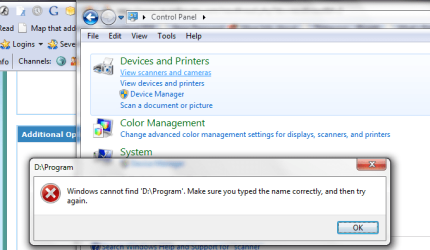
  • Control Panel--scanner err.png
    Control Panel--scanner err.png
    28.9 KB · Views: 79
Last edited:

My Computer

OS
Windows 7 X64
CPU
Inte Core 2 Duo E6420 Socket 77LGA [email protected]
Motherboard
ASUSTek Computer P5B-Deluxe Rev 1.xx, Chipset P965/G965
Memory
DDR2 Dula 8192 MBytes Symmetric DRAM Freq 400 MHz FSB 2:3
Graphics Card(s)
NVIDIA GeForce 8800 GTS, Perfm level 3D, V A2, Mem 320 MByte
Hard Drives
USB 2 * 2 Terabytes.
USB 1 * 500 GiG
4 SETA
Other Info
Mainboard Model P5B-Deluxe (0x0000035B - 0x15997268)

Caches: L2 D-Chache 32 KBytes x2 8-way set associative, 64-byte line size.

L1 I-Chache 32 KBytes x2 8-way set associative, 64-byte line size.

L2 Cache 4096 KBytes 16-way set associative, 64-byte line size.
Graphic Interface version PCI-Express

BIOS American Mega Trends V 1101 03/09/2007
Chipset
----------------------------------
Quick fix -

Search reg for D:\Program Files

Change entry to original
or
Change entry to "D:\Progam Files\..." - [meaning - wrap the entry in quotes.]

System restore may be in order.
 
Thank you for your help.

What is default path for Control Panel--Scanners & Cameras shortcut?
How do I get the path to the program that is supposed to run when I click Control Panel--Scanners & Cameras?

Everything else in Control Path works. Only error is Scanners & Cameras.
 

My Computer

OS
Windows 7 X64
CPU
Inte Core 2 Duo E6420 Socket 77LGA [email protected]
Motherboard
ASUSTek Computer P5B-Deluxe Rev 1.xx, Chipset P965/G965
Memory
DDR2 Dula 8192 MBytes Symmetric DRAM Freq 400 MHz FSB 2:3
Graphics Card(s)
NVIDIA GeForce 8800 GTS, Perfm level 3D, V A2, Mem 320 MByte
Hard Drives
USB 2 * 2 Terabytes.
USB 1 * 500 GiG
4 SETA
Other Info
Mainboard Model P5B-Deluxe (0x0000035B - 0x15997268)

Caches: L2 D-Chache 32 KBytes x2 8-way set associative, 64-byte line size.

L1 I-Chache 32 KBytes x2 8-way set associative, 64-byte line size.

L2 Cache 4096 KBytes 16-way set associative, 64-byte line size.
Graphic Interface version PCI-Express

BIOS American Mega Trends V 1101 03/09/2007
Chipset
----------------------------------
if you are using 64bit windows, the path is

C:\Program Files (x86)\Windows Photo Viewer\ImagingDevices.exe

if on 32bit,

C:\Program Files\Windows Photo Viewer\ImagingDevices.exe (i would assume)
 

My Computer

Computer Manufacturer/Model Number
mickey megabyte 1234
OS
ultimate 64 sp1
CPU
i5 2500K [email protected]
Motherboard
MSI P67A-GD53
Memory
8 gigs GSkill Ripjaws 1600
Graphics Card(s)
amd hd6950
Sound Card
creative x-fi gamer
Monitor(s) Displays
samsung 24"
Screen Resolution
1920x1080
Hard Drives
ocz vertex 2e 60 gig, samsung f3 1tb, buffalo 2tb ext
PSU
antec 550
Case
antec three hundred
Cooling
i'm a cooling fan
Keyboard
saitek eclipse ii
Mouse
logitech g3
Internet Speed
about 4 Mbps
Other Info
i love win7
Clicking on ImagingDevices.exe produces nothing.
Still have error:

"Windows cannot find 'D:\Program'. Make sure you typed the name correctly, and then try again."

I find lots of locations in registry with D:\Program Files, I'm afraid to start changing, maybe I won't get them all. Looking for a program that will find and replace in registry for all.

I'm not sure what I'd change it back to.

C:\Program Files (x86)
or
C:\Program Files

I guess C:\Program Files


My Computer

OS
Windows 7 X64
CPU
Inte Core 2 Duo E6420 Socket 77LGA [email protected]
Motherboard
ASUSTek Computer P5B-Deluxe Rev 1.xx, Chipset P965/G965
Memory
DDR2 Dula 8192 MBytes Symmetric DRAM Freq 400 MHz FSB 2:3
Graphics Card(s)
NVIDIA GeForce 8800 GTS, Perfm level 3D, V A2, Mem 320 MByte
Hard Drives
USB 2 * 2 Terabytes.
USB 1 * 500 GiG
4 SETA
Other Info
Mainboard Model P5B-Deluxe (0x0000035B - 0x15997268)

Caches: L2 D-Chache 32 KBytes x2 8-way set associative, 64-byte line size.

L1 I-Chache 32 KBytes x2 8-way set associative, 64-byte line size.

L2 Cache 4096 KBytes 16-way set associative, 64-byte line size.
Graphic Interface version PCI-Express

BIOS American Mega Trends V 1101 03/09/2007
Chipset
----------------------------------
Ok, here is what I've learned:

See attachment "Expanded error.pdf".
I found the directory name in "Expanded error.pdf" on C: drive.
Copied that folder to same path on D: drive.
Then Control Panel--Scanners & Camers worked.


Attachments

My Computer

OS
Windows 7 X64
CPU
Inte Core 2 Duo E6420 Socket 77LGA [email protected]
Motherboard
ASUSTek Computer P5B-Deluxe Rev 1.xx, Chipset P965/G965
Memory
DDR2 Dula 8192 MBytes Symmetric DRAM Freq 400 MHz FSB 2:3
Graphics Card(s)
NVIDIA GeForce 8800 GTS, Perfm level 3D, V A2, Mem 320 MByte
Hard Drives
USB 2 * 2 Terabytes.
USB 1 * 500 GiG
4 SETA
Other Info
Mainboard Model P5B-Deluxe (0x0000035B - 0x15997268)

Caches: L2 D-Chache 32 KBytes x2 8-way set associative, 64-byte line size.

L1 I-Chache 32 KBytes x2 8-way set associative, 64-byte line size.

L2 Cache 4096 KBytes 16-way set associative, 64-byte line size.
Graphic Interface version PCI-Express

BIOS American Mega Trends V 1101 03/09/2007
Chipset
----------------------------------
Start
All Programs
Accessories
Snipping Tool

A very handy tool for taking screenshots, grabbing dialog boxes, or portions of a screen.
 
Ok, here is what I've learned:

See attachment "Expanded error.pdf".
I found the directory name in "Expanded error.pdf" on C: drive.
Copied that folder to same path on D: drive.
Then Control Panel--Scanners & Camers worked.
OK. That fixes Control Panel. It may suffice as a long term solution - at least until your next OS insall. Early November?
 
How can I change thread title? I want to add "Solved!" to this thread.
 

My Computer

OS
Windows 7 X64
CPU
Inte Core 2 Duo E6420 Socket 77LGA [email protected]
Motherboard
ASUSTek Computer P5B-Deluxe Rev 1.xx, Chipset P965/G965
Memory
DDR2 Dula 8192 MBytes Symmetric DRAM Freq 400 MHz FSB 2:3
Graphics Card(s)
NVIDIA GeForce 8800 GTS, Perfm level 3D, V A2, Mem 320 MByte
Hard Drives
USB 2 * 2 Terabytes.
USB 1 * 500 GiG
4 SETA
Other Info
Mainboard Model P5B-Deluxe (0x0000035B - 0x15997268)

Caches: L2 D-Chache 32 KBytes x2 8-way set associative, 64-byte line size.

L1 I-Chache 32 KBytes x2 8-way set associative, 64-byte line size.

L2 Cache 4096 KBytes 16-way set associative, 64-byte line size.
Graphic Interface version PCI-Express

BIOS American Mega Trends V 1101 03/09/2007
Chipset
----------------------------------
click on one of the buttons as shown below - then you can make a quick report to the admins that the thread is solved.
 

Attachments

  • button.JPG
    button.JPG
    7.8 KB · Views: 60

My Computer

Computer Manufacturer/Model Number
mickey megabyte 1234
OS
ultimate 64 sp1
CPU
i5 2500K [email protected]
Motherboard
MSI P67A-GD53
Memory
8 gigs GSkill Ripjaws 1600
Graphics Card(s)
amd hd6950
Sound Card
creative x-fi gamer
Monitor(s) Displays
samsung 24"
Screen Resolution
1920x1080
Hard Drives
ocz vertex 2e 60 gig, samsung f3 1tb, buffalo 2tb ext
PSU
antec 550
Case
antec three hundred
Cooling
i'm a cooling fan
Keyboard
saitek eclipse ii
Mouse
logitech g3
Internet Speed
about 4 Mbps
Other Info
i love win7
Back
Top