Control Panel stopped working

Coneman

New member
Local time
3:11 PM
Messages
2
Hello, I recently did a fresh install of Win7 32bit on two computers (Dell Optiplex 330, 360) in my office. The installation went fine but I noticed that both computers have errors in the control panel.

On one, if I open the control panel from the start menu (CP homepage) it opens for a second, then closes and I get a 'Windows Explorer has stopped working' error -> it asks to look for online solutions and finds nothing. However, this only happens to the main Control Panel page, if I open a section of the Control Panel like the 'Adjust Screen Resolution' via search bar, it opens fine.

On the other, control panel works fine, but when I open the 'Backup and Restore' section, I get a blank menu screen. It has the title 'Backup and Restore' but there are no buttons or options.

Is there a way to re-install control panel? Or other ways to fix this problem, I don't plan on re-formating.
 

My Computer

OS
Windows 7 32bit
Most likely Control Panel is crushed by a new menu item which was installed with Dell video or audio drivers.

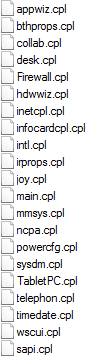
Turn Hidden files option On and then turn hide SYSTEM files option OFF.
And search for *.CPL files in C:\Windows\

Something outside the list could be Control panel item, causing the problem.
Before deleting anything backup and make sure it is not a default Windows Control panel menu item.

For Backup and Restore try to start this file
C:\Windows\System32\sdclt.exe
 

Attachments

  • cpl.png
    cpl.png
    2.8 KB · Views: 23

My Computer

Computer type
PC/Desktop
OS
Windows 8.1 ; Windows 7 x86 (Dec2008-Jan2013)
Other Info
"The scale icon at the top right of a post or tutorial is how you can give rep to the member."
I ran the sfc command several times and it never pulled up any fixes/problems. I found a new .cpl files that are not on the list provided by Neutron16, i'll try to remove those and see if anything happens.
 

My Computer

OS
Windows 7 32bit
I ran the sfc command several times and it never pulled up any fixes/problems. I found a new .cpl files that are not on the list provided by Neutron16, i'll try to remove those and see if anything happens.

To be safe, start them first and see what are they.
Or may be take ownership and rename.
And backup, backup, backup!:)
 

My Computer

Computer type
PC/Desktop
OS
Windows 8.1 ; Windows 7 x86 (Dec2008-Jan2013)
Other Info
"The scale icon at the top right of a post or tutorial is how you can give rep to the member."
Hello Coneman and welcome to Seven Forums.

It might be more advantageous to try a repair install. The control panel errors might be the tip of the iceberg for some additional OS problems.

http://www.sevenforums.com/tutorials/3413-repair-install.html

Also, it might be more than a coincidence that both machines are experiencing control panel errors. Bad install media perhaps?
 

My Computer

Computer type
Laptop
Computer Manufacturer/Model Number
Sony Vaio VPCEB47GM Laptop
OS
Win 7 Pro 64-bit
CPU
Intel i5 2.4 Ghz
Memory
8GB DDR3
Graphics Card(s)
Intel HD 3000
Sound Card
IDT High Definition
Monitor(s) Displays
15.6 WGXA Anti-Glare LED
Screen Resolution
1280x800
Hard Drives
640Gb 7200rpm
Antivirus
MSE
Browser
Opera (primary) with IE9 backup
Back
Top