Control panel view style?

jambananas

New member
Local time
4:57 AM
Messages
13
Is there any way of changing the view style of "All Control Panel Items"? Being stuck with tiles sucks hard and all of the options are greyed out.
 

My Computer

OS
hamsters
Hello Jambananas, and welcome to Seven Forums.

Resetting all folder view settings back to default should restore this for you.

Hope this helps,
Shawn
 

My Computer

Computer type
PC/Desktop
Computer Manufacturer/Model Number
Self built custom
OS
64-bit Windows 11 Pro for Workstations
CPU
Intel i7-8700K OC'd to 5 GHz
Motherboard
ASUS ROG Maximus XI Formula Z390
Memory
64 GB (4x16GB) G.SKILL TridentZ RGB DDR4 3600 MHz
Graphics Card(s)
ASUS ROG-STRIX-GTX1080TI-O11G-GAMING
Sound Card
Integrated
Monitor(s) Displays
2 x Samsung Odyssey G7 27"
Screen Resolution
2560x1440
Hard Drives
1TB Samsung 990 PRO M.2,
4TB Samsung 990 PRO PRO M.2,
TerraMaster F8 SSD Plus NAS
PSU
Seasonic Prime Titanium 850W
Case
Thermaltake Core P3
Cooling
Corsair Hydro H115i
Keyboard
Logitech wireless K800
Mouse
Logitech MX Master 4
Internet Speed
2 Gb/s Download and 100 Mb/s Upload
Antivirus
Malwarebyte Anti-Malware Premium
Browser
Google Chrome
Other Info
Logitech Z625 speaker system,
Logitech BRIO 4K Pro webcam,
HP Color LaserJet Pro MFP M477fdn,
APC SMART-UPS RT 1000 XL - SURT1000XLI,
Galaxy S23 Plus phone
Thanks, but this doesn't work as the control panel view doesn't appear to take its values from standard folder view settings. The setting changed to medium icons, but it still appeared as tiles and the options were still greyed out.
 

My Computer

OS
hamsters
Okay, if you problem is what i think it is go over to view by click on small icons and select large icons ;)
 
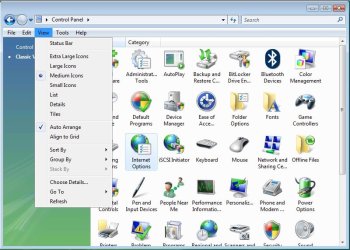
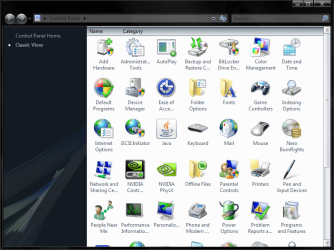
Vista screenshot! This is how I want it to look.
 

Attachments

  • vista.png
    vista.png
    69.2 KB · Views: 133

My Computer

OS
hamsters
Okay, I think the closest to make it look like that is selecting large icons... sorry i cannot help more with this :(
 
The problem is that 'Control Panel' is a system folder, thus there is no way (other than 3rd party apps) that the view can change IMO.
 

My Computer

Computer Manufacturer/Model Number
Compaq Desktop
OS
Windows 7 Ultimate x64
CPU
AMD Sempron Dual Core
Memory
3GB
Graphics Card(s)
NVIDIA GeForce 6150SE nForce 430
Screen Resolution
1024x768
Hard Drives
150GB Sata
The problem is that the devs do what they feel is right to them and then completely disregard the minority. Even if it requires modifying dlls, I'm sure there will be a solution.
 

My Computer

OS
hamsters
There is a workaround. Create a folder to hold the complete set of controls or your modified/preferred set of controls. Drag and drop the CPL items from Control Panel into the new folder. Pin it on the taskbar (requires right click) or place it in your user folder. Set the folder appearance options to your liking. I think you could even create a Control Panel item for it (the folder) and include it Control Panel (?!?)

See MSDN article regarding in depth discussion of Vista Control Panel.
Or we could just get accustomed to the new appearance.
 
Except for the slight quirk where you have to keep updating the folder. It's called preferences for a reason, it's not to say that you can't get used to it, it's because you prefer to use it if you have the option.
 

My Computer

OS
hamsters
I'm glad the changed to small icons for view all. It was down right ridawnkulous that I would have to scroll on a 1902x1080 monitor in an option manager window.

It's also called visual consistency on developers part.
 

My Computer

OS
7264x64/7260x86
Haha, you mean you didn't even have the option for small icons in previous builds? Comedy gold.
 

My Computer

OS
hamsters
No, it was there, I'm refering to the setup that would happen with vista icons.

They should just release vista as seven with no changes, that should make people happy.
 

My Computer

OS
7264x64/7260x86
You couldn't customise the control panel view options in Vista before?
 

My Computer

OS
hamsters
Jambananas,

In Vista, if you changed the Control Panel to Classic View, then you were able to change the View settings. Unfortunately, there is not a Classic View in Windows 7. :(

Vista.jpg
 

My Computer

Computer type
PC/Desktop
Computer Manufacturer/Model Number
Self built custom
OS
64-bit Windows 11 Pro for Workstations
CPU
Intel i7-8700K OC'd to 5 GHz
Motherboard
ASUS ROG Maximus XI Formula Z390
Memory
64 GB (4x16GB) G.SKILL TridentZ RGB DDR4 3600 MHz
Graphics Card(s)
ASUS ROG-STRIX-GTX1080TI-O11G-GAMING
Sound Card
Integrated
Monitor(s) Displays
2 x Samsung Odyssey G7 27"
Screen Resolution
2560x1440
Hard Drives
1TB Samsung 990 PRO M.2,
4TB Samsung 990 PRO PRO M.2,
TerraMaster F8 SSD Plus NAS
PSU
Seasonic Prime Titanium 850W
Case
Thermaltake Core P3
Cooling
Corsair Hydro H115i
Keyboard
Logitech wireless K800
Mouse
Logitech MX Master 4
Internet Speed
2 Gb/s Download and 100 Mb/s Upload
Antivirus
Malwarebyte Anti-Malware Premium
Browser
Google Chrome
Other Info
Logitech Z625 speaker system,
Logitech BRIO 4K Pro webcam,
HP Color LaserJet Pro MFP M477fdn,
APC SMART-UPS RT 1000 XL - SURT1000XLI,
Galaxy S23 Plus phone
Back
Top