Convert and Burn BD?

Corpsecrank

NSFW
Pro User
Local time
11:40 AM
Messages
334
I bought a bluray burner. I now regret that.

But I want to take a file such as mkv or mp4 etc and convert it back to bluray format and then burn it to a blank bd-r. So far I have not found anything capable of doing the job the way I want it done.

I am looking for something similar to convertXtodvd only for bluray.

Has anyone done anything with bluray yet? I need some software suggestions or I am going to sell this drive and go back to my old one.
 

My Computer

Computer Manufacturer/Model Number
Custom
OS
Win7 64bit Ultimate
CPU
AMD Phenom II X6 1100T Black Edition Thuban 3.3GHz, 3.7GHz
Motherboard
Gigabyte GA-890FXA-UD5
Memory
CORSAIR DOMINATOR GT 8GB (2 x 4GB) 1866 DDR3
Graphics Card(s)
XFX HD-697A-CNDC Radeon HD6970 2GB 256-bit
Sound Card
Creative SoundBlaster X-Fi Platinum Fatal1ty Edition
Monitor(s) Displays
Dual 25 Inch Hanns-G HZ251
Screen Resolution
1920x1080 X 2
PSU
Corsair 850W Single Rail
Case
Thermaltake V9 BlacX w/ Dual HDD Docking Station
Cooling
Air lots and lots of air and copper...
Keyboard
Kensington (Low-Profile)
Mouse
Creative Fatal1ty
Internet Speed
15Gbit (15 Down 5 Up)
Other Info
XIGMATEK HDT-S1284F 120mm HYPRO Bearing CPU Cooler, LG Blu-Ray Burner.
First off what are the properties of the files you wish to convert? Unless they were originally high definition clips then you are wasting your time. Coincidently if you think your new BD writer is not working properly, put the standard writer back in, come back here and I will explain how to create up to a 30 minute Blu-Ray disc from a standard DVD writer! You do not need a special Blu-Ray burner to do this. I only now produce high def DVD's and I haven't got a Blu-Ray writer. I just use my standard writer and the free software "Burn aware"
 

My Computer

Computer type
PC/Desktop
OS
Microsoft Windows 7 Home Premium 64-bit 7601 Multiprocessor Free Service Pack 1
CPU
Intel(R) Core(TM) i7-3770 CPU @ 3.40GHz
Motherboard
ASUSTeK COMPUTER INC. P8H77-M
Memory
8.00 GB
Graphics Card(s)
Intel(R) HD Graphics 4000
Sound Card
On Board
Monitor(s) Displays
Dell 24"
Screen Resolution
1920 x 1080
Hard Drives
(1) INTEL SSDSC2CT180A3 ATA Device (2) ST500DM002-1BD142 ATA Device (3) WDC WD3200AAKS-75L9A0 ATA Device (4) Generic- Compact Flash USB Device (5) Generic- MS/MS-Pro USB Device (6) Generic- SD/MMC USB Device (7) Generic- SM/xD-Picture USB
PSU
500w Corsair
Case
Cooler Master
Cooling
3 Fans
Keyboard
Logitech MK300
Mouse
Logitech WOM
Internet Speed
75Mb
Antivirus
Norton 360
Browser
Firefox, Opera, IE
You can use TS Muxer to create a AVCHD disc, and burn the resulting folders to Disc.
It will be a BluRay Structure which can be burned to DVD, DVD DL, or BD disc.


However, you must know a bit about the file itself.
1. It must be 1280x720 or 1920x1080. Not close, but exactly.
2. It must have been encoded properly. Typically 4 or 5 Ref. Frames.
Anything more, it may not work. A lot depends on the playback device as well.

Theres a lot of other settings as well that need to conform to strict guidelines.

If you just downloaded them, chances are they don't even come remotely close to BlueRay specs.
 

My Computer

Computer Manufacturer/Model Number
Custom (Self Build)
OS
Windows 7 Home Premium 64bit
CPU
Intel Core i7 2700k
Motherboard
eVGA P67 SLI
Memory
8GB Mushkin Redline Ridgebacks @1866
Graphics Card(s)
EVGA GTX570 SC
Sound Card
XiFi Titanium HD
Monitor(s) Displays
LG W2453V
Screen Resolution
1920x1080
Hard Drives
Intel 320 80GB -- Intel X25-V 40GB --WD Black 1TB x2 -- WD Blue 640GB
PSU
Seasonic x750
Case
Corsair 600T SE White
Cooling
eVGA Superclocked CPU Cooler
Keyboard
Saitek Cyborg
Antivirus
Kaspersky
Browser
IE
Other Info
LG BD/DVD
You can use TS Muxer to create a AVCHD disc, and burn the resulting folders to Disc.
It will be a BluRay Structure which can be burned to DVD, DVD DL, or BD disc.


However, you must know a bit about the file itself.
1. It must be 1280x720 or 1920x1080. Not close, but exactly.
2. It must have been encoded properly. Typically 4 or 5 Ref. Frames.
Anything more, it may not work. A lot depends on the playback device as well.

Theres a lot of other settings as well that need to conform to strict guidelines.

If you just downloaded them, chances are they don't even come remotely close to BlueRay specs.

Now that is exactly what I was after. I have heard that TS Muxer could do the job as well but no one would go into any real detail.

As for the format I do want to convert a file that is exactly 1080 or 720 and was created from an HD source. I want to convert a blu-ray rip that was ripped from a blu-ray disc as h.264 back into blu-ray structure for burning onto a BD-R disc.

This is why I do need a blu-ray burner and discs for the project. I want to be able to play the finished discs back over a blu-ray player at the same full quality level as the original disc.

I think I will give TS Muxer a try and see what I can do.
 

My Computer

Computer Manufacturer/Model Number
Custom
OS
Win7 64bit Ultimate
CPU
AMD Phenom II X6 1100T Black Edition Thuban 3.3GHz, 3.7GHz
Motherboard
Gigabyte GA-890FXA-UD5
Memory
CORSAIR DOMINATOR GT 8GB (2 x 4GB) 1866 DDR3
Graphics Card(s)
XFX HD-697A-CNDC Radeon HD6970 2GB 256-bit
Sound Card
Creative SoundBlaster X-Fi Platinum Fatal1ty Edition
Monitor(s) Displays
Dual 25 Inch Hanns-G HZ251
Screen Resolution
1920x1080 X 2
PSU
Corsair 850W Single Rail
Case
Thermaltake V9 BlacX w/ Dual HDD Docking Station
Cooling
Air lots and lots of air and copper...
Keyboard
Kensington (Low-Profile)
Mouse
Creative Fatal1ty
Internet Speed
15Gbit (15 Down 5 Up)
Other Info
XIGMATEK HDT-S1284F 120mm HYPRO Bearing CPU Cooler, LG Blu-Ray Burner.
TS Muxer should work just fine for you, provided the rip was encoded properly.

As I said, it really does depend on the playback device.

As a reference, my particular BD player requires these H264 settings if recoded:

--level 4.1 --bframes 3 --ref 4 --b-pyramid strict --keyint 24 --min-keyint 2 --vbv-maxrate 14000 --vbv-bufsize 14500

The rest is pretty much optional.

If you are not re-coding at all .. well, it should be pretty staright forward.


I use IMGBurn to burn the disc, but TBH, I also only use DVD or DL-DVD. Not sure off hand if it handles BD as well.
 

My Computer

Computer Manufacturer/Model Number
Custom (Self Build)
OS
Windows 7 Home Premium 64bit
CPU
Intel Core i7 2700k
Motherboard
eVGA P67 SLI
Memory
8GB Mushkin Redline Ridgebacks @1866
Graphics Card(s)
EVGA GTX570 SC
Sound Card
XiFi Titanium HD
Monitor(s) Displays
LG W2453V
Screen Resolution
1920x1080
Hard Drives
Intel 320 80GB -- Intel X25-V 40GB --WD Black 1TB x2 -- WD Blue 640GB
PSU
Seasonic x750
Case
Corsair 600T SE White
Cooling
eVGA Superclocked CPU Cooler
Keyboard
Saitek Cyborg
Antivirus
Kaspersky
Browser
IE
Other Info
LG BD/DVD
ImgBurn will burn to BD media; of course you need a BD Burner. ImgBurn is IMO the best burning application period.
 

My Computer

Computer Manufacturer/Model Number
My Build
OS
win7 Ult 64
CPU
i7 3930K & 3960X
Motherboard
ASUS P9X79 Deluxe
Memory
16GB G-Skill 2133MHz
Graphics Card(s)
Sapphire HD 7970
Sound Card
On-board
Monitor(s) Displays
ASUS 27 inch
Screen Resolution
1920X1080
Hard Drives
Crucial M4 256GB, 1.5TB WD Black for Data/Images
PSU
Corsair AX1200
Case
NZXT 810
Cooling
Custom Loop, Swiftech HDBlock
Keyboard
Mionix
Mouse
Mionix
Internet Speed
Cable
ImgBurn will burn to BD media; of course you need a BD Burner. ImgBurn is IMO the best burning application period.

Correct and it is a great burning app. I also planned to use it for this purpose. I knew that once I got a file back into BD structure I could easily burn it back to disc with ImgBurn the problem was getting files back into the proper structure.

I have a lot of fancy tools at my disposal but finding blu-ray utilities has been an issue for me.
 

My Computer

Computer Manufacturer/Model Number
Custom
OS
Win7 64bit Ultimate
CPU
AMD Phenom II X6 1100T Black Edition Thuban 3.3GHz, 3.7GHz
Motherboard
Gigabyte GA-890FXA-UD5
Memory
CORSAIR DOMINATOR GT 8GB (2 x 4GB) 1866 DDR3
Graphics Card(s)
XFX HD-697A-CNDC Radeon HD6970 2GB 256-bit
Sound Card
Creative SoundBlaster X-Fi Platinum Fatal1ty Edition
Monitor(s) Displays
Dual 25 Inch Hanns-G HZ251
Screen Resolution
1920x1080 X 2
PSU
Corsair 850W Single Rail
Case
Thermaltake V9 BlacX w/ Dual HDD Docking Station
Cooling
Air lots and lots of air and copper...
Keyboard
Kensington (Low-Profile)
Mouse
Creative Fatal1ty
Internet Speed
15Gbit (15 Down 5 Up)
Other Info
XIGMATEK HDT-S1284F 120mm HYPRO Bearing CPU Cooler, LG Blu-Ray Burner.
Check whether the Freemake Video Converter can be of any help to you.

At this point in time, what all I know is that it can convert any video and burn it to a BD.

Download from here Freemake - Best Freeware Alternatives To Paid Video Software and try it.

Your report on how well or otherwise it performed for your project may be of help to others. ( Use a BD-RE for the trial)

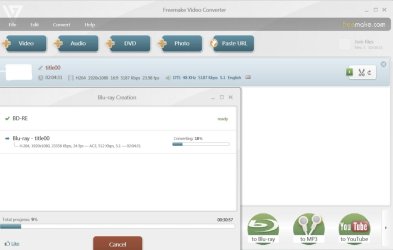
EDIT:Though I am averse to any conversion process that will change the original, out of curiosity I decided to try the conversion and burn to BD of the Freemake Video Converter.

To this end, I first converted a less than 25GB main video of a BD with DTS HD and DTS 3/2+1 audio plus English subtitles - which I already had as a BD ISO - to an mkv file using MakeMKV (MakeMKV - Make MKV from Blu-ray and DVD). I opened this mkv file in the Freemake Video Converter,hit the To Bluray button and started the conversion & burning process. Its just click and keep watching. The conversion/burning process is on and here is the clip, where one can see the input file attributes and the BD content attributes. The only thing I can see is that DTS is now converted into AC3. Once the burning is over, I shall try to play it on my PS3 Slim and let all know. It shall be for others to scrutinise this screenshot and give their comments.

mkv2bd.jpg
 
Last edited:

My Computer

Computer Manufacturer/Model Number
self-assembled
OS
Windows 7 Ultimate 32bit
CPU
AMD Phenom II X3 720 Processor
Motherboard
Gigabyte GA-MA78GM-S2H Revision 1.0
Memory
Transcend DDR2 (PC2 6400) 4 X 1GB
Graphics Card(s)
Integrated + ATI Radeon 4550
Sound Card
Integrated Realtek ALC 889A
Monitor(s) Displays
DELL 1704 FPT
Screen Resolution
1280 x 1024
Hard Drives
Western Digital Caviar SE16 250 GB x2 in RAID 0
PSU
Coolermaster 400 W
Case
Zebronics Cube
Cooling
stock
Keyboard
Microsoft - wired
Mouse
Microsoft - wired
Internet Speed
ADSL 256-512Kbps
Update

The BD was successfully created. It took about 3hours and 23 minutes for the conversion and another one hour + ( I lost the time count since I was busy doing something else - what else but browsing the forum :D ) for the burning. (No seperate burning program needed.)

I played it both on my desktop with Power DVD and on my PS3 slim. But for the fact that the sound now is ac3 5.1 as against the original DTS MA 5.1 as indicated in my last post, there was no other discernible difference. The subtitle is directly rendered on the video.

So I do think that the OP's question has been answered successfully. He may have his HD video clips in different containers. The Freemake Video Converter facilitates joining of the various clips and also a rudimentary editing feature. He only has to try and report whether his requirements are met and how happy or otherwise he is with this simple and straight-forward BD creator.
 

My Computer

Computer Manufacturer/Model Number
self-assembled
OS
Windows 7 Ultimate 32bit
CPU
AMD Phenom II X3 720 Processor
Motherboard
Gigabyte GA-MA78GM-S2H Revision 1.0
Memory
Transcend DDR2 (PC2 6400) 4 X 1GB
Graphics Card(s)
Integrated + ATI Radeon 4550
Sound Card
Integrated Realtek ALC 889A
Monitor(s) Displays
DELL 1704 FPT
Screen Resolution
1280 x 1024
Hard Drives
Western Digital Caviar SE16 250 GB x2 in RAID 0
PSU
Coolermaster 400 W
Case
Zebronics Cube
Cooling
stock
Keyboard
Microsoft - wired
Mouse
Microsoft - wired
Internet Speed
ADSL 256-512Kbps
I think AC3 is a good way to go for compressed files. I always convert DTS to AC3.


TBH, I can not tell that much of a difference between the Core 640 AC3 and Core 1536 DTS. And many times, 640AC3 vs 448AC3 is hard for me to tell the difference in as well.

Many Times I just compress it down to a 448 AC3 5.1 track, unless its a Music Concert and I leave it at 640. (I can tell a slight difference with Concerts)

But I think this all comes down to the quality of speakers themselves.
 

My Computer

Computer Manufacturer/Model Number
Custom (Self Build)
OS
Windows 7 Home Premium 64bit
CPU
Intel Core i7 2700k
Motherboard
eVGA P67 SLI
Memory
8GB Mushkin Redline Ridgebacks @1866
Graphics Card(s)
EVGA GTX570 SC
Sound Card
XiFi Titanium HD
Monitor(s) Displays
LG W2453V
Screen Resolution
1920x1080
Hard Drives
Intel 320 80GB -- Intel X25-V 40GB --WD Black 1TB x2 -- WD Blue 640GB
PSU
Seasonic x750
Case
Corsair 600T SE White
Cooling
eVGA Superclocked CPU Cooler
Keyboard
Saitek Cyborg
Antivirus
Kaspersky
Browser
IE
Other Info
LG BD/DVD
Back
Top