Convert HTML file to Excel or CSV

rundwald

New member
Member
VIP
Local time
9:35 PM
Messages
394
Location
UK, Hampshire
Hi there! Can anyone direct me to a way to convert HTML files to Excel or CSV, freeware o ron-line? Please!

Here's a short example of the files' contents
Code:
<?xml version="1.0" encoding="UTF-8"?>

-<CRC>


+<Sample Number="0">


-<Sample Number="1">

<Time>20/03/2014 11:02:42</Time>

<Downstream>0.0</Downstream>

<Upstream>0.0</Upstream>

<DrawBlank>False</DrawBlank>

</Sample>


-<Sample Number="2">

<Time>20/03/2014 11:03:42</Time>

<Downstream>0.0</Downstream>

<Upstream>0.0</Upstream>

<DrawBlank>False</DrawBlank>

</Sample>


-<Sample Number="3">

<Time>20/03/2014 11:04:42</Time>

<Downstream>0.0</Downstream>

<Upstream>0.0</Upstream>

<DrawBlank>False</DrawBlank>

</Sample>


-<Sample Number="4">

<Time>20/03/2014 11:05:42</Time>

<Downstream>0.0</Downstream>

<Upstream>0.0</Upstream>

<DrawBlank>False</DrawBlank>
 

My Computer

Computer type
PC/Desktop
Computer Manufacturer/Model Number
Dell Inspiron 560MT
OS
Home Premium 64 bit
CPU
2.9 gigahertz Intel Core2 Duo 64 kilobyte primary memory cac
Motherboard
Board: Dell Inc. 0K83V0 A00 Serial Number: ..CN750939CP069B
Memory
4096 Megabytes Usable Installed Memory Slot 'DIMM0' has 102
Graphics Card(s)
ATI Radeon HD 4300/4500 Series
Sound Card
High Definition Audio Device NVIDIA High Definition Audio (
Monitor(s) Displays
DELL ST2210 [Monitor] (21.7"vis, s/n P479R01Q0VCU, January 2
Screen Resolution
1920x1080
Hard Drives
628.58 Gigabytes Usable Hard Drive Capacity
554.78 Gigabytes Hard Drive Free Space
Keyboard
Std Dell UK
Mouse
KEYBOARD, 105, UNITED KINGDOM, KWE9C0
Internet Speed
~8000 kbps
Antivirus
Avast Free
Browser
Chrome
Other Info
Office 2007: Photo Editing; Serif PhotoPlus X7
Rename file

On my machine all that's required is to rename a copy of the .html file with the .csv extension.

I say a "copy" so that you're not changing the properties of the original file!

Default software for reading html files on my machine is Cyberfox 64 bit.

Default software for reading csv files on my machine is SoftMaker FreeOffice (Planmaker)

I have other browsers and office suites that can handle the same files!
.
 

My Computer

Computer type
Laptop
Computer Manufacturer/Model Number
ASUS
OS
Microsoft Windows 7 Home Premium 64-bit 7601 Multiprocessor Free Service Pack 1
CPU
AMD C-60 APU with Radeon(tm) HD Graphics
Motherboard
ASUSTeK COMPUTER INC. X501U
Memory
4.00 GB
Graphics Card(s)
AMD Radeon HD 6290 Graphics
Sound Card
(1) AMD High Definition Audio Device (2) Realtek High Defi
Screen Resolution
1366 x 768 x 32 bits (4294967296 colors) @ 60 Hz
Hard Drives
Hitachi HTS545050A7E380 SATA Disk Device
Antivirus
Comodo CIS & FW, SecureAplus App Whitelisting, Threatfire
Browser
Cyberfox 64bit, Opera 64bit, Airfox
Other Info
Spy-The-Spy, HitmanPro.Alert, Norton Connect Safe, MJRegWatcher, BitDefender TrafficLight, Voodoo Shield, Zemana AntiMalware
OOps! I meant xml files!:(:o Does that make a difference? Also not sure how to alter file extension!
 

My Computer

Computer type
PC/Desktop
Computer Manufacturer/Model Number
Dell Inspiron 560MT
OS
Home Premium 64 bit
CPU
2.9 gigahertz Intel Core2 Duo 64 kilobyte primary memory cac
Motherboard
Board: Dell Inc. 0K83V0 A00 Serial Number: ..CN750939CP069B
Memory
4096 Megabytes Usable Installed Memory Slot 'DIMM0' has 102
Graphics Card(s)
ATI Radeon HD 4300/4500 Series
Sound Card
High Definition Audio Device NVIDIA High Definition Audio (
Monitor(s) Displays
DELL ST2210 [Monitor] (21.7"vis, s/n P479R01Q0VCU, January 2
Screen Resolution
1920x1080
Hard Drives
628.58 Gigabytes Usable Hard Drive Capacity
554.78 Gigabytes Hard Drive Free Space
Keyboard
Std Dell UK
Mouse
KEYBOARD, 105, UNITED KINGDOM, KWE9C0
Internet Speed
~8000 kbps
Antivirus
Avast Free
Browser
Chrome
Other Info
Office 2007: Photo Editing; Serif PhotoPlus X7
Rename a file's extension

OOps! I meant xml files!:(:o Does that make a difference? Also not sure how to alter file extension!

The same works for xml files on my machine/

First you need to have file extensions shown (if they are not already set to be shown). Here's how:

http://www.sevenforums.com/tutorials/10570-file-extensions-hide-show.html

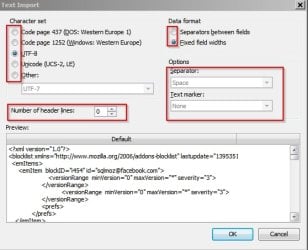
Then make a copy of your .xml file and rename the copy.

Let's suppose that the original is named test.xml - right click the file and choose rename then delete everything after the dot and replace xml with csv so the new file will be named test.csv

Open the new file with your office program that can handle csv files - usually your spreadheet application.

If you're lucky enough to see a preview window try different options until you get the display details that you require.

Text Import.jpg
 
Last edited:

My Computer

Computer type
Laptop
Computer Manufacturer/Model Number
ASUS
OS
Microsoft Windows 7 Home Premium 64-bit 7601 Multiprocessor Free Service Pack 1
CPU
AMD C-60 APU with Radeon(tm) HD Graphics
Motherboard
ASUSTeK COMPUTER INC. X501U
Memory
4.00 GB
Graphics Card(s)
AMD Radeon HD 6290 Graphics
Sound Card
(1) AMD High Definition Audio Device (2) Realtek High Defi
Screen Resolution
1366 x 768 x 32 bits (4294967296 colors) @ 60 Hz
Hard Drives
Hitachi HTS545050A7E380 SATA Disk Device
Antivirus
Comodo CIS & FW, SecureAplus App Whitelisting, Threatfire
Browser
Cyberfox 64bit, Opera 64bit, Airfox
Other Info
Spy-The-Spy, HitmanPro.Alert, Norton Connect Safe, MJRegWatcher, BitDefender TrafficLight, Voodoo Shield, Zemana AntiMalware
I tried the advised method, but the output was such that it could not be set in columns e.g. date, time, downsstrem
Code:
<?xml version="1.0" encoding="utf-8"?>
<CRC>
  <Sample Number="0">
    <Time>22/03/2014 08:46:19</Time>
    <Downstream>1.0</Downstream>


    <Upstream>0.0</Upstream>
    <DrawBlank>False</DrawBlank>
  </Sample>
  <Sample Number="1">
    <Time>22/03/2014 08:47:19</Time>
    <Downstream>0.0</Downstream>
    <Upstream>0.0</Upstream>
    <DrawBlank>False</DrawBlank>

Finally I found an online converter, that produced columnar output as text, so all is OK now.
 

My Computer

Computer type
PC/Desktop
Computer Manufacturer/Model Number
Dell Inspiron 560MT
OS
Home Premium 64 bit
CPU
2.9 gigahertz Intel Core2 Duo 64 kilobyte primary memory cac
Motherboard
Board: Dell Inc. 0K83V0 A00 Serial Number: ..CN750939CP069B
Memory
4096 Megabytes Usable Installed Memory Slot 'DIMM0' has 102
Graphics Card(s)
ATI Radeon HD 4300/4500 Series
Sound Card
High Definition Audio Device NVIDIA High Definition Audio (
Monitor(s) Displays
DELL ST2210 [Monitor] (21.7"vis, s/n P479R01Q0VCU, January 2
Screen Resolution
1920x1080
Hard Drives
628.58 Gigabytes Usable Hard Drive Capacity
554.78 Gigabytes Hard Drive Free Space
Keyboard
Std Dell UK
Mouse
KEYBOARD, 105, UNITED KINGDOM, KWE9C0
Internet Speed
~8000 kbps
Antivirus
Avast Free
Browser
Chrome
Other Info
Office 2007: Photo Editing; Serif PhotoPlus X7
i think the discontinued MS expression web can handle that (i think the installer is still available )
all you need to do is save the html to xml then right click to see if your xml is well formed
346pdb
if it... then save it and open the file to excel
 
Last edited:

My Computer

Computer type
Laptop
Computer Manufacturer/Model Number
Acer
OS
Windows 7 Ultimate x64
Motherboard
Aspire V3-471G
Memory
4096MB RAM
Graphics Card(s)
Intel(R) HD Graphics 4000,GEForce 360
Antivirus
MSE + Malwarebytes
Browser
Chrome and Maxthon
Back
Top