Converting a dynamic disk to basic without data loss

Bollard

New member
Local time
9:21 PM
Messages
5
Hello All,

Would really appreciate some help.

I have a 500GB dynamic hard drive which had a Windows 7 install on it. I wanted to reinstall Windows, so from within Windows setup I formatted the system and Windows partition, leaving a partition containing documents and pictures (i was unable to delete them). From then, Windows seemed unable to recognise the disk so i searched in DISKPART and found that the disk was labelled as INVALID.

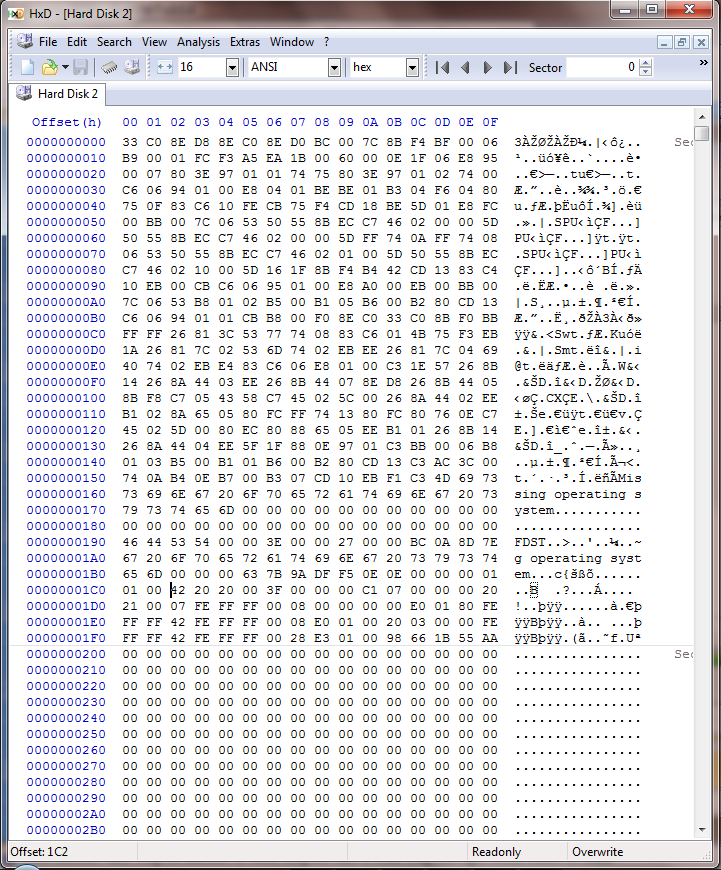
After Googling around it looks as though i can simply change the 1C02 in the hex from 42 to 07 - however, my only concern was that the documents i have on this drive are spanned across three adjacent (dynamic?) partitions - so i am concerned that by focing the disk to be basic i will lose the connection between these partitions, if that makes sense?

Sorry if that doesnt make any sense, hopefully these will help explain what i mean (the direct link to the gallery is here: http://imgur.com/a/4nXWT)

DISKPART:
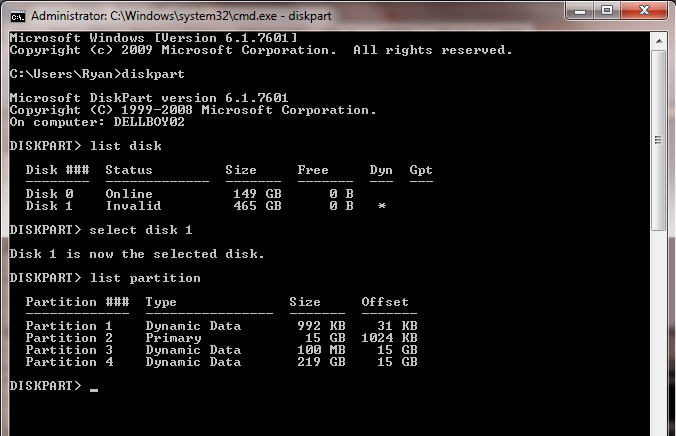
tWqbh.jpg


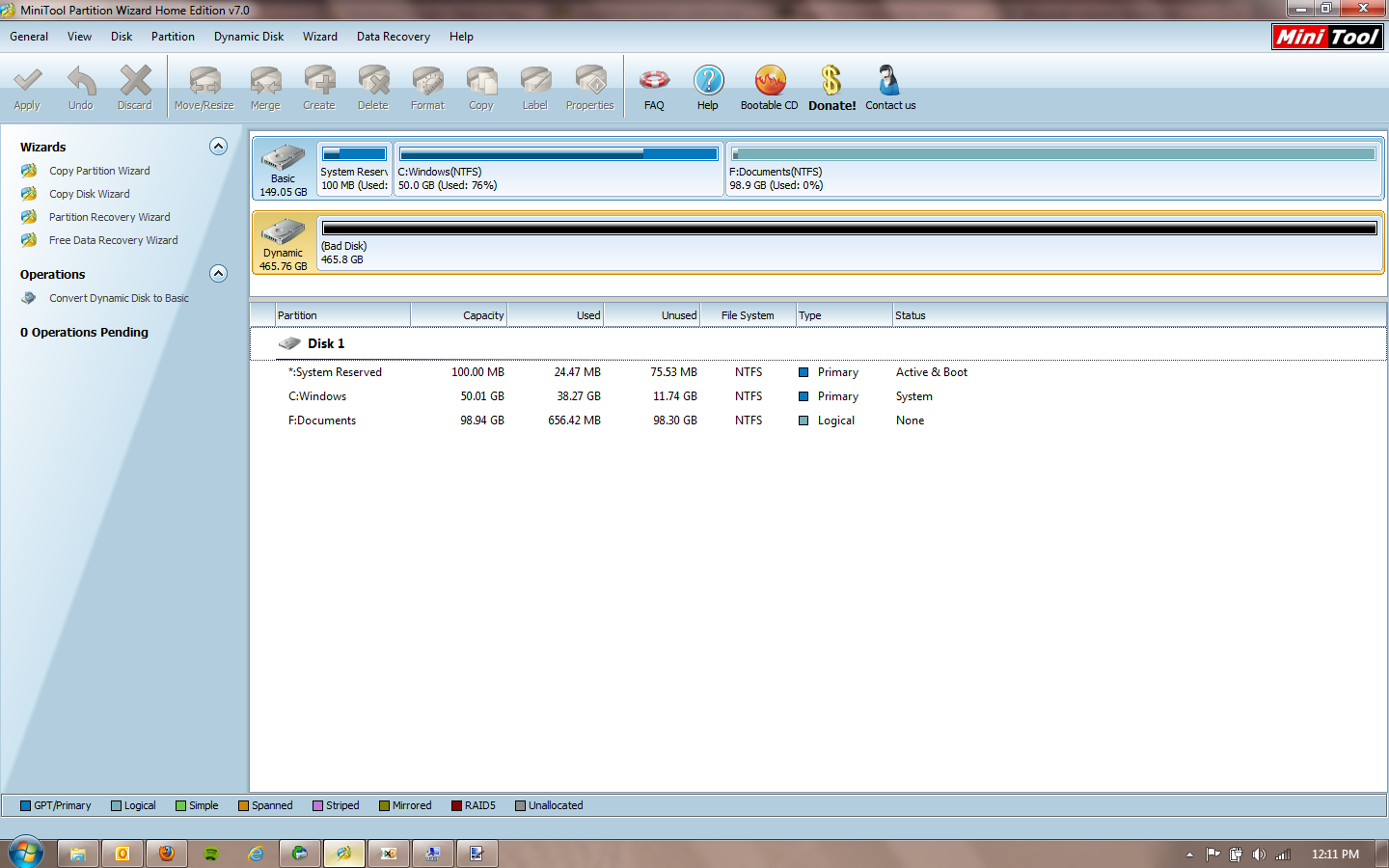
Acronis Disk Director (see documents spanned)
rFhdr.jpg


Active unDelete (again, three partitions)
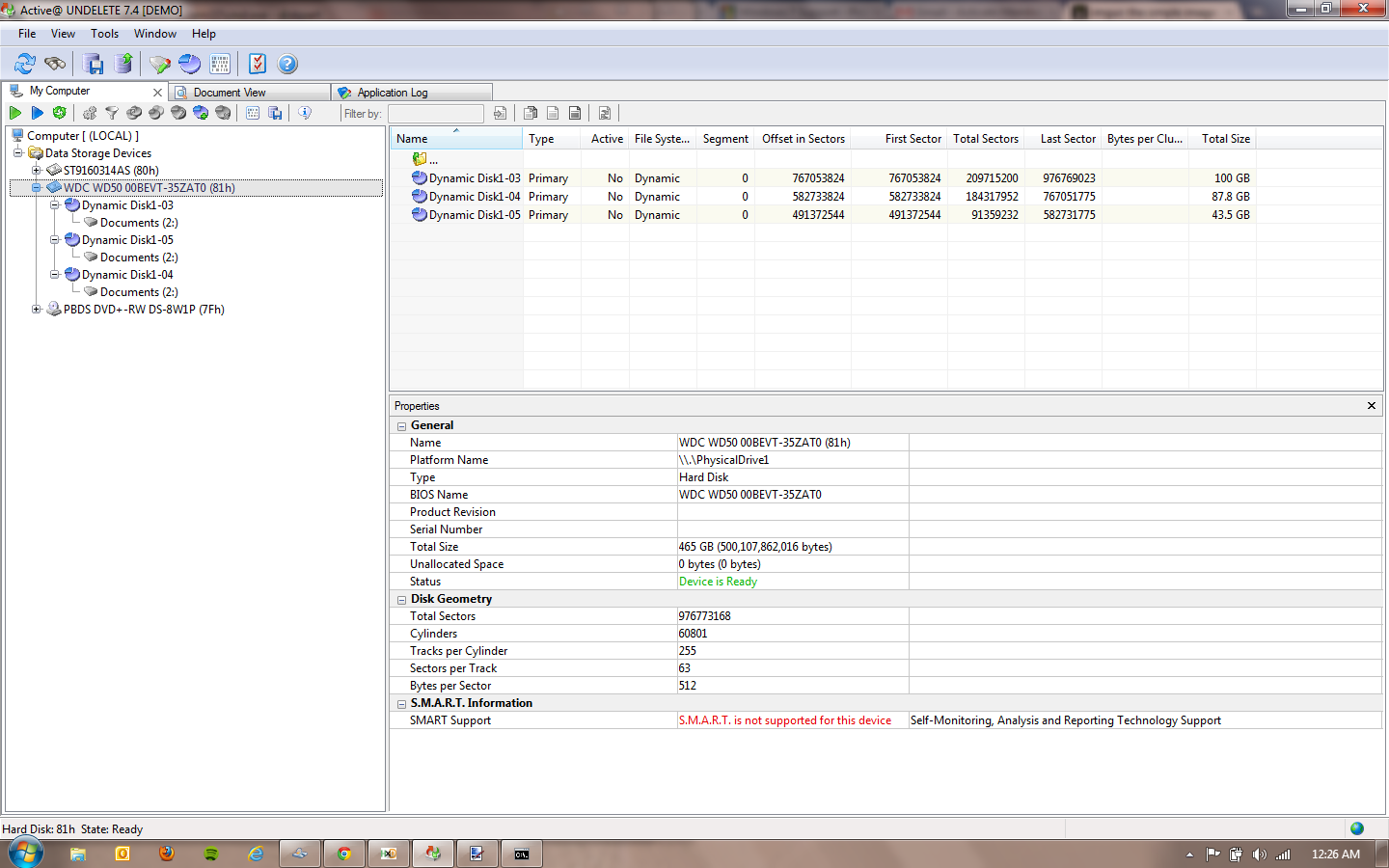
t7TMP.jpg


HxD (showing 42)
1Ddx0.jpg


So, basically im asking if i am safe to convert 42 to 07 WITHOUT losing any data?

Thank you for any help - i would really appreciate it

Cheers
 
Last edited:

My Computer

OS
Windows 7

My Computer

Computer Manufacturer/Model Number
HP Pavilion Elite 495UK
OS
Windows 7 Ultimate SP1 64-Bit
CPU
Intel Core i7 870 @ 2.93GHz
Motherboard
MSI 2A9C (CPU1)
Memory
8Gb Dual-Channel DDR3 @ 664MHz
Graphics Card(s)
nVidia GeForce GTX 460 1024MB dedicated RAM
Sound Card
Realtek HD Audio
Monitor(s) Displays
HP2310i
Screen Resolution
1920 x 1080
Hard Drives
1x1954GB Hitachi HDS22020ALA 330 (RAID), 1x1954GB Hitachi External for backup and storage
PSU
460W
Case
HP Elite
Cooling
Air cooled
Keyboard
Logitech K750 solar-powered keyboard
Mouse
Logitech Wireless M180 mouse
Internet Speed
2Mb
Other Info
Pure Avanti Flow Internet Radio with iPod Dock, 64Gb iPod, HP USB Speakers, Sony MDR-V500 Headphones, Sony Vaio F-Series Laptop
Thank you for the reply.

Yes thats the tutorial i read, but i just wanted to confirm that it still applied to my three spanned documents partitions, and not just to one dynamic disk with one partition?

Thank you
 

My Computer

OS
Windows 7
This is the type of thing you're talking about
http://www.sevenforums.com/1127096-post85.html
Although the MBR partition table will allow you to set the partition type byte to 3 dynamic and one primary like yours I'm not sure what purpose this was intended to serve as generally the whole disk is basic or dynamic. Most people go dynamic by accident and coverting back is straightforward. Was this deliberate in your case?

Since you are going to reinstall Windows I'd play it safe and
1) Move all your data onto an external Basic HDD with a standard NTFS file system
2) Reformat your 500GB HDD as Basic, NTFS and install Windows
3) then transfer your data back.
 

My Computer

Computer type
PC/Desktop
Computer Manufacturer/Model Number
Own build
OS
Windows 7x64 Home Premium SP1
CPU
Intel i7 2600k
Motherboard
ASUS P8Z68 Deluxe
Memory
G.Skill Ripjaws (DDR3-1600) 2x4GB
Graphics Card(s)
Nvidia GeForce GTS 450; Intel HD Graphics 3000(GT2+)
Monitor(s) Displays
Dell Ultrasharp IPS panel U2311H, Samsung SyncMaster P2350
Screen Resolution
1920x1080
Hard Drives
Samsung 850 Pro SSD 256GB, Samsung SSD 840 120GB, Seagates 1TB Barracuda ST31000528AS x2
PSU
Seasonic M12II 520W
Case
Lian Li Lancool PC-K60
Cooling
Case: 1x120mm, 3x140mm CPU: Hyper 212+
Keyboard
Logitech MK520 (wireless)
Mouse
Logitech MK520
Internet Speed
6-7 Mbps
Antivirus
Norton Security Premium, Malwarebytes on 2 (MSE on 3rd PC)
Browser
FireFox
Other Info
Audio: Logitech Z523 2.1
mjf thank you very much for the reply. I would really appreciate your help.

The long story is I did not know the disk was dynamic. I initally had 1 500gb partition containing all my documents and windows files. I created a partition in the free space to copy my documents into so I could overwrite Windows keeping my documents intact. However I did not have enough free space for all my documents so after copying over one batch of files I shrunk the windows partition and extended my document partition. I had to repeat this again so I now have three extended document partitions.

I then put in the windows CD, formatted the OS Recovery, SYSTEM Reserved and Windows parititions but then was unable to install Windows as it did not recognise any disks. I attempted FixMBR etc but to no avail.

So my question is, will changing 42 to 07 preserve the extended partitions. Do I need to repeat for each 42 (like the link you posted) and then the three dynamic extended partitions will then become one basic partition?

At the moment I can not actually see the data so have no idea how to back it up? Otherwise I would do as you say and back it up, format and copy back over.

Any ideas? I would GREATLY appreciate your help

Thank you very much
 

My Computer

OS
Windows 7
So my question is, will changing 42 to 07 preserve the extended partitions. Do I need to repeat for each 42 (like the link you posted) and then the three dynamic extended partitions will then become one basic partition?
You've carried out a number of operations on this disk and I can only give you my best guess.
If the data wasn't absolutely critical and it was my HDD, I would edit all the (0x42) byte type entries in the partition table to (0x07). I would then expect the partitions to show as Basic primary and if the old file system is in tact then I would expect to see the files. If not I'd take some follow on action. This can be discussed if you go down this route.

I'm more familiar with the screenshots from Windows Diskmanager and Partition Wizard with ALL the status information shown. For example the MBR for Disk 2 shows one partition (status) as active which isn't shown in your status screenshot info. Including full Windows Disk Management screenshots as well would help.
 
Last edited:

My Computer

Computer type
PC/Desktop
Computer Manufacturer/Model Number
Own build
OS
Windows 7x64 Home Premium SP1
CPU
Intel i7 2600k
Motherboard
ASUS P8Z68 Deluxe
Memory
G.Skill Ripjaws (DDR3-1600) 2x4GB
Graphics Card(s)
Nvidia GeForce GTS 450; Intel HD Graphics 3000(GT2+)
Monitor(s) Displays
Dell Ultrasharp IPS panel U2311H, Samsung SyncMaster P2350
Screen Resolution
1920x1080
Hard Drives
Samsung 850 Pro SSD 256GB, Samsung SSD 840 120GB, Seagates 1TB Barracuda ST31000528AS x2
PSU
Seasonic M12II 520W
Case
Lian Li Lancool PC-K60
Cooling
Case: 1x120mm, 3x140mm CPU: Hyper 212+
Keyboard
Logitech MK520 (wireless)
Mouse
Logitech MK520
Internet Speed
6-7 Mbps
Antivirus
Norton Security Premium, Malwarebytes on 2 (MSE on 3rd PC)
Browser
FireFox
Other Info
Audio: Logitech Z523 2.1
Thank you for your help and continued support mjf.

I have managed to recovery a few files using R Studio, so will go ahead with the conversion and report back.

Shown below are the screen shots as requested (though they give little information, to me atleast!)

Disk Management (see the invalid disk):
LiurE.jpg


Partition Wizard (not sure how to show all information?):
iWsvP.jpg


The album of the two is here: Photo Album - Imgur
 

My Computer

OS
Windows 7
Bollard,
thanks for the feedback. If you tried the (0x42) to (0x07) change, some feedback on the outcome would be useful. Was it the screenshots you last posted (& it didn't achieve the desired results?).
 

My Computer

Computer type
PC/Desktop
Computer Manufacturer/Model Number
Own build
OS
Windows 7x64 Home Premium SP1
CPU
Intel i7 2600k
Motherboard
ASUS P8Z68 Deluxe
Memory
G.Skill Ripjaws (DDR3-1600) 2x4GB
Graphics Card(s)
Nvidia GeForce GTS 450; Intel HD Graphics 3000(GT2+)
Monitor(s) Displays
Dell Ultrasharp IPS panel U2311H, Samsung SyncMaster P2350
Screen Resolution
1920x1080
Hard Drives
Samsung 850 Pro SSD 256GB, Samsung SSD 840 120GB, Seagates 1TB Barracuda ST31000528AS x2
PSU
Seasonic M12II 520W
Case
Lian Li Lancool PC-K60
Cooling
Case: 1x120mm, 3x140mm CPU: Hyper 212+
Keyboard
Logitech MK520 (wireless)
Mouse
Logitech MK520
Internet Speed
6-7 Mbps
Antivirus
Norton Security Premium, Malwarebytes on 2 (MSE on 3rd PC)
Browser
FireFox
Other Info
Audio: Logitech Z523 2.1
Hello,

Sorry for the delayed reply.

I attempted the change and some partitions appeared in Windows Explorer (including the old System reserved), however not the Documents partition as i hoped.

I resorted to using R-Studio to "recover" and copy over files in batches.

Moral of the story - always check you have basic partitions!

Thanks for all the help - i really appreciate it
 

My Computer

OS
Windows 7
Back
Top