Converting bmps to jpegs?

darkdisturbed

Tick Tock on the drop
Member
VIP
Local time
2:43 AM
Messages
95
Location
Australia
Hey guys, what programs are out there can currently convert bmps to jpegs? - Finding a few images in bmp photos are way too big for their size.
 

My Computer

Computer Manufacturer/Model Number
HP Pavilion pc6000
OS
Windows 7 Ultimate
CPU
Intel Core Processor 2 Quad Processor Q9400 Series
Memory
2 GIG
Graphics Card(s)
NVIDIA Geforce GT230 3D
Sound Card
Integrated Intel HIgh Definition Audio 5.1 Surround Sound
Monitor(s) Displays
20 Inch 2009F 16:9 HP LCD Monitor
Hard Drives
Primary 320GIG
External 1 500G
External 2 640G
Keyboard
HP USB Keyboard
Mouse
HP USB Mouse
I normally use Windows Paint. Also ACDSee (a very old version - v2.43) allows me to convert multiple images in one go. IrfanView is also a great tool and its free
 

My Computer

Computer type
Laptop
Computer Manufacturer/Model Number
HP EliteBook 8530w Mobile Workstation
OS
Windows 7 Ultimate x64 (XP, 98SE, 95, 3.11, DOS 7.10 on VM) + Ubuntu 10.04 LTS Lucid Lynx
CPU
Intel Core 2 Duo Processor P8600 (2.40 GHz, 3 MB L2 cache)
Motherboard
Mobile Intel PM45 Express Chipset ICH9M-Enhanced
Memory
4GB 800 MHz DDR2 SDRAM
Graphics Card(s)
ATI Mobility FireGL V5700 with 256 MB
Sound Card
SoundMAX Integrated Digital HD Audio
Monitor(s) Displays
15.4-inch WXGA anti-glare (1280 x 800 resolution)
Screen Resolution
1280 x 800
Hard Drives
500GB + 1TB
Mouse
Synaptics PS/2 Port Touchpad, USB Mouse
Internet Speed
4 Mbps
Antivirus
MSE
Browser
Firefox, Chrome, IE
Other Info
Authentec AES2810 Fingerprint Reader
I use Paint.net. It is free. Nice basic image editor.
 

My Computer

Computer Manufacturer/Model Number
Toshiba Satellite A135S4487
OS
Windows 7 Ultimate (32-bit)
CPU
Intel Mobile Core 2 Duo T5500 @ 1.66 GHz
Motherboard
Intel i945GM Chipset
Memory
2.0GB Dual Channel DDR2 @ 266 MHz 4-4-4-12
Graphics Card(s)
Mobile Intel 945 Express Chipset Family
Sound Card
Realtek High Definition Audio
Monitor(s) Displays
Generic PnP Monitor, Samsung 46" LCD
Screen Resolution
1280 x 800, 1920 x 1080
Hard Drives
100GB Hitachi ATA Device (IDE)
120GB Western Digital USB
250GB External USB
Keyboard
Microsoft Wireless Comfort Keyboard 5000
Mouse
Microsoft Wireless Mouse 5000
Internet Speed
DSL
I normally use Paint.NET for Start Orbs and other editing.
 

My Computer

Computer type
Laptop
Computer Manufacturer/Model Number
HP EliteBook 8530w Mobile Workstation
OS
Windows 7 Ultimate x64 (XP, 98SE, 95, 3.11, DOS 7.10 on VM) + Ubuntu 10.04 LTS Lucid Lynx
CPU
Intel Core 2 Duo Processor P8600 (2.40 GHz, 3 MB L2 cache)
Motherboard
Mobile Intel PM45 Express Chipset ICH9M-Enhanced
Memory
4GB 800 MHz DDR2 SDRAM
Graphics Card(s)
ATI Mobility FireGL V5700 with 256 MB
Sound Card
SoundMAX Integrated Digital HD Audio
Monitor(s) Displays
15.4-inch WXGA anti-glare (1280 x 800 resolution)
Screen Resolution
1280 x 800
Hard Drives
500GB + 1TB
Mouse
Synaptics PS/2 Port Touchpad, USB Mouse
Internet Speed
4 Mbps
Antivirus
MSE
Browser
Firefox, Chrome, IE
Other Info
Authentec AES2810 Fingerprint Reader
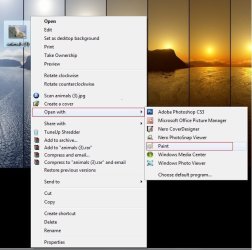
If you ask me, I would say that no third party software is required in this task. Microsoft Paint is enough able to do that. Want a walk-through ?
Right click on your .bmp picture, and open it wirh paint.
Untitled.jpg

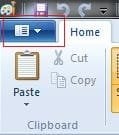
When it is opened with paint, click the paint button (the deep blue button in the top left corner )
Capture.JPG

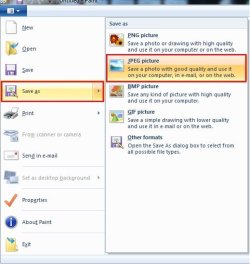
Now just save as > JPEG image
Untitled1.jpg

It will reduce image size (alongwit quality) quickly :)
 

My Computer

Computer type
PC/Desktop
Computer Manufacturer/Model Number
Self Assembled
OS
Microsoft Windows 10 Pro Insider Preview 64-bit
CPU
Intel(R) Core(TM) i3-4130 CPU @ 3.40GHz
Motherboard
Gigabyte Technology Co., Ltd. B85M-D3H
Memory
Corsair Vengence 4GB x2 (8.00GB Dual-Channel DDR3 @ 798MHz)
Graphics Card(s)
2047MB GeForce GTS 450 (ZOTAC International)
Sound Card
Onboard (Realtek High Definition Audio)
Monitor(s) Displays
LG Flatron E2040T
Screen Resolution
1600x900
Hard Drives
Western Digital 1 TB
Seagate 500 GB
PSU
Corsair VS550
Case
Cooler Master K380
Cooling
Cooler Master Seidon 120V Plus
Keyboard
Logitech MK260r
Mouse
Logitech MK260r
Internet Speed
PMPL Broadband
Antivirus
Windows Defender + MBAM
Browser
Firefox
Other Info
Dell Studio 15" Laptop

My Computer

Computer Manufacturer/Model Number
Home built
OS
Windows 7 Ultimate 32 bit
CPU
Intel(R) Pentium(R) 4 CPU 3.00GHz
Motherboard
ASUS P4P800-VM Motherboard Chipset: Intel 865G + ICH5
Memory
2.50 GB RAM
Graphics Card(s)
NVIDIA GeForce 7600 GS
Sound Card
SoundMax Integrated Digital Audio (Chip)
Monitor(s) Displays
ViewSonic VX 1962 wm
Screen Resolution
1680 X 1050
Hard Drives
Seagate Barracuda 7200.10 80 GB
ST380215A ATA Device 18.6 GB
Western Digital "My Book" external hard drive 750 GB
Cooling
Fan based
Keyboard
Microsoft Comfort Curve Keyboard 2000 v10 USB
Mouse
Logitec optic USB
Internet Speed
3.01 Mb/s download 0.64 Mb/s upload
Hey guys, what programs are out there can currently convert bmps to jpegs? - Finding a few images in bmp photos are way too big for their size.
Do you want to reduce the size of the file or the physical size of the image? Keep in mind that BMP files are not compressed whereas you have control over the amount of compression you give a JPEG. Also keep in mind that compressing reduces the quality proportionately.
 

My Computer

Computer type
PC/Desktop
OS
Microsoft Windows 7 Home Premium 64-bit 7601 Multiprocessor Free Service Pack 1
CPU
Intel(R) Core(TM) i7-3770 CPU @ 3.40GHz
Motherboard
ASUSTeK COMPUTER INC. P8H77-M
Memory
8.00 GB
Graphics Card(s)
Intel(R) HD Graphics 4000
Sound Card
On Board
Monitor(s) Displays
Dell 24"
Screen Resolution
1920 x 1080
Hard Drives
(1) INTEL SSDSC2CT180A3 ATA Device (2) ST500DM002-1BD142 ATA Device (3) WDC WD3200AAKS-75L9A0 ATA Device (4) Generic- Compact Flash USB Device (5) Generic- MS/MS-Pro USB Device (6) Generic- SD/MMC USB Device (7) Generic- SM/xD-Picture USB
PSU
500w Corsair
Case
Cooler Master
Cooling
3 Fans
Keyboard
Logitech MK300
Mouse
Logitech WOM
Internet Speed
75Mb
Antivirus
Norton 360
Browser
Firefox, Opera, IE
Irfanview gets my vote for sure.
 

My Computer

Computer type
PC/Desktop
Computer Manufacturer/Model Number
Self Built
OS
Windows 7 Home Premium (64 bit)
CPU
Intel I5 2500K 3.3Ghz Stock
Motherboard
Asus P8H 61-M LE USB 3
Memory
8Gig Kingston DDRIII HyperX Blue 1333 Mhz
Graphics Card(s)
AMD Sapphire 7870 2GB
Sound Card
Creative Fatality Pro
Monitor(s) Displays
27" BENQ LED
Screen Resolution
1920X1080
Hard Drives
1 x OCZ Agility 3 120GB SSD
1 x Seagate 250GB
1 x Western Digital 1000GB
1 x HP 500GB
PSU
700W Coolermaster Stealth Pro etc
Case
Coolermaster Scout
Cooling
Some fans
Keyboard
Some Logitech type.
Mouse
Logitech MX518
Internet Speed
Wireless 8mb
Other Info
Canon Scanner
Epson Printer
Nikon DSLR 3000
Wacom Tablet
Hey guys

Thanks for the responses. I am not really tech savy when it comes to imaging, only know how to do spreadsheets and word processing, so this is a whole new thing for me. I just want to chop their size down to a decent jpeg size and also take the resolution down something below 640:400 to upload to my facebook account.

Oh and yeah I just downloaded IrfanView, but also having a look at the Paint program as mentioned. I honestly did not see that command there. LOL Must have skipped right past it. Just reading through the help file in IrfanView.
 

My Computer

Computer Manufacturer/Model Number
HP Pavilion pc6000
OS
Windows 7 Ultimate
CPU
Intel Core Processor 2 Quad Processor Q9400 Series
Memory
2 GIG
Graphics Card(s)
NVIDIA Geforce GT230 3D
Sound Card
Integrated Intel HIgh Definition Audio 5.1 Surround Sound
Monitor(s) Displays
20 Inch 2009F 16:9 HP LCD Monitor
Hard Drives
Primary 320GIG
External 1 500G
External 2 640G
Keyboard
HP USB Keyboard
Mouse
HP USB Mouse
Want to resize an image in 640:480 (640:400 is not a regular size, but it is also possible) pixels ?

It is also easiest in Paint. I am describing :

1. Start > All programs > accessories > Paint.
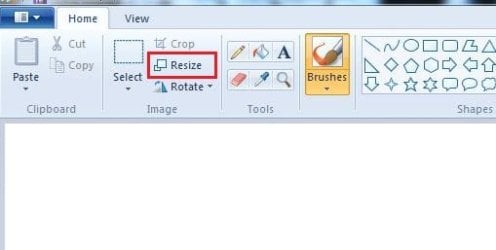
2. Click the resize button
Capture.JPG
3. In the upcoming Resize and Skew window, select resize by "pixels" , and give the pixel size of tour choice.
Capture1.JPG
Click on ok. then save as jpeg image.
 

My Computer

Computer type
PC/Desktop
Computer Manufacturer/Model Number
Self Assembled
OS
Microsoft Windows 10 Pro Insider Preview 64-bit
CPU
Intel(R) Core(TM) i3-4130 CPU @ 3.40GHz
Motherboard
Gigabyte Technology Co., Ltd. B85M-D3H
Memory
Corsair Vengence 4GB x2 (8.00GB Dual-Channel DDR3 @ 798MHz)
Graphics Card(s)
2047MB GeForce GTS 450 (ZOTAC International)
Sound Card
Onboard (Realtek High Definition Audio)
Monitor(s) Displays
LG Flatron E2040T
Screen Resolution
1600x900
Hard Drives
Western Digital 1 TB
Seagate 500 GB
PSU
Corsair VS550
Case
Cooler Master K380
Cooling
Cooler Master Seidon 120V Plus
Keyboard
Logitech MK260r
Mouse
Logitech MK260r
Internet Speed
PMPL Broadband
Antivirus
Windows Defender + MBAM
Browser
Firefox
Other Info
Dell Studio 15" Laptop
With Irfanview click on Image > Resize. The easiest way is to select Percent. And you can always Undo and try another size before you save the resized image.
 

My Computer

Computer Manufacturer/Model Number
Home built
OS
Windows 7 Ultimate 32 bit
CPU
Intel(R) Pentium(R) 4 CPU 3.00GHz
Motherboard
ASUS P4P800-VM Motherboard Chipset: Intel 865G + ICH5
Memory
2.50 GB RAM
Graphics Card(s)
NVIDIA GeForce 7600 GS
Sound Card
SoundMax Integrated Digital Audio (Chip)
Monitor(s) Displays
ViewSonic VX 1962 wm
Screen Resolution
1680 X 1050
Hard Drives
Seagate Barracuda 7200.10 80 GB
ST380215A ATA Device 18.6 GB
Western Digital "My Book" external hard drive 750 GB
Cooling
Fan based
Keyboard
Microsoft Comfort Curve Keyboard 2000 v10 USB
Mouse
Logitec optic USB
Internet Speed
3.01 Mb/s download 0.64 Mb/s upload
Thanks for the help guys :) DiD a couple images after i got home from work. Worked like a charm :)
 

My Computer

Computer Manufacturer/Model Number
HP Pavilion pc6000
OS
Windows 7 Ultimate
CPU
Intel Core Processor 2 Quad Processor Q9400 Series
Memory
2 GIG
Graphics Card(s)
NVIDIA Geforce GT230 3D
Sound Card
Integrated Intel HIgh Definition Audio 5.1 Surround Sound
Monitor(s) Displays
20 Inch 2009F 16:9 HP LCD Monitor
Hard Drives
Primary 320GIG
External 1 500G
External 2 640G
Keyboard
HP USB Keyboard
Mouse
HP USB Mouse
Very good; glad it was a success. Which software did yo use?
 

My Computer

Computer Manufacturer/Model Number
Home built
OS
Windows 7 Ultimate 32 bit
CPU
Intel(R) Pentium(R) 4 CPU 3.00GHz
Motherboard
ASUS P4P800-VM Motherboard Chipset: Intel 865G + ICH5
Memory
2.50 GB RAM
Graphics Card(s)
NVIDIA GeForce 7600 GS
Sound Card
SoundMax Integrated Digital Audio (Chip)
Monitor(s) Displays
ViewSonic VX 1962 wm
Screen Resolution
1680 X 1050
Hard Drives
Seagate Barracuda 7200.10 80 GB
ST380215A ATA Device 18.6 GB
Western Digital "My Book" external hard drive 750 GB
Cooling
Fan based
Keyboard
Microsoft Comfort Curve Keyboard 2000 v10 USB
Mouse
Logitec optic USB
Internet Speed
3.01 Mb/s download 0.64 Mb/s upload
I played with both Paint and Irfan View :) I prefer Irfan view, it's easier to use then Paint.
:) Thanks again for the help. This one looks like has more features to play with as well.
 

My Computer

Computer Manufacturer/Model Number
HP Pavilion pc6000
OS
Windows 7 Ultimate
CPU
Intel Core Processor 2 Quad Processor Q9400 Series
Memory
2 GIG
Graphics Card(s)
NVIDIA Geforce GT230 3D
Sound Card
Integrated Intel HIgh Definition Audio 5.1 Surround Sound
Monitor(s) Displays
20 Inch 2009F 16:9 HP LCD Monitor
Hard Drives
Primary 320GIG
External 1 500G
External 2 640G
Keyboard
HP USB Keyboard
Mouse
HP USB Mouse
I played with both Paint and Irfan View :) I prefer Irfan view, it's easier to use then Paint.
:) Thanks again for the help. This one looks like has more features to play with as well.
Glad you have resolved your problem. When you have time look at the plug ins that are available for Irfanview. They can all be downloaded from this site:
IrfanView PlugIns
Really a very versatile program and it's free too.
 

My Computer

Computer type
PC/Desktop
OS
Microsoft Windows 7 Home Premium 64-bit 7601 Multiprocessor Free Service Pack 1
CPU
Intel(R) Core(TM) i7-3770 CPU @ 3.40GHz
Motherboard
ASUSTeK COMPUTER INC. P8H77-M
Memory
8.00 GB
Graphics Card(s)
Intel(R) HD Graphics 4000
Sound Card
On Board
Monitor(s) Displays
Dell 24"
Screen Resolution
1920 x 1080
Hard Drives
(1) INTEL SSDSC2CT180A3 ATA Device (2) ST500DM002-1BD142 ATA Device (3) WDC WD3200AAKS-75L9A0 ATA Device (4) Generic- Compact Flash USB Device (5) Generic- MS/MS-Pro USB Device (6) Generic- SD/MMC USB Device (7) Generic- SM/xD-Picture USB
PSU
500w Corsair
Case
Cooler Master
Cooling
3 Fans
Keyboard
Logitech MK300
Mouse
Logitech WOM
Internet Speed
75Mb
Antivirus
Norton 360
Browser
Firefox, Opera, IE
I played with both Paint and Irfan View :) I prefer Irfan view, it's easier to use then Paint.
:) Thanks again for the help. This one looks like has more features to play with as well.

Glad you liked Irfanview. I agree; it is easier to use than paint. I have been using it for over eight years.
 

My Computer

Computer Manufacturer/Model Number
Home built
OS
Windows 7 Ultimate 32 bit
CPU
Intel(R) Pentium(R) 4 CPU 3.00GHz
Motherboard
ASUS P4P800-VM Motherboard Chipset: Intel 865G + ICH5
Memory
2.50 GB RAM
Graphics Card(s)
NVIDIA GeForce 7600 GS
Sound Card
SoundMax Integrated Digital Audio (Chip)
Monitor(s) Displays
ViewSonic VX 1962 wm
Screen Resolution
1680 X 1050
Hard Drives
Seagate Barracuda 7200.10 80 GB
ST380215A ATA Device 18.6 GB
Western Digital "My Book" external hard drive 750 GB
Cooling
Fan based
Keyboard
Microsoft Comfort Curve Keyboard 2000 v10 USB
Mouse
Logitec optic USB
Internet Speed
3.01 Mb/s download 0.64 Mb/s upload
Back
Top