Converting External HD from Fat 32 to NTFS

Tram 1

New member
Member
Local time
2:01 PM
Messages
83
Can't believe this but I have just discovered my external back up HD is fat 32.

I know in XP I could run a command line from the run box to convert to NTFS.

I did try this, I'm using Win 7 with run enabled but no joy, can I convert this HD from within the Win 7 environment?

I wish to convert but not loose any data.
 

My Computer My Computer

OS
Win7
Hello Tram,

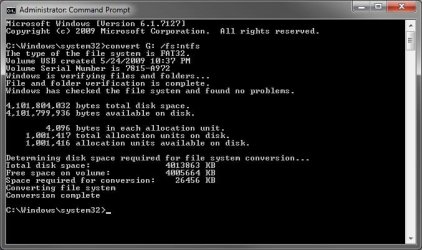
You should be able to use the same command convert C: /fs:ntfs to do this with. Substitute C: for the drive letter of the external drive. I just tested it on a USB flash key in Windows 7 (7127 build) in a elevated command prompt, and it worked without a problem.

Command.jpg

Hope this helps,
Shawn
 
Last edited:

My Computer My Computer

Computer type
PC/Desktop
Computer Manufacturer/Model Number
Self built custom
OS
64-bit Windows 11 Pro for Workstations
CPU
Intel i7-8700K OC'd to 5 GHz
Motherboard
ASUS ROG Maximus XI Formula Z390
Memory
64 GB (4x16GB) G.SKILL TridentZ RGB DDR4 3600 MHz
Graphics Card(s)
ASUS ROG-STRIX-GTX1080TI-O11G-GAMING
Sound Card
Integrated
Monitor(s) Displays
2 x Samsung Odyssey G7 27"
Screen Resolution
2560x1440
Hard Drives
1TB Samsung 990 PRO M.2,
4TB Samsung 990 PRO PRO M.2,
TerraMaster F8 SSD Plus NAS
PSU
Seasonic Prime Titanium 850W
Case
Thermaltake Core P3
Cooling
Corsair Hydro H115i
Keyboard
Logitech wireless K800
Mouse
Logitech MX Master 4
Internet Speed
2 Gb/s Download and 100 Mb/s Upload
Antivirus
Malwarebyte Anti-Malware Premium
Browser
Google Chrome
Other Info
Logitech Z625 speaker system,
Logitech BRIO 4K Pro webcam,
HP Color LaserJet Pro MFP M477fdn,
APC SMART-UPS RT 1000 XL - SURT1000XLI,
Galaxy S23 Plus phone
Thanks Shawn, that went just fine. :)
 

My Computer My Computer

OS
Win7
You're welcome Tram. I'm happy to hear that it work for you. :)
 

My Computer My Computer

Computer type
PC/Desktop
Computer Manufacturer/Model Number
Self built custom
OS
64-bit Windows 11 Pro for Workstations
CPU
Intel i7-8700K OC'd to 5 GHz
Motherboard
ASUS ROG Maximus XI Formula Z390
Memory
64 GB (4x16GB) G.SKILL TridentZ RGB DDR4 3600 MHz
Graphics Card(s)
ASUS ROG-STRIX-GTX1080TI-O11G-GAMING
Sound Card
Integrated
Monitor(s) Displays
2 x Samsung Odyssey G7 27"
Screen Resolution
2560x1440
Hard Drives
1TB Samsung 990 PRO M.2,
4TB Samsung 990 PRO PRO M.2,
TerraMaster F8 SSD Plus NAS
PSU
Seasonic Prime Titanium 850W
Case
Thermaltake Core P3
Cooling
Corsair Hydro H115i
Keyboard
Logitech wireless K800
Mouse
Logitech MX Master 4
Internet Speed
2 Gb/s Download and 100 Mb/s Upload
Antivirus
Malwarebyte Anti-Malware Premium
Browser
Google Chrome
Other Info
Logitech Z625 speaker system,
Logitech BRIO 4K Pro webcam,
HP Color LaserJet Pro MFP M477fdn,
APC SMART-UPS RT 1000 XL - SURT1000XLI,
Galaxy S23 Plus phone
wait, wat. You can convert FSs?
I hope for the 3 hours I spent copying and formatting yesterday that this wouldn't work with HFSJ to NTFS.
 

My Computer My Computer

Computer Manufacturer/Model Number
Dell DM061 (E520)
OS
Win 7 (7100 x64); OS X 10.5.6
CPU
Intel Pentium D 915 - 2.8Ghz x 2
Motherboard
Dell 0WG864
Memory
4GB DDR2 PC2-6400
Graphics Card(s)
nVidia XFX GeForce 9600GT
Monitor(s) Displays
Acer P223W; Acer X223W
Screen Resolution
3360x1050
Hard Drives
Seagate 150GB; Western Digital 150GB; Western Digital 500GB; WD MyBook World Edition 1TB (NAS)
PSU
OCZ StealthXstream 400W
Case
Dell E520 (lol)
Keyboard
Dell Multimedia Keyboard
Mouse
Dell
Internet Speed
128KB/s :(
It will only work for FAT (FAT16) or FAT32 to NTFS, but will not work for NTFS to anything else.
 

My Computer My Computer

Computer type
PC/Desktop
Computer Manufacturer/Model Number
Self built custom
OS
64-bit Windows 11 Pro for Workstations
CPU
Intel i7-8700K OC'd to 5 GHz
Motherboard
ASUS ROG Maximus XI Formula Z390
Memory
64 GB (4x16GB) G.SKILL TridentZ RGB DDR4 3600 MHz
Graphics Card(s)
ASUS ROG-STRIX-GTX1080TI-O11G-GAMING
Sound Card
Integrated
Monitor(s) Displays
2 x Samsung Odyssey G7 27"
Screen Resolution
2560x1440
Hard Drives
1TB Samsung 990 PRO M.2,
4TB Samsung 990 PRO PRO M.2,
TerraMaster F8 SSD Plus NAS
PSU
Seasonic Prime Titanium 850W
Case
Thermaltake Core P3
Cooling
Corsair Hydro H115i
Keyboard
Logitech wireless K800
Mouse
Logitech MX Master 4
Internet Speed
2 Gb/s Download and 100 Mb/s Upload
Antivirus
Malwarebyte Anti-Malware Premium
Browser
Google Chrome
Other Info
Logitech Z625 speaker system,
Logitech BRIO 4K Pro webcam,
HP Color LaserJet Pro MFP M477fdn,
APC SMART-UPS RT 1000 XL - SURT1000XLI,
Galaxy S23 Plus phone
I'm gonna borrow this thread. So, i have my 1TB buffalo external, but ofcourse buffalo has formatted it into FAT32, and now i have ~500 gb in it, so can copy + format + paste them. So, i did it all that the tutorial said, but after when i type convert g: /fs:ntfs and press enter, it says: enter current volume for drive G:. Where i can see what is the volumenumber for my external HD? i tried, 0, 1.. nope. didnt work. Any help?


Thanks.
 

My Computer My Computer

OS
Windows XP 32-bit, Windows 7 64-bit
I'm gonna borrow this thread. So, i have my 1TB buffalo external, but ofcourse buffalo has formatted it into FAT32, and now i have ~500 gb in it, so can copy + format + paste them. So, i did it all that the tutorial said, but after when i type convert g: /fs:ntfs and press enter, it says: enter current volume for drive G:. Where i can see what is the volumenumber for my external HD? i tried, 0, 1.. nope. didnt work. Any help?


Thanks.
Are you sure he didn't say "Enter volume name for drive G:", thus letting you change the volume label ?
 

My Computer My Computer

Computer Manufacturer/Model Number
Gateway GT5056
OS
XP_Pro, W7_7201, W7RC.vhd, SciLinux5.3, Fedora12, Fedora9_2x, OpenSolaris_09-06
CPU
AMD 64x2
Motherboard
Yes
Memory
1 gig
Graphics Card(s)
Dunno
Sound Card
Realtek something
Monitor(s) Displays
Samsung SyncMaster 940MW w/TV
Screen Resolution
1280x1024
Hard Drives
250 GB WD, USB Seagate Freedesk 1.5 T
Internet Speed
Cable modem
Other Info
1 + 1 = 10b,
7 + 7 = 16o,
a + b = 15h.
Thanks. Now i got it to work, it said volume label.. of course...
 

My Computer My Computer

OS
Windows XP 32-bit, Windows 7 64-bit
Hello Ex3r, and welcome to Seven Forums.

Yes, it's safe to use the method below to convert a FAT32 HDD to NTFS without losing anything on it. However, you should always backup anything that you do not want to lose to be extra safe. You never know if you could lose power or something in the middle of it converting.

http://www.sevenforums.com/tutorials/11106-convert-fat-fat32-volume-ntfs.html

Hope this helps,
Shawn
 

My Computer My Computer

Computer type
PC/Desktop
Computer Manufacturer/Model Number
Self built custom
OS
64-bit Windows 11 Pro for Workstations
CPU
Intel i7-8700K OC'd to 5 GHz
Motherboard
ASUS ROG Maximus XI Formula Z390
Memory
64 GB (4x16GB) G.SKILL TridentZ RGB DDR4 3600 MHz
Graphics Card(s)
ASUS ROG-STRIX-GTX1080TI-O11G-GAMING
Sound Card
Integrated
Monitor(s) Displays
2 x Samsung Odyssey G7 27"
Screen Resolution
2560x1440
Hard Drives
1TB Samsung 990 PRO M.2,
4TB Samsung 990 PRO PRO M.2,
TerraMaster F8 SSD Plus NAS
PSU
Seasonic Prime Titanium 850W
Case
Thermaltake Core P3
Cooling
Corsair Hydro H115i
Keyboard
Logitech wireless K800
Mouse
Logitech MX Master 4
Internet Speed
2 Gb/s Download and 100 Mb/s Upload
Antivirus
Malwarebyte Anti-Malware Premium
Browser
Google Chrome
Other Info
Logitech Z625 speaker system,
Logitech BRIO 4K Pro webcam,
HP Color LaserJet Pro MFP M477fdn,
APC SMART-UPS RT 1000 XL - SURT1000XLI,
Galaxy S23 Plus phone
Just wondering, how did you know that your device was FAT and not NTFS?
How do you test whether a device is NTFS?
 

My Computer My Computer

OS
Windows 7 Pro
Hello Ravan, and welcome to Seven Forums.

The easiest way is to open Disk Management (type diskmgmt.msc in Start Menu search box and press enter) to see what "File system" is shown for each hard drive.

Disk_Management.jpg

Hope this helps,
Shawn
 

My Computer My Computer

Computer type
PC/Desktop
Computer Manufacturer/Model Number
Self built custom
OS
64-bit Windows 11 Pro for Workstations
CPU
Intel i7-8700K OC'd to 5 GHz
Motherboard
ASUS ROG Maximus XI Formula Z390
Memory
64 GB (4x16GB) G.SKILL TridentZ RGB DDR4 3600 MHz
Graphics Card(s)
ASUS ROG-STRIX-GTX1080TI-O11G-GAMING
Sound Card
Integrated
Monitor(s) Displays
2 x Samsung Odyssey G7 27"
Screen Resolution
2560x1440
Hard Drives
1TB Samsung 990 PRO M.2,
4TB Samsung 990 PRO PRO M.2,
TerraMaster F8 SSD Plus NAS
PSU
Seasonic Prime Titanium 850W
Case
Thermaltake Core P3
Cooling
Corsair Hydro H115i
Keyboard
Logitech wireless K800
Mouse
Logitech MX Master 4
Internet Speed
2 Gb/s Download and 100 Mb/s Upload
Antivirus
Malwarebyte Anti-Malware Premium
Browser
Google Chrome
Other Info
Logitech Z625 speaker system,
Logitech BRIO 4K Pro webcam,
HP Color LaserJet Pro MFP M477fdn,
APC SMART-UPS RT 1000 XL - SURT1000XLI,
Galaxy S23 Plus phone
Back
Top