Cooler Master Hyper 212 Plus

SPARTAN 001

New member
Member
Local time
6:46 PM
Messages
36
Location
United States, Michigan
Hello. I just ordered a new heatsink for my Core 2 Quad Q9550 at stock clocks (2.83GHz), and I was wondering if anybody else had any experience with this heatsink. Any advice would be useful because this will be my first aftermarket heatsink. If you could provide installation tips or stuff like that, that'd be good too. Thanks.
 

My Computer

Computer Manufacturer/Model Number
SPARTAN-001 mkII
OS
Windows 7 Ultimate x64, Ubuntu 9.10 x64
CPU
Intel Core 2 Quad Q9550 @ 3.2 GHz
Motherboard
MSI P43 Neo-F
Memory
4GB Kingston DDR2 800mHz + 2 GB Corsair DDR2 800mHz
Graphics Card(s)
EVGA GTS 250 1GB
Sound Card
Onboard Realtek
Monitor(s) Displays
20" Acer X203H
Screen Resolution
1600x900
Hard Drives
Western Digital 250GB 7200 rpm SATA &
Western Digital 500GB 7200 rpm SATA (Windows 7),
Western Digital 160GB 5400 rpm (Ubuntu 9.10)
PSU
PC Power & Cooling Silencer 750W
Case
Cooler Master CM 690
Cooling
Cooler Master Hyper 212 Plus
Keyboard
Logitech G15 v2
Mouse
Cooler Master Storm Sentinel Advance
Internet Speed
12/1.5
Two things. First, understand that if your Intel CPU was a retail version that came with an Intel supplied heatsink fan (HSF) assembly, then according Intel's CPU policy, using a 3rd party cooler voids the warranty! Also note that damage attributed to overclocking is not covered under any CPU, motherboard, or cooler warranty either, regardless any overclocking features or software provided by motherboard makers. Certainly, this is not a concern for some enthusiasts. But it is a concern for many others, and everyone should be aware of it.
Intel CPU Warranty Information (my bold added)
Intel warrants the Product (defined as the boxed Intel® processor and the accompanying thermal solution)... ... if the Product is properly used and installed, for a period of three (3) years. This Limited Warranty does NOT cover:
• damage to the Product due to external causes, including accident, problems with electrical power, abnormal electrical, mechanical or environmental conditions, usage not in accordance with product instructions, misuse, neglect, alteration, repair, improper installation, or improper testing; OR
• any Product which has been modified or operated outside of Intel's publicly available specifications
Note that is NOT my opinion, I am just the messenger making sure you are aware of Intel's policy. For AMD readers, they have the same policies about overclocking and the use of 3rd party HSF assemblies on CPUs that come supplied with OEM HSF assemblies.
***

Second, the proper use of TIM is essential. Here's my canned text on that:

An often misunderstood and sometimes overlooked critical hardware component is thermal interface material or TIM. TIM is typically seen as a thermal pad on a CPU heatsink, or in paste form. It may also be called thermal grease, silicon grease, heat transfer compound, thermal paste, heat sink compound, goop, and probably more.

The 4 Most Common Heatsink Fan (HSF) Assembly Mounting Mistakes:
  1. Failure to use TIM
  2. Used too much TIM
  3. Reused old TIM
  4. Did not clean mating surfaces thoroughly before applying TIM
The purpose of TIM is to ensure all the microscopic pits and valleys in the CPU die and heatsink mating surfaces are void of heat trapping air, maximizing surface to surface contact. Any excess is too much and gets in the way, and can actually be counterproductive to the heat transfer process.

Materials Needed: One clean plastic shaft Q-Tip (cotton swab), acetone or 91% isopropyl alcohol (note - most rubbing alcohol is 70% and leaves a film, 91% alcohol can be found at your local drug store), clean scissors, can of compressed air, and the TIM. I recommend one of the new generations of non-metallic TIMs such as Tuniq TX-2 or AC MX-2, or the venerable silver based TIM, Arctic Silver 5.

WARNING: Keep yourself grounded with the case to ensure there is no static buildup and discharge that might destroy any electrostatic discharge (ESD) sensitive devices. It is important to realize that the "threshold for human awareness" for a static shock is higher than the tolerance of ESD sensitive devices. In other words, you can shock and destroy a CPU, RAM module, or other sensitive device without even knowing there was a static discharge! Use an anti-static wrist-strap or frequently touch bare metal on the case to maintain your body at the same potential as chassis (case) ground.

Preparation: Power off and unplug the computer from the wall. Cut off one cotton swap near the end. Bend the plastic shaft about 1/2 inch from the cut end to make a nice little hockey stick. This is the working end of your TIM application device. Clean the die and heat sink mating surfaces with a soft, lint free cloth dampened (not dripping wet) with acetone or 91% alcohol. Do not let any fluids run down the sides of the CPU die. Clean skin oils from the working end of your applicator with the alcohol dampened cloth. Blast the surfaces with a quick blast of compressed air to ensure the surfaces are dry and no lint or dust remains behind. Do NOT touch the CPU die or heatsink mating surfaces, or the applicator's working end from this point on.

Application: Apply one "drop" of paste on the corner of the die and spread it out across the die with the applicator, like spreading icing on a cake. Spread the paste as thin as possible while ensuring complete coverage. It is easier to add more than remove excess. Remember, too much is counterproductive.

Note 1: Depending on the type of TIM used, some, such as the silver based compounds, can take 2 - 5 days or longer (depending on the power/heat up-cool down cycles) for the TIM to cure and reach optimum effectiveness. A 2 – 4°C drop in average temperatures may be realized after curing.

Note 2: A new HSF may come with a thermal interface pad already applied. Those pads consist of mostly paraffin, which is supposed to melt and squirm out of the way when the CPU heats up for the first time. Thermal pads are certainly better than no TIM at all, but they are not as effective as silver or ceramic based compounds. Do not use a sharp or metal object to remove the pad. A fingernail will work fine, removing any residue with acetone or alcohol.

Note 3: Do not reuse a thermal pad or paste. Always remove the old, cured TIM, clean the mating surfaces thoroughly, and apply a fresh application of new TIM.

Note 4: Thermal adhesive is a specific type of TIM used to permanently or semi-permanently glue heatsinks to devices that have no other heatsink mounting mechanism. Thermal adhesive is NOT intended to be used between a CPU and the CPU heatsink.

Note 5: TIM is also used to ensure maximum heat transfer to the heatsink from graphics processor units (GPUs), chipsets, graphics card memory modules, and other devices. Adhesive TIM, as mentioned in the note above, is often used on these devices as many do not have mounting brackets or holes to support a clamping mechanism. When mounting a heatsink to one of these components, the idea is the same; apply as thin a layer of TIM as possible, while still ensuring complete coverage.

See Benchmark Reviews 33-Way TIM Comparison or TweakTown TIM Review for additional information.

 

My Computer

Computer Manufacturer/Model Number
BrightWorks Systems B4
OS
Windows 7 Profession 64-bit
CPU
Intel Core i7-860 Quad
Motherboard
Gigabyte P55-UD4P
Memory
Mushkin 4x2Gb PC12800
Graphics Card(s)
Gigabyte GTX260 896Mb
Sound Card
Integrated 7.1 HD Dolby
Monitor(s) Displays
2 Samsung 2220wm-HAS 22"
Screen Resolution
1680 x 1050 | 1680 x 1050
Hard Drives
WD HE 1Tb
PSU
Corsair TX-750W
Case
Ultra M998
Cooling
OEM
Keyboard
MS Wireless Comfort 5000
Mouse
MS Wireless 5000
Internet Speed
Cable and pretty darn fast
Just follow the instructions provided with the package and it will be fine and be careful with the screws tighten all 4 at small steps equally.
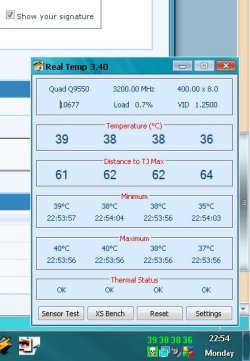
Here's temps of the normal Hyper212 with 1fan (temps are on light load)

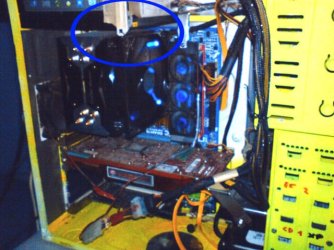
and yes be prepared to take out your motherboard
and its a good idea to somehow add a extra support just in case.
Good choice for a cooler.
 

Attachments

  • Temp.jpg
    Temp.jpg
    35.5 KB · Views: 740
  • 0-Kuciste-206.jpg
    0-Kuciste-206.jpg
    58.3 KB · Views: 271

My Computer

Computer type
PC/Desktop
Computer Manufacturer/Model Number
696
OS
7 Ultimate x64 sp1
CPU
Intel i5-4690K
Motherboard
GA Z97X Gaming 5
Memory
16Gb HyperX fury
Graphics Card(s)
R9-270x 2Gb
Sound Card
On Board
Monitor(s) Displays
2443NW
Screen Resolution
1920x1200
Hard Drives
WD5000 -
WD5001 -
WD1002
PSU
Cft-650-14cs
Case
Very Big Case
Cooling
stock
Keyboard
G11
Mouse
Logitech
Internet Speed
Adsl
Browser
FF
Other Info
RWD
You can look at the Arctic Silver site for instructions on thermal paste.

Arctic Silver, Inc. - Instructions

The proper technique varies according to processor type. Sometimes you should use a drop, other times a line, etc. Sometimes in the center, sometimes left to right, etc.

The heatsink mount engineering on current Intel processors was apparently a joint venture between Alfred E. Newman and the Marquis de Sade, so be sure to enjoy yourself as you curse them both.

If I remember correctly, it helps to secure one clip and then work on the one diagonally across, rather than trying to go clockwise or counterclockwise.

Intel used to have a 7 minute video on processor and heatsink installation. I don't have the link, but it is still probably on Intel.com. It's a laff-riot. Zip, zip, zip, and you're done.
 

My Computer

Computer type
PC/Desktop
Computer Manufacturer/Model Number
Ignatz Special; 4 speed manual gearbox; factory air conditioning; one of one
OS
Windows 7 Home Premium SP1, 64-bit
CPU
Intel Skylake i5-6600K, not overclocked
Motherboard
AsRock Z170M Extreme 4, micro ATX
Memory
8 GB HyperX DDR4-2666 (2 x 4 GB)
Graphics Card(s)
none; graphics are integrated on CPU
Sound Card
onboard: Realtek ALC1150; external: USB Behringer UF0-202
Monitor(s) Displays
Dell S2340M 23 inch IPS
Screen Resolution
1600 x 900
Hard Drives
System: Crucial MX100 series SSD, 128 GB;
Data: Samsung Spinpoint 103SJ, 1 TB;
Backup: WD Caviar Green WD30EZRX-00D8PB0, 3 TB
PSU
Rosewill SilentNight 500 watt fanless, semi-modular
Case
Antec Solo II
Cooling
Noctua NH-U12S; Noctua F12 intake, Noctua S12A exhaust
Keyboard
Microsoft 200 6JH-00001 USB
Mouse
Dell or Microsoft optical wired; USB
Antivirus
Microsoft Security Essentials and Malwarebytes Premium
Browser
Pale Moon
Other Info
All fans PWM; speeds at idle: CPU circa 500 rpm; intake circa 600 rpm; exhaust circa 600 rpm; CPU temps 27 idle and 47 C load in a warm room (27 C/81 F) when running Intel Extreme Tuning Utility stress test.
Thanks

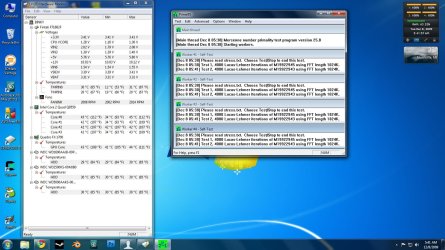
Thanks for the info. It's a bit late, because i put in the heatsink already, but I was careful to do most of that already. It's still good info, though. I really like this cooler. My temperatures (at stock speeds) are 34C idle and 47C load (after Prime95 all night). This is compared to 65+ load temps before!! I'm very happy with this cooler.
 

Attachments

  • Prime95.jpg
    Prime95.jpg
    195.7 KB · Views: 1,068

My Computer

Computer Manufacturer/Model Number
SPARTAN-001 mkII
OS
Windows 7 Ultimate x64, Ubuntu 9.10 x64
CPU
Intel Core 2 Quad Q9550 @ 3.2 GHz
Motherboard
MSI P43 Neo-F
Memory
4GB Kingston DDR2 800mHz + 2 GB Corsair DDR2 800mHz
Graphics Card(s)
EVGA GTS 250 1GB
Sound Card
Onboard Realtek
Monitor(s) Displays
20" Acer X203H
Screen Resolution
1600x900
Hard Drives
Western Digital 250GB 7200 rpm SATA &
Western Digital 500GB 7200 rpm SATA (Windows 7),
Western Digital 160GB 5400 rpm (Ubuntu 9.10)
PSU
PC Power & Cooling Silencer 750W
Case
Cooler Master CM 690
Cooling
Cooler Master Hyper 212 Plus
Keyboard
Logitech G15 v2
Mouse
Cooler Master Storm Sentinel Advance
Internet Speed
12/1.5
This cooler kicks ass mate.
 

My Computer

Computer Manufacturer/Model Number
Customised
OS
Windows 7 64Bit Ultimate Edition SP1
CPU
AMD Phenom II X5 955 @ 3200 Mhz
Motherboard
Asus M5A99X EVO
Memory
G.Skill 12GB DDR3 1333MHz
Graphics Card(s)
Palit GeForce GTX 550 Ti OC Sonic 1GB
Sound Card
Onboard
Monitor(s) Displays
LG 32" HDTV
Screen Resolution
1920x1080 @ 60Hz
Hard Drives
Internal 250GB SATA 3.0 Western Digital WDC WD25 00AAKX-001CA0

Internal 500GB SATA 2.0 Seagate ST350041 3AS

Internal 500GB SATA 2.0 Western Digital WDC WD50 00AAKS-00WWP

External 1TB USB 2.0 Western Digital

External 2TB USB 2.0 Buffalo
PSU
Colors-IT 750w BLACK 12CM Silent
Case
Xigamatek CPC-T45UB-U01 Asgard Chassis
Cooling
4 120mm Fans In Total
Keyboard
ADVENT Illuminated Keyboard
Mouse
Genius
Internet Speed
30MB
Other Info
CPU Cooler - Cooler Master Hyper 212 Plus Cooler
Yes, it certainly does. I've had it for almost a year now, and its performance is still as awesome as ever.
 

My Computer

Computer Manufacturer/Model Number
SPARTAN-001 mkII
OS
Windows 7 Ultimate x64, Ubuntu 9.10 x64
CPU
Intel Core 2 Quad Q9550 @ 3.2 GHz
Motherboard
MSI P43 Neo-F
Memory
4GB Kingston DDR2 800mHz + 2 GB Corsair DDR2 800mHz
Graphics Card(s)
EVGA GTS 250 1GB
Sound Card
Onboard Realtek
Monitor(s) Displays
20" Acer X203H
Screen Resolution
1600x900
Hard Drives
Western Digital 250GB 7200 rpm SATA &
Western Digital 500GB 7200 rpm SATA (Windows 7),
Western Digital 160GB 5400 rpm (Ubuntu 9.10)
PSU
PC Power & Cooling Silencer 750W
Case
Cooler Master CM 690
Cooling
Cooler Master Hyper 212 Plus
Keyboard
Logitech G15 v2
Mouse
Cooler Master Storm Sentinel Advance
Internet Speed
12/1.5
Back
Top