Copied files change modified date

Sherry0

New member
Local time
11:26 AM
Messages
7
I've hit a showstopper in Windows 7 for which I have so far been unable to find a workaround. I maintain my websites by duplicating all updated files in my local public_html directory tree to a new location, and then using FileZilla to upload only those files to the web server. This has always been simple in WinXP :
- use WinZip to archive everything in the directory tree
- open the archive, sort by date, and remove all older files
- select and extract the remaining files to the new location

Unfortunately the new version of WinZip seems to rely on the new "feature" of Windows 7 that copying a file resets its modified date, so this approach is no longer possible. I don't see any way to force it to keep the original modified date of the file in the archive. Things I've tried so far to resolve my problem are :

- RoboCopy
Does not seem to have any way to filter files to be copied by date.

- RichCopy
Looks like it should work, but the GUI selection of include/exclude filters does not work. Everything is copied, regardless of the selection, nor does that selection persist when you save the profile.

- 7-Zip
Can't find any way to hide the directories and show only the files when browsing the archive. Deleting the older files does not remove the no longer used directories. I can't see how to get the files to extract using their internal relative paths -- the dialog box mentioned in the help file does not come up on this machine.

- WinRAR
Can't find any way to show the files in a flat view when browsing the archive in order to remove the older files.

At this point I'm working on a bash script to run under cygwin as a last resort. Can anyone point me to something that is workable for this task?

Thanks for the help.
 

My Computer

Computer Manufacturer/Model Number
DIY
OS
Windows 7 Home Premium 64-bit
CPU
AMD Phenom II X4 965
Motherboard
Asus M4A89GTD Pro/USB3
Memory
2x2Gb
- RoboCopy
Does not seem to have any way to filter files to be copied by date.
Robocopy's MAXAGE switch? To for instance exclude all files over 2 days old:
Code:
robocopy C:\Example\ D:\Example\ /E /MAXAGE:2

Kari
 

My Computer

Computer type
Laptop
Computer Manufacturer/Model Number
HP ENVY 17-1150eg
OS
Windows 10 Pro x64 EN-GB
CPU
1.6 GHz Intel Core i7-720QM Processor
Memory
6 GB
Graphics Card(s)
ATI Mobility Radeon HD 5850 Graphics
Sound Card
Beats sound system with integrated subwoofer
Monitor(s) Displays
17" laptop display, 22" LED and 32" Full HD TV through HDMI
Screen Resolution
1600*900 (1), 1920*1080 (2&3)
Hard Drives
Internal: 2 x 500 GB SATA Hard Disk Drive 7200 rpm
External: 2TB for backups, 3TB USB3 network drive for media
Cooling
As Envy runs a bit warm, I have it on a Cooler Master pad
Keyboard
Logitech diNovo Media Desktop Laser (bluetooth)
Mouse
Logitech Performance Mouse MX
Internet Speed
50/10 Mbps VDSL
Antivirus
Windows Defender 4.3.9431.0
Browser
Maxthon 3.5.2., IE11
I've said in another thread of similer nature. Windows 7 does not change the modified date when copying. I've tried over and over again to replicate this. But never have I seen the modified date altered. I can only assume you have software like an anti-virus that is makling these changes. Otherwise I cannot replicate the issue at hand.

However, maybe you should look into SVN? Let it handle keeping record of all your modifications and keeping previous versions of files. Most developers these days use some type of revision control.
 

My Computer

Computer type
PC/Desktop
Computer Manufacturer/Model Number
Alienware Aurora ALX R4
OS
Windows 10 Pro (x64)
CPU
Intel Core i7-3930K (3.2GHz - 4.5GHz)
Motherboard
Alienware Aurora-R4 x79
Memory
4x Samsung 4GB PC3-12800 DDR3 (16GB 1600MHz)
Graphics Card(s)
Nvidia Geforce GTX 690
Sound Card
SteelSeries Siberia Elite
Monitor(s) Displays
Dell UltraSharp U3011
Screen Resolution
2560x1600
Hard Drives
Samsung 850 Pro 256 GB, Seagate 1TB Desktop Hybrid HDD, 2x Western Digital 4TB Green HDD
PSU
875W Some Dell PSU <.<
Case
Alienware Aurora ALX
Cooling
Custom Liquid Cooling (EK CPU & GPU blocks) dual EK 480RAD
Keyboard
Logitech G710+ Mechanical
Mouse
Logitech G700s
Internet Speed
Verizon Fios (50 mbps average)
Other Info
Server: Intel NUC D54250WYK: i5-4250U, 16GB, 256 GB mSATA, Windows Server 2012 R2
@Kari: Thank you for the pointer. It's not exposed in the GUI, but the command line switch can even use a YYYYMMDD date. This will greatly simplify my first step.

@logicearth: Yes, I read your other posts. Unfortunately it seems a number of folks continue to struggle with this problem, so it keeps coming up. I do not believe it is a virus issue based on my experience detailed below.

This behavior was consistent with me, costing me several days of frustration and research, and resulted in my post above. This morning I read on the WinZip site that they only certify their versions 14+ for Windows 7. Since I have been using WinZip 11.2, I downloaded and installed version 15 (the newest). Suddenly the problem disappeared.

In an effort to track down the source of the problem, I uninstalled all the various tools I have tried to use for workarounds, including purging my machine of all flavors of WinZip. Then I re-installed WinZip 11.2 from its MSI file. Things still appear to be functioning as expected. I can only say that I originally installed WinZip 8.0 here before realizing it would not actually run under Windows 7, and then installed WinZip 11.2 afterwards. So, perhaps something in that sequence caused the behavior shift.

As for SVN -- yes, I would prefer to use something other than zip files for my audit trail. Right now that's a couple of steps down the road, and the exact reason I upgraded to Windows 7 for my (new) primary machine. The old WinXP box will be converted to Linux Mint with PostgreSQL and SVN. But that won't happen tomorrow, as I have a day job, so I need to continue my interim processes. And I will still want a sparse directory for the FTP upload.

Anyway, thank you both for your replies, and I hope the description of my experience here will benefit others who are having the same issues.
 

My Computer

Computer Manufacturer/Model Number
DIY
OS
Windows 7 Home Premium 64-bit
CPU
AMD Phenom II X4 965
Motherboard
Asus M4A89GTD Pro/USB3
Memory
2x2Gb
Workaround

Yes I realise this is an OLD thread but I came across it looking for a solution to this problem myself.

Well after a lot of searching I discovered this has never been fixed by MS :rolleyes: No change there then!

What I discovered is that if you try copy paste a file as a workaround it also retains the original modified date. Although I notice that file Date accessed does change. However...
For sorting files and archiving etc or whatever your purpose a lot of people expect NATURALLY that a modified file should date/time stamp correctly and work on the Date modified parameter.

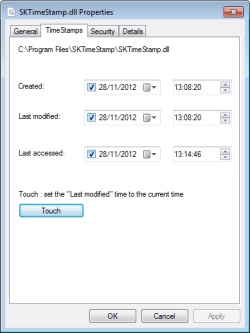
So in the end I came across this little shell extension app SKTimeStamp and there's a 64bit version too.
SKTimeStamp_one.png

SKTimeStamp

You can modify a single file's attributes or by selecting a group of files you can modify them simultaneously. You can change the Modified date, Created Date and Accessed date or you can click Touch button and it changes modified date to the current date and time.

Not perfect but failing a hotfix by MS I hope it helps others out.

cheers
SD

PS Its my 1st post here so I hope I didn't break any rules - be kind :p
PPS I registered here, just to put this info up ;)
 
Last edited:

My Computer

Computer type
PC/Desktop
Computer Manufacturer/Model Number
Custom
OS
Win 7 Pro x64
CPU
i7 3930K UL
Motherboard
RIVE
Memory
32GB DDR3 Quad
Graphics Card(s)
GTX670 SC 4GB x2 Sli
Monitor(s) Displays
Dell UltraSharp U3011 30”; Samsung 2443BW 24" x2
Screen Resolution
2560x1600
Hard Drives
Samsung SSD 830 256GB x2 RAID 1
Samsung SSD 850 SSD 1TB
WD Caviar Black 4TB HDD
WD Caviar Black 2TB HDD
WD Caviar Black 2x1TB HDD
Cooling
Noctua NH-D15S
Internet Speed
120 mbps up+down
Antivirus
MSE
Browser
Chrome
Welcome SnQQpyDog to our Forum. No I don't believe you have broken any rules.
Thank you for the information it could very likely help others and that is why we are here.
 

My Computer

Computer type
PC/Desktop
Computer Manufacturer/Model Number
Home made Desktop
OS
Windows 10 Pro. 64/ version 1709 Windows 7 Pro/64
CPU
Intel i7-6800K @ 4.3
Motherboard
ASUS X-99 Deluxe II
Memory
Corsair Platinum 16 gig @2400
Graphics Card(s)
EVGA GTX 1070 OC
Monitor(s) Displays
Asus 27" LED LCD/VE278Q
Screen Resolution
1920-1080 or 1280-720 HDMI
Hard Drives
INTEL SSD 730-240 Gb Sata 3.0/
PSU
EVGA Platium 1200W
Case
Phanteks Luxe Tempered Glass 8 fans/ one radiator
Cooling
XSPC/ Water Cooled CPU
Keyboard
Das 4 Professional
Mouse
Logitech M705/MX Anywhere 2-S
Internet Speed
100 mbits
Antivirus
Microsoft Security Essentials/ Malwarebytes Premium 3.0/ SAS
Browser
I.E. 11 default/Firefox/ ISP Time Warner Cable/Spectrum
Other Info
LG BluRay Burner/
Sound system-KLipsch-THX/
Icy Dock ssd Hot Swap bays.
Welcome SnQQpyDog to our Forum. No I don't believe you have broken any rules.
Thank you for the information it could very likely help others and that is why we are here.

Well thats a relief and thank you for the welcome... though I have to admit I've been lurkin for a while! :p

A quick question I did have an image for the tool, does the BBcode omit images or is it because I'm MrNewbie?haha
 

My Computer

Computer type
PC/Desktop
Computer Manufacturer/Model Number
Custom
OS
Win 7 Pro x64
CPU
i7 3930K UL
Motherboard
RIVE
Memory
32GB DDR3 Quad
Graphics Card(s)
GTX670 SC 4GB x2 Sli
Monitor(s) Displays
Dell UltraSharp U3011 30”; Samsung 2443BW 24" x2
Screen Resolution
2560x1600
Hard Drives
Samsung SSD 830 256GB x2 RAID 1
Samsung SSD 850 SSD 1TB
WD Caviar Black 4TB HDD
WD Caviar Black 2TB HDD
WD Caviar Black 2x1TB HDD
Cooling
Noctua NH-D15S
Internet Speed
120 mbps up+down
Antivirus
MSE
Browser
Chrome

My Computer

Computer type
PC/Desktop
Computer Manufacturer/Model Number
Home made Desktop
OS
Windows 10 Pro. 64/ version 1709 Windows 7 Pro/64
CPU
Intel i7-6800K @ 4.3
Motherboard
ASUS X-99 Deluxe II
Memory
Corsair Platinum 16 gig @2400
Graphics Card(s)
EVGA GTX 1070 OC
Monitor(s) Displays
Asus 27" LED LCD/VE278Q
Screen Resolution
1920-1080 or 1280-720 HDMI
Hard Drives
INTEL SSD 730-240 Gb Sata 3.0/
PSU
EVGA Platium 1200W
Case
Phanteks Luxe Tempered Glass 8 fans/ one radiator
Cooling
XSPC/ Water Cooled CPU
Keyboard
Das 4 Professional
Mouse
Logitech M705/MX Anywhere 2-S
Internet Speed
100 mbits
Antivirus
Microsoft Security Essentials/ Malwarebytes Premium 3.0/ SAS
Browser
I.E. 11 default/Firefox/ ISP Time Warner Cable/Spectrum
Other Info
LG BluRay Burner/
Sound system-KLipsch-THX/
Icy Dock ssd Hot Swap bays.

My Computer

Computer type
PC/Desktop
Computer Manufacturer/Model Number
Custom
OS
Win 7 Pro x64
CPU
i7 3930K UL
Motherboard
RIVE
Memory
32GB DDR3 Quad
Graphics Card(s)
GTX670 SC 4GB x2 Sli
Monitor(s) Displays
Dell UltraSharp U3011 30”; Samsung 2443BW 24" x2
Screen Resolution
2560x1600
Hard Drives
Samsung SSD 830 256GB x2 RAID 1
Samsung SSD 850 SSD 1TB
WD Caviar Black 4TB HDD
WD Caviar Black 2TB HDD
WD Caviar Black 2x1TB HDD
Cooling
Noctua NH-D15S
Internet Speed
120 mbps up+down
Antivirus
MSE
Browser
Chrome
I personally prefer our Forum method. It's more sure for other members. If I remember correctly their is a size limit.
 

My Computer

Computer type
PC/Desktop
Computer Manufacturer/Model Number
Home made Desktop
OS
Windows 10 Pro. 64/ version 1709 Windows 7 Pro/64
CPU
Intel i7-6800K @ 4.3
Motherboard
ASUS X-99 Deluxe II
Memory
Corsair Platinum 16 gig @2400
Graphics Card(s)
EVGA GTX 1070 OC
Monitor(s) Displays
Asus 27" LED LCD/VE278Q
Screen Resolution
1920-1080 or 1280-720 HDMI
Hard Drives
INTEL SSD 730-240 Gb Sata 3.0/
PSU
EVGA Platium 1200W
Case
Phanteks Luxe Tempered Glass 8 fans/ one radiator
Cooling
XSPC/ Water Cooled CPU
Keyboard
Das 4 Professional
Mouse
Logitech M705/MX Anywhere 2-S
Internet Speed
100 mbits
Antivirus
Microsoft Security Essentials/ Malwarebytes Premium 3.0/ SAS
Browser
I.E. 11 default/Firefox/ ISP Time Warner Cable/Spectrum
Other Info
LG BluRay Burner/
Sound system-KLipsch-THX/
Icy Dock ssd Hot Swap bays.
Back
Top