- Local time
- 12:11 AM
- Messages
- 106
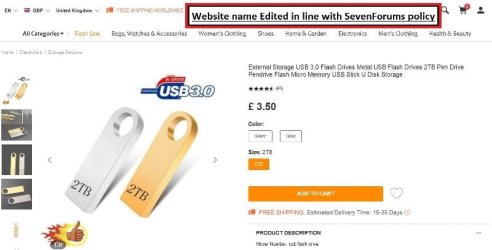
Copied my folders onto a 2tb stick & some have gone help needed please
Hi there people
I copied 116 folders onto a 2tb stick and the majority some have gone.
This is what I did.
I inserted the 2tb stick it was recognised.
I got up the folder named by me "Ready to Move" that I wanted to copy i.e. where all these folders resided.
I copied one as a test (which had word documents) and pasted it into the 2tb drive I then checked the drive for the copied folder and made sure that the contents remain intact and they were.
I copied one as a test (which had PDF documents) and pasted it into the 2tb drive I then checked the drive for the copied folder and made sure that the contents remain intact and they were.
I copied one as a test (which had some images) and pasted it into the 2tb drive I then checked the drive for the copied folder and made sure that the contents remain intact and they were.
I copied one as a test (which had music files) and pasted it into the 2tb drive I then checked the drive for the copied folder and made sure that the contents remain intact and they were, i.e. I listened to one and it played ok
I copied one as a test (which had some short videos anything from 5 minutes to 15 minutes) and pasted it into the 2tb drive I then checked the drive for the copied folder and made sure that the contents remain intact and they were.
So as far as I was concerned if I could read Word, PDF, view an image, listen to music and watch a short video I was good to go.
Which is exactly what did.
The originals have now gone, please see my other thread regarding BSOD, so even if I could do system restore it would help because they were wiped totally.
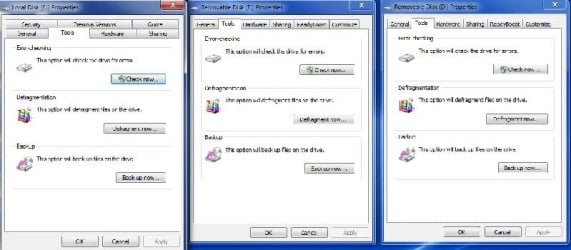
Properties
General tab
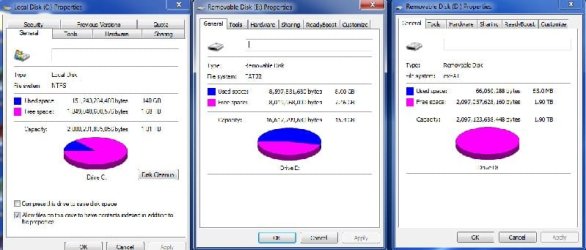
The 2tb disk properties are as follows
File system exFAT
Used space 61,774,757,888 bytes 57.5GB
Free space 2,035,348,930,560 bytes 1.85 TB
Capacity 2,097,123,688,488 bytes 1.90 TB
Sharing tab
D:\ Not Shared
Nothing in advanced sharing.
>
>
As a final piece help for you to understand Please see the attached images.
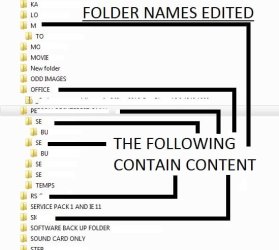
D: drive is what my 2tb looks like, as you can imagine I have edited the majority of the folder names for personal reasons.
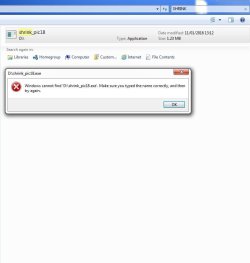
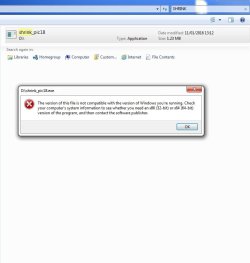
Something that I know is in there is "Shrink_pic"
The first image shows me trying as "Administrator"
The second image shows me as I "double click"
>
Just in case you are wondering how I managed to do it I got the "Shrink_pic" I have another drive, but it is available on tinternet just type "Shrink_pic" in Google.
>
Any suggestions would be very helpful please
Hi there people
I copied 116 folders onto a 2tb stick and the majority some have gone.
This is what I did.
I inserted the 2tb stick it was recognised.
I got up the folder named by me "Ready to Move" that I wanted to copy i.e. where all these folders resided.
I copied one as a test (which had word documents) and pasted it into the 2tb drive I then checked the drive for the copied folder and made sure that the contents remain intact and they were.
I copied one as a test (which had PDF documents) and pasted it into the 2tb drive I then checked the drive for the copied folder and made sure that the contents remain intact and they were.
I copied one as a test (which had some images) and pasted it into the 2tb drive I then checked the drive for the copied folder and made sure that the contents remain intact and they were.
I copied one as a test (which had music files) and pasted it into the 2tb drive I then checked the drive for the copied folder and made sure that the contents remain intact and they were, i.e. I listened to one and it played ok
I copied one as a test (which had some short videos anything from 5 minutes to 15 minutes) and pasted it into the 2tb drive I then checked the drive for the copied folder and made sure that the contents remain intact and they were.
So as far as I was concerned if I could read Word, PDF, view an image, listen to music and watch a short video I was good to go.
Which is exactly what did.
The originals have now gone, please see my other thread regarding BSOD, so even if I could do system restore it would help because they were wiped totally.
Properties
General tab
The 2tb disk properties are as follows
File system exFAT
Used space 61,774,757,888 bytes 57.5GB
Free space 2,035,348,930,560 bytes 1.85 TB
Capacity 2,097,123,688,488 bytes 1.90 TB
Sharing tab
D:\ Not Shared
Nothing in advanced sharing.
>
>
As a final piece help for you to understand Please see the attached images.
D: drive is what my 2tb looks like, as you can imagine I have edited the majority of the folder names for personal reasons.
Something that I know is in there is "Shrink_pic"
The first image shows me trying as "Administrator"
The second image shows me as I "double click"
>
Just in case you are wondering how I managed to do it I got the "Shrink_pic" I have another drive, but it is available on tinternet just type "Shrink_pic" in Google.
>
Any suggestions would be very helpful please
Attachments
My Computer
At a glance
Windows 7 64bit Service Pack 1Intel Core 2 Quad Q8300 @ 2.50GHz8.00GB Dual-Channel DDR3 @ 666MHzV223W (1680x1050@59Hz) 1023MB NVIDIA GeForce ...
- Computer type
- PC/Desktop
- Computer Manufacturer/Model Number
- Custom build
- OS
- Windows 7 64bit Service Pack 1
- CPU
- Intel Core 2 Quad Q8300 @ 2.50GHz
- Motherboard
- ASUSTeK Computer INC. P5E3 Premium (LGA775)
- Memory
- 8.00GB Dual-Channel DDR3 @ 666MHz
- Graphics Card(s)
- V223W (1680x1050@59Hz) 1023MB NVIDIA GeForce GT 430 (NVIDIA)
- Sound Card
- NVIDIA Virtual Audio Device (Wave Extensible) (WDM)
- Monitor(s) Displays
- Acer 22"
- Screen Resolution
- X193HQL (Analog)
- Hard Drives
- Seagate 2.0TB
ST2000DL003-9VT166 ATA Device
- PSU
- 700W
- Cooling
- Akassa heatsink and two coolingfansg
- Keyboard
- Logitech
- Antivirus
- Kaspersky Internet Security 2019
- Browser
- IE 11
- Other Info
- Will be undertaking a total upgrade from the case upwards next year.
Case, motherboard, ram, cpu and last but not least a 2TB SSD, but before I do that everything will be backed up to the cloud