copy a local group policy from one computer into another computer

red99

New member
Local time
5:04 AM
Messages
4
Hello Everybody,
I have been trying for over two months to copy a local group policy to a standard user in other computers that are not in the domain without affecting the administrator account. But it did not work. I used the LGPO.exe tool to export and import the local group policy. Here is the steps that I followed YouTube (select and right-click the link to see it)
Thank you!
 

My Computer My Computer

Computer type
PC/Desktop
Computer Manufacturer/Model Number
Dell
OS
windows 7 Professional
Hello red99,

welcome to seven forums.

Did you run commands from an administrators command prompt? What error messages did you receive? What went wrong?
 

My Computer My Computer

Computer type
PC/Desktop
OS
Windows 7 x64, Vista x64, 8.1 smartphone
CPU
Intel E8400 65W 64-bit
Motherboard
Gigabyte EP45-UD3LR
Memory
DDR2 2 x 2GB, 1GB x 2
Graphics Card(s)
XFX Radeon HD5750
Sound Card
AMD High Definition Audio; Realtek High Definition Audio
Monitor(s) Displays
iiyama prolite X2377HDS
Screen Resolution
1920 x 1080
Hard Drives
500GB 7200 rpm Seagate ST3500413AS 16MB, 500GB 5400 rpm Toshiba MQ02ABF050H 32MB, 200GB 7200 rpm Seagate ST3200820AS 8MB, 2TB 7200 rpm Western Digital WD20EZRX 64MB
PSU
Enermax Liberty Modular
Case
Antec P193 Midi Tower
Keyboard
Mionix ZIBAL 60
Mouse
Razer USB 2.0 Diamondback Mouse or Huion Graphics Tablet
Browser
Internet Explorer, Lunascape, Firefox, Opera, Avast Safezone
Hello iko22,
First of all, thank you! I didn't receive any error. I run command as administrator. I copied the backed up file on a thumb drive and import it on another machine. But nothing happens.
I opted for another solution:
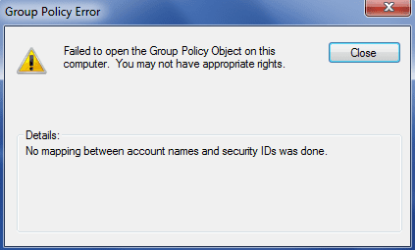
I used a Snap-in in the MMC to create group policy for a certain user and I copied it to a USB, but when I try to load it on another machine I get the error "Failed to open the Group Policy Object on this computer. You may not have appropriate rights." "Details: No mapping between account names and security IDs was done."

I am logged in as local admin so I should have the rights, even if I right click and select "Run as Administrator" I get the same error.
 

My Computer My Computer

Computer type
PC/Desktop
Computer Manufacturer/Model Number
Dell
OS
windows 7 Professional
BOTH command needs be run from administrator's command prompt.

It could be, you need to make sure both computers are not on a domain, when each command is executed, otherwise policy data may be valid in one domain, and invalid in the domain that the GPO is being copied to.

As a last resort, you may wish to use LGPO to parse the backed-up registry.pol file into a readable text file and open it up in a text editor to check it contains what you believe to be correct, then parse this text file (using lgpo again) into a new registry.pol file.

Run lgpo.exe with the /v switch (verbose) and see if the execution output is any more informed.
 

My Computer My Computer

Computer type
PC/Desktop
OS
Windows 7 x64, Vista x64, 8.1 smartphone
CPU
Intel E8400 65W 64-bit
Motherboard
Gigabyte EP45-UD3LR
Memory
DDR2 2 x 2GB, 1GB x 2
Graphics Card(s)
XFX Radeon HD5750
Sound Card
AMD High Definition Audio; Realtek High Definition Audio
Monitor(s) Displays
iiyama prolite X2377HDS
Screen Resolution
1920 x 1080
Hard Drives
500GB 7200 rpm Seagate ST3500413AS 16MB, 500GB 5400 rpm Toshiba MQ02ABF050H 32MB, 200GB 7200 rpm Seagate ST3200820AS 8MB, 2TB 7200 rpm Western Digital WD20EZRX 64MB
PSU
Enermax Liberty Modular
Case
Antec P193 Midi Tower
Keyboard
Mionix ZIBAL 60
Mouse
Razer USB 2.0 Diamondback Mouse or Huion Graphics Tablet
Browser
Internet Explorer, Lunascape, Firefox, Opera, Avast Safezone
Capture.PNG

That is the kind of error I get when I try to run copied MMC into another computer.
This is my other way to copy the local group policy,knowing that both machines are not on the domain.

I made sure the administrator account has full control.
 

My Computer My Computer

Computer type
PC/Desktop
Computer Manufacturer/Model Number
Dell
OS
windows 7 Professional
Back
Top