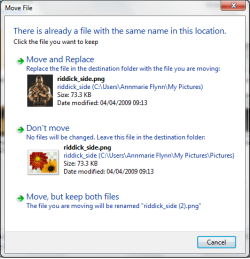
In the Windows7 Explorer, when I move a file it makes a copy with - Copy.jpg (or whatever extension) appended to the filename. How can I make Move actually move from the source directory and overwrite the file in the target directory like you would expect it to?
To further explain:
To further explain:
- left click and drag to select files at source directory
- right click and drag selected files to destination directory
- let go of right click and menu presented offers choice of move or copy
- selecting move makes copies of files instead of overwriting
My Computer
- Computer Manufacturer/Model Number
- homebuilt
- OS
- Windows 7
- CPU
- Intel Core i7 965 EE
- Motherboard
- Gigabyte X58 Extreme
- Memory
- 6GB OCZ DDR3 1600MHz
- Graphics Card(s)
- nVidia 9600GT
- Sound Card
- onBoard
- Monitor(s) Displays
- dual Acer 24" widescreens
- Screen Resolution
- 1920x1200
- Hard Drives
- 2 80GB Intel X25-M SSDs in RAID0
2 750GB Western Digital Caviar Blacks in RAID1
WD SATAII 250GB w/16meg cache
- PSU
- 1,000W Enermax Galaxy
- Case
- Lian-Li
- Cooling
- Air

 LOL
LOL