Copy and Paste Issue

MilesGibson

New member
Local time
9:58 PM
Messages
2
I love Windows 7, and I really like the confirmation prompt that W7 showed me when copying files from one folder to another.

HOWEVER, somehow, someway, W7 now copies the files to the destination folder, no prompt, and creates copies of the files instead.

GRRRRRR..........! any ideas?
 

My Computer

Computer Manufacturer/Model Number
Dell T7400
OS
Windows 7 Pro
CPU
Xeon
Memory
8GB
Graphics Card(s)
nVidia
Monitor(s) Displays
3
Are the folders on different hard drives?
 

My Computer

Computer Manufacturer/Model Number
ultraplanet - model 23
OS
Windows 7
CPU
P4 3.0 HT
Motherboard
Intel DQ965GF
Memory
4 gigs of Crucial DDR2
Graphics Card(s)
nVidia GeForce 7800GT 256MB 256-bit w/ ACCELS1 Rev 2
Sound Card
on board
Monitor(s) Displays
HP 2509m
Screen Resolution
1920x1080
Hard Drives
2x 320gb Seagate Barracuda's - SATA 3Gbit/s - RAID-0 array
PSU
650 watt
Case
Antec
Cooling
Cool Master
Keyboard
Logitech diNovo Media Desktop
Mouse
see keyboard
Internet Speed
comcast cable
Other Info
7 Ultimate and 7 Pro twice each at home - Gigabit on the Network - Tomato on the Linksys - I freely share my wireless with my neighbors (8-10 additional devices)
Yes, one folder is local, the other is a remote folder. Remember this was working normally, earlier today, so I don't think that is the issue.
 

My Computer

Computer Manufacturer/Model Number
Dell T7400
OS
Windows 7 Pro
CPU
Xeon
Memory
8GB
Graphics Card(s)
nVidia
Monitor(s) Displays
3
Window default is to copy files when dragged from one location to another when those locations are on different drives and to move the files when on the same drive.
 

My Computer

Computer Manufacturer/Model Number
ultraplanet - model 23
OS
Windows 7
CPU
P4 3.0 HT
Motherboard
Intel DQ965GF
Memory
4 gigs of Crucial DDR2
Graphics Card(s)
nVidia GeForce 7800GT 256MB 256-bit w/ ACCELS1 Rev 2
Sound Card
on board
Monitor(s) Displays
HP 2509m
Screen Resolution
1920x1080
Hard Drives
2x 320gb Seagate Barracuda's - SATA 3Gbit/s - RAID-0 array
PSU
650 watt
Case
Antec
Cooling
Cool Master
Keyboard
Logitech diNovo Media Desktop
Mouse
see keyboard
Internet Speed
comcast cable
Other Info
7 Ultimate and 7 Pro twice each at home - Gigabit on the Network - Tomato on the Linksys - I freely share my wireless with my neighbors (8-10 additional devices)
Right click and drag, drop to get a prompt regarding Copy/Move/Shortcut

If Windows was prompting you before - while using left click drag and drop - that was the odd behavior, not the behavior reported here.
 
You can also experiment with Shift + click/drag, ALT + click/drag, CTRL + cliclk/drag.

Each has a different function. I use right click/drag.
 
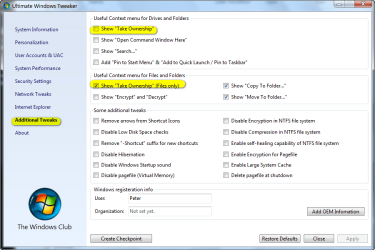
You can use a free app Ultimate Windows Tweaker v2, a Tweak UI for Windows 7 to add "move to folder" and "copy to folder" to the explorer right click context menu, in addition to other useful options (see screen shot below for some of the options you can easily add (or remove at any time & disregard the highlighted sections as they are not applicable to this discussion)). Very convenient.

Also, a superior free file transfer app that seamlessly integrates and works with win explorer is called "TeraCopy." It provides a much more informative display as files are being copied or moved than the native Windows fuction. The latest beta version of TeraCopy works great with 7. Once installed, everytime you use explorer to copy or move a file, TeraCopy actually makes the transfer with it's nice informative display that pops up while it's doing so. There is a paid pro version but the free version is very full featured (everything anyone would need) and absolutely no adware.
 

Attachments

  • 2009-08-10_015341.png
    2009-08-10_015341.png
    35.8 KB · Views: 52

My Computer

Computer Manufacturer/Model Number
HP DV8t quad
OS
Windows 7 Ultimate x64 (Retail)
CPU
i7-Q 720
Motherboard
Motherboard Chipset Intel Ibex Peak-M PM55, Intel Lynnfield
Memory
6 GB
Graphics Card(s)
nVidia GeForce GT 230M (1GB)
Sound Card
IDT High Definition Audio CODEC
Monitor(s) Displays
18.4 inch HP Infinity FHD (Samsung 184HT03-001)
Screen Resolution
1920 x 1080
Hard Drives
Hitachi 500GB 7200 rpm (x2)
Seagate FreeAgent 1.5 TB External USB (x2)
Thermaltake BlacX eSATA/USB 2.0 3.5/2.5 HD dock
Cooling
Zalman NC-2000 notebook cooling pad
Keyboard
laptop
Mouse
Logitech VX Revolution
Other Info
Backup Unit: Lenovo T61p
Windows Registry Editor Version 5.00
[HKEY_CLASSES_ROOT\AllFilesystemObjects\shellex\ContextMenuHandlers\Copy To]
@="{C2FBB630-2971-11D1-A18C-00C04FD75D13}"
---------------------------------------------------------
lots of programs have nice things. here is how I do copy to and shows when you right click a file. Then you pick where you want it copied to.
 
Back
Top