Copy and paste to folder

musiclover7

New member
Power User
Local time
3:07 PM
Messages
210
Location
Stoughton, WI
One of the things that is bothering me, is the difficulty I have when I copy a file from another folder, and then try to past that file into another folder that is full of other folders.. etc.. It can be quite difficult to find a place on the screen in explorer, that I can paste to, that will actually put the file in same folder, and not one of the sub-folders.. This was easier to accomplish in prior versions of windows..

For the most part, I love this OS.. and would certainly say it trumps any prior version of windows.. Yes, there are some 3rd party apps that should be installed to make it even better, but this is the best Windows yet, and it has not even hit the market..
 

My Computer

Computer Manufacturer/Model Number
Custom
OS
Windows 7 Ultimate
CPU
Amd 5400+ dual core overclocked to 3.0 ghz
Motherboard
EVGA 590 sli aM2
Memory
8gb 5-5-5-5-15 g-skill
Graphics Card(s)
Nvidia 9800gt 512mb
Sound Card
M-Audio Delta 2496
Monitor(s) Displays
Acer 22 inch lcd
Screen Resolution
1680 x 1050
Hard Drives
Hmm

4.0 terabytes total..
PSU
650 watts
Case
Antec Sonata II
Cooling
Zallmen Xpu cooler
Keyboard
some rubbish I found in my garage
Mouse
logitech
Internet Speed
caps at about 650kb down, 50kb up . Gigabit local network.
Hi Musiclover,

I agree it can be difficult to get used to but there is a distinct area at the far left and right side of the detail pane that moves or copies to the actual folder
 

My Computers

System One System Two

  • Computer type
    PC/Desktop
    Computer Manufacturer/Model Number
    ChillBlast - Custom to my design
    OS
    Windows 11 Pro x64 [Latest Release and Release Preview]
    CPU
    Ryzen 9 5950X, 3.8 - 5.2 MHz
    Motherboard
    Asus Prime X570-Pro
    Memory
    64GB [2 x 32GB] DDR4 3200MHz
    Graphics Card(s)
    4GB NVIDIA GEFORCE GTX 1650 Ti
    Sound Card
    On-board SPDIF to 5.1 System + HDMI [5.1 system]
    Monitor(s) Displays
    32" UHD 32 Bit HDR Monitor + 43" UHD 4K 32Bit HDR TV
    Screen Resolution
    2 x 3840 x 2160 @60Hz
    Hard Drives
    1TB M2 SSD OS, 500GB Fast Access SSD, 2 x 8TB Data + Various Externals from 1TB to 4TB, 10TB NAS
    PSU
    NZXT C750 80 PLUS Gold 750W Modular PSU
    Case
    Workstation Case [Matt Black]
    Cooling
    NZXT Kraken X63 280mm CPU Cooler +2x Quiet Case fans
    Keyboard
    Logitech Wireless MX Keys & K400 + others
    Mouse
    Logitech Wireless MX Master 3S
    Internet Speed
    920 MB Down 50 MB Up
    Antivirus
    BitDefender Total Security Pro
    Browser
    Chrome (always run latest Non-Beta)
    Other Info
    Also run ...
    Laptop - Quad 8GB - Windows 10 Pro x64
    Nexus 7 Android tablet x2
    Samsung 10.2" tablet
    Blackview TAB 8 4G Android Tablet c/w Keyboard
    Wacom Intuos Pro Medium Pen Pad
    Wacom Intuos Pro Small Pen Pad
    Wacom Expresskeys Remote
    Loopdeck+ Graphics Controller
    Shuttle Pro v2 Control
  • Computer type
    Laptop
    System Manufacturer/Model Number
    Dell XPS 17 10750H
    OS
    Windows 11 Pro x64 Latest RP
    CPU
    Intel I7 10750H 5.0GHz
    Motherboard
    Dell XPS
    Memory
    32GB [2x16GB] DDR4 2933 MHz
    Graphics Card(s)
    nVidia GTX1650Ti 4 GB GDDR6
    Sound Card
    Stock [Realtek] 4 Speaker
    Monitor(s) Displays
    17" IPS UHD+ Infinity Edge Touchscreen
    Screen Resolution
    3840 x 2400
    Hard Drives
    2TB M2 NVMe, 4TB External + various 500GB & 1TB External NVMe (also have access to spinner HDD from
    PSU
    Stock
    Case
    Stock XPS Aluminium & Carbon Fibre
    Cooling
    Stock - Active Fan Control
    Keyboard
    Backlit + Various Logitech
    Mouse
    Stock Track Pad + Logitech MX Trackball
    Internet Speed
    72 MB Down 18MB Up
    Browser
    Chrome
    Other Info
    Also run ...
    Laptop - Quad 8GB - Windows 10 Pro x64
    Nexus 7 Android tablet x2
    10.2" tablet
    Sony Z3 Android Smartphone
    Wacom Intuos Pro Medium Pen Pad
    Wacom Intuos Pro Small Pen Pad
    Wacom Expresskeys Remote
    Loopdeck+ Graphics Controller
    Shuttle Pro v2 Control Pad
    10TB NAS
One of the things that is bothering me, is the difficulty I have when I copy a file from another folder, and then try to past that file into another folder that is full of other folders.. etc.. It can be quite difficult to find a place on the screen in explorer, that I can paste to, that will actually put the file in same folder, and not one of the sub-folders.. This was easier to accomplish in prior versions of windows..

For the most part, I love this OS.. and would certainly say it trumps any prior version of windows.. Yes, there are some 3rd party apps that should be installed to make it even better, but this is the best Windows yet, and it has not even hit the market..
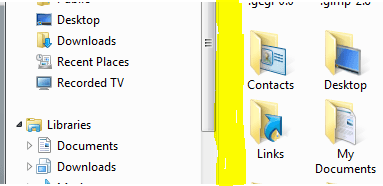
I use this area marked with yellow. It took a couple of days to get used to it, now it's no longer bothering me.

paste_area.PNG

Kari
 

My Computer

Computer type
Laptop
Computer Manufacturer/Model Number
HP ENVY 17-1150eg
OS
Windows 10 Pro x64 EN-GB
CPU
1.6 GHz Intel Core i7-720QM Processor
Memory
6 GB
Graphics Card(s)
ATI Mobility Radeon HD 5850 Graphics
Sound Card
Beats sound system with integrated subwoofer
Monitor(s) Displays
17" laptop display, 22" LED and 32" Full HD TV through HDMI
Screen Resolution
1600*900 (1), 1920*1080 (2&3)
Hard Drives
Internal: 2 x 500 GB SATA Hard Disk Drive 7200 rpm
External: 2TB for backups, 3TB USB3 network drive for media
Cooling
As Envy runs a bit warm, I have it on a Cooler Master pad
Keyboard
Logitech diNovo Media Desktop Laser (bluetooth)
Mouse
Logitech Performance Mouse MX
Internet Speed
50/10 Mbps VDSL
Antivirus
Windows Defender 4.3.9431.0
Browser
Maxthon 3.5.2., IE11
One of the things that is bothering me, is the difficulty I have when I copy a file from another folder, and then try to past that file into another folder that is full of other folders.. etc.. It can be quite difficult to find a place on the screen in explorer, that I can paste to, that will actually put the file in same folder, and not one of the sub-folders....
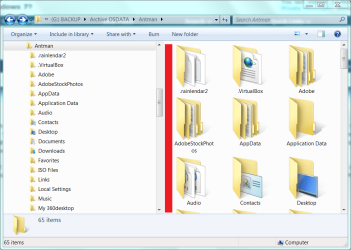
Yes, this is challenging with certain folder views. The area marked in red is always available, no matter the view.

Are you aware that you can enable Copy To/Move To in your right click context menu?
 

Attachments

  • 1.PNG
    1.PNG
    64.4 KB · Views: 36
Thanks for that all.. I figured out too that you can also paste to the address bar. It is a bit of an annoyance, but not a huge one.. For the most part, I am loving Windows 7 more and more each day.. The library concept, when put to good use, is brilliant...
 

My Computer

Computer Manufacturer/Model Number
Custom
OS
Windows 7 Ultimate
CPU
Amd 5400+ dual core overclocked to 3.0 ghz
Motherboard
EVGA 590 sli aM2
Memory
8gb 5-5-5-5-15 g-skill
Graphics Card(s)
Nvidia 9800gt 512mb
Sound Card
M-Audio Delta 2496
Monitor(s) Displays
Acer 22 inch lcd
Screen Resolution
1680 x 1050
Hard Drives
Hmm

4.0 terabytes total..
PSU
650 watts
Case
Antec Sonata II
Cooling
Zallmen Xpu cooler
Keyboard
some rubbish I found in my garage
Mouse
logitech
Internet Speed
caps at about 650kb down, 50kb up . Gigabit local network.
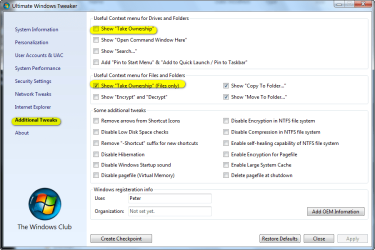
You can use a free app Ultimate Windows Tweaker v2, a Tweak UI for Windows 7 to add "move to folder" and "copy to folder" to the explorer right click context menu, in addition to other useful options (see screen shot below for some of the options you can easily add (or remove at any time & disregard the highlighted sections as they are not applicable to this discussion)). Very convenient.

Also, a superior free file transfer app that seamlessly integrates and works with win explorer is called "TeraCopy." It provides a much more informative display as files are being copied or moved than the native Windows fuction. The latest beta version of TeraCopy works great with 7. Once installed, everytime you use explorer to copy or move a file, TeraCopy actually makes the transfer with it's nice informative display that pops up while it's doing so. There is a paid pro version but the free version is very full featured (everything anyone would need) and absolutely no adware.
 

Attachments

  • 2009-08-10_015341.png
    2009-08-10_015341.png
    35.8 KB · Views: 82

My Computer

Computer Manufacturer/Model Number
HP DV8t quad
OS
Windows 7 Ultimate x64 (Retail)
CPU
i7-Q 720
Motherboard
Motherboard Chipset Intel Ibex Peak-M PM55, Intel Lynnfield
Memory
6 GB
Graphics Card(s)
nVidia GeForce GT 230M (1GB)
Sound Card
IDT High Definition Audio CODEC
Monitor(s) Displays
18.4 inch HP Infinity FHD (Samsung 184HT03-001)
Screen Resolution
1920 x 1080
Hard Drives
Hitachi 500GB 7200 rpm (x2)
Seagate FreeAgent 1.5 TB External USB (x2)
Thermaltake BlacX eSATA/USB 2.0 3.5/2.5 HD dock
Cooling
Zalman NC-2000 notebook cooling pad
Keyboard
laptop
Mouse
Logitech VX Revolution
Other Info
Backup Unit: Lenovo T61p
Back
Top