Copy file to XP

markg2

New member
Member
VIP
Local time
9:12 AM
Messages
477
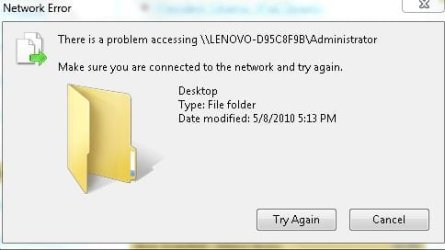
Although I can copy small files from my Win7 machine to my wife's XP, copying larger files consistently results in the error: 'There is a problem accessing (the particular target dir) Make sure you are connected and try again"

Anyone know what could be causing this problem?

Mark
 

Attachments
  • FileCopy.JPG
    FileCopy.JPG
    20.8 KB · Views: 9

My Computer

Computer type
PC/Desktop
OS
Windows 7 & Windows 10
Hi, this problem is probably caused by an inconsistent WiFi connection.

It could be on either computer.

Make sure the network drivers are are all completely upto date on both of your PCs and then try again.

Post back with any results.

Oli
 

My Computer

Computer Manufacturer/Model Number
Apple MacBook 5,1
OS
Windows 7 Profesional x86, Mac OS X 10.6 Snow Leopard
CPU
Intel Core 2 Duo 2.4Ghz
Memory
4GB DDR3
Graphics Card(s)
Nvidia 9400m
Monitor(s) Displays
13.3" Internal + 22" DVI + 21.5" USB
Screen Resolution
1280x800 + 1920x1080 + 1920x1080
Hard Drives
Internal SATA 2.5" 500GB (395GB Mac HFS+, 105GB Windows NTFS)
2.48TB RAID consisting of 5 disks (HFS+)
Case
Aluminium Unibody
Keyboard
Apple Late 2009 Wireless Keyboard (US)
Mouse
Apple Magic Mouse
Internet Speed
6.33Mb/s up. 0.36Mb/s down.
Other Info
Harman Kardon Soundsticks II Speakers
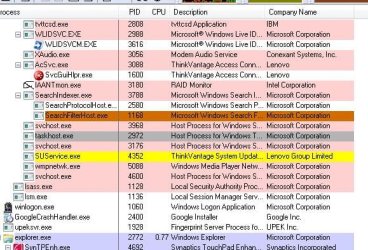
I would try to find out which process issues this message. Use Process Explorer. Drag the icon indicated in the picture over the message and release it there. Then Process Explorer will mark the process in pale blue. You may have to go into the process properties to find more information.

2010-05-11_005126.png
 

My Computer

Computer Manufacturer/Model Number
HP, Dell, Gateway, Toshiba - 4 laptops and 2 desktops
OS
Vista, Windows7, Mint Mate, Zorin, Windows 8
CPU
from 1.6GHz Duo to i7
Monitor(s) Displays
2x HP w2207
Hard Drives
5x HDD, 7x SSD, 12x Externals
Keyboard
with trackball - no mices
Mouse
Trackball mice
Internet Speed
DSL 6000
I've done as you instructed (attached). I do not see any useful information. Possibly you do?

Mark
 

Attachments

  • TaskHost.JPG
    TaskHost.JPG
    41.1 KB · Views: 5
  • TaskHost2.JPG
    TaskHost2.JPG
    75.2 KB · Views: 7

My Computer

Computer type
PC/Desktop
OS
Windows 7 & Windows 10
As for Osholt--

The connection is Ethernet not WiFi.

I ran Lenovo Update system on both computers. No relative drivers were installed. The problem remains.

Mark
 

My Computer

Computer type
PC/Desktop
OS
Windows 7 & Windows 10
*lol*

Are you True Admin on both of the computers and have the same passwords on the computers?
 

My Computer

Computer Manufacturer/Model Number
HP Pavilion Elite HPE-410f
OS
Windows 7 Ultimate x64
CPU
AMD Phenom x6 1045t
Motherboard
N/A
Memory
8 GB
Graphics Card(s)
ATI Radeon HD 5570
Sound Card
Realtek Highdefinition Audio / 5.1 Dolby Setup
Monitor(s) Displays
HP w2207h Widescreen
Screen Resolution
1680*1050
Hard Drives
1 TB (fixed), 320 Portable maxtor, Server Hard drives
PSU
350 Watt
Case
HP CASE
Cooling
Bass
Keyboard
Logitech MX 5500
Mouse
Logitech MX 5500
Internet Speed
ROAD RUNNER 16MB D/512 U
I've done as you instructed (attached). I do not see any useful information. Possibly you do?

Mark
Unfortunately you are right. The taskhost.exe (a new invention for win7) runs .dlls similar as the svchost.exe or rundll.exe. Unfortunately there is no Services tab in properties, so we cannot see which .dlls were run.
 

My Computer

Computer Manufacturer/Model Number
HP, Dell, Gateway, Toshiba - 4 laptops and 2 desktops
OS
Vista, Windows7, Mint Mate, Zorin, Windows 8
CPU
from 1.6GHz Duo to i7
Monitor(s) Displays
2x HP w2207
Hard Drives
5x HDD, 7x SSD, 12x Externals
Keyboard
with trackball - no mices
Mouse
Trackball mice
Internet Speed
DSL 6000
markg2, can you do a test ping? Say 3 minutes...? In case you don't know how, open command prompt,
type in --> ping the_other_computer's_ip -t

Watch the result for weird numbers... Post back ANYTHING you find weird.

zzz2496
 

My Computer

Computer Manufacturer/Model Number
Self Built
OS
Windows7 Ultimate 64bit
CPU
Intel Core 2 Quad Q6600
Motherboard
Abit IN9-32X-MMAX
Memory
DDR2 Adata 4GB
Graphics Card(s)
Nvidia GeForce GTX 285 1024 and Nvidia GeForce 8800GT 512
Sound Card
Asus Xonar HDAV 1.3
Monitor(s) Displays
Dell 2407WFP and BenQ 2400v and Philips 150v3
Screen Resolution
3840x1200 and 1024x768
Hard Drives
2 WDC 1TB
1 WDC 1.5TB
1 WDC 640GB
1 WDC 320GB
1 Seagate 200GB
PSU
Corsair TX 850W
Case
Cooler Master HAF932
Cooling
Arctic Cooling Freezer Extreme and plenty of fans...
Keyboard
MicrosoftNaturalKeyboard 4000/Apple Alu keyboard/Dinovo mini
Mouse
Logitech G5/MarbleMouseTrackball/PerformanceMX/SpacePilotPRO
Internet Speed
1.5Mbps down/384Kbps up
Other Info
APC SURT 1000XL
Logitech Z-560
Wiimote
Mikrotik Router
Linksys (now Cisco) SD2008 8 port Gigabit switch
Linksys WRT54G (acting as AP)
Apple wireless Aluminium keyboard
Apple Magic Mouse
Xbox360 wired controller
Back
Top