
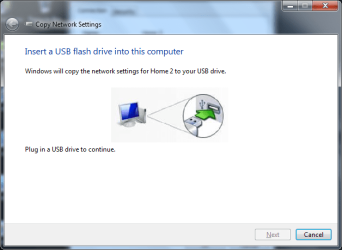
Copy Network Settings

barsim

New member
Member
Local time
11:41 AM
Messages
50
Hi,
What to do when I tried to copy network settings to USB (attached png) and the Wizzard window Next button remaines greyed out although the flash-drive was recognized by the PC?
Thank you
barsim(
 

Attachments

  • CNS.png
    CNS.png
    26.2 KB · Views: 10

My Computer

Computer type
PC/Desktop
Computer Manufacturer/Model Number
HP Compaq dc5800
OS
Microsoft Windows 7 Professional 64-bit 7601 Multiprocessor Free Service Pack 1
CPU
Intel(R) Core(TM)2 Duo CPU E8400 @ 3.00GHz
Motherboard
Hewlett-Packard 2820h
Memory
6.00 GB, usable: 5.92 GB
Graphics Card(s)
ATI Radeon HD 3400 Series
Sound Card
(1) High Definition Audio Device (2) HD Webcam C270
Monitor(s) Displays
HP
Screen Resolution
1920 x 1080 x 60 hertz
Hard Drives
ST3500418AS ATA Device
Fixed hard disk media
Partitions: 2
Size: 465.76 GB
Other Info
BIOS: Hewlett-Packard
Default System BIOS
Version: 786F2 v01.51
Release Date: 8/1/2008
Barsim, could it be that your flash drive is not formatted ntfs.

Rich
 

My Computer

Computer type
Laptop
Computer Manufacturer/Model Number
Toshiba Laptop Qosimo X870
OS
Windows 7 Pro x64 SP1
CPU
Intel Core I7
Motherboard
Toshiba Qosmio
Memory
16 Gigs
Graphics Card(s)
NVIDIA GeForce GTX 670M
Monitor(s) Displays
17.7" laptop
Screen Resolution
1600 x 900
Hard Drives
256 Gig SanDisk SSD for C
256 Gig Intel SSD for D
Internet Speed
50/25 FIOS
Antivirus
Vipre (all you can eat for 10 machines)
Browser
IE and FF
Other Info
I have dos 6.22, wfwg 3.11, win98, 2000 and xp VHD's available for testing. MS's Virtual PC works great.
Just make sure I'ved reformatted the USB drive in NTFS but no avail.
barsim
 

My Computer

Computer type
PC/Desktop
Computer Manufacturer/Model Number
HP Compaq dc5800
OS
Microsoft Windows 7 Professional 64-bit 7601 Multiprocessor Free Service Pack 1
CPU
Intel(R) Core(TM)2 Duo CPU E8400 @ 3.00GHz
Motherboard
Hewlett-Packard 2820h
Memory
6.00 GB, usable: 5.92 GB
Graphics Card(s)
ATI Radeon HD 3400 Series
Sound Card
(1) High Definition Audio Device (2) HD Webcam C270
Monitor(s) Displays
HP
Screen Resolution
1920 x 1080 x 60 hertz
Hard Drives
ST3500418AS ATA Device
Fixed hard disk media
Partitions: 2
Size: 465.76 GB
Other Info
BIOS: Hewlett-Packard
Default System BIOS
Version: 786F2 v01.51
Release Date: 8/1/2008
Looks like the program did not see that you had a usb drive in the slot. Did you insert the drive at this screen
or was it already in a slot?

Rich
 

My Computer

Computer type
Laptop
Computer Manufacturer/Model Number
Toshiba Laptop Qosimo X870
OS
Windows 7 Pro x64 SP1
CPU
Intel Core I7
Motherboard
Toshiba Qosmio
Memory
16 Gigs
Graphics Card(s)
NVIDIA GeForce GTX 670M
Monitor(s) Displays
17.7" laptop
Screen Resolution
1600 x 900
Hard Drives
256 Gig SanDisk SSD for C
256 Gig Intel SSD for D
Internet Speed
50/25 FIOS
Antivirus
Vipre (all you can eat for 10 machines)
Browser
IE and FF
Other Info
I have dos 6.22, wfwg 3.11, win98, 2000 and xp VHD's available for testing. MS's Virtual PC works great.
Of course, it was plugged-in.
 

My Computer

Computer type
PC/Desktop
Computer Manufacturer/Model Number
HP Compaq dc5800
OS
Microsoft Windows 7 Professional 64-bit 7601 Multiprocessor Free Service Pack 1
CPU
Intel(R) Core(TM)2 Duo CPU E8400 @ 3.00GHz
Motherboard
Hewlett-Packard 2820h
Memory
6.00 GB, usable: 5.92 GB
Graphics Card(s)
ATI Radeon HD 3400 Series
Sound Card
(1) High Definition Audio Device (2) HD Webcam C270
Monitor(s) Displays
HP
Screen Resolution
1920 x 1080 x 60 hertz
Hard Drives
ST3500418AS ATA Device
Fixed hard disk media
Partitions: 2
Size: 465.76 GB
Other Info
BIOS: Hewlett-Packard
Default System BIOS
Version: 786F2 v01.51
Release Date: 8/1/2008
I recommend that you eject the usb drive and insert it at the screen where it asks for it.

Rich
 

My Computer

Computer type
Laptop
Computer Manufacturer/Model Number
Toshiba Laptop Qosimo X870
OS
Windows 7 Pro x64 SP1
CPU
Intel Core I7
Motherboard
Toshiba Qosmio
Memory
16 Gigs
Graphics Card(s)
NVIDIA GeForce GTX 670M
Monitor(s) Displays
17.7" laptop
Screen Resolution
1600 x 900
Hard Drives
256 Gig SanDisk SSD for C
256 Gig Intel SSD for D
Internet Speed
50/25 FIOS
Antivirus
Vipre (all you can eat for 10 machines)
Browser
IE and FF
Other Info
I have dos 6.22, wfwg 3.11, win98, 2000 and xp VHD's available for testing. MS's Virtual PC works great.
I have a lappy. I have a SDHC card in the memory card slot. When I tried to do the same it worked

Just try once
 

My Computer

Computer type
PC/Desktop
OS
Windows 7 Ultimate x32
Motherboard
Gigabyte Z68XP UD3R rev 1
Memory
4 gb
Graphics Card(s)
Gigabyte AMD Radeon 7770 1 GB
Antivirus
ESET Smart Security 6
Browser
Chrome
I recommend that you eject the usb drive and insert it at the screen where it asks for it.

Rich

Plugged-in the flash-drive when the Wizzard called for it only, but no success.
 

My Computer

Computer type
PC/Desktop
Computer Manufacturer/Model Number
HP Compaq dc5800
OS
Microsoft Windows 7 Professional 64-bit 7601 Multiprocessor Free Service Pack 1
CPU
Intel(R) Core(TM)2 Duo CPU E8400 @ 3.00GHz
Motherboard
Hewlett-Packard 2820h
Memory
6.00 GB, usable: 5.92 GB
Graphics Card(s)
ATI Radeon HD 3400 Series
Sound Card
(1) High Definition Audio Device (2) HD Webcam C270
Monitor(s) Displays
HP
Screen Resolution
1920 x 1080 x 60 hertz
Hard Drives
ST3500418AS ATA Device
Fixed hard disk media
Partitions: 2
Size: 465.76 GB
Other Info
BIOS: Hewlett-Packard
Default System BIOS
Version: 786F2 v01.51
Release Date: 8/1/2008
coolamitraj I have a lappy. I have a SDHC card in the memory card slot. When I tried to do the same it worked

Just try once

@coolamitraj:

I tried it and sure enough it worked! From there I copied those files and transferred them onto the USB drive. I had this similar problem where the Next button was greyed out, my USB drive is formatted as NTFS and ejected the USB and reinserted. I don't know what the deal was but thank you coolamitraj!
 

My Computer

Computer type
Laptop
Computer Manufacturer/Model Number
ASUS G1S-B1
OS
Windows 7 Ultimate x64
Back
Top