Copy/Paste between guest and host not working

lodester

New member
Local time
1:53 PM
Messages
3
Ultimate x64, running a guest XP 32bit OS.
I am unable to copy/paste between the guest and the host. Can anyone offer troubleshooting steps? I have not found any answers searching google or these forums. :: sad face ::

I should probably mention the XP guest is a converted P2V. I had some trouble with a SmartCard driver (there is no smartcard device on my guest, this looked like the advanced integration features just bugging out) spamming the guest OS over and over and the guest would eventually just lock up requiring a hard restart.
I eventually disabled the integration features to work around this issue, i am wondering if the advanced integration is required for the clipboard to work.
 

My Computer

OS
Win 7 Ultimate x4
Hello Lodester, welcome to the Seven Forums.

You have to install and enable integration features to be able to copy / paste between Virtual PC guest and host. Drag and drop don't work. More in this thread.

Kari
 

My Computer

Computer type
Laptop
Computer Manufacturer/Model Number
HP ENVY 17-1150eg
OS
Windows 10 Pro x64 EN-GB
CPU
1.6 GHz Intel Core i7-720QM Processor
Memory
6 GB
Graphics Card(s)
ATI Mobility Radeon HD 5850 Graphics
Sound Card
Beats sound system with integrated subwoofer
Monitor(s) Displays
17" laptop display, 22" LED and 32" Full HD TV through HDMI
Screen Resolution
1600*900 (1), 1920*1080 (2&3)
Hard Drives
Internal: 2 x 500 GB SATA Hard Disk Drive 7200 rpm
External: 2TB for backups, 3TB USB3 network drive for media
Cooling
As Envy runs a bit warm, I have it on a Cooler Master pad
Keyboard
Logitech diNovo Media Desktop Laser (bluetooth)
Mouse
Logitech Performance Mouse MX
Internet Speed
50/10 Mbps VDSL
Antivirus
Windows Defender 4.3.9431.0
Browser
Maxthon 3.5.2., IE11
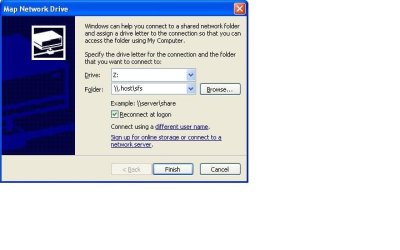
Possible you can enable the shared drive, on the guest Manchine map the local drive on any drive letter you desire:

*** Do not forget \\.host\sfs < this will mount your local drive on your guest machine

map drive on xp mode.JPG


migrate13
 

My Computer

OS
windows 7
Hello Lodester, welcome to the Seven Forums.

You have to install and enable integration features to be able to copy / paste between Virtual PC guest and host. Drag and drop don't work. More in this thread.

Kari

Thanks Kari for the welcome and reply.

Yeah, that's what i thought (needing integration features). Unfortunately I can't enable integration features without destabilizing the virtual machine, i get a lot of SmartCard errors in the application log and within 30 minutes, sometimes right away, the machine becomes completely unresponsive. Neither the guest or the host has ever had any SmartCard driver/device installed so that particular error is a mystery and possibly just symptomatic of the real issue.

I have tried a lot of remedial stuff to work around this, such as disconnecting all usb devices, removing unneeded/detached device drivers even from the host machine.

If anyone knows of any VM related patches that have come down since RTM I can check to see if they've been installed yet, my auto-updates keep my Win7 install up to date, so I'd think I'd have them. In any case, i may try this again soon and see if I get any better results.

Thanks
 

My Computer

OS
Win 7 Ultimate x4
You could try to install Sun VirtualBox, create a VirtualBox virtual machine using your existing XP vhd and see if it works better on VirtualBox than in Virtual PC.

VirtualBox free download here. Remeber to install VirtualBox guest additions.

Kari
 

My Computer

Computer type
Laptop
Computer Manufacturer/Model Number
HP ENVY 17-1150eg
OS
Windows 10 Pro x64 EN-GB
CPU
1.6 GHz Intel Core i7-720QM Processor
Memory
6 GB
Graphics Card(s)
ATI Mobility Radeon HD 5850 Graphics
Sound Card
Beats sound system with integrated subwoofer
Monitor(s) Displays
17" laptop display, 22" LED and 32" Full HD TV through HDMI
Screen Resolution
1600*900 (1), 1920*1080 (2&3)
Hard Drives
Internal: 2 x 500 GB SATA Hard Disk Drive 7200 rpm
External: 2TB for backups, 3TB USB3 network drive for media
Cooling
As Envy runs a bit warm, I have it on a Cooler Master pad
Keyboard
Logitech diNovo Media Desktop Laser (bluetooth)
Mouse
Logitech Performance Mouse MX
Internet Speed
50/10 Mbps VDSL
Antivirus
Windows Defender 4.3.9431.0
Browser
Maxthon 3.5.2., IE11
Back
Top