Copy+Replace dialog. Is there a way to get old one, like in XP?

Murloc7

New member
Local time
11:10 PM
Messages
1
I often have to copy and overwrite files in multiple folders.
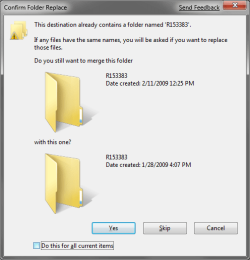
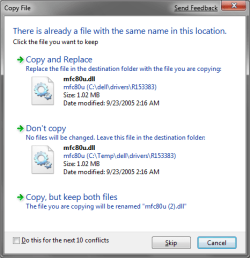
Previously in Vista, and now in 7, Explorer prompts me with:
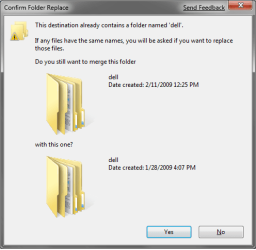
- a dialog to overwrite the top folder
- when subfolders are overwritten it prompts me again with similar dialog with the checkbox "Repeat for all"
- finally "Copy + Replace or Copy + Keep Old File" choice, to which I always answer 'Copy+Replace"

See attached
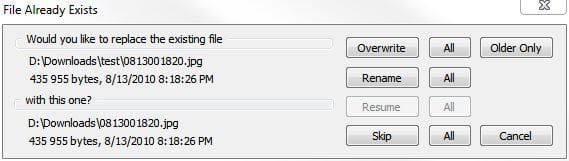
Is there a way to resurrect old style XP dialog with one "Yes To All" button?

Thanks!
 

Attachments
  • Screen1.png
    Screen1.png
    16.2 KB · Views: 113
  • Screen2.png
    Screen2.png
    17 KB · Views: 240
  • Screen3.png
    Screen3.png
    17 KB · Views: 225

My Computer My Computer

At a glance

7
OS
7
No Kidding

This is so annoying. Did you ever find an answer for this? I'd do anything to have my XP dialog back.
 

My Computer My Computer

At a glance

Windows 7
OS
Windows 7
I agree the new dialog/notification boxes are ugly and waste so much space and time move the mouse more and lack of the simple "yes to all" button...
However turns out we are not alone!

Welcome to Classic Shell

Scroll down a bit and see the classic explorer part of that... and during installation you have the choice of just the explorer part or just the start menu part. I love it.

:D
 

My Computer My Computer

At a glance

Windows 7 Ultimate x64QX6700 @ 3.2Ghz (temporarily till I get the d...8gb (4x2gb) OCZ PC2-8500GTX280
Computer Manufacturer/Model Number
Custom
OS
Windows 7 Ultimate x64
CPU
QX6700 @ 3.2Ghz (temporarily till I get the drive to tweak)
Motherboard
Asus Maximus Formula
Memory
8gb (4x2gb) OCZ PC2-8500
Graphics Card(s)
GTX280
Sound Card
Auzentech Prelude
Monitor(s) Displays
Samsung 244T & 940BF
Screen Resolution
1920x1200 & 1280x1024
Hard Drives
2 x Hitatchi 7K500 500GB in raid 0
PSU
Seasonic M-12 700w
Case
Lian Li PC-6077B
Cooling
Liquid (D-tek Fuzion 2/DDC+/240GTX)
Keyboard
Saitech Eclipse II
Mouse
Logitech G9
Internet Speed
22Mbit burst - 15 Mbit typical down / 500Kbit up
Other Info
http://pics.livejournal.com/bun_bun/pic/001c64ww

My Computer My Computer

At a glance

Windows 7 Ultimate x64 ®™Intel Core 2 Duo (2.2 GHz)2x 2GB Corsair (667 MHz)NVIDIA 8600M GS (256MB)
Computer Manufacturer/Model Number
Sony Vaio FZ21Z
OS
Windows 7 Ultimate x64 ®™
CPU
Intel Core 2 Duo (2.2 GHz)
Motherboard
Sony (Intel Chipset)
Memory
2x 2GB Corsair (667 MHz)
Graphics Card(s)
NVIDIA 8600M GS (256MB)
Sound Card
Sigmatel
Monitor(s) Displays
15.4" TFT X-Black
Screen Resolution
1280x800
Hard Drives
Western Digital 300GB Scorpio Black (7200rpm)
Mouse
Logitech Anywhere MX
Internet Speed
Sky 5MB
If you notice Murloc7 post was a year ago... just saying. I was answering Cyric.
 

My Computer My Computer

At a glance

Windows 7 Ultimate x64QX6700 @ 3.2Ghz (temporarily till I get the d...8gb (4x2gb) OCZ PC2-8500GTX280
Computer Manufacturer/Model Number
Custom
OS
Windows 7 Ultimate x64
CPU
QX6700 @ 3.2Ghz (temporarily till I get the drive to tweak)
Motherboard
Asus Maximus Formula
Memory
8gb (4x2gb) OCZ PC2-8500
Graphics Card(s)
GTX280
Sound Card
Auzentech Prelude
Monitor(s) Displays
Samsung 244T & 940BF
Screen Resolution
1920x1200 & 1280x1024
Hard Drives
2 x Hitatchi 7K500 500GB in raid 0
PSU
Seasonic M-12 700w
Case
Lian Li PC-6077B
Cooling
Liquid (D-tek Fuzion 2/DDC+/240GTX)
Keyboard
Saitech Eclipse II
Mouse
Logitech G9
Internet Speed
22Mbit burst - 15 Mbit typical down / 500Kbit up
Other Info
http://pics.livejournal.com/bun_bun/pic/001c64ww

My Computer My Computer

At a glance

Windows 7 Ultimate x64 ®™Intel Core 2 Duo (2.2 GHz)2x 2GB Corsair (667 MHz)NVIDIA 8600M GS (256MB)
Computer Manufacturer/Model Number
Sony Vaio FZ21Z
OS
Windows 7 Ultimate x64 ®™
CPU
Intel Core 2 Duo (2.2 GHz)
Motherboard
Sony (Intel Chipset)
Memory
2x 2GB Corsair (667 MHz)
Graphics Card(s)
NVIDIA 8600M GS (256MB)
Sound Card
Sigmatel
Monitor(s) Displays
15.4" TFT X-Black
Screen Resolution
1280x800
Hard Drives
Western Digital 300GB Scorpio Black (7200rpm)
Mouse
Logitech Anywhere MX
Internet Speed
Sky 5MB
Thanks

I'll give that a try. Thanks for getting back to me!
 

My Computer My Computer

At a glance

Windows 7
OS
Windows 7
Easiest way is to bypass the friendly windows entirely:

Microsoft Corporation

Use xcopy to copy the directories with the "/y" option to suppress all of those "are you sure" messages.
 

My Computer My Computer

At a glance

XP / Win7 x64 ProIntel Quad-Core Q9450 @ 3.2GHz2x2GB GSkill DDR2NVIDIA GeForce 8600 GTS (EVGA)
OS
XP / Win7 x64 Pro
CPU
Intel Quad-Core Q9450 @ 3.2GHz
Motherboard
Asus P5-E
Memory
2x2GB GSkill DDR2
Graphics Card(s)
NVIDIA GeForce 8600 GTS (EVGA)
Monitor(s) Displays
Dell 2408WFP
Screen Resolution
1920x1200
Yea but...

That'd be great if i wanted to drop out to the command line every time, and then when copying across networks it would still be inconvenient. Trying to type in UNC paths when you already had the window open would be a PITA. I'd rather just use the old dialogs... i didn't even need to use the mouse to use them, and I could be extremely fast this way.
 

My Computer My Computer

At a glance

Windows 7
OS
Windows 7

My Computer My Computer

At a glance

Systems 1 and 2: Windows 7 Enterprise x64, Wi...System 1: i7 [email protected], System 2: AMD FX-41...System 1: 8GB System 2: 8GBSystem 1: ATI FirePro V4800 System 2: Radeon ...
Computer Manufacturer/Model Number
Dell and Custom
OS
Systems 1 and 2: Windows 7 Enterprise x64, Win 8 Developer
CPU
System 1: i7 [email protected], System 2: AMD FX-4100 Zambezi 3.6G
Motherboard
System 1:Dell 06NWYK System 2: ASUS M5A97 AM3+
Memory
System 1: 8GB System 2: 8GB
Graphics Card(s)
System 1: ATI FirePro V4800 System 2: Radeon HD 6850
Sound Card
System 1: onboard System 2: onboard
Monitor(s) Displays
System1: Viewsonic HDMI 24"
Screen Resolution
System 1: 1920x1080 System 2: 1920x1080
Hard Drives
System 1: Mirrored .5B drives System 2: Seagate Barracuda ST1000DM003 1TB 7200 RPM 64MB Cache SATA 6.0Gb/s
Case
System 1: Dell System 2: Cooler Master
Internet Speed
10 MBPS
Ironically, that seems just as complicated as using the command line where you can just copy and paste the directories (since they are already open during this time, as Cyric stated) rather than have to navigate back through explorer again to find each one.
 

My Computer My Computer

At a glance

XP / Win7 x64 ProIntel Quad-Core Q9450 @ 3.2GHz2x2GB GSkill DDR2NVIDIA GeForce 8600 GTS (EVGA)
OS
XP / Win7 x64 Pro
CPU
Intel Quad-Core Q9450 @ 3.2GHz
Motherboard
Asus P5-E
Memory
2x2GB GSkill DDR2
Graphics Card(s)
NVIDIA GeForce 8600 GTS (EVGA)
Monitor(s) Displays
Dell 2408WFP
Screen Resolution
1920x1200
LOL. I'm used to UNIX command line, so anything is easier to me :cool:
 

My Computer My Computer

At a glance

Systems 1 and 2: Windows 7 Enterprise x64, Wi...System 1: i7 [email protected], System 2: AMD FX-41...System 1: 8GB System 2: 8GBSystem 1: ATI FirePro V4800 System 2: Radeon ...
Computer Manufacturer/Model Number
Dell and Custom
OS
Systems 1 and 2: Windows 7 Enterprise x64, Win 8 Developer
CPU
System 1: i7 [email protected], System 2: AMD FX-4100 Zambezi 3.6G
Motherboard
System 1:Dell 06NWYK System 2: ASUS M5A97 AM3+
Memory
System 1: 8GB System 2: 8GB
Graphics Card(s)
System 1: ATI FirePro V4800 System 2: Radeon HD 6850
Sound Card
System 1: onboard System 2: onboard
Monitor(s) Displays
System1: Viewsonic HDMI 24"
Screen Resolution
System 1: 1920x1080 System 2: 1920x1080
Hard Drives
System 1: Mirrored .5B drives System 2: Seagate Barracuda ST1000DM003 1TB 7200 RPM 64MB Cache SATA 6.0Gb/s
Case
System 1: Dell System 2: Cooler Master
Internet Speed
10 MBPS
Me too, but the OP expressed disinterest in anything command line related and this GUI, somehow, seems to be just as complicated (kind of defeating the purpose of the GUI).
 

My Computer My Computer

At a glance

XP / Win7 x64 ProIntel Quad-Core Q9450 @ 3.2GHz2x2GB GSkill DDR2NVIDIA GeForce 8600 GTS (EVGA)
OS
XP / Win7 x64 Pro
CPU
Intel Quad-Core Q9450 @ 3.2GHz
Motherboard
Asus P5-E
Memory
2x2GB GSkill DDR2
Graphics Card(s)
NVIDIA GeForce 8600 GTS (EVGA)
Monitor(s) Displays
Dell 2408WFP
Screen Resolution
1920x1200

My Computer My Computer

At a glance

Main - Windows 7 Pro SP1 64-Bit; 2nd - Window...Main - Core i7 2600K; 2nd - Core i7 920Main - 16GB Corsair Vengeance; 2nd - 12GB Cor...Main - XFX Radeon 6870 1GB; 2nd - XFX Radeon ...
Computer Manufacturer/Model Number
Self
OS
Main - Windows 7 Pro SP1 64-Bit; 2nd - Windows Server 2008 R2
CPU
Main - Core i7 2600K; 2nd - Core i7 920
Motherboard
Main - Asus P8Z68-V Pro/Gen3; 2nd - Gigabyte GA-EX58-UDR3
Memory
Main - 16GB Corsair Vengeance; 2nd - 12GB Corsair Vengeance
Graphics Card(s)
Main - XFX Radeon 6870 1GB; 2nd - XFX Radeon 4870 1GB
Sound Card
Both: Onboard Realtek Azalia
Monitor(s) Displays
Main - Hann 25" + I-INC 25" + Acer 23"; 2nd - Upgrading Soon
Screen Resolution
Main - 1920x1080 (All Three Monitors); 2nd - Upgrading Soon
Hard Drives
Main - (1) Crucial M4 128GB (Boot)
Main - (1) Seagate 2TB 64MB Cache (Data)
Main - (1) Seagate 2TB 64MB Cache (Data Backup)
2nd - (1) Intel X25-M SSD 80GB (Boot)
2nd - (3) Seagate 1TB 32MB Cache (Data Backup)
2nd - (1) Seagate 320GB (Because)
PSU
Main - OCZ 600W Modular; 2nd - OCZ 600W
Case
Main - Thermaltake Element G; 2nd - NZXT something or other
Cooling
Main - Corsair H80; 2nd - Prolimatech Megahalems
Keyboard
Main - Razer Reclusa; 2nd - Old MS Keyboard
Mouse
Main - Logitech MX Revolution; 2nd - Old MS Mouse
Internet Speed
20Mbps Time-Warner Cable

My Computer My Computer

At a glance

Systems 1 and 2: Windows 7 Enterprise x64, Wi...System 1: i7 [email protected], System 2: AMD FX-41...System 1: 8GB System 2: 8GBSystem 1: ATI FirePro V4800 System 2: Radeon ...
Computer Manufacturer/Model Number
Dell and Custom
OS
Systems 1 and 2: Windows 7 Enterprise x64, Win 8 Developer
CPU
System 1: i7 [email protected], System 2: AMD FX-4100 Zambezi 3.6G
Motherboard
System 1:Dell 06NWYK System 2: ASUS M5A97 AM3+
Memory
System 1: 8GB System 2: 8GB
Graphics Card(s)
System 1: ATI FirePro V4800 System 2: Radeon HD 6850
Sound Card
System 1: onboard System 2: onboard
Monitor(s) Displays
System1: Viewsonic HDMI 24"
Screen Resolution
System 1: 1920x1080 System 2: 1920x1080
Hard Drives
System 1: Mirrored .5B drives System 2: Seagate Barracuda ST1000DM003 1TB 7200 RPM 64MB Cache SATA 6.0Gb/s
Case
System 1: Dell System 2: Cooler Master
Internet Speed
10 MBPS

Attachments

  • TeraCopy.JPG
    TeraCopy.JPG
    23 KB · Views: 60

My Computer My Computer

At a glance

Main - Windows 7 Pro SP1 64-Bit; 2nd - Window...Main - Core i7 2600K; 2nd - Core i7 920Main - 16GB Corsair Vengeance; 2nd - 12GB Cor...Main - XFX Radeon 6870 1GB; 2nd - XFX Radeon ...
Computer Manufacturer/Model Number
Self
OS
Main - Windows 7 Pro SP1 64-Bit; 2nd - Windows Server 2008 R2
CPU
Main - Core i7 2600K; 2nd - Core i7 920
Motherboard
Main - Asus P8Z68-V Pro/Gen3; 2nd - Gigabyte GA-EX58-UDR3
Memory
Main - 16GB Corsair Vengeance; 2nd - 12GB Corsair Vengeance
Graphics Card(s)
Main - XFX Radeon 6870 1GB; 2nd - XFX Radeon 4870 1GB
Sound Card
Both: Onboard Realtek Azalia
Monitor(s) Displays
Main - Hann 25" + I-INC 25" + Acer 23"; 2nd - Upgrading Soon
Screen Resolution
Main - 1920x1080 (All Three Monitors); 2nd - Upgrading Soon
Hard Drives
Main - (1) Crucial M4 128GB (Boot)
Main - (1) Seagate 2TB 64MB Cache (Data)
Main - (1) Seagate 2TB 64MB Cache (Data Backup)
2nd - (1) Intel X25-M SSD 80GB (Boot)
2nd - (3) Seagate 1TB 32MB Cache (Data Backup)
2nd - (1) Seagate 320GB (Because)
PSU
Main - OCZ 600W Modular; 2nd - OCZ 600W
Case
Main - Thermaltake Element G; 2nd - NZXT something or other
Cooling
Main - Corsair H80; 2nd - Prolimatech Megahalems
Keyboard
Main - Razer Reclusa; 2nd - Old MS Keyboard
Mouse
Main - Logitech MX Revolution; 2nd - Old MS Mouse
Internet Speed
20Mbps Time-Warner Cable
Nice. Let's assume another satisfied customer :sarc:
 

My Computer My Computer

At a glance

Systems 1 and 2: Windows 7 Enterprise x64, Wi...System 1: i7 [email protected], System 2: AMD FX-41...System 1: 8GB System 2: 8GBSystem 1: ATI FirePro V4800 System 2: Radeon ...
Computer Manufacturer/Model Number
Dell and Custom
OS
Systems 1 and 2: Windows 7 Enterprise x64, Win 8 Developer
CPU
System 1: i7 [email protected], System 2: AMD FX-4100 Zambezi 3.6G
Motherboard
System 1:Dell 06NWYK System 2: ASUS M5A97 AM3+
Memory
System 1: 8GB System 2: 8GB
Graphics Card(s)
System 1: ATI FirePro V4800 System 2: Radeon HD 6850
Sound Card
System 1: onboard System 2: onboard
Monitor(s) Displays
System1: Viewsonic HDMI 24"
Screen Resolution
System 1: 1920x1080 System 2: 1920x1080
Hard Drives
System 1: Mirrored .5B drives System 2: Seagate Barracuda ST1000DM003 1TB 7200 RPM 64MB Cache SATA 6.0Gb/s
Case
System 1: Dell System 2: Cooler Master
Internet Speed
10 MBPS
Nice! /thread
 

My Computer My Computer

At a glance

XP / Win7 x64 ProIntel Quad-Core Q9450 @ 3.2GHz2x2GB GSkill DDR2NVIDIA GeForce 8600 GTS (EVGA)
OS
XP / Win7 x64 Pro
CPU
Intel Quad-Core Q9450 @ 3.2GHz
Motherboard
Asus P5-E
Memory
2x2GB GSkill DDR2
Graphics Card(s)
NVIDIA GeForce 8600 GTS (EVGA)
Monitor(s) Displays
Dell 2408WFP
Screen Resolution
1920x1200
Windows Classic Shell

I tried this solution out and I have to say that I love it. It came with a few extra things that i missed from XP (like the up arrow for folder traversal!!!) Whats great is that you can configure it to use both the new stuff and the old stuff depending on what you like. So far I haven't had any problems and I am much happier with windows 7 now (was pleased to begin with but now its just cake).

If I do end up having problems, I'll check out TeraCopy.
 

My Computer My Computer

At a glance

Windows 7
OS
Windows 7
id love it

Id actually love it if windows xp had this feature that you so distaste. hoenst this is really good file handling. i have a number of photos that i want to put on my pc and everytime i move files from my camera to the folder the camera recognises that there are no photos and resumes the file name as ?????001.jpg so while i fill up my memory card and it comes to the point i want to move it to my pictures or pictures in win7 it asks me do i want to replace the file or rename it systimatically. of course rename it i dont want to go on a lenthy process of cancelling and renaming i want to do it automatically. in xp we have the overwrite option or cancel. its pretty lame. I LOVE THE WINDOWS 7 and vista option. serious is it possible to do this in xp. id love to change from the old ways to the new ways!

if anyone knows please contact me. :)
 

My Computer My Computer

At a glance

windows xp 32 bit service pack 3
OS
windows xp 32 bit service pack 3
Back
Top