Copying Drive

ROBO731

New member
Member
VIP
Local time
7:57 PM
Messages
223
I want to copy my entire C drive because I may be getting an SSD tomorrow. I navigated to "Computer" and right clicked my C drive and chose copy. Then I pasted it to the desired folder on ym external HDD. The problem is that It says it's only copying 45.0 GB, but my HDD is 532.48 GB. How can I properly copy my entire Hard Drive?
 

My Computer

OS
Windows 7 Home Premium x64
CPU
Intel i7-2600K
Motherboard
ASUS Sabertooth Z77
Memory
G.SKILL Ripjaws (16 GB Total)
Graphics Card(s)
EVGA GeForce GTX 560 Ti
Monitor(s) Displays
ASUS
Screen Resolution
1920x1080 (2 Monitors)
Hard Drives
Hitachi GST Deskstar 2 TB (HDD)
Samsung 840 Pro 256 GB (SSD)
PSU
SeaSonic X Series X650 Gold
Case
Antec DF 85
Keyboard
Microsoft SideWinder X4
Mouse
MadCatz M.M.O. 7 & Logitech G35
Internet Speed
50 down
Antivirus
Avast Free, SuperAntiSpyware Free, Malwarebytes Free
Browser
Mozilla Firefox
You cannot copy and use the contents of the HDD C: drive for anything meaningful on the SSD. What are you hoping to achieve by doing this? Is it only user files that you want to backup?
 

My Computer

Computer type
PC/Desktop
Computer Manufacturer/Model Number
Golden Mk. I.4
OS
Windows 10 Pro x64 ; Xubuntu x64
CPU
Intel i7 860 @ 2.80 GHz O/C'ed to 4.0GHz
Motherboard
Gigabyte P55A-UD3R Rev.1. Award BIOS F13
Memory
16GB Corsair Vengance DDR3 @ 661 MHz Dual Channel (9-9-9-24)
Graphics Card(s)
EVGA NVidia GTX 560 1024MB
Sound Card
Realtek Integrated
Monitor(s) Displays
Dual Samsung SyncMaster 2494HS
Screen Resolution
1920*1080 and 1920*1080
Hard Drives
1*Samsung 840 EVO 120GB SSD;
1*OCZ Vertex 2 60GB SSD;
2*Samsung F3 SpinPoint 1TB in RAID0;
1*Samsung F1 SpinPoint 1TB;
2*Western Digital 1TB External USB 3.0
1*Western Digital 500GB External USB 3.0
1*Seagate 500GB External USB 2.0
PSU
Thermaltake ToughPower QFan 750W
Case
Thermaltake Element S VK60001W2Z
Cooling
Corsair H60 Water Cooling, 2*230mm and 2*80mm case fans
Keyboard
Logitech G110
Mouse
Logitech MX518

My Computer

Computer type
PC/Desktop
Computer Manufacturer/Model Number
Home Built
OS
Windows 8.1 Pro w/Media Center 64bit, Windows 7 HP 64bit
CPU
Phenom II X6 1100T
Motherboard
ASUS M5A99X EVO
Memory
Crucial Balistic 8gb DDR3-1866 CL9
Graphics Card(s)
MSI R6850 Cyclone IGD5 PE
Sound Card
On Board
Monitor(s) Displays
ASUS VE258Q 25" LED with DVI-HDMI-DisplayPort
Screen Resolution
1920 x 1080
Hard Drives
Two WD Cavier Black 2TB Sata III, WD My Book Essential 2TB USB 3.0
PSU
Seasonic X650 80 Plus GOLD Modular
Case
Corsair 400R
Cooling
Antec Kuhler H2O 620, Two 120mm and four 140mm
Keyboard
Logitech K120
Mouse
Logitech Marble Mouse USB, Logitech Precision Game Pad
Internet Speed
15MB
Antivirus
Norton IS 2013, Malwarebytes Pro Beta 2
Browser
IE-11, FF-27
Other Info
APC UPS ES 750, Netgear WNR3500L Gigabit & Wireless N Router with SamKnows Test Program, Motorola SB6120 Gigabit Cable Modem. Brother HL-2170W Laser Printer, Epson V300 Scanner
Thanks for the quick response guys. I was going to use macrium, but will I be able to access the files from the back up easily? I am going to need access to some of them. I mainly want my user folders, but also some other files.
 

My Computer

OS
Windows 7 Home Premium x64
CPU
Intel i7-2600K
Motherboard
ASUS Sabertooth Z77
Memory
G.SKILL Ripjaws (16 GB Total)
Graphics Card(s)
EVGA GeForce GTX 560 Ti
Monitor(s) Displays
ASUS
Screen Resolution
1920x1080 (2 Monitors)
Hard Drives
Hitachi GST Deskstar 2 TB (HDD)
Samsung 840 Pro 256 GB (SSD)
PSU
SeaSonic X Series X650 Gold
Case
Antec DF 85
Keyboard
Microsoft SideWinder X4
Mouse
MadCatz M.M.O. 7 & Logitech G35
Internet Speed
50 down
Antivirus
Avast Free, SuperAntiSpyware Free, Malwarebytes Free
Browser
Mozilla Firefox
I would identify and only copy those files/folders you require manually - you cannot selectively pick & choose what you want to restore from the Macrium image (you will need to restore the entire image)
 

My Computer

Computer type
PC/Desktop
Computer Manufacturer/Model Number
Golden Mk. I.4
OS
Windows 10 Pro x64 ; Xubuntu x64
CPU
Intel i7 860 @ 2.80 GHz O/C'ed to 4.0GHz
Motherboard
Gigabyte P55A-UD3R Rev.1. Award BIOS F13
Memory
16GB Corsair Vengance DDR3 @ 661 MHz Dual Channel (9-9-9-24)
Graphics Card(s)
EVGA NVidia GTX 560 1024MB
Sound Card
Realtek Integrated
Monitor(s) Displays
Dual Samsung SyncMaster 2494HS
Screen Resolution
1920*1080 and 1920*1080
Hard Drives
1*Samsung 840 EVO 120GB SSD;
1*OCZ Vertex 2 60GB SSD;
2*Samsung F3 SpinPoint 1TB in RAID0;
1*Samsung F1 SpinPoint 1TB;
2*Western Digital 1TB External USB 3.0
1*Western Digital 500GB External USB 3.0
1*Seagate 500GB External USB 2.0
PSU
Thermaltake ToughPower QFan 750W
Case
Thermaltake Element S VK60001W2Z
Cooling
Corsair H60 Water Cooling, 2*230mm and 2*80mm case fans
Keyboard
Logitech G110
Mouse
Logitech MX518
Oh, i would rather clone the disk. Is there a way to clone it without deleting the files on the drive I'm cloning to? What I really need to do is make a copy of the drive so I can go through it later and find any files that I need.
 

My Computer

OS
Windows 7 Home Premium x64
CPU
Intel i7-2600K
Motherboard
ASUS Sabertooth Z77
Memory
G.SKILL Ripjaws (16 GB Total)
Graphics Card(s)
EVGA GeForce GTX 560 Ti
Monitor(s) Displays
ASUS
Screen Resolution
1920x1080 (2 Monitors)
Hard Drives
Hitachi GST Deskstar 2 TB (HDD)
Samsung 840 Pro 256 GB (SSD)
PSU
SeaSonic X Series X650 Gold
Case
Antec DF 85
Keyboard
Microsoft SideWinder X4
Mouse
MadCatz M.M.O. 7 & Logitech G35
Internet Speed
50 down
Antivirus
Avast Free, SuperAntiSpyware Free, Malwarebytes Free
Browser
Mozilla Firefox
I would identify and only copy those files/folders you require manually - you cannot selectively pick & choose what you want to restore from the Macrium image (you will need to restore the entire image)

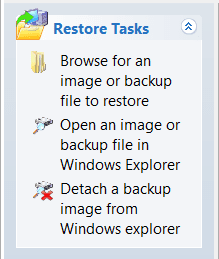
WRONG! You can "Open an Image in Windows Explorer" and then can pick and choose what you want to copy back. Then "Detach" it when you are done. It mounts the image as a new drive.

Reflex.PNG

Jim :cool:
 

My Computer

Computer type
PC/Desktop
Computer Manufacturer/Model Number
Home Built
OS
Windows 8.1 Pro w/Media Center 64bit, Windows 7 HP 64bit
CPU
Phenom II X6 1100T
Motherboard
ASUS M5A99X EVO
Memory
Crucial Balistic 8gb DDR3-1866 CL9
Graphics Card(s)
MSI R6850 Cyclone IGD5 PE
Sound Card
On Board
Monitor(s) Displays
ASUS VE258Q 25" LED with DVI-HDMI-DisplayPort
Screen Resolution
1920 x 1080
Hard Drives
Two WD Cavier Black 2TB Sata III, WD My Book Essential 2TB USB 3.0
PSU
Seasonic X650 80 Plus GOLD Modular
Case
Corsair 400R
Cooling
Antec Kuhler H2O 620, Two 120mm and four 140mm
Keyboard
Logitech K120
Mouse
Logitech Marble Mouse USB, Logitech Precision Game Pad
Internet Speed
15MB
Antivirus
Norton IS 2013, Malwarebytes Pro Beta 2
Browser
IE-11, FF-27
Other Info
APC UPS ES 750, Netgear WNR3500L Gigabit & Wireless N Router with SamKnows Test Program, Motorola SB6120 Gigabit Cable Modem. Brother HL-2170W Laser Printer, Epson V300 Scanner
Jeez, sorry.
 

My Computer

Computer type
PC/Desktop
Computer Manufacturer/Model Number
Golden Mk. I.4
OS
Windows 10 Pro x64 ; Xubuntu x64
CPU
Intel i7 860 @ 2.80 GHz O/C'ed to 4.0GHz
Motherboard
Gigabyte P55A-UD3R Rev.1. Award BIOS F13
Memory
16GB Corsair Vengance DDR3 @ 661 MHz Dual Channel (9-9-9-24)
Graphics Card(s)
EVGA NVidia GTX 560 1024MB
Sound Card
Realtek Integrated
Monitor(s) Displays
Dual Samsung SyncMaster 2494HS
Screen Resolution
1920*1080 and 1920*1080
Hard Drives
1*Samsung 840 EVO 120GB SSD;
1*OCZ Vertex 2 60GB SSD;
2*Samsung F3 SpinPoint 1TB in RAID0;
1*Samsung F1 SpinPoint 1TB;
2*Western Digital 1TB External USB 3.0
1*Western Digital 500GB External USB 3.0
1*Seagate 500GB External USB 2.0
PSU
Thermaltake ToughPower QFan 750W
Case
Thermaltake Element S VK60001W2Z
Cooling
Corsair H60 Water Cooling, 2*230mm and 2*80mm case fans
Keyboard
Logitech G110
Mouse
Logitech MX518
I would use Jim's suggestion. Just copy what you need from the image when its attached to your PC.

Also remember that the image is read only so you can't add to it once its created without creating a new image.
 

My Computer

OS
Windows 7 Ultimate x64
Okay, that's what I'll do, thanks guys and merry Christmas!
 

My Computer

OS
Windows 7 Home Premium x64
CPU
Intel i7-2600K
Motherboard
ASUS Sabertooth Z77
Memory
G.SKILL Ripjaws (16 GB Total)
Graphics Card(s)
EVGA GeForce GTX 560 Ti
Monitor(s) Displays
ASUS
Screen Resolution
1920x1080 (2 Monitors)
Hard Drives
Hitachi GST Deskstar 2 TB (HDD)
Samsung 840 Pro 256 GB (SSD)
PSU
SeaSonic X Series X650 Gold
Case
Antec DF 85
Keyboard
Microsoft SideWinder X4
Mouse
MadCatz M.M.O. 7 & Logitech G35
Internet Speed
50 down
Antivirus
Avast Free, SuperAntiSpyware Free, Malwarebytes Free
Browser
Mozilla Firefox
Back
Top