Copying Files Within Source Folder

odog552

New member
Local time
9:42 AM
Messages
2
This is something small, but kinda annoying for me. In XP, if I copied and pasted a file within the same folder, the file name would be "copy of file.ext". this was great for me cause I could easily sort the files by name and then move them to the final destination folder.

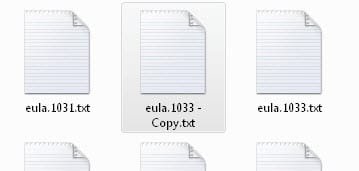
But now in Win7, the copied files get renamed with copy at the end, like "file.ext - copy". Now I cant sort by name, and have to use the sort by creation date. Its not that hard obviously, but try teaching that to senior citizen when all he wants to do is easily find his photos.

I know its a small thing to complain about, so please dont flame me. All Im saying is that I would like to know if theres a way to tell Win7 to rename copied files within the same folder as "copy of file.ext". Anyone out there think they can help?
 

My Computer

OS
windows 7 pro
Strange i can do it
 

Attachments

  • copying to same folder.jpg
    copying to same folder.jpg
    5.7 KB · Views: 9

My Computer

Computer Manufacturer/Model Number
Self
OS
W7, Xp Pro
CPU
AMD Sempron 2600+
Motherboard
K8V-MX
Memory
1GB
Graphics Card(s)
Radeon HD3650
Sound Card
Soundmax
Monitor(s) Displays
17" HP CRT
Screen Resolution
1024x768
Hard Drives
1x WDC WD800BB
1x HDS728080
PSU
? 460W
Case
Coolermaster
Cooling
enough
Keyboard
M$S
Mouse
Optical
Internet Speed
1500kbs
Other Info
OLD!!! does the job i need.

My Computer

Computer Manufacturer/Model Number
Apple Macbook Pro (April 2009)
OS
W7 Ult. x64 | OS X
CPU
Intel Mobile Core 2 Duo 2.93Ghz [T9800 Penryn]
Motherboard
NVIDIA nForce 730i Rev. B1 [Mac-F2268EC8 (U2E1)]
Memory
4096MB Samsung DDR3 Dual Channel [PC3-8500F 1066Mhz]
Graphics Card(s)
NVIDIA GeForce 9600M GT 512MB [G96M Rev. C1]
Sound Card
SB X-Fi Surround 5.1 USB | Onboard Realtek (Disabled)
Monitor(s) Displays
Acer x223wbd 22" | Apple Anti-Glare 17" (Disabled)
Screen Resolution
{Current} 1440x900 {Acer} 1680x1050 {Apple} 1920x1200
Hard Drives
{Internal}
Seagate Momentus 320GB 2.5" 7200RPM [ST9320421AS]

{Externals}
LaCie 320GB USB 2.0 HDD [301284UR]
LaCie 750GB USB 2.0 FW400 eSATA HDD [301314U]
LaCie 1TB USB 2.0 HDD [301304UR]
PSU
Magsafe
Case
Aluminum/Unibody (MBP52)
Cooling
2 x 6000 RPM Fans
Keyboard
Logitech G-15v2 [PN 920-000379]
Mouse
Logitech G-9 [PN 910-000338]
Internet Speed
12Mbps/2.5Mbps w/ 24Mbps Speed Boost [Comcast]
Other Info
Logitech X-540 Speakers [PN 970223-0122]
Sennheiser PC-151 Headset
eula.1033 - Copy.txt

i thought that's how odog552 wanted it?

been wrong before:confused:
 

My Computer

Computer Manufacturer/Model Number
Self
OS
W7, Xp Pro
CPU
AMD Sempron 2600+
Motherboard
K8V-MX
Memory
1GB
Graphics Card(s)
Radeon HD3650
Sound Card
Soundmax
Monitor(s) Displays
17" HP CRT
Screen Resolution
1024x768
Hard Drives
1x WDC WD800BB
1x HDS728080
PSU
? 460W
Case
Coolermaster
Cooling
enough
Keyboard
M$S
Mouse
Optical
Internet Speed
1500kbs
Other Info
OLD!!! does the job i need.
Notsograymatter is on the same page as me. Ive decided that theres no way I can change how Win7 makes the files names when I copy and paste within the source file.

So I just added an extra column to sort by creation date/modified date. its the fastest way I can all of the files that were copied.

Thanks for you guys trying to help me out.

:)
 

My Computer

OS
windows 7 pro
Back
Top