I am using Word 7.0 and I need some info on the following:
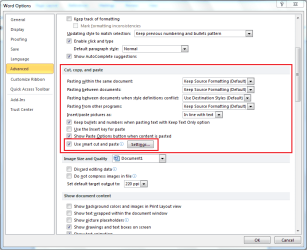
I am copying a series of items from different word documents into a new word document, I cannot remember how to do this in one operation.
What I am doing now is copying from one document then pasting it into my new document, then going into the next document I want to copy from and doing the same.
There is a way to just copy each one into a side panel in word then click each of these to paste into the new document.
Thanks
jack
I am copying a series of items from different word documents into a new word document, I cannot remember how to do this in one operation.
What I am doing now is copying from one document then pasting it into my new document, then going into the next document I want to copy from and doing the same.
There is a way to just copy each one into a side panel in word then click each of these to paste into the new document.
Thanks
jack
My Computer
- Computer Manufacturer/Model Number
- Packard Bell
- OS
- Windows 7 Home Premium
- CPU
- Intel(R) Core(TM2) Quad CPU Q8300 @ 2.50Mhz 4 Core(s)
- Motherboard
- Packard Bell EG43M
- Memory
- 6.00 GB
- Graphics Card(s)
- Geforce GT220
- Hard Drives
- 1.5 TB
- Keyboard
- Logitech Wireless
- Mouse
- Logitech Wireless